
1:39
Explore
AutoComputer (YC F24) — Demo
AutoComputer · Nov 2024 · 2:14 · Full motion · AI-annotated
- Length
- 2:14
- Scenes
- 3 · 44.7 s avg
- Product on screen
- 0:00
- Voiceover
- Yes
- Views
- 2.7K on YouTube
as of November 24, 2026
00:00:00 / 02:14:04
- Length
- 2:14
- Scenes
- 3 · 44.7 s avg
- Product on screen
- 0:00
- Voiceover
- Yes
- Views
- 2.7K on YouTube
as of November 24, 2026
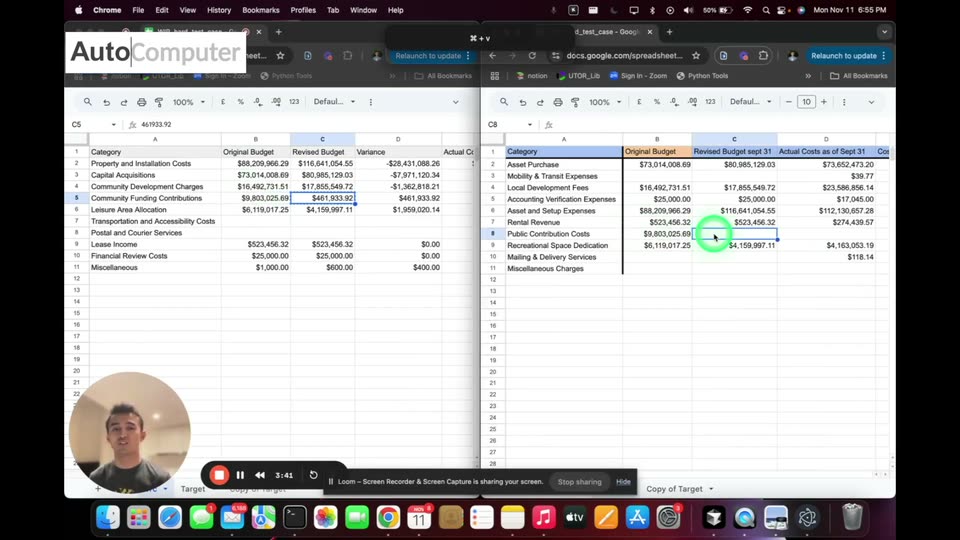
AutoComputer’s 2:14 launch film runs 3 scenes, about 45 s each. The product is on screen from the first frame. There is no explicit call to action; a voiceover carries the film. The video is a near-continuous screen recording that opens on two side-by-side spreadsheets with a green-ringed cursor performing a data transfer, then makes a single cut to a dark 2x2 feature grid. Its style is defined by the persistent presenter PiP, the green cursor ring, and very few cuts that let the automation play out in real time.
No filming indicatedEstimated needs: 3 capture groups — your screens or recordings
Is this your launch? to your site or press kit.
More like this


Similar soundtrack
Films whose music sounds like this one, voice left out
2:31

Autumn: Stripe for AI Startups
Autumn · Speech
AutoComputer (YC F24) — Demo, scene by scene
· 3 scenes as text
01 · Product intro · 0:00–0:44
A macOS screen shows two Google Spreadsheets side by side, with the presenter's webcam circle at lower left and a recording timer below. A green-ringed cursor selects budget cells on the left sheet, then enters values in the right sheet, and the view zooms in on both spreadsheets.
On-screen text: “AutoComputer”
Techniques: Cursor demo, UI zoom
Camera: Push in
02 · Demo · 0:44–1:42
Two Google Sheets windows sit side by side beneath a command bar that receives the typed prompt to finish a data transfer. A green ring tracks the cursor as new values fill in and match across both sheets.
Techniques: UI zoom, Split screen, Cursor demo
Camera: Pull out
03 · Other · 1:42–2:14
A dark presentation slide fills the screen, showing four bordered feature cards in a two-by-two grid with line icons and white headings. A circular webcam of a man speaking sits bottom-left, a red record timer runs on the left edge, and a crosshair cursor drifts across the cards.
Techniques: Cursor demo
Camera: Static