1:48


OpenAI Developers - Building apps with GPT-Live-1? Give them a voice that fits. Here’s h
OpenAI · AI · Oct 2026
Dimely · Jun 2026 · 2:25 · Full motion · AI-annotated
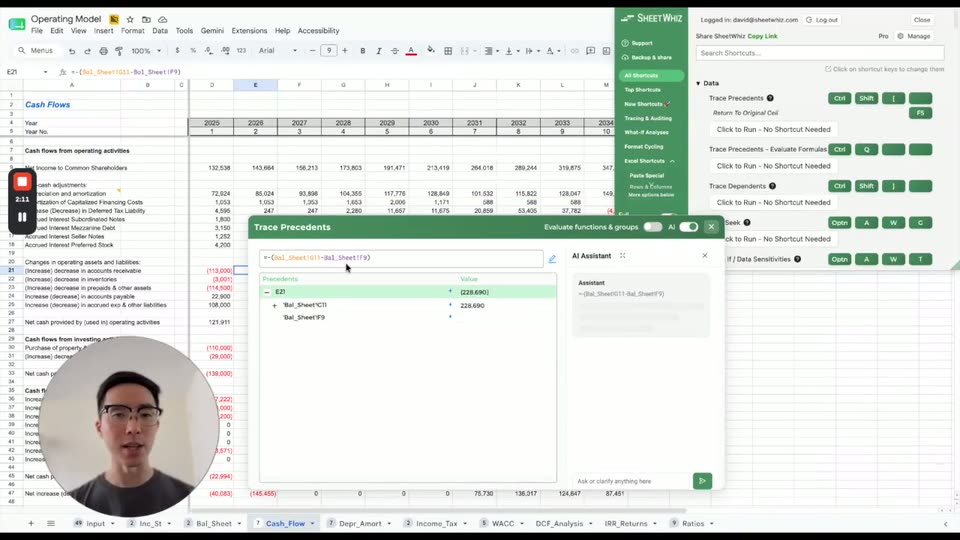
Dimely’s 2:25 launch film runs 26 scenes, about 5.6 s each. The product is on screen from the first frame and 3 features are revealed. The call to action lands at 2:11 (91% in), over a voiceover. A continuous screen capture of the spreadsheet with a fixed circular talking-head in the lower-left corner, advancing feature by feature and cutting on each new use case. Signature moves are the green SheetWiz panels sliding in, slow zooms into the Trace Precedents and AI Assistant windows, and cursor-driven navigation that lets the on-screen text do the explaining.
Is this your launch? to your site or press kit.
OpenAI · AI · Oct 2026
Marker · B2B · Nov 2026
A full-screen spreadsheet shows a cash flow model while a circular video call of a man sits in the lower left corner. A cursor clicks the green SheetWiz button at the top right, and a Trace Precedents panel with an AI Assistant column opens in the center.
Techniques: Cursor demo
Camera: Static
A spreadsheet screen with the SheetWiz sidebar and a Trace Precedents popup listing the cells that feed a formula. A cursor hovers the list, then the sheet reframes to the balance sheet. A round webcam of the presenter holds the lower-left corner.
Techniques: Cursor demo, UI zoom
Camera: Static
A spreadsheet screen jumps from cell to cell as the Trace Precedents tree expands to show deeper formula levels. On the right, an AI Assistant panel spins a loading icon, then types out an explanation. A circular presenter video sits in the lower left corner.
Camera: Static
A spreadsheet screen shows a Trace Precedents tree beside an AI Assistant panel. The view slowly zooms into the panels as a cursor hovers over the assistant's text. A circular webcam of a man with glasses stays fixed in the lower left corner.
Techniques: UI zoom, Cursor demo
Camera: Push in
A white precedent-tracing panel slides in over a green spreadsheet, then the AI Assistant text on the right scrolls down while a cursor hovers; a circular webcam of a man in glasses sits bottom left.
Techniques: Cursor demo
Camera: Push in
Close-up of a spreadsheet with an AI assistant panel on the right and a circular webcam of the presenter bottom-left. A blue highlight marks the assistant's explanation, then the view zooms out to reveal the full sheet and an opened Trace Precedents window.
Techniques: Cursor demo, UI zoom
Camera: Pull out
An Excel spreadsheet fills the frame with a Trace Precedents panel open over a cash-flow formula, while an AI Assistant pane lists steps on the right. A cursor moves to a precedent line, and a circular webcam shows the presenter at bottom left.
Techniques: Cursor demo
Camera: Static
A cursor edits a formula in the Trace Precedents window, then clicks the pencil icon; the precedent list collapses to two rows and the spreadsheet scrolls to the balance sheet section. A circular webcam feed of a presenter sits in the lower left.
Techniques: Cursor demo, UI zoom
Camera: Pull out
A spreadsheet fills the frame with a green dropdown menu and an AI assistant panel open. Both close to reveal the balance sheet grid. A red video player widget and a circular webcam of a man with glasses stay pinned in the lower left corners.
Camera: Static
A spreadsheet cash-flow model fills the screen, its grid of yearly figures static as a cursor hops from cell to cell. A presenter in a black beanie speaks from a circular video-call bubble in the lower left, and a red recording timer counts down at the left edge.
Techniques: Cursor demo
Camera: Static
A spreadsheet window displays a cash flow model with rows of figures across ten years. A circular webcam feed of a man with glasses sits in the lower left, next to a play button. The screen stays static.
Camera: Static
A Google Sheets screen fills the frame, with a circular webcam inset of a man with glasses at the lower left. The view jumps from a small lookup demo table to a wide, multi-column data table.
Camera: Static
A Google Sheets window shows the Electric Vehicle Population Data spreadsheet. Rows of data scroll down the sheet while a circular video of a bespectacled presenter sits at the lower left. A red recording badge stays pinned on the left edge.
Camera: Static
A full-screen view of a Google Sheets spreadsheet titled Electric Vehicle Population Data, its grid of vehicle records and column headers filling the frame. Two small circular video thumbnails, a play icon and a man's face, sit at the left edge. The shot is static with no motion.
Camera: Static
A Google Sheets grid of electric vehicle records scrolls upward past a fixed toolbar and menu bar. A circular control with a pause icon and a small red dot holds still on the left edge, its timer ticking up.
Camera: Static
A static screen capture of a Google Sheets workbook titled Electric Vehicle_Population_Data fills the frame, its grid of rows and columns locked in place. A small circular webcam of a man sits in the lower-left corner, and a dark pill-shaped control with a number rests on the left edge.
On-screen text: “9. Menus”
Camera: Static
A Google Sheets grid fills the frame with a small circular webcam of a presenter in the lower left. A cursor clicks the VIN and formula cells, the formula bar populates, then a Trace Precedents panel slides in from the right listing the cell references.
Techniques: Cursor demo
Camera: Static
A spreadsheet shows a Trace Precedents panel listing formula parts with their values, a circular presenter webcam in the corner. The view zooms into the panel header as a cursor flips the Evaluate functions and groups toggle to on.
Techniques: UI zoom, Cursor demo
Camera: Push in
A Google Sheets screen recording zooms into the 'Trace Precedents' window, a formula tree listing each argument's value and cell reference. The AI Assistant panel streams an explanation as the cursor hovers over reference links, then the presenter types a question about INDEX and MATCH, with a webcam inset bottom-left.
Techniques: UI zoom, Cursor demo
Camera: Push in
A Google Sheets spreadsheet fills the frame with a Trace Precedents panel and an AI Assistant panel open. A circular webcam of a bespectacled man talks in the lower left. A cursor moves to the top right and clicks the SheetWiz button, opening a dropdown menu of shortcut options.
Techniques: Cursor demo
Camera: Static
A static screen capture of a spreadsheet app with a green SheetWiz panel on the right listing keyboard shortcuts and green key caps. A circular webcam of a man in glasses sits in the lower left corner over the data grid.
Camera: Push in
A green shortcut panel scrolls down through a list of Excel shortcuts with green keycap combos. A spreadsheet sits to the left and a circular webcam feed of a presenter with glasses anchors the lower-left corner.
Camera: Static
A screen capture of a spreadsheet with a green SheetWhiz sidebar; the right column of shortcut rows scrolls up to reveal Data entries while a circular webcam of the speaker sits in the lower left.
Camera: Static
A spreadsheet screen with a green SheetWhiz sidebar holds still while a long list of keyboard shortcuts scrolls down the right panel, a cursor gliding along the rows. A small circular webcam of a bespectacled presenter sits in the lower left corner.
Techniques: Cursor demo
Camera: Pan
A screen shows a spreadsheet on the left with a circular webcam of a man speaking, and a green SheetWiz panel on the right. The shortcut list scrolls upward, revealing rows of orange keycap buttons.
Camera: Static
A Google Sheets grid of electric vehicle data fills the screen with the green SheetWiz sidebar open on the right. A small circular webcam of a man with glasses sits in the bottom left corner. The view holds steady, then a vertical icon toolbar appears along the left edge.
Camera: Static