
2:10
Explore
00:00:00 / 00:58:02
- Length
- 0:58
- Scenes
- 23 · 2.5 s avg
- Product on screen
- 0:04
- Voiceover
- No
- Views
- 63 on YouTube
as of November 26, 2026
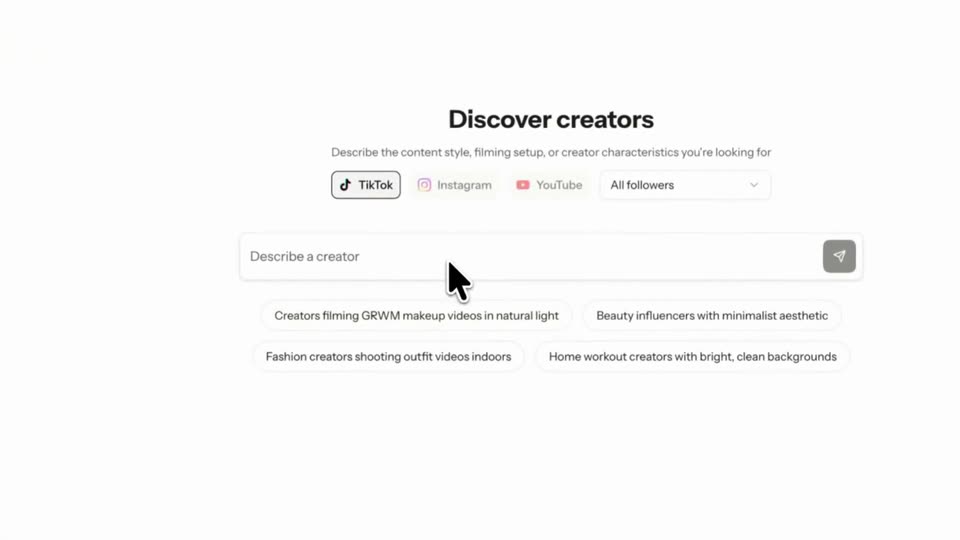
Syncly’s 0:58 launch film runs 23 scenes, about 2.5 s each. The product shows up at 0:04. There is no explicit call to action. The video opens with a fast three-panel montage of creator clips under heavy overlay type, lands on the Syncly wordmark, then runs a long screen-recording tour that zooms in on each cursor action from prompt to export. Pacing is quick and even at about 15 cuts per minute, with tight zoom-ins on buttons and modals, a clean white interface, and black logo cards bookending the tour.
Footage neededEstimated needs: 5 capture groups — your screens or recordings · 1 official logo — reused across the film · 4 filmed passages — shoot, supply or replace
Is this your launch? to your site or press kit.
More like this
1:46

Third Chair Product Demo
Third Chair · B2B · May 2025
1:00

New SharePoint innovations
Microsoft · AI · May 2019
Similar soundtrack
Films whose music sounds like this one, voice left out
0:54
0:27

OpenSea - Introducing Deals: offer your NFTs for theirs, securely on OpenSea. 👉
OpenSea · Electronic dance music, trap
0:43

Jam.dev - Jam for Mac is officially out - Get logs from Chrome, Safari + Elect
Jam · Trap / Lo-fi Hip-Hop
Syncly Social: Content-first Creator Discovery, scene by scene
· 23 scenes as text
01 · Hook · 0:00–0:01
Three vertical clips of people, a model in a leather jacket, a woman applying gloss, a woman chopping greens, sit side by side under a grainy overlay as the white word CONTENT-FIRST types in across them.
On-screen text: “CONTENT-FIRST”
Techniques: Split screen, Kinetic type, Masking
Camera: Static
02 · Hook · 0:01–0:02
Three vertical clips play side by side: a man in a leather jacket, a woman applying lip gloss, a woman holding herbs. A white headline CONTENT-FIRST spans the center, then a dark dip fades the text out as the panels return to full brightness.
On-screen text: “CONTENT-FIRST”
Techniques: Split screen
Camera: Static
03 · Hook · 0:02–0:04
Three vertical panels play live footage of people at home: a woman wipes a wooden desk, a man pulls a box from a shelf, a woman applies mascara through a round mirror. The words CREATOR and DISCOVERY sit in large white type centered across the panels.
On-screen text: “CREATOR”, “DISCOVERY”
Techniques: Split screen
Camera: Static
04 · Product intro · 0:04–0:06
A locked-off split screen shows three vertical live-action clips: a top-down woman walking, a man by a lake, and a seated person on a sofa, with a white wordmark centered.
On-screen text: “ssyncly”
Techniques: Split screen
Camera: Static
05 · Product intro · 0:06–0:07
A white logo reading “ssyncly” sits centered on a solid black background. The frame is locked-off and the text remains completely still throughout the clip.
On-screen text: “ssyncly”
Camera: Static
06 · Demo · 0:07–0:09
A left icon sidebar and a ghosted 'Discover creators' panel resolve into a crisp, centered view as the sidebar clears. A cursor hovers over the search field, then drifts down toward the suggestion chips.
Techniques: Cursor demo
Camera: Push in
07 · Demo · 0:09–0:13
A chat discovery screen fades in, showing an AI response card with video analysis and content insights. A hand cursor moves to the Find creators button, the frame zooms in, then cuts to a loading view with skeleton placeholders and a Checking creator filters header.
Techniques: Cursor demo, UI zoom
Camera: Push in
08 · Demo · 0:13–0:14
A product screen shows a grid of creator video thumbnails with a hand cursor hovering over one. The interface blurs out as a centered status message reads Step 1 of 4 and Checking creator filters.
Camera: Pull out
09 · Demo · 0:14–0:14
A creator-discovery dashboard fills the frame, a filter panel on the left beside a grid of makeup-video thumbnails. A hand cursor hovers on one card while the whole layout slides a few pixels left and locks.
Techniques: Cursor demo
Camera: Pan
10 · Demo · 0:14–0:19
A creator-discovery interface shows a filter sidebar beside a grid of video thumbnails. The view zooms in on one creator card as a hand cursor clicks Select, the button flips to Selected, and the frame pulls back to the full screen.
Techniques: UI zoom, Cursor demo
Camera: Pan
11 · Demo · 0:19–0:20
A creator-matching dashboard fills the frame: a left filter panel beside rows of creator profiles with video thumbnails. A black cursor hovers over the rightmost thumbnail, nudging it slightly.
Techniques: Cursor demo
Camera: Static
12 · Demo · 0:20–0:20
A creator search interface fills the frame, with a filter panel on the left and a grid of video thumbnails on the right. A creator card for kenzidaniel sits mid-screen, and a cursor hovers near the Select and Exclude buttons.
Techniques: Cursor demo
Camera: Static
13 · Demo · 0:20–0:25
A creator-discovery dashboard fills the frame. A hand cursor clicks Select on a creator row, then the view zooms to the top bar and a Save to List modal pops in the center as the cursor presses Create New List.
Techniques: Cursor demo, UI zoom
Camera: Push in
14 · Demo · 0:25–0:27
A close-up of a video grid with a cursor hovering over a thumbnail. The view zooms out to reveal the full application window with a filter sidebar, set in a 3D perspective against a dark background.
Techniques: Cursor demo, UI zoom, 3D mockup
Camera: Pull out
15 · Demo · 0:27–0:31
A creator discovery screen with a filter sidebar and video thumbnails. A cursor opens a location dialog, selects United States, and applies it, then the frame zooms into the top creator's video grid.
Techniques: Cursor demo, UI zoom
Camera: Push in
16 · Demo · 0:31–0:36
A hand cursor opens the language filter on a creator search dashboard, types English in the modal's search box, ticks the box, and clicks Apply. The view then scrolls down to the followers slider and the Search creators button.
Techniques: Cursor demo, UI zoom
Camera: Pan
17 · Demo · 0:36–0:37
A creator search dashboard fades in from a bright white overlay. A hand cursor moves from the Search creators button toward a profile card, pointing at a thumbnail.
Techniques: Cursor demo
Camera: Pull out
18 · Demo · 0:37–0:45
A creator-matching dashboard fills the frame. The cursor hovers an info icon to open a tooltip, then the view zooms into the top creator card. The list scrolls to the next creator, and a detail panel opens on the right showing a video summary, transcript and demographics.
Techniques: Cursor demo, UI zoom
Camera: Pan
19 · Demo · 0:45–0:47
A light interface lists creators with video thumbnails beside a filter panel. The view zooms in, cropping the left sidebar, as a cursor moves from a thumbnail to the follower slider.
Techniques: Cursor demo, UI zoom
Camera: Push in
20 · Demo · 0:47–0:49
A left sidebar lists brand names and menu rows, a cursor rests on the Manage item. The list and a top caption blur and dissolve out, clearing the white panel while the cursor drifts to the center.
Techniques: Cursor demo
Camera: Static
21 · Demo · 0:49–0:50
A hand cursor clicks a row in a saved lists table. The screen slides into a detail page titled with the list name, revealing three creator cards with colored avatars, follower counts, engagement rates and category tags.
Techniques: Cursor demo
Camera: Static
22 · Demo · 0:50–0:55
A cursor hovers over a three-row creator list, then moves to the top right and clicks an Export All button, triggering a download notification. The frame zooms out to reveal the full browser window, including a left sidebar listing brand names.
Techniques: Cursor demo, UI zoom
Camera: Pull out
23 · Outro · 0:55–0:58
On a black field, the white wordmark Syncly fades in letter by letter from left to right, settling centered, then holds still for the rest of the clip.
On-screen text: “Syncly”
Techniques: Kinetic type
Camera: Static