1:38

Branching just got a whole lot easier!
Supabase · Developer tools · Jul 2025
Stamp’s 3:22 launch film runs 10 scenes, about 20 s each. The product is on screen from the first frame and 4 features are revealed. The call to action lands at 3:05 (92% in), over a voiceover. Tone is friendly and conversational, a single presenter walks the viewer through the app in real time over a calm dark teal field crossed by glowing diagonal beams. The build is a linear feature tour: a tilted app window opens, the view flattens into a screen recording that zooms between the inbox list, the grouped labels, the action items panel and the compose box, then resolves to a centered circular talking-head close for the sign-off. Pacing is steady at about one cut per minute with smooth
Is this your launch? to your site or press kit.
Supabase · Developer tools · Jul 2025
Google · AI · May 2007
Films whose music sounds like this one, voice left out
Pangolin · Technical tutorial
Autumn · Speech
PgDog · Technical tutorial / Product demonstration
A tilted browser window shows the Stamp inbox list on a dark teal background with diagonal light streaks. A circular webcam inset of a talking man sits top right, and a cursor hovers over the emails. White captions swap in at the bottom.
On-screen text: “Stamp is the first AI native email client.”, “But it's more than just an email client.”, “It's like your second brain.”, “Let me show you how it works.”
Camera: Static
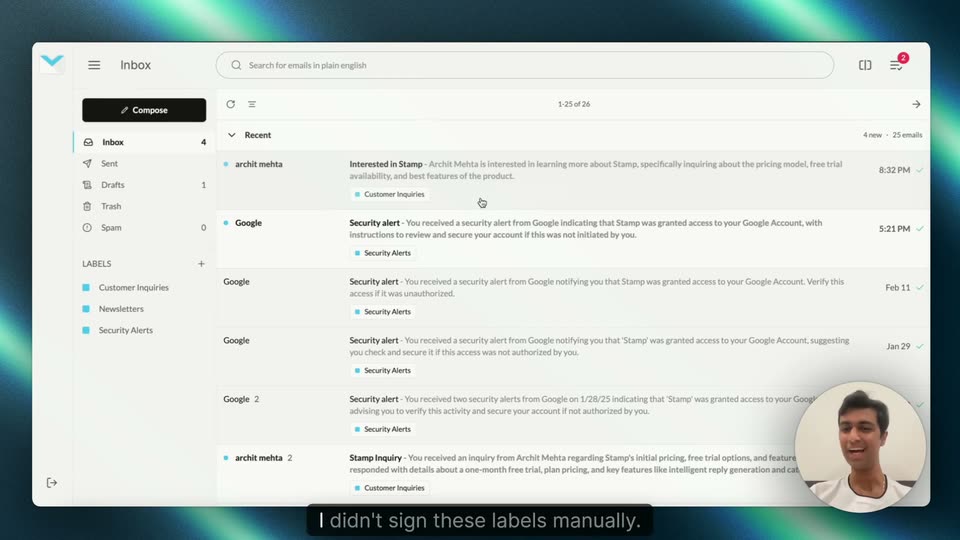
A flat screen recording of an email inbox lists recent messages, each preview carrying a bold subject and one-line summary. The view zooms in on the rows, holds, then pulls back as the cursor hovers and clicks a view toggle; a circular webcam of the presenter and bottom captions stay fixed.
On-screen text: “What you see on your screen right now is my inbox.”, “And what you'll notice is that every single email”, “has a summary right in the preview.”, “So that even before I click on the email,”, “I can already tell what it's about and prioritize”, “the emails that I care about most.”, “What you'll also notice is that many of these”, “emails have labels attached to them.”, “I didn't sign these labels manually.”, “Stamp added them for me automatically as soon as I received the emails. In fact, by clicking this button here,”
Techniques: UI zoom, Cursor demo
Camera: Static
The inbox view zooms out to a floating app window on a dark teal gradient, then back in as the cursor clicks Customer Inquiries and the group expands into email threads. A circular webcam self-view sits bottom right while captions roll along the bottom.
On-screen text: “by clicking this button here”, “Stamp will automatically group all of my emails”, “for me by category so that I can focus on things”, “that I really care about first,”, “like customer inquiries,”
Techniques: UI zoom, Cursor demo
Camera: Static
An inbox list collapses into four label rows, then the view zooms out to the full app window over a teal gradient. The cursor opens the right-side Action Items panel with two task cards and expands the Customer Inquiries row. A circular presenter webcam sits in the corner.
On-screen text: “and automatically get rid of the things that I”, “don't care about”, “like these security alerts or these newsletters”, “that were cluttering up my inbox and taking away”, “focus from the things that mattered most.”, “On top of automatically generating summaries for”, “every single email I get and automatically”, “categorizing those emails for me,”, “Stamp also automatically extracts key action items”, “that I can easily follow up on. To see that in action let's click on the Action Items tab over here and what you'll see is that Stamp automatically tracks what ”
Techniques: Cursor demo, UI zoom
Camera: Pull out
A screen recording of the Stamp email app shows an inbox with a Summary and Action Items panel, while a circular webcam of the presenter sits in a corner. The view zooms into the summary, then into a reply box where a typed prompt generates a draft response.
On-screen text: “all you actually have to do is click on it and Stamp”, “automatically brings us to the relevant email so”, “that we can act upon this action item.”, “and because the summary is already there ready for”, “me as soon as I click on the email,”, “I don't even need to read this email to understand”, “what it's about.”, “As you can see”, “a user is reaching out to us asking you about”, “free trial availability and our best features. And because I have that summary, I can reply to this email even faster than I just All I have to do is hit reply,”
Techniques: UI zoom, Cursor demo
Camera: Pull out
A screen recording of an email draft in the Stamp app shows a formatted message with a small circular video-call avatar of a man in the lower right. The view slowly zooms in on the email body text. A dark caption bar sits along the bottom edge.
On-screen text: “Stamp talks about how you can begin with a one”
Techniques: UI zoom
Camera: Push in
A close-up of an email draft in the app's editor shows a blinking caret as captions roll in at the bottom. The view zooms out to reveal the full inbox app with sidebar and action items panel, a circular webcam feed of a man in the corner.
On-screen text: “Stamp talks about how you can begin with a one”, “month free trial,”, “and after that stamp costs only $10 a month.”, “it goes on to talk about some of Stamp's best”
Techniques: UI zoom
Camera: Pull out
A flat screen capture of the Stamp inbox shows a compose window with a long generated reply. The presenter highlights a sentence, types a plain-English instruction into a small box, and the paragraph rewrites itself. A circular webcam bubble sits bottom right while the cursor clicks Send.
On-screen text: “it goes on to talk about some of Stamp's best”, “features like reply generation as well as”, “automatic categorization.”, “But we can take it one step further because with”, “Stamp editing an email is as simple as”, “highlighting this portion of text and asking Stamp”, “to talk about how categorization”, “is done based on plain English descriptions.”, “And as soon as we hit submit,”, “Stamp will automatically update only this portion', 'of the text with information about how Stamp uses', 'plain English descriptions to do categorization.', 'of”
Techniques: Cursor demo
Camera: Static
A Gmail-style inbox floats in 3D perspective over a teal gradient, a circular webcam of a man at lower right. A cursor taps two action-item checkmarks; the cards fade and the Todo count drops to zero, showing No Action Items. A caption bar sits at the bottom.
On-screen text: “Let's hit send and mark these action items as”
Techniques: 3D mockup, Cursor demo
Camera: Static
A young man in a white shirt speaks to camera inside a centered circular cutout on a dark blue field crossed by diagonal glowing teal beams. White subtitles in a dark box at the bottom update line by line. The framing is locked off.
On-screen text: “Stamp is completely free to try out.”, “You can go to stampmail AI to sign up for free and”, “anyone who signs up in the next week,”, “we'll be able to keep using Stamp for free for the”, “next year.”, “Thank you so much for watching and let me know how”
Camera: Static