0:38

Retool - Say hello to the fusion of visual programming, code, and AI. Retool
Retool · Developer tools · Oct 2023
Kura AI · Nov 2024 · 2:36 · Full motion · AI-annotated
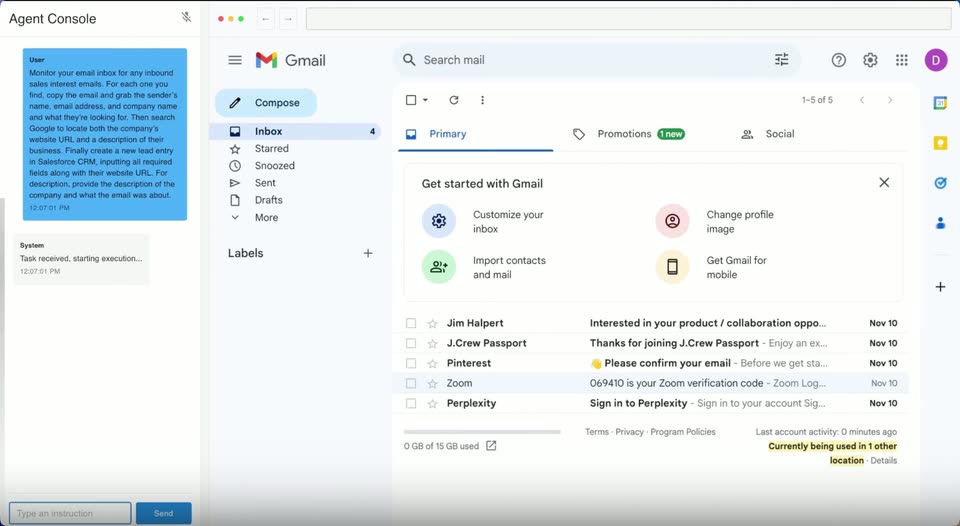
Kura AI’s 2:36 launch film runs 14 scenes, about 11 s each. The product is on screen from the first frame. There is no explicit call to action; a voiceover carries the film. A single continuous split-screen screen recording: a static Agent Console log on the left where color-coded Planner, Executor and Critic cards stack and scroll, paired with a live application pane (Gmail, then Google, then Salesforce) on the right. Signature moves are push-in zooms and focus racks that shift attention between the agent log and the active UI element, plus red highlight boxes that mark the exact field or phrase the agent is acting on.
Is this your launch? to your site or press kit.
Retool · Developer tools · Oct 2023
Phone Harness · B2B · Oct 2026
Films whose music sounds like this one, voice left out
A split view pairs an Agent Console chat on the left with a Gmail inbox on the right. Planner and Executor messages drop into the console while the Gmail panel switches from the inbox list to an opened email, a red box marking a word in the body.
Techniques: Split screen, Cursor demo
Camera: Static
A two-panel view holds an agent console with stacked task cards beside a Gmail email, where a red rectangle highlights the phrase 'collaboration opportunities'. The frame stays still, then zooms into the console, blurring the email and centering the Planner card.
Techniques: UI zoom
Camera: Push in
Split view: an Agent Console chat log stacks Planner, Executor and Critic messages on the left while a Gmail email from Jim Halpert sits on the right. A red box highlights the phrase 'collaboration opportunities', then the view zooms into the email body.
Techniques: Split screen, UI zoom
Camera: Push in
The clip opens defocused on a Gmail message body, then racks focus and pulls back to reveal a two-pane desktop: an Agent Console log on the left filling with colored Planner, Executor and Critic cards, and the same email open in a browser on the right.
Techniques: UI zoom
Camera: Pull out
A split view pairs an Agent Console on the left with a Google window on the right. Planner and Executor cards stack and scroll in the console as the search field flashes a red outline, types WestRock website, drops a suggestion list, then loads the results page.
Techniques: Split screen
Camera: Static
A left Agent Console sidebar holds a vertical stack of color-coded Planner, Executor and Critic cards that scroll up as new ones drop in. The right pane holds a static Google results page for WestRock website, with a sponsored westrock.com entry and blue links.
Techniques: Split screen
Camera: Static
A split view shows an agent console with colored chat bubbles on the left and a Google results page on the right. A hand cursor clicks the WestRock result link, and the browser switches to a blank white page with the westrock.com URL in the bar.
Techniques: Split screen, Cursor demo
Camera: Static
A split view shows the Agent Console chat on the left and a browser with the WestRock homepage on the right. Colored task cards scroll down the console as new agent messages arrive, then the camera zooms into the page's partnership and sustainability panels.
Techniques: Split screen, UI zoom
Camera: Static
Split screen: a left Agent Console chat feed of colored message cards sits beside a right Salesforce Leads page showing an empty Recently Viewed list. The opening blur resolves into a static frame.
Techniques: Split screen
Camera: Static
A two-pane demo screen: the left Agent Console feed scrolls up at a steady pace, revealing new colored agent message cards, while the right Salesforce Leads page with its empty Recently Viewed list stays static.
Camera: Static
A split screen shows an Agent Console chat log on the left, its colored message cards scrolling as new entries appear, beside a Salesforce New Lead form on the right. Form fields fill in sequence with typed text. The view then zooms into the Description field and Save button.
Techniques: Split screen, UI zoom
Camera: Push in
A white form panel with Cancel, Save & New and Save buttons slides up out of frame, revealing a lead list with column headers and empty checkbox rows. A circular spinner of blue and gray dots spins at the center of the table.
Camera: Static
A split view pairs an Agent Console step log on the left with a CRM lead page on the right. The shot opens zoomed and blurred on the lead page, then pulls back into focus to reveal both panels and a green toast confirming the new lead.
Techniques: UI zoom, Split screen
Camera: Pull out
A split view pairs a left Agent Console feed with a right Salesforce lead page. The console scrolls up through colored Executor, Critic and Planner cards while the lead page holds still under a green creation banner.
Techniques: Split screen
Camera: Static