0:30

Nanoloop for Analogue Pocket
Analogue · Hardware · Feb 2020
Retool · Oct 2023 · 0:38 · AI-annotated
Retool’s 0:38 launch film runs 15 scenes, about 2.6 s each. The product is on screen from the first frame. There is no explicit call to action. One continuous screen-recording tour that assembles a Retool workflow node by node, each step opened by a hand cursor tapping the same plus-menu dropdown on a dotted grid. The pacing is zoom-driven and cut-free: a tight crop on each node editor, a play action, then a push into the output table or text, with no titles, narration, or branding.
Is this your launch? to your site or press kit.
Analogue · Hardware · Feb 2020
Result · Consumer · Nov 2026
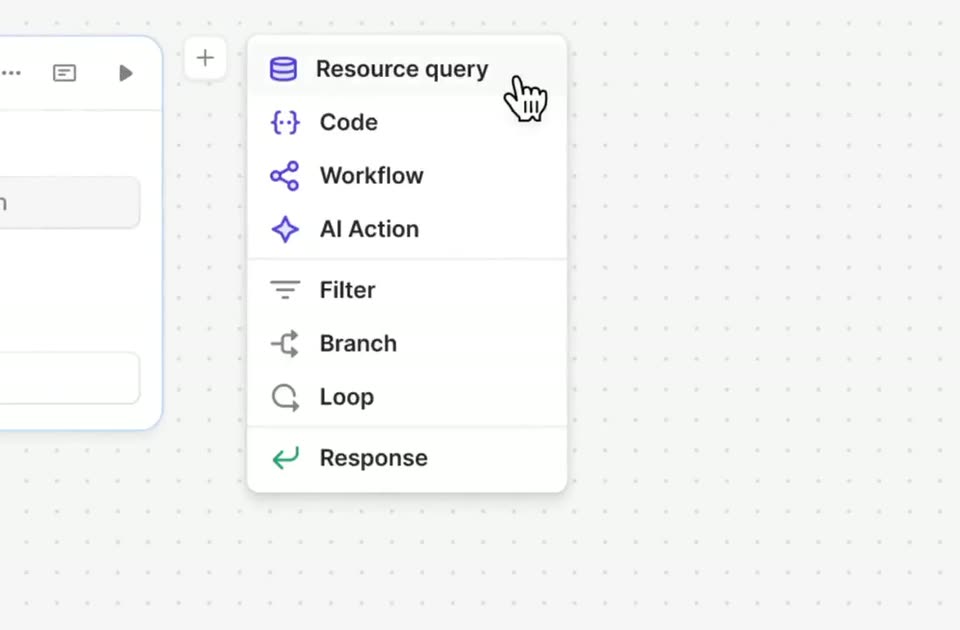
A workflow canvas with a trigger node fills the frame, then the view zooms to a plus button. A hand cursor clicks it, opening a menu of node types, and hovers over Resource query.
Techniques: UI zoom, Cursor demo
Camera: Static
A hand cursor opens a resource dropdown and picks Retool Database, the panel switching to a SQL editor that types a query line. The cursor clicks play, and the frame zooms into the output table of sales rows.
Techniques: Cursor demo, UI zoom
Camera: Push in
A hand cursor taps a plus button at the top of a dotted canvas, and a white dropdown menu of node options pops in. The cursor glides down the list to the Code row.
Techniques: Cursor demo
Camera: Static
A white dropdown menu of node types sits on a light dotted canvas, the Code row shaded gray under a hand cursor. A partial side panel with a GUI tab peeks in at the left edge.
Techniques: Cursor demo
Camera: Static
Close-up of a code editor card labeled filterSales on a dotted grid. Code is typed into the Javascript tab, completing a filter line, then a hand cursor glides to the play button in the top right corner and hovers over it.
Techniques: Cursor demo
Camera: Static
A JavaScript code editor card dissolves into the output panel, revealing a table of 90 filtered sales rows, all New York entries, with a green check mark on the Output tab.
Camera: Push in
A light interface panel with Output, JSON and Log tabs holds a data table titled Array (90 items). The view zooms in, enlarging the rows of product names and prices until the table fills the frame.
Techniques: UI zoom
Camera: Pull out
A dropdown menu of workflow options opens on a dotted grid canvas beside a Python code card. A hand cursor glides down the list and stops on the AI Action row, which highlights in light gray.
Techniques: Cursor demo
Camera: Static
A white generateReport card with Retool AI, Action, Input and Model fields sits on a dotted grid, beside a partial Python code card. A hand-drawn cursor taps the Action field, a prompt fills the Input box, then the cursor moves to the play icon, which becomes a loading spinner.
Techniques: Cursor demo
Camera: Static
A light step-editor panel scrolls down. It opens on an Input field with a prompt and a gpt-4 dropdown, a hand cursor at the top right, then reveals an Output box where a multi-line New York sales report appears, ending with a green check mark.
Camera: Push in
A white output card holding a sales report sits on a dotted canvas. The framing shifts left as a hand cursor moves down and a dropdown menu of node types opens, the cursor resting on the top item.
Techniques: UI zoom, Cursor demo
Camera: Pull out
A white Resource Query panel shows an open dropdown listing resource types, each with a small colored icon. A hand cursor glides down the list and stops on the Retool Email row, which fills with a light gray highlight.
Techniques: Cursor demo
Camera: Static
A white email node panel crossfades into a tighter crop on the Body field. A blinking caret sits in the empty box, then a sentence ending in a green template variable is typed in while a hand cursor hovers at the right.
Techniques: UI zoom, Cursor demo
Camera: Push in
A flat Retool workflow view shows a sendEmail card on a dotted grid, a hand cursor resting on the blue Deploy button at top right. A white notification banner with a blue mail icon slides in from the top, then slides out to the right.
Techniques: Cursor demo
Camera: Pan
A light workflow canvas with a trigger card on the left and a dotted grid. The full interface zooms out from a tight crop, settling the centered title and the top-right Run and Deploy buttons into place in one smooth move.
Techniques: UI zoom
Camera: Pull out