0:50

Chris Yoo ⚡ CoRL - Fine-tuning VLAs just got so much easier. Today, we're releasing Tra
Dreamscale Labs · Industrials · Oct 2026
Zarna · Nov 2025 · 2:53 · Full motion · AI-annotated
Zarna’s 2:53 launch film runs 25 scenes, about 6.9 s each. The product is on screen from the first frame and 3 features are revealed. There is no explicit call to action; a voiceover carries the film. A single continuous screen-recording walkthrough: a brief product greeting, a problem setup with a full inbox and a 54-page CIM, then three cursor-led feature demos (inbox auto-pull, Zarna AI chat, report generation) separated by hard cuts and a couple of crossfades. Pacing is steady at about six cuts per minute, with content streaming in row by row, table by table and page by page as the narrator explains each panel.
Is this your launch? to your site or press kit.
Dreamscale Labs · Industrials · Oct 2026
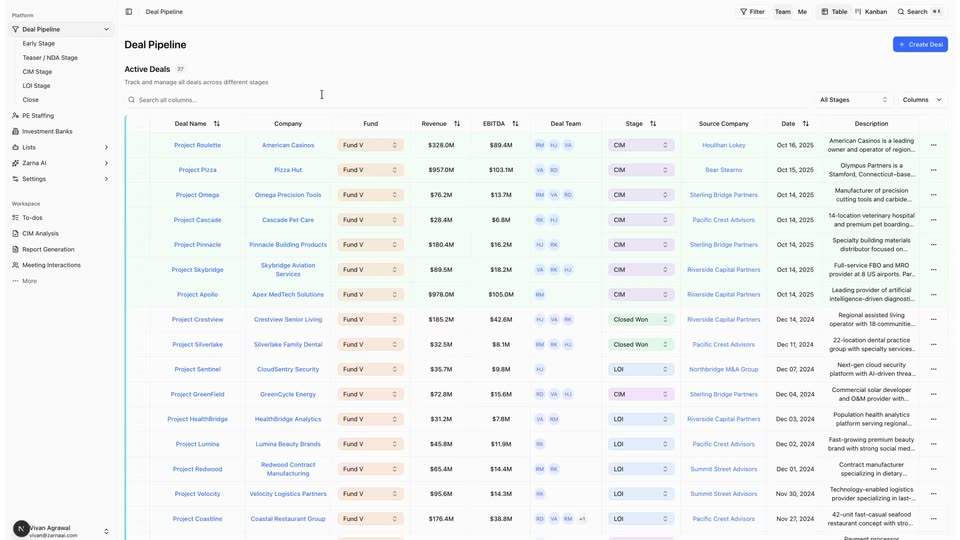
A light-themed deal pipeline table fills the screen, listing active deals with colored fund and stage tags. A toast notification in the top right fades out, leaving a blue Create Deal button. The cursor hovers near the heading.
Camera: Static
A light Gmail inbox fills the frame, listing dozens of messages with sender names and preview lines. The view stays static while a cursor glides in and hovers over the top row, highlighting it.
Techniques: Cursor demo
Camera: Static
A blank white Gmail loading screen holds a faint gray M logo at center. A cursor arrow rests in the lower middle, and a small purple circle with a white starburst appears at the bottom left. The frame stays static.
Camera: Static
Gmail inbox in a locked-off frame: a red 3-now badge pops onto the Updates tab and a new Project Omega email drops into the top of the list, while a cursor glides up the list, highlighting rows in turn.
Techniques: Cursor demo
Camera: Static
A Gmail message titled Project Roulette CIM sits open with its body text and a blank attachment box. A PDF thumbnail labeled American-casinos-CIM.pdf fills the box, and the cursor slides in to hover over it.
Techniques: Cursor demo
Camera: Static
A PDF viewer on a darkened desktop scrolls a 54-page Bear Stearns memorandum, moving from the cover page through the contents, summary tables and bar charts as the page counter ticks from 1 to 9. A cursor hovers over the white page while the sidebar and toolbar stay fixed.
Camera: Pan
The Deal Pipeline table of a CRM fills the frame; the cursor hovers across rows, then seven new deals drop in at the top as the list count rises to 37 and the sidebar narrows. The cursor settles on the Omega Precision Tools row.
Techniques: Cursor demo
Camera: Static
A document viewer holds a confidential Bear, Stearns PDF page with bulleted investment notes on casino assets, the page static in frame. A blue loading spinner pulses in the lower left corner beneath the toolbar.
Camera: Static
A cursor glides across the column headers of a Deal Pipeline table, pausing on Revenue, EBITDA, Stage, Source Company and Description to show the auto-filled fields. A tooltip pops up on the last column, then the left nav sidebar slides as the view transitions.
Techniques: Cursor demo
Camera: Static
A CRM deal page fills in from skeleton loaders: key metrics, deal team and four contact cards appear. The cursor hovers the contact cards, then the right panel switches to the Documents tab, revealing a CIM file card with View and Download buttons and an empty Teaser card.
Techniques: Cursor demo
Camera: Static
A PDF preview panel slides in from the right over the deal's Documents view, shows a brief loading spinner, then renders a Bear Stearns confidential information memorandum. The cursor clicks the page arrow to flip to page 2, then the panel slides out to reveal the empty Teaser tab.
Techniques: Cursor demo
Camera: Static
A locked-off view of the Documents tab in a CRM interface. The left panel lists deal metrics and activity; the right panel shows two document cards, CIM and Teaser, above an empty All Documents area. No motion occurs.
Camera: Static
A CRM deal screen fills the left half with a metrics and activity panel; on the right a PDF income statement zooms in to fill its panel as a cursor drifts across the table.
Techniques: UI zoom, Cursor demo
Camera: Static
A cursor moves from the deal metrics panel to the left sidebar, then hovers over Zarma AI to open its submenu. The three-column CRM view with documents and metrics remains still.
Techniques: Cursor demo
Camera: Static
A light SaaS dashboard with a left sidebar and a glowing purple orb above the greeting What's on the agenda today, Vivan? and four suggestion cards. A cursor moves from the sidebar onto a card, highlights it, then a loading spinner appears on it.
Techniques: Cursor demo
Camera: Static
A light-themed AI chat interface streams a multi-step analysis. A blue prompt bubble sits at top; below it, reasoning blocks and data tables appear one after another as the page scrolls down, ending on a benchmark report. A cursor drifts across the fields.
Techniques: Cursor demo
Camera: Pan
A CRM screen crossfades from an AI comparative analysis with a financial metrics table to a Project Roulette deal page with meetings, contacts and notes; a cursor hovers the sidebar as its labels slide and reflow.
Camera: Static
A light dashboard with a left sidebar and a centered greeting under a glowing gradient orb. A cursor clicks a suggestion card, which lifts into a blue prompt bar at the top as the view scrolls up.
Techniques: Cursor demo
Camera: Static
A white chat screen streams an AI answer beneath a blue prompt bubble. A reasoning line expands, then five action rows drop in one by one, each trailing name tags. A data table appears, and the view scrolls a long bulleted report while a cursor hovers the left sidebar.
Techniques: Cursor demo
Camera: Pan
A light-themed SaaS workspace shows the Report Generation page. A cursor moves from the sidebar to the Report Type dropdown, opens it, and picks CIM One Pager, which adds a Select Deal field beside the blue Generate Documents button.
Techniques: Cursor demo
Camera: Static
A flat software screen shows a Report Generation page beside a maroon one-pager document preview. A cursor opens the Select Deal dropdown, picks a project, the history list fills in, then the cursor hovers the Generate Documents button as a red issue badge pops in.
Techniques: Cursor demo
Camera: Static
On a report-generation screen, the right panel holds a static one-pager document while the left column of field rows scrolls down. The cursor follows, and the Management Team row expands to reveal its query and source citation.
Techniques: Cursor demo
Camera: Static
A two-panel interface shows a report checklist with completed badges on the left and a PDF viewer on the right. The document jumps from page 1 to page 51, and a yellow highlight box frames the CEO biography as the cursor hovers over the text.
Techniques: Cursor demo
Camera: Static
The Zarna interface fills the frame: a report checklist with completed badges on the left, a PDF of executive biographies on the right. A cursor glides over the orange-highlighted Senior Management Biographies block, then to the company logo.
Techniques: Cursor demo
Camera: Static
A static screen of a report generation tool. The left column lists fields, each with a green check and a blue completed badge; one row is expanded. The right panel holds a one-page overview document with magenta section headers. A cursor hovers over the list.
Camera: Static