1:16

Introducing le Chat by Mistral AI
Mistral AI · AI · Feb 2025
Google’s 0:59 launch film runs 40 scenes, about 1.5 s each. The product shows up at 0:52 and 4 features are revealed. The call to action lands at 0:57 (96% in). The video opens with a 3D swarm of image tiles that flatten into a grid, then walks through feature demos each framed in a rounded card on black under one declarative headline, and closes with a montage of generated clips before a late product reveal. Its signature moves are slow 3D perspective tilts of the card grid, a dashed lasso selection, a typed prompt bar, and white headlines that scale in over the action.
Is this your launch? to your site or press kit.
Mistral AI · AI · Feb 2025
Webflow · Design · Sep 2026
Films whose music sounds like this one, voice left out
ZoomInfo · Electronic, lo-fi hip-hop, vaporwave, and cinematic choral
Gem · Electronic
Dropbox Dash · Modern electronic dance music
Hundreds of small image cards drift in 3D space, clustered in a ring around a dark central void. They start dim and blurred, then sharpen and brighten as they swirl.
Techniques: Particles, Parallax
Camera: Pull out
A swarm of 3D image tiles tumbles through a black void while the white words Every story scale in at the center. The tiles then flatten and settle into a neat grid of rounded rectangles.
On-screen text: “Every story”
Techniques: Kinetic type, 3D mockup, Particles
Camera: Push in
A dark project gallery of image thumbnails sits flat, then tilts into 3D perspective as the white headline Starts with vision appears. The grid recedes and the view settles on a single garden photo card.
On-screen text: “Starts with vision”
Techniques: 3D mockup
Camera: Pull out
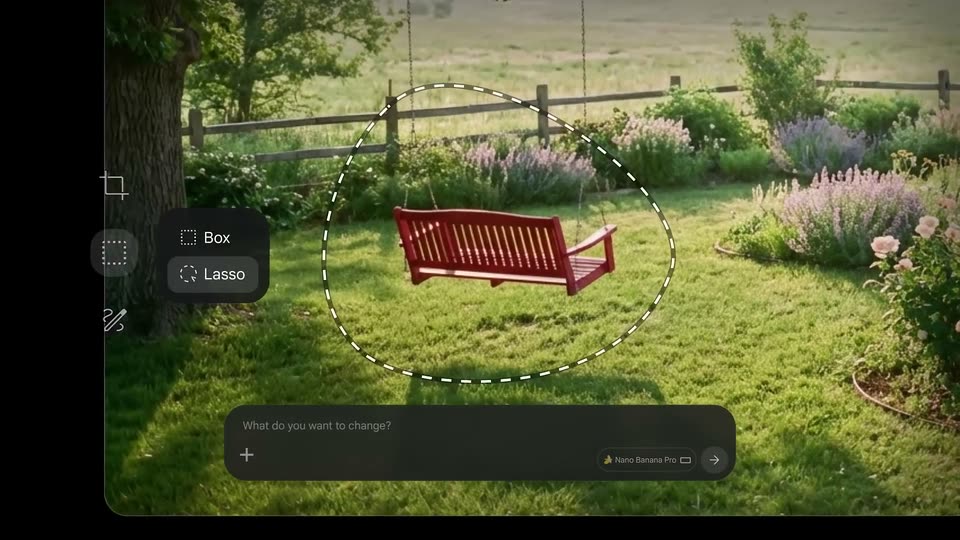
A photo editor window shows a sunlit garden with a red swing bench. A cursor opens the selection menu, picks Lasso, and draws a dashed loop around the bench while the view zooms in. The prompt field types add @ and a panel of recent suggestions rises.
On-screen text: “Starts with vision”
Techniques: UI zoom, Cursor demo
Camera: Push in
A dark prompt panel floats over a blurred garden. The left list and right preview swap from a top-down pool shot to an elderly couple as the query changes, while a hand cursor hovers the rows. A dashed oval marks the right side.
Techniques: Cursor demo
Camera: Push in
A dark prompt bar over a garden photo types “add grandparents.portrait to the swing” beside a small portrait chip; a dashed white ellipse outlines the red swing. The bar expands, then fades out as a hand cursor hovers over it.
Techniques: Kinetic type, Cursor demo
Camera: Pull out
A soft dark blur resolves into a sharp photo of two people on a bench in a garden, held in a rounded card on black. The white headline sits over the right side while the card eases down in size.
On-screen text: “Add characters.”
Camera: Push in
A garden photo with a dashed oval drawn in the sky. The prompt bar placeholder is replaced as “Add barn” is typed, then the view zooms in and darkens while a cursor moves to the send button.
Techniques: UI zoom, Cursor demo
Camera: Push in
Over a blurred farm field, a dark prompt bar holds the typed text 'Add barn', a Nano Banana Pro pill and a send arrow with a cursor. The bar slides down and shrinks as the large white headline 'Build environments.' scales in across the frame.
On-screen text: “Build environments.”
Techniques: Cursor demo, Kinetic type
Camera: Static
A sunlit garden with a red barn and three people on a wooden swing. Large white text “Build environments.” scales across the frame, then fades as the image retracts into a rounded-corner card on a black background.
On-screen text: “Build environments.”
Techniques: Kinetic type
Camera: Pull out
A product prompt interface on black: a photo card of three people on a garden bench sits above a dark input bar. The view zooms into the input field, the placeholder fades, and the prompt text fills in with a blinking cursor.
Techniques: UI zoom
Camera: Push in
Close-up of a dark chat bubble over a blurred green backdrop. A pill chip labeled Image x1 sits beside a round send button, and a white hand cursor taps the button as the chip slides and scales into place.
Techniques: Cursor demo
Camera: Static
A rounded interface card tilts in 3D over stacked layers, showing an illustrated farmyard with two figures on a swing and a red barn at sunset. A dark prompt bar below reads Make it in an animated style with an Image x1 control as the scene brightens.
Techniques: 3D mockup
Camera: Push in
A deck of rounded cards in 3D perspective shows an illustrated farm party scene. The prompt in the input bar changes from Throw a party to Oil painting style as the image melts into a blur; the cards stack and a white headline Create stories. appears over the soft background.
On-screen text: “Create stories.”
Techniques: 3D mockup, Morph
Camera: Push in
A 3D stack of rounded interface cards, the top one showing an illustrated farm scene with two figures on a bench, rotates and flattens into a dark dashboard. A sidebar, search field and a row of three thumbnails appear, with a prompt bar fixed at the bottom.
Techniques: 3D mockup
Camera: Pan
A tilted 3D grid of colorful media thumbnails fills a black frame, with a search bar above and a prompt field below. The whole interface rotates gently toward the camera, settling into a flatter angle as the clip plays.
Techniques: 3D mockup
Camera: Push in
A grid of colorful image thumbnails fills the screen. A white hand cursor hovers, then the rainbow dragon card lifts out and tilts in 3D, two cards fanned behind it, as the rest darkens and large white text scales in over the center.
On-screen text: “Image and Video”
Techniques: Cursor demo, UI zoom, Kinetic type, 3D mockup
Camera: Static
A blurred photo grid sits behind two tilted cards showing a colorful dragon, with a hand cursor hovering on them. White text 'Image and Video' scales and fades as the cards drift left and an 'Ingredients' bar slides in from the right.
On-screen text: “Image and Video”
Techniques: Kinetic type, Cursor demo, 3D mockup
Camera: Pull out
A dark grid of blurred thumbnails fills the background. A tilted 3D card with a colorful dragon and a hand cursor sits left, next to a dark pill reading Ingredients. The camera zooms in on the dragon card as the pill slides off the right edge.
On-screen text: “Ingredients”
Techniques: 3D mockup, Cursor demo, UI zoom
Camera: Push in
A dark prompt card floats in 3D perspective on black, holding a dragon illustration and a desert photo with a plus icon. A caption types out beneath them, then the focus shifts to a blurred bottom bar showing a video pill and a hand cursor button.
Techniques: 3D mockup, UI zoom
Camera: Pan
A person in a flowing cream dress moves across a desert before a concrete gate as a multicolored dragon flies overhead. The shot brightens from a dark rounded frame, and the white caption fades in at center.
On-screen text: “Working as one.”
Camera: Static
A person in a flowing cream dress walks across a desert toward a concrete structure while a multicolored dragon flies overhead. The shot pushes in closer on the pair. White text “Working as one.” holds centered.
On-screen text: “Working as one.”
Camera: Push in
A black and white side view shows a man in a fedora and light overcoat walking right on a moving walkway, holding a briefcase. He crosses a glossy floor that mirrors his reflection, with a blurred city visible through large windows behind him.
Camera: Static
A woman in a white top and black backpack jogs across a metal footbridge, mid-shot, against a soft-focus backdrop of apartment blocks and trees in warm evening light. The camera holds steady as she crosses from left to right.
Camera: Static
A small pink plush cat stands in profile on a soft cotton cloud, its tail flicking up. The pastel sky and blurred clouds fill the background in warm peach and pale blue tones, with shallow depth of field keeping focus on the toy.
Camera: Static
A group of five students with backpacks walks left to right across a concrete path on a grassy campus quad. A large brick building and autumn trees fill the background, with other students strolling in the distance. Wide, eye-level framing, steady pace.
Camera: Static
A claymation-style old man with a cane walks past a sandcastle on a beach, then the clip cuts to an aerial view of a line of military trucks racing across desert dunes, each trailing a plume of dust.
Camera: Push in
A hard cut opens on a 3D monster truck labeled Desert Beast leaping a ridge in a sunset desert, dust billowing behind it. It snaps to a low-angle view of a crystal chandelier hanging above a spiral staircase, with figures peeking over the railings.
Camera: Static
A worm's-eye view shows six women in pastel dresses reaching their hands toward the center of a circle, then it cuts to a man seated on a wooden floor holding a glowing green disc, surrounded by standing figures in a dim room.
Camera: Static
A black cat leaps onto a wooden chair in a dim green-walled room, then the scene cuts to a torn-paper papercraft diorama packed with origami birds and a small white figure beside a sign.
Camera: Static
A top-down satellite view of a river delta fills the frame, winding blue channels threading through green and tan land. The terrain ripples and warps like a liquid surface, edges undulating while the composition stays centered.
Camera: Static
A high-angle shot follows a hiker in a blue jacket and backpack walking away down a narrow dirt trail. The camera tracks forward through a dense evergreen forest thick with moss and ferns.
Camera: Static
Top-down aerial view of a green hedge maze. Two men in white shirts and dark trousers walk along separate dirt paths, one on the left, one on the right, moving slowly through the winding hedges.
Camera: Static
A papercraft street diorama: a yellow cardboard taxi with a TAXI roof sign drives toward the locked-off camera down a road of newspaper and blue paper with white dashes, flanked by colorful paper buildings and street lamps.
Camera: Static
A full-frame night photo of a woman leaning out of a car window, framed by a film-strip edge, shrinks into the screen of a tilted tablet. The tablet rests on a fanned stack of rounded photo cards, and the whole group rotates in 3D on a dark background.
Techniques: 3D mockup
Camera: Pull out
A row of rounded video cards recedes in 3D perspective on a black field, scrolling left to reveal new clips. The clips show a figure in a city, a colorful dragon on a beach, a rider on the dragon, and a woman in red.
Techniques: 3D mockup, Parallax
Camera: Push in
Rounded video cards in 3D perspective scroll left across a black background, showing astronauts on the moon, campus students, and a market street. A white headline, Introducing the new, sits centered, then the large word Flow takes its place.
On-screen text: “Introducing the new”, “Flow”
Techniques: 3D mockup, Parallax
Camera: Push in
A grid of rounded video clips, each playing a different scene such as clouds, a campus, dinosaurs, a street fair, astronauts and a bride with a robot, scrolls left on a black background. A static white headline sits centered over the grid.
On-screen text: “Your AI Creative Studio”
Camera: Pan
Black letterforms act as cutouts, each revealing a short video clip (an astronaut on a red planet, a street, a lake). The cutouts then fill to solid white text on a plain black background.
On-screen text: “Start creating.”
Techniques: Masking
Camera: Static
White text “Start creating.” holds centered on black, then cuts to the Flow wordmark with “by Google” beneath and a small disclaimer at the bottom. Locked-off frame throughout.
On-screen text: “Start creating.”, “Flow”, “by Google”, “Google account required. 18+”
Camera: Static