0:58

Introducing App Studio | Runway
Runway · AI · Oct 2026
Google Flow · Feb 2026 · 0:59 · AI-annotated
Google Flow’s 0:59 launch film runs 39 scenes, about 1.5 s each. The product shows up at 0:52 and 4 features are revealed. The call to action lands at 0:57 (96% in). The video is built as one continuous garden story that demos each feature in turn, bookended by a 3D swarm of photo cards and a rapid montage of generated clips before the product is named. Signature moves: white centered headlines over 3D-tilted card grids, lasso selections with typed prompts, and hard cuts between live-action and 3D outputs.
Is this your launch? to your site or press kit.
Runway · AI · Oct 2026
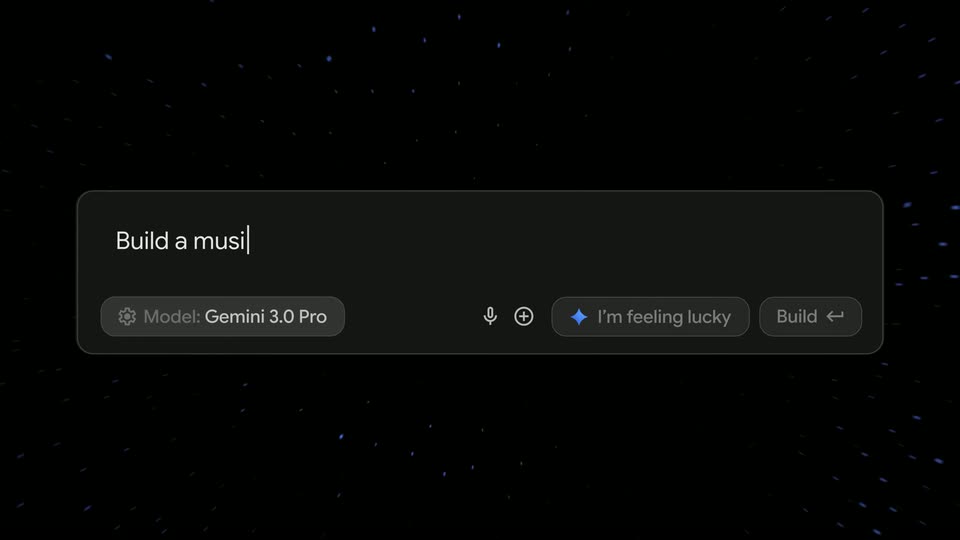
Google AI Studio · Nov 2025
Loom · Productivity · Aug 2023
A swarm of small 3D photo cards tumbles and drifts through a dark space. White text reading Every story appears in the center.
On-screen text: “Every story”
Techniques: Kinetic type, Particles
Camera: Pull out
A 3D grid of image cards floats in a black void as the camera pushes forward through the layers. The centered white headline 'Every story' holds, then the view zooms in, blurring the outer cards.
On-screen text: “Every story”
Techniques: 3D mockup, Parallax
Camera: Push in
A scattered grid of rounded photo tiles drifts slowly across a black background. The tiles hold varied images, including a bicycle on sand, perfume bottles, fashion figures and a forest path.
Camera: Push in
A dark project gallery grid of image thumbnails sits flat, then tilts and recedes into 3D perspective. The white headline holds centered over the rotating interface as it angles away.
On-screen text: “Starts with vision”
Techniques: 3D mockup
Camera: Pull out
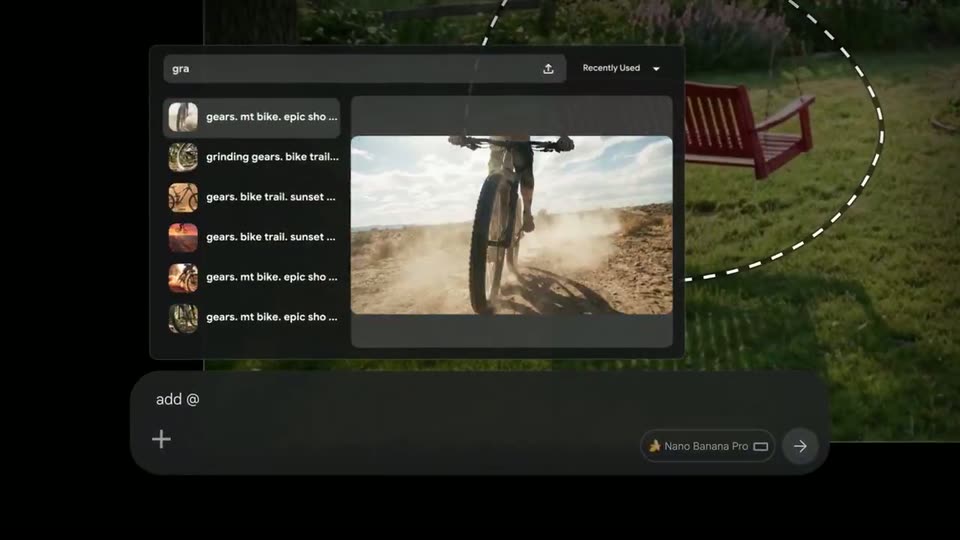
The editor's garden photo fills the frame as the view zooms onto the red swing bench. A cursor picks the lasso tool, draws a dashed selection around the bench, then types add @ in the prompt bar, opening a search panel that filters saved reference images to grandparents portraits.
On-screen text: “Starts with vision”
Techniques: UI zoom, Cursor demo
Camera: Push in
A prompt bar with a portrait thumbnail reads add grandparents.portrait to the swing over a garden photo, a dashed oval marking the red swing. The cursor clicks the send arrow, the image blurs into a wider card where the couple now sits on the swing, captioned Add characters.
On-screen text: “Add characters.”
Techniques: Cursor demo, Morph
Camera: Pull out
A garden photo fills the screen while a dashed white lasso is drawn around the open sky. The prompt bar below fills with the typed text Add barn, the photo dims, and a hand cursor taps the right arrow.
On-screen text: “What do you want to change?”, “Add barn”
Techniques: Cursor demo
Camera: Push in
A dark rounded prompt bar reading Add barn with a Nano Banana Pro chip slides down over a blurred green field as the large white headline Build environments. appears above it. A cursor hovers on the circular send arrow.
On-screen text: “Build environments.”
Techniques: Cursor demo
Camera: Static
A sunlit garden with a red barn and three people seated on a bench. The white headline “Build environments.” overlays the image and fades out as the footage settles inside a black rounded-rectangle frame.
On-screen text: “Build environments.”
Techniques: Masking
Camera: Pull out
A rounded card holds a photo of an elderly couple on a bench facing a red barn, above a dark prompt bar. The view zooms into the bar and the prompt “Make it in an animated style” is typed.
Techniques: UI zoom
Camera: Push in
Close-up of a dark rounded input bar over a blurred green background. An Image x1 attachment pill and a circular send arrow sit inside; a white hand cursor rests on the arrow as the bar slides left in a locked-off frame.
Techniques: Cursor demo
Camera: Static
A pastel illustration of a couple on a bench swing beneath a tree, with a red barn in a sunset field, settles into view behind a dark rounded prompt bar. The bar holds the typed prompt and an Image x1 tag with a send arrow at the right.
On-screen text: “Make it in an animated style”
Camera: Push in
A rounded image card shows a countryside party illustration with a red barn and hanging lanterns; the picture shifts from a warm sunset rendering to a brighter oil-painting style while the dark prompt bar below swaps its text.
Techniques: Morph
Camera: Static
A floating creation card on black holds a blurred garden illustration that pulls into focus, revealing an elderly couple on a bench before a red barn, while the white headline scales and dissolves above the dark input bar.
On-screen text: “Create stories.”
Techniques: Kinetic type, 3D mockup
Camera: Pull out
A dark app screen brightens as a row of media cards slides in: a colorful robot illustration, a desert photo, an abstract image, with a phone preview below and a prompt bar at the bottom.
Camera: Static
A grid of generated images floats in 3D perspective on black. The camera pushes in until the tiles fill the frame, a cursor glides across the grid and clicks the unicorn card, which pops forward as the white title Image and Video appears centered.
On-screen text: “Image and Video”
Techniques: 3D mockup, UI zoom, Cursor demo
Camera: Push in
A 3D-tilted stack of cards showing a colorful dragon hovers over a dim image grid while the white headline 'Image and Video' fades out. The grid brightens and the cards slide left, exposing a dark 'Ingredients' pill on the right.
On-screen text: “Image and Video”
Techniques: 3D mockup
Camera: Pull out
A dark card grid sits blurred in the background while a fanned stack of cards on the left, topped by a 3D dragon and a white hand cursor, zooms in to fill the frame. A dark pill labeled Ingredients rests to the right.
Techniques: Cursor demo, UI zoom
Camera: Push in
A dark panel in 3D perspective holds two rounded thumbnails, a dragon render and a desert photo, with a plus icon below. The caption 'Dragon flies into scene.' types in word by word, then the frame zooms onto a Video x1 pill and a hand cursor button, ending soft-focused.
On-screen text: “Dragon flies into scene.”
Techniques: 3D mockup, Kinetic type, UI zoom, Cursor demo
Camera: Pan
A woman in a flowing cream robe walks across a barren desert toward a concrete gate as a multicolored winged dragon swoops down from the sky. A centered white tagline scales in. The shot is framed by rounded corners and a dark border.
On-screen text: “Working as one.”
Techniques: Kinetic type
Camera: Push in
A black-and-white man in a suit and fedora walks left to right across a polished lobby floor, carrying a briefcase. Large windows and a blurred city backdrop sit behind him, and his reflection appears on the glossy ground.
Camera: Static
A woman with a black backpack jogs left to right across a metal footbridge, lit by warm low sun. Blurred apartment blocks and green trees fill the background above a canal. The camera holds still as she crosses the frame.
Camera: Static
A small pink plush toy stands on a soft cloud, its tail and legs shifting as the camera drifts slowly. Pastel clouds fill the blurred background in peach and lavender.
Techniques: Parallax
Camera: Static
Five students with backpacks walk along a campus sidewalk from left to right, passing a green lawn and a large brick university building with bare trees.
Camera: Static
A claymation diorama shows an old man with a cane walking along a beach past a sandcastle, then the scene cuts to an aerial view of a truck convoy raising dust across desert dunes.
Camera: Push in
A 3D monster truck marked Desert Beast leaps off a desert ridge at sunset, throwing up a dust plume, then hard cuts to a low-angle view of an ornate spiral staircase with a lit crystal chandelier and suited figures on the railings.
Camera: Static
A low-angle shot of women in pastel dresses form a circle overhead, then a hard cut to a man seated on a wooden floor holding a bowl with a green glowing orb, ringed by standing figures in a dim room.
Camera: Static
A black cat crouches on a wooden chair in a green-walled room, then the frame tears open into a colorful cardboard diorama of origami birds and a white crane. A small paper sign reads FIN.
On-screen text: “FIN”
Techniques: Masking
Camera: Static
A top-down satellite view of a river delta, winding teal channels cutting through brown-green land. The frame drifts slowly while the right edge warps into a curved 3D globe shape, deep blue water filling the right side.
Techniques: 3D mockup
Camera: Static
A hiker with a blue backpack walks away down a narrow dirt trail through a dense green forest. The camera tracks forward from a high angle, framing the path between tall trunks and ferns.
Techniques: Parallax
Camera: Static
Top-down aerial of a green hedge maze; two figures in white shirts walk through separate paths. The camera holds a high overhead angle with a slight drift.
Camera: Static
A cardboard street set shows a yellow taxi approaching a locked-off camera, then the scene cuts to a low-angle courtyard with colorful laundry flapping on lines between balconies.
Camera: Static
A night highway clip of a woman leaning from a car window scales down into a rounded photo card that tilts in 3D. Beneath it, a fan of other photo cards, a beach and a sunset, spreads out on a black background as the stack rotates.
Techniques: 3D mockup
Camera: Pull out
A diagonal cascade of rounded cards in 3D perspective slides across a black background, each holding a different clip: a fighter, a rainbow dragon on a dune, a wooden climbing frame, a fantasy rider, a red throne. The camera tracks right along the receding strip.
Techniques: 3D mockup, Parallax
Camera: Static
A horizontal strip of video panels in 3D perspective scrolls right, revealing a Mars astronaut clip, a campus walk and a beach scene in turn, while the white headline holds fixed at the center.
On-screen text: “Introducing the new”
Techniques: 3D mockup, Parallax
Camera: Push in
A row of rounded video cards in 3D perspective, each playing live-action clips of T-rex costumes and a street festival, sits on a black background. The camera flies through the cards into a full-screen grid of short video thumbnails, with a white tagline centered.
On-screen text: “Introducing the new”, “Flow”, “Your AI Creative Studio”
Techniques: 3D mockup, Kinetic type
Camera: Push in
A grid of rounded video clips, each showing a different AI-generated scene, scrolls slowly across the frame. A white headline sits centered and static over the middle row.
On-screen text: “Your AI Creative Studio”
Camera: Push in
The word creating appears as a black cutout revealing moving footage behind it, then the letters fill in to plain white type on a black background, centered and static.
On-screen text: “Start creating.”
Techniques: Masking
Camera: Static
On a black background, the white tagline 'Start creating.' sits above 'by Google', then it is replaced by the large 'Flow' wordmark with 'by Google' beneath and a small disclaimer at the bottom.
On-screen text: “Start creating.”, “Flow”, “by Google”, “Google account required. 18+”
Camera: Static