0:59
Google Flow - Today we're expanding Flow into a full AI creative studio. We’ve rede
Google Flow · Feb 2026
Google AI Studio · Nov 2025 · 1:07 · AI-annotated
Google AI Studio’s 1:07 launch film runs 41 scenes, about 1.7 s each. The product shows up at 0:05 and 8 features are revealed. The call to action lands at 1:03 (94% in), over a voiceover. A black starfield with drifting blue dots carries the whole film, with white sans-serif headlines that highlight one word in blue and dark UI cards tilted in 3D perspective. The structure alternates short word-by-word title cards with fast 3D demos of app screens, building a single car-game example through prompt, refine, share and publish, then closing on a logo and URL.
Is this your launch? to your site or press kit.
Films whose music sounds like this one, voice left out
Galaxy S26 Ultra · Modern electronic, cinematic
Samsung Galaxy S26 Ultra · Cinematic electronic
BYD · Electronic
On a black field, small blue dots drift and fade while the headline “Bring anything to life” builds up word by word in the center, the word “anything” in blue.
On-screen text: “Bring anything to life”
Techniques: Kinetic type, Particles
Camera: Pull out
App screens float at varying depths in a black starfield, a polaroid photo card labeled Post Forward centered between the words Build and anything. After a brief hold, the camera pulls back fast, shrinking the screens into the distance as blue particle streaks rush past.
On-screen text: “Build”, “anything”
Techniques: Kinetic type, 3D mockup, Parallax, Particles
Camera: Pull out
On a near-black starfield, the four-pointed rainbow Gemini sparkle sits left of the white wordmark “Gemini 3 Pro.” The “3 Pro” half starts dim and brightens to full white over the first second while the frame stays locked off.
On-screen text: “Gemini 3 Pro”
Camera: Static
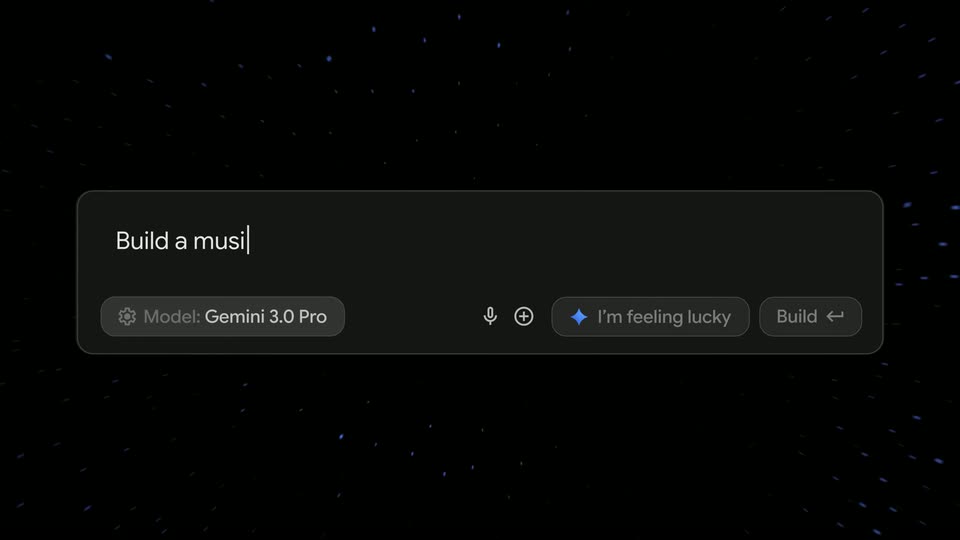
A dark prompt bar on a black field of drifting blue particles types 'Build a music video game' with a blinking cursor, while the model chip and action buttons scale up.
Techniques: Kinetic type, Particles
Camera: Static
A dark 3D prompt card tilts in space, a text field typing a request above a Build button. The camera pushes in on the Build pill, then the card gives way to a glowing laptop mockup floating in a starfield.
Techniques: UI zoom, 3D mockup
Camera: Push in
A rounded interface card tilts in 3D perspective on a black background, then rotates flat to face the viewer. Inside, a hovering blue object with two wings of circular discs floats over a city skyline at sunset, with arrow buttons along the bottom edge.
Techniques: 3D mockup
Camera: Static
A tablet tilted in 3D perspective shows a voxel world at sunset, a blue butterfly flying over the city before the view switches to birds on branches. On the left, the word new slides in white, then experiences scales in blue.
On-screen text: “new”, “experiences”
Techniques: 3D mockup, Kinetic type
Camera: Push in
A square photo of sparrows on orange maple branches sits centered on black. Orange bounding boxes with blue House Finch tags track the birds as the frame slowly zooms in, a small white sparkle in the lower corner.
Techniques: UI zoom
Camera: Static
A tilted 3D card shows a sunset photo of birds on branches, each framed by a blue bounding box labeled House Finch. On the right, the words apps, that, and see appear in sequence, the last in blue.
On-screen text: “apps that see”
Techniques: 3D mockup, Kinetic type
Camera: Pan
The word “tools” appears in white lowercase at center on black, then “that listen” joins it, “listen” in blue. The line holds as a dark laptop in 3D perspective fades in behind it, its screen showing a blue audio waveform and two small buttons.
On-screen text: “tools”, “that listen”
Techniques: Kinetic type, 3D mockup
Camera: Static
A dark two-panel recording mockup tilts in 3D space, its blue waveform pulsing and its transcript lines filling in. White and blue words 'tools' and 'that listen' hold at the left and right edges on black.
On-screen text: “tools”, “that listen”
Techniques: 3D mockup
Camera: Static
A dark chat card tilted in 3D perspective fades out as the blue word Prompt scales up at center, a blue audio waveform crossing its o. A gray paperclip icon slides from the top right into the middle of the word, and a small gray 0 pops in beneath it.
On-screen text: “tools”, “that listen”, “Prompt”, “0”
Techniques: 3D mockup, Kinetic type
Camera: Push in
A dark prompt card floats on black, a PDF chip and a typed instruction visible. The card tilts into 3D perspective and the camera pushes in, enlarging the text until it fills the frame.
Techniques: 3D mockup, UI zoom
Camera: Static
A dark chat input panel sits tilted in 3D perspective on black. The typed prompt and its file chip crossfade from a logo redesign request to a New Wave song script request.
Techniques: 3D mockup
Camera: Static
A dark chat input is shown as a fanned stack of overlapping cards receding in 3D perspective, each holding a paperclip icon and a filename. The front card carries a blue outline and the typed prompt, which scales while the frame stays locked.
Techniques: 3D mockup, UI zoom
Camera: Pan
A fanned stack of dark chat cards, each holding a file chip and a prompt, sits in depth against black. The word Get appears large in blue on the left, overlapping the cards.
On-screen text: “Get”
Techniques: Kinetic type
Camera: Static
A dark chat panel shows the blue placeholder “Get inspired” over stacked ghost cards. The camera zooms onto the “I'm feeling lucky” pill, cuts to the typed prompt with two model chips, then tilts into a 3D close-up of a file list gaining green checkmarks.
On-screen text: “Sequences shortened and screen images simulated. Results for illustrative purposes.”
Techniques: Kinetic type, UI zoom, 3D mockup
Camera: Push in
A dark interface displays a chat panel on the left and a top-down racing game on the right. The left panel scrolls upward, sliding the prompt text and file list, while the game view remains static.
Camera: Static
On a black field with drifting blue dots, the blue word Refine sits left of a white bracket logo. A dark grey disc grows around the logo while the word slides off the left edge.
On-screen text: “Refine”
Techniques: Kinetic type, Particles, Masking
Camera: Pull out
A dark diff panel with a column of green checkmarks sits left of a top-down 3D city map where a red car drives under a blue loop that draws itself. The panel scrolls up as the buttons rise and a large word scales in.
On-screen text: “Refine”
Techniques: Kinetic type
Camera: Pull out
A dark prompt interface shows an image chip and a typed question, while large white words fade in over the screen. The view holds steady as the overlay text completes the phrase.
On-screen text: “and refine some more.”
Techniques: Kinetic type
Camera: Pan
A dark code editor panel, tilted in 3D perspective, fills the right side of a black frame, its syntax-highlighted lines soft at the edges. On the left, the caption 'and refine some more' sits in white sans-serif, the final word in blue.
On-screen text: “and refine some more”
Techniques: 3D mockup
Camera: Static
A 3D-tilted panel shows a top-down oval race track with a small car and a layer of code, rotating gently; a code editor panel floats behind it on the left. The line 'and refine some more' holds in the lower left, 'more' in blue.
On-screen text: “and refine some more”
Techniques: 3D mockup
Camera: Pull out
A dark chat interface tilts in 3D perspective against a black background. A user message asks to change the car to green, and the assistant replies that it updated the color to sporty green, above a components/Car.tsx chip and checkpoint rows with green checkmarks on the right.
Techniques: 3D mockup
Camera: Pull out
A split-screen product view: on the left a dark chat panel logs new instructions and checkpoints, on the right a top-down 3D racetrack in a city gains a second car as the messages appear.
Techniques: Split screen
Camera: Static
A dark app screen shows a chat panel on the left and a top-down 3D racing track with two cars on the right. The camera tilts into perspective and zooms onto the track, reframing the live preview.
Techniques: UI zoom, 3D mockup
Camera: Push in
The word Share scales in on a black background, then with a friend appears in a lighter weight beside it. Share morphs into a gray circular share icon while small blue particles drift across the frame.
On-screen text: “Share”, “with a friend”
Techniques: Kinetic type, Morph, Particles
Camera: Static
On a black field, the lowercase words and remix hold left in white and blue. A rounded 3D top-down city map with an oval track and two cars floats right, slowly scales up, then whips out in a motion-blurred exit.
On-screen text: “and remix”
Techniques: Speed ramp
Camera: Static
Three rounded panels sit side by side, each a top-down 3D track layout with a small teal car. The strip scrolls left, swapping the green, neon-wireframe, lunar, desert and water environments into view one after another.
Techniques: Split screen
Camera: Pan
On a black background, the lowercase phrase 'then share' slides across the center, 'share' in blue, then exits as 'with the world' slides in, 'world' in blue. Below, a small dark pill labeled 'Publish your app' with a toggle scales in.
On-screen text: “then share”, “with the world”
Techniques: Kinetic type
Camera: Static
A dark rounded card labeled 'Publish its app' sits below the headline 'with the world' on a black field of drifting blue dots. The headline slides away as the card scales up to fill the frame and its toggle flips on with a blue ring.
On-screen text: “with the world”, “0”
Techniques: Kinetic type, UI zoom, Particles
Camera: Push in
A tilted 3D grid of app interface cards floats in a black starry void. The cards scale up and brighten into place as the camera settles, while a headline scales in over the grid.
On-screen text: “Publish your app”, “0”
Techniques: 3D mockup
Camera: Static
A wall of interface mockups floats in 3D perspective over a black starfield, rows tilted and receding. The camera dollies in, reframing onto the center row so the hexagon and 'Dream in color' cards grow larger.
Techniques: 3D mockup
Camera: Push in
A tall retro game interface mockup, tilted in 3D on the left, scrolls vertically past a static headline on the right. The mockup reveals a wireframe hex grid, a NEON VECTOR title card with an INSERT COIN button, and a wireframe octahedron.
On-screen text: “Bring retro vector spaceships to life”
Techniques: 3D mockup, Split screen
Camera: Pan
A tilted 3D tablet floats on black, its screen showing two comic panels, as a white and blue headline sits to the right. The view reframes down the device to a grid of space-themed cards while the headline swaps to a white title.
On-screen text: “Bring a custom comic hero to life”, “Unveil the Cosmos”
Techniques: 3D mockup, UI zoom
Camera: Static
A tilted Stellaris web interface floats in 3D on black, rotating slightly as it settles. To the right, the headline sits static, with the middle lines in blue. The mockup shows a hero banner, a search bar and three lesson cards.
On-screen text: “Bring an astronomy lesson to life”
Techniques: 3D mockup
Camera: Static
A dark loan calculator dashboard, tilted in 3D perspective, sits on a black background. A large headline stands at right, with the middle phrase in blue and the rest in white.
On-screen text: “Bring a loan calculator to life”
Techniques: 3D mockup
Camera: Static
A tilted tablet mockup on the left displays a photo of a brown dog in a red holiday sweater against a Christmas tree. To the right, a four-line headline reads in white and blue. The device eases slightly into its angled position on a black background.
On-screen text: “Bring interactive holiday cards to life”
Techniques: 3D mockup
Camera: Static
A dark app interface tilted in 3D on the left swaps from a pub crawl planner to a synth compiler. On the right, large white text reads Bring and to life while the middle phrase cycles in blue: pub crawls, holiday cards, retro vector notes, compiler spaceships.
On-screen text: “Bring”, “pub crawls”, “to life”, “holiday cards”, “interactive”, “Tap cand to fip”, “retro vector notes”, “compiler spaceships”
Techniques: Kinetic type, 3D mockup
Camera: Static
A centered text line reads 'Bring a loan calculator to life' on a black background. The blue middle words blur and morph into the single word 'anything', then the frame cuts to the Google AI Studio logo and a blue URL.
On-screen text: “Bring a loan calculator to life”, “Bring anything to life”, “Google AI Studio”, “ai.studio/build”
Techniques: Kinetic type, Morph
Camera: Pull out
The Google AI Studio logo lockup, white icon and wordmark, sits centered on a black field with a blue URL line beneath it. Faint blue and white dots drift across the frame and fade out over the duration, leaving the static mark.
On-screen text: “ai.studio/build”
Techniques: Particles
Camera: Static