
1:34
Explore
Dropbox Dash: Search videos, images, and create content fast
Dropbox Dash · Apr 2025 · 0:56 · AI-annotated
- Length
- 0:56
- Scenes
- 31 · 1.8 s avg
- Product on screen
- 0:00
- Features shown
- 5
- Voiceover
- No
- Views
- 1.9M on YouTube
as of November 19, 2026
00:00:00 / 00:56:21
- Length
- 0:56
- Scenes
- 31 · 1.8 s avg
- Product on screen
- 0:00
- Features shown
- 5
- Voiceover
- No
- Views
- 1.9M on YouTube
as of November 19, 2026
Dropbox Dash’s 0:56 launch film runs 31 scenes, about 1.8 s each. The product is on screen from the first frame and 5 features are revealed. There is no explicit call to action. The video is built as a brand title card followed by five feature blocks, each opened by a typewriter blue headline and closed by a flat white UI demo that zooms in on a single card. Its signature moves are the blinking caret typing, the 3D rotation of the blue bar and the app grid, and a hard flip to dark mode for the security block before the black logo outro.
No filming indicatedEstimated needs: 5 capture groups — your screens or recordings · 1 official logo — reused across the film · 2 graphic passages — draw or supply · 2 3D passages — build or supply
Is this your launch? to your site or press kit.
More like this



Similar soundtrack
Films whose music sounds like this one, voice left out
0:53

Best AI Product Video for SaaS | Lovio
Lovio · Electronic
2:32

RoboParty - 🚀RP1 is officially here. 🌍Putting control of robotics back in develo
RoboParty · Electronic
0:44

Discord - Xbox and Discord are joining forces to give Nitro a major upgrade. @
Discord · Electronic
Dropbox Dash: Search videos, images, and create content fast, scene by scene
· 31 scenes as text
01 · Product intro · 0:00–0:04
A blue Dropbox Dash title with the Dropbox logo sits on white, then the sentence Search videos and images-and create content fast types out word by word with a blinking caret, finishing on a blue highlight bar.
On-screen text: “Dropbox Dash”, “Spring 2025 release”, “Search videos and images-and create content fast”
Techniques: Kinetic type
Camera: Static
02 · Feature reveal · 0:04–0:06
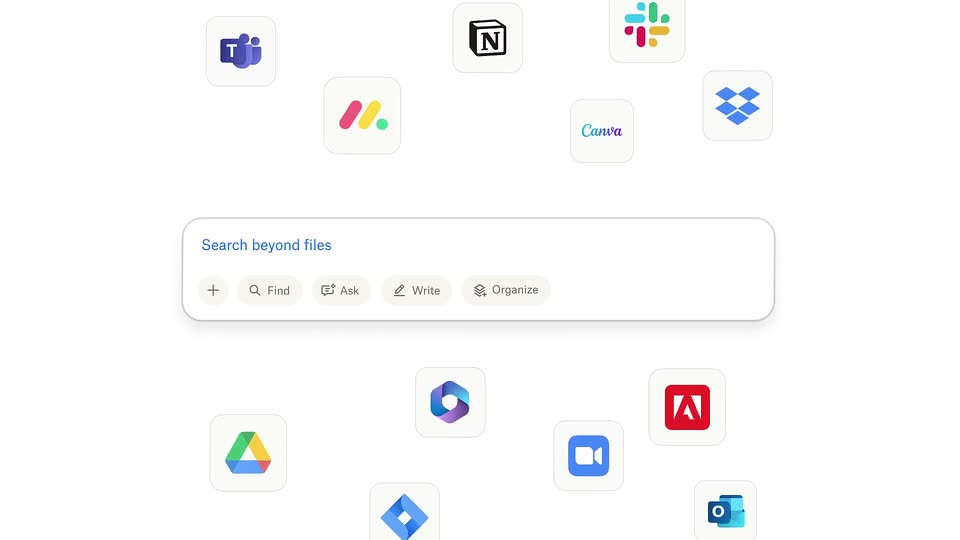
A centered search field on white is ringed by floating app icons (Slack, Canva, Dropbox, Notion, Teams, Drive, Zoom). A blue bar slides away, the border turns blue, and a query types itself letter by letter as the icons drift out and fade.
On-screen text: “Search videos and”
Techniques: Kinetic type
Camera: Pull out
03 · Feature reveal · 0:06–0:08
A Dropbox answer card on a white background: an enlarged query pill fades out as the answer text, four file rows and a grid of four model photos fade in, while the cursor glides to hover See all.
Techniques: UI zoom, Cursor demo
Camera: Static
04 · Feature reveal · 0:08–0:09
A white file-browser panel sits on a pale background. Its image grid fills in as outdoor photo thumbnails of people pop into place across two rows, while a black cursor rests at the right edge.
Camera: Static
05 · Feature reveal · 0:09–0:11
A file library grid of photo thumbnails fills the panel. A cursor hovers over the first image, then the view zooms in, expanding that thumbnail to a large preview with a filename header and a Share button.
Techniques: Cursor demo, UI zoom
Camera: Push in
06 · Feature reveal · 0:11–0:13
A white image viewer window on a plain white background shows a portrait of a woman in a metallic jacket against a blue backdrop. A cursor clicks the Share button, then blue bars slide in from the frame edges as the window scales down.
Techniques: Cursor demo, Masking
Camera: Static
07 · Feature reveal · 0:13–0:16
Blue headline types out line by line on a white background with a blinking cursor, then a white app card with a greeting, search bar and quick actions slides in from the right behind the text.
On-screen text: “All your content at your fingertips, from even more of your work apps”
Techniques: Kinetic type
Camera: Static
08 · Feature reveal · 0:16–0:19
A white app screen with a left icon rail and a greeting; the view zooms into the search field as 'new york skyline campaign' is typed, the Find, Ask, Write, Organize chips growing until the text fills the frame.
Techniques: UI zoom, Cursor demo
Camera: Pan
09 · Feature reveal · 0:19–0:20
A white frame holds a large black sans-serif headline, cropped on the left to read “gn shoot”, with a blue vertical caret bar at the end. The text and bar sit still on the plain background.
On-screen text: “gn shoot”
Camera: Static
10 · Feature reveal · 0:20–0:22
A glowing blue vertical bar rotates in 3D on a white field, tilting away to show its edge. As it turns, two small cards slide in to its left: a city photo thumbnail and a dark orange card with the word nyc.
Techniques: 3D mockup, Light sweep
Camera: Static
11 · Feature reveal · 0:22–0:23
A 3D grid of app windows and documents rotates from a side profile to face the camera, revealing multiple rows of UI screens. A vertical blue light bar glows on the right edge.
On-screen text: “nyc”
Techniques: 3D mockup, Light sweep
Camera: Pan
12 · Feature reveal · 0:23–0:25
A white grid of flat app interface cards, including Asana, Sheets, Dropbox and a video file, scrolls horizontally from right to left. The cards stay front-facing and evenly spaced as they pass, with no tilt or depth.
Camera: Pan
13 · Feature reveal · 0:25–0:26
A wide scatter of file cards on a light background zooms into the central dark video card, showing a city skyline and a play button, isolating it on white as the others slide out of frame.
Techniques: UI zoom
Camera: Static
14 · Feature reveal · 0:26–0:29
On a plain off-white background, blue sans-serif text reads in three left-aligned lines. The first two lines sit still while the third types out letter by letter behind a blinking cursor, finishing with “person on your team”.
On-screen text: “Dash can even help you find the right person on your team”
Techniques: Kinetic type
Camera: Static
15 · Feature reveal · 0:29–0:31
A white product UI card showing an organization tree zooms in on the Marketing card, which gains a purple glow as a cursor hovers beside it. A small Coming soon caption stays fixed at the bottom.
On-screen text: “Dash can even help you find the right person on your team”, “Coming soon”
Techniques: UI zoom, Cursor demo
Camera: Push in
16 · Feature reveal · 0:31–0:32
A profile card for Mariah Casey, Digital Marketing Specialist, sits large and centered, linked by a horizontal line to smaller cards for Bethany Frazier and Robert Standen on the right. The active card slides left and shrinks as the next card slides in and enlarges, while a “Coming soon” caption holds at the bottom.
On-screen text: “Coming soon”
Camera: Static
17 · Feature reveal · 0:32–0:33
On a pale blue background, three digital profile cards sit in a row. The large center card scales down and slides left while the right card enlarges and settles in the center; the left card fades away. A small caption stays at the bottom.
On-screen text: “Coming soon”
Camera: Static
18 · Feature reveal · 0:33–0:34
A white profile card sits centered on a pale background with a man's photo, name, title, a Send message button and two icon buttons. A cursor glides up from the lower right to hover the Send message button, which gains a focus ring. Small gray text reads Coming soon below.
On-screen text: “Coming soon”
Techniques: Cursor demo
Camera: Static
19 · Feature reveal · 0:34–0:36
A blue sans-serif headline types itself out on a plain pale background, left-aligned. A block caret sits after the first line, then a thin caret blinks at the end of the finished sentence.
On-screen text: “Get to a final draft, fast”
Techniques: Kinetic type
Camera: Static
20 · Feature reveal · 0:36–0:38
A prompt is typed into a white input field, then the frame pulls back to reveal a left icon sidebar. The message becomes a right-aligned chat bubble, a “Thinking…” label appears, and a document card titled “Q2 Company Strategy” slides in at the top right.
On-screen text: “Get to a final draft, fast”
Techniques: UI zoom
Camera: Static
21 · Feature reveal · 0:38–0:40
A white chat screen holds a strategy card and a beige prompt bubble at the top. A 'Thinking...' label fades out, then a response sentence and two light-blue suggestion pills with sparkle icons fade in beneath it.
Camera: Pan
22 · Feature reveal · 0:40–0:42
Two white document cards overlap on a pale gray background. The front card, headed Marketing tone, slides right to cover the back card as a large black cursor glides in and hovers over the copy icon in the header.
Techniques: Cursor demo, Masking
Camera: Static
23 · Feature reveal · 0:42–0:45
On a plain white background, the blue headline “Protect everything,” sits static on the left. Below it, the word “everywhere” types itself out letter by letter with a blinking cursor, finishing by mid-scene. The frame stays locked off.
On-screen text: “Protect everything,”, “everywhere”
Techniques: Kinetic type
Camera: Static
24 · Feature reveal · 0:45–0:46
A dark notification card with a bell icon, red 3 badge and chevron sits centered, a cursor and purple Admin chip beside it. The view zooms out to reveal the card docked in the top of a larger dark panel, then the headline Protect everything, everywhere appears in white.
On-screen text: “Protect everything,”, “everywhere”
Techniques: UI zoom
Camera: Static
25 · Feature reveal · 0:46–0:49
A dark file list in an admin console is reframed close as a cursor tagged Admin moves down the rows, checking three boxes. The selected rows brighten while the rest dim.
On-screen text: “Admin”
Techniques: UI zoom, Cursor demo
Camera: Push in
26 · Feature reveal · 0:49–0:50
A gray open padlock icon sits on a dark rounded tile at center, with a purple cursor arrow pointing at it. A purple pill labeled Admin scales in at the lower right of the tile and holds.
On-screen text: “Admin”
Techniques: Kinetic type
Camera: Static
27 · Feature reveal · 0:50–0:51
A small light-gray padlock icon sits centered on a near-black gradient field. A thin circular stroke draws itself around the icon, completing a full ring by the end of the clip.
Camera: Static
28 · Feature reveal · 0:51–0:52
A dark notification toast with a checkmark icon and white text zooms out from a large close-up on the right to a small centered element.
On-screen text: “Stopped sharing 3 items.”
Techniques: UI zoom
Camera: Static
29 · Feature reveal · 0:52–0:53
On a dark screen, a centered toast with a checkmark icon and the words 'Stopped sharing 3 items.' holds, then fades out. The headline 'Find anything.' fades in at the left in light gray.
On-screen text: “Find anything.”
Camera: Static
30 · Outro · 0:53–0:55
White two-line tagline sits left on black, the second line carrying a brief horizontal offset that settles. The text fades out as a small pink pin icon and the gray Dropbox Dash wordmark fade in at center.
On-screen text: “Find anything.”, “Protect everything.”
Camera: Static
31 · Outro · 0:55–0:56
On a black field, the Dropbox box icon settles from slightly offset pieces into its final mark, then holds centered beside the white wordmark Dropbox Dash. The frame is locked off for the duration.
On-screen text: “Dropbox Dash”
Camera: Static