2:02

Sully AI - 120 Second Product Video
Sully AI · Jul 2026
Gem · Sep 2026 · 1:03 · AI-annotated
studio Motion The Agency
The video is built as a chain of blur-sharp-blur beats: a serif headline or a white UI card eases in from soft focus, holds, then blurs out as the next line lands, with the gem mark and cursor clicks stitching the demos together. Feature sections repeat one fixed pattern, a centered serif claim paired with a floating product card over pastel gradients, moving at a steady ~103 bpm pace.
Sully AI · Jul 2026
Framer · Design · Nov 2025
ServiceUp · Oct 2026
A blurred green and blue mark sharpens into a black circle holding a faceted green gem, centered on a light gray field. The wordmark “Meet Gem” scales in around it, serif “Meet” and sans “Gem”, then blurs out as a new headline blurs in.
On-screen text: “MeetOGem”
Techniques: Kinetic type
Camera: Static
On a plain off-white background, the headline “The AI-first recruiting platform” drifts in from the right, soft and out of focus, then sharpens and settles centered in the frame.
On-screen text: “The AI-first recruiting platform”
Techniques: Kinetic type
Camera: Static
A centered dark serif headline on a flat light gray field. The frame is locked off and the line holds still with no motion or reveal.
On-screen text: “The AI-first recruiting platform”
Camera: Static
A pale gray card holds a two-line serif headline top-left and a Google for Jobs badge with five stars and 4.8/5 bottom-left. Both ease in from a soft blur, then lock. A thin angled panel line cuts the right side.
On-screen text: “that recruiters love to use”, “4.8/5”
Camera: Static
A blurred testimonial card with a 4.8/5 Google rating fades into a soft pastel gradient as a WORK pill scales in sharp at center, then the pill slides up and a large serif line reading 2x fas fades in beneath it.
On-screen text: “that recruiters love to use”, “★★★★★”, “4.8/5”, “WORK”, “2x fas”
Techniques: Kinetic type
Camera: Static
A soft pastel gradient field holds a centered lockup: a small pill tag reading WORK scales in above a large serif headline whose leading digit rolls from 4 to 5. Locked-off frame.
On-screen text: “WORK”, “5x faster”
Techniques: Kinetic type
Camera: Static
Six labeled tiles orbit the headline with AI-powered solutions, then collapse into colored spokes around a central black logo as that work better together appears below. The camera zooms past the blurred logo to the AI App Review Agent tile; a cursor clicks it, revealing a white UI panel.
On-screen text: “with AI-powered solutions”, “that work better together”
Techniques: UI zoom, Cursor demo, Parallax
Camera: Push in
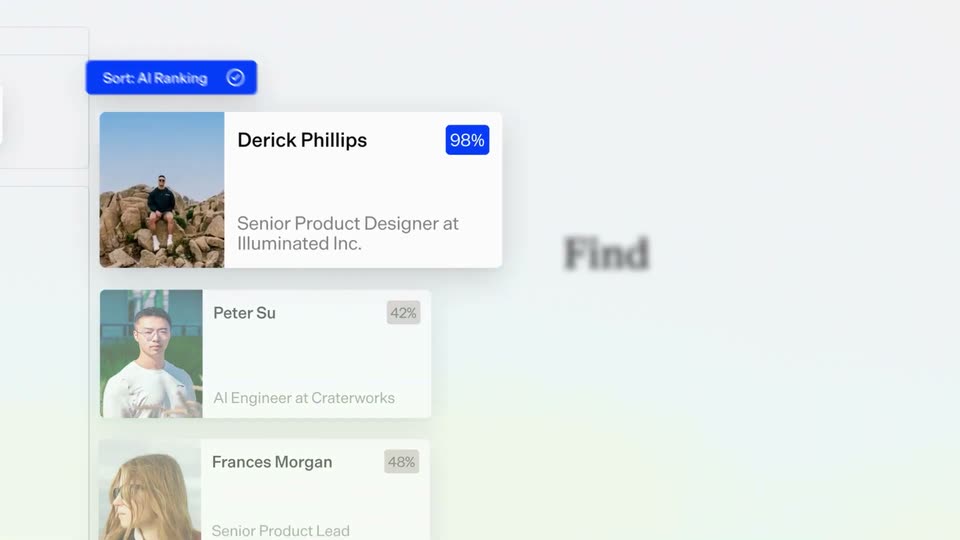
A tab bar and blue sort pill sit above a scrolling list of profile cards, each with a photo, name, title and percentage badge. The list scrolls up as a new card slides in from the bottom, while a large blurred logo and heading fade out behind.
Camera: Pull out
A flat applicant list of photo cards with names and match-percentage badges sits on the left beneath a blue sort button. On the right, the serif headline Find your top applicants faster resolves from a soft blur into sharp focus as the lower cards fade in.
On-screen text: “Find your top applicants faster”
Camera: Static
A light product interface shows a list of applicant cards with a Sort button, then the view reframes onto a Jenni Leight profile card flagged High-risk. An AI Resume Summary panel below fills in with a red-flag line and contact details, while a blurred headline sits behind.
On-screen text: “Find your top applicants faster”, “with automated”
Techniques: UI zoom
Camera: Static
A candidate profile card with a red High-risk badge sits on a soft pastel gradient. The headline above sharpens on its last word as a highlight sweeps the summary text and the IP address row fades in at the bottom.
On-screen text: “with automated fraud detection”
Camera: Static
A flat candidate-profile card with a red High-risk badge and an AI resume summary sits on a soft blue-green gradient, under the serif headline with automated fraud detection. The card fades to transparent as the headline blurs and swaps to and easy.
On-screen text: “with automated fraud detection”, “and easy”
Camera: Static
A centered serif headline reads and easy bulk actions above a white panel of action tabs and candidate rows. The panel eases from a soft blur into focus as three checkboxes tick on in sequence.
On-screen text: “and easy bulk actions”
Camera: Static
A flat product list card with name rows and tab buttons sits on a soft pastel gradient. The serif headline above it slides up and fades with a motion echo while the card collapses into a small white pill with a blue dot.
On-screen text: “and easy bulk actions”, “Source 24/7”
Techniques: Kinetic type, Morph
Camera: Pan
A white search card with a blue circular icon sits below the serif heading “Source 24/7” on a light gray field. The query “Product managers at Series B startups” types in with a glitchy scramble, then the card lifts and the heading blurs out.
On-screen text: “Source 24/7”
Techniques: Kinetic type
Camera: Static
A serif headline fades in above a white search card listing two profiles with blue match badges and a green pipeline pill. The card slides left and its header transforms into an AI Rediscovery Results list, swapping the rows for tagged profiles.
On-screen text: “across millions of profiles”
Techniques: Morph
Camera: Static
A tilted stack of candidate cards on the left, the top card sharp and the lower ones blurred, as the serif line “and rediscover silver medalists” comes into focus on the right. The stack then slides left, revealing a white message panel with a blue button.
On-screen text: “and rediscover silver medalists”
Techniques: 3D mockup
Camera: Static
A stack of three UI cards, a blue search banner, a candidate profile and an email draft, floats over a faint gray interface. A cursor glides to the blue Send button, then the whole stack slides out to the left, leaving a blank white frame.
Techniques: Cursor demo
Camera: Pan
Candidate cards fly in from a close-up and settle into three kanban columns with green pill headers beneath the serif headline Manage your pipeline. A cursor then grabs the Peter Su card and drags it from the middle column to the right column.
On-screen text: “Manage your pipeline”
Techniques: UI zoom, Cursor demo
Camera: Pull out
A scheduling interface shows candidate profile cards on the left and an October 2026 calendar on the right. The frame tightens on the calendar as a cursor hovers the 9th, while a blurred serif headline drifts in at the left edge.
On-screen text: “and schedule interviews”
Techniques: Cursor demo, UI zoom
Camera: Static
A profile card and October calendar sit on the right; a cursor clicks the blue Schedule button, and the profile card zooms in to fill the screen as the serif headline on the left fades out.
On-screen text: “and schedule interviews effortlessly”
Techniques: Cursor demo, UI zoom
Camera: Pull out
A white meeting-confirmation card eases from an offset position to the center of a light gray field. The card holds a headshot, the name Peter Su with his title, the event line, duration, date, and two outline buttons, then holds still.
Camera: Pull out
A meeting-scheduled confirmation card fills the center, then the camera pulls back and tilts up to reveal a three-panel hiring dashboard, the card dropping to the bottom edge of the frame.
Techniques: UI zoom
Camera: Pan
Under the headline “Get the full picture”, a white dashboard shows a gauge, a bar chart and a days figure that count up. The board then switches to a funnel view and tilts into 3D perspective.
On-screen text: “Get the full picture”
Techniques: 3D mockup
Camera: Pan
A white funnel-chart card labeled Hires sits on a pale gradient background beneath the serif headline from hello to hire. The card tilts into 3D perspective and rotates while its black bars fill and the percentages count up.
On-screen text: “from hello to hire”
Techniques: 3D mockup
Camera: Pull out
A white gauge card labeled Total Hires tilts from a 3D angle to face front on a pastel gradient, its blue needle sweeping right as the count climbs to 150. Confetti falls while the serif headline scales in at the top.
On-screen text: “and hit your hiring goals”
Techniques: 3D mockup, Particles
Camera: Push in
Confetti drifts over a white Total Hires gauge card beneath a serif headline, then the card clears and a row of customer testimonial cards scrolls left across a pastel gradient. The serif line See why 1,000+ TA teams can't live without Gem fades in sharp below, and the scene blurs out.
On-screen text: “and hit your hiring goals”, “See why 1,000+ TA teams can't live without Gem”
Techniques: Particles, Kinetic type
Camera: Pull out
A blurred sans-serif title transitions into a clean beige background. The serif text “It's better recruiting. Built on” sits centered as the word “Gem.” slides in from the right.
On-screen text: “It's better recruiting. Built on Gem.”
Techniques: Kinetic type
Camera: Pull out
A black serif sentence sits centered on a pale gray field, scaling in and out with a soft motion blur while the frame stays locked.
On-screen text: “It's better recruiting. Built on Gem.”
Techniques: Kinetic type
Camera: Static
On a plain light gray background, the Gem wordmark in a green gradient and a round teal-to-lime gradient icon fade in from a soft blur to sharp focus, centered in frame.
On-screen text: “Gem”
Camera: Static
A black Gem logo with a white gem mark sharpens from a blur over a soft pastel gradient. The tagline fades in below, and a blue search pill with gem.com and a magnifying glass scales up as a cursor hovers over it, then clicks.
On-screen text: “Make hiring happen.”, “gem.com”
Techniques: Cursor demo
Camera: Static