1:06


Mercury - The wait is over. Mercury Desktop is here. All of Mercury in one app
Mercury Agent · Nov 2026
Google · Jul 2025 · 0:37 · Full motion · AI-annotated
Google’s 0:37 launch film runs 11 scenes, about 3.4 s each. The product is on screen from the first frame and 1 feature is revealed. The call to action lands at 0:31 (84% in), over a voiceover. The video is a single feature launch built as one continuous UI walkthrough: it zooms from the full three panel app into the Studio panel, follows the cursor as it clicks the Video Overview card and watches the result generate, then hands off full frame to the generated video playing. Its signature moves are the smooth zoom and pan through the interface, the word by word typing captions, and the soft mint to periwinkle gradient wash that ties the UI, the generated slides, and the end card into a
Is this your launch? to your site or press kit.
Mercury Agent · Nov 2026
LangEase · Jun 2025
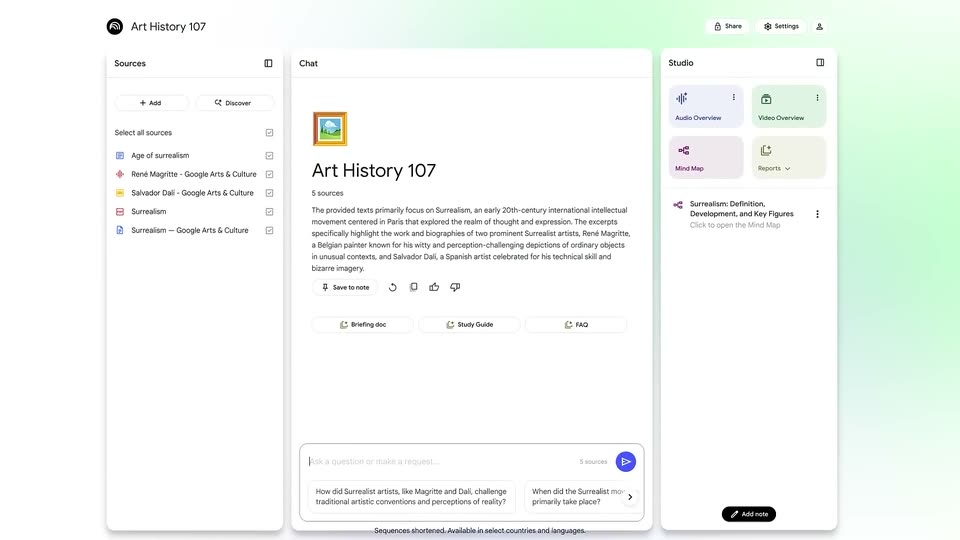
A flat three-panel notebook interface sits on a pale background. The center chat panel shows an Art History 107 note card with body copy and action chips; the right Studio panel lists overview tiles. A cursor drifts in near the Discover button. A disclaimer caption runs along the bottom.
On-screen text: “Sequences shortened. Available in select countries and languages.”
Techniques: Cursor demo
Camera: Push in
A multi-panel interface with a chat view and two Studio panels sits on a green gradient. The view zooms into the right Studio panel, centering four feature cards: Audio Overview, Video Overview, Mind Map, and Reports.
Techniques: UI zoom
Camera: Push in
A flat Studio dashboard with four pastel cards (Audio, Video, Mind Map, Reports) fills the frame. The view slowly zooms in on the grid while a blue-and-black cursor glides in and hovers over the green Video Overview card.
On-screen text: “Sequences shortened. Available in select countries and languages.”
Techniques: Cursor demo, UI zoom
Camera: Static
A close-up of the app's output grid scrolls down as the cursor selects Video Overview. A green Generating Video Overview banner appears, then swaps to a finished video row, The World of Surrealism, which the cursor hovers as the frame pans left to show a document.
On-screen text: “Sequences shortened. Available in select countries and languages.”
Techniques: Cursor demo, UI zoom, Morph
Camera: Pull out
A three-panel app view, Sources, Chat and Studio, holds a cursor over the Studio cards. The frame pulls back to reveal the whole window on a white canvas with a soft green glow at the right edge. A disclaimer caption sits at the bottom.
On-screen text: “Sequences shortened. Available in select countries and languages.”
Techniques: Cursor demo, UI zoom
Camera: Pull out
A three-panel product UI eases in from a slight zoom-out; a cursor clicks the play button on the Studio audio player, flipping it to pause, and a subtitle types in along the bottom.
On-screen text: “Sequences shortened. Available in select countries and languages.”, “Okay! Let's dive in to the”
Techniques: Cursor demo
Camera: Static
A flat notebook-page card, tilted in 3D, fades in at center over a pale gradient, framed by partial interface shapes. The card holds the NotebookLM mark, a bold title, and a melting-clock drawing; a caption types out along the bottom.
On-screen text: “The World of Surrealism”, “Okay! Let's dive in to the wild world of surrealism.”
Techniques: 3D mockup
Camera: Static
A locked-off NotebookLM note card on a grid background displays Dali's Illumined Pleasures with its caption, under the header The World of Surrealism. A light pill at the bottom types out the voiceover line word by word while the player bar sits idle.
On-screen text: “What better way to kick things off than with Salvador Dalí's Illumined Pleasures from 1929?”, “And check out this piece from René Magritte.”
Techniques: Kinetic type
Camera: Static
A locked-off shot of a NotebookLM page on a pale green-to-blue gradient. A white grid canvas shows Magritte's Golconda painting at left, with a curved arrow and caption at right. A bottom caption bar updates with the voiceover line.
On-screen text: “And check out this piece from René Magritte.”, “Okay,”
Camera: Static
A locked-off NotebookLM screen shows a white grid card titled “Surrealism: A Quick Timeline” with a blue horizontal line and six year badges. A player bar at the bottom types a transcript sentence word by word as the progress bar creeps forward.
Camera: Static
On a white field with a soft blue and green gradient at the bottom, the dark concentric-arc logo mark draws itself in the center. The NotebookLM wordmark fades in beside it, then the URL notebooklm.google fades in below, and the lockup holds.
On-screen text: “NotebookLM”, “notebooklm.google”
Camera: Static