
0:25
Explore
Grok - Build apps from iOS, and Android. With one prompt, turn an idea into
Grok · Jul 2026 · 0:55 · Full motion · AI-annotated
- Length
- 0:55
- Scenes
- 23 · 2.4 s avg
- Product on screen
- 0:00
- Voiceover
- No
- Views
- 1.7M on X
as of November 18, 2026
00:00:00 / 00:55:08
- Length
- 0:55
- Scenes
- 23 · 2.4 s avg
- Product on screen
- 0:00
- Voiceover
- No
- Views
- 1.7M on X
as of November 18, 2026
Grok’s 0:55 launch film runs 23 scenes, about 2.4 s each. The product is on screen from the first frame. There is no explicit call to action. The video is one continuous demo of the Build model, alternating typed prompt pills, 3D phone mockups, and two-pane desktop previews, punctuated by plain text cards. Its signature moves are letter-by-letter typing, soft white crossfades, and devices that rotate from a 3D angle into a flat front view.
No filming indicatedEstimated needs: 6 capture groups — your screens or recordings · 1 official logo — reused across the film · 1 graphic passage — draw or supply · 3 3D passages — build or supply
Is this your launch? to your site or press kit.
More like this

1:13

Retell AI - Introducing Retell Dialer, the first AI-native dialer, built for end-
Retell AI · B2B · Nov 2026
1:29

The new Apple TV 4K: The ultimate cinematic experience.
Apple · Hardware · Oct 2026
Grok - Build apps from iOS, and Android. With one prompt, turn an idea into, scene by scene
· 23 scenes as text
01 · Product intro · 0:00–0:01
On a plain off-white background, a dark gray sans-serif headline types out letter by letter in the center, ending with a blinking text cursor. The frame stays locked off while the line grows from a single word to the full sentence.
On-screen text: “Introducing Build Model”
Techniques: Kinetic type
Camera: Static
02 · Product intro · 0:01–0:03
A rounded input pill sits on a white field as a prompt types out letter by letter behind a block caret. The pill then shrinks to the left while a gray model label fades in on the right and a headline scales up over the field.
On-screen text: “Introducing Build Model”
Techniques: Kinetic type
Camera: Static
03 · Demo · 0:03–0:06
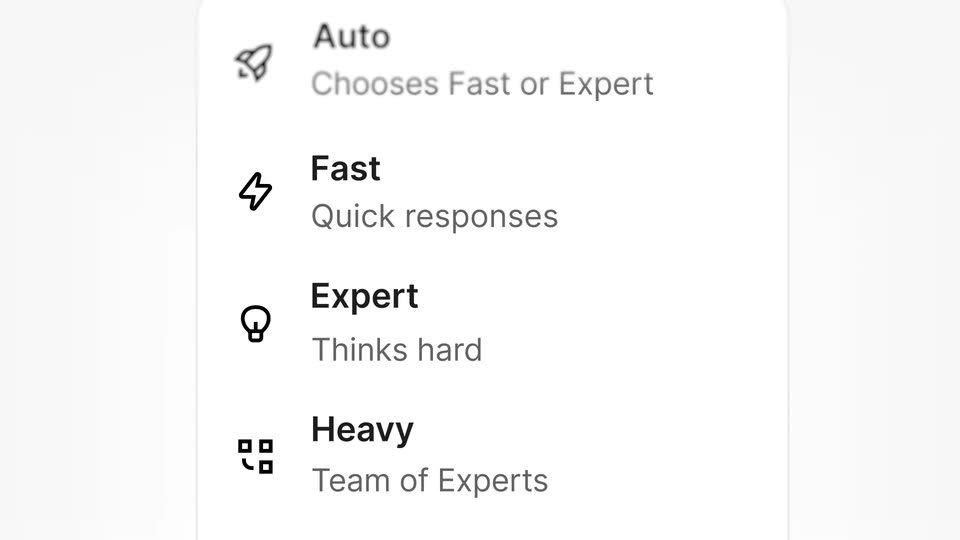
A light input bar shows “Grok 4.5” with chevron, mic and arrow icons. A white dropdown opens below, listing model options with icons; the view pans down the list to a checked “Build” row and “Models”, while app buttons blur in the background.
Techniques: UI zoom
Camera: Pan
04 · Demo · 0:06–0:07
Three rounded pill buttons sit on a light gray field. The center More ideas pill scales up while the side pills slide off the edges, and a white card panel rises from below the center.
Techniques: Kinetic type
Camera: Static
05 · Demo · 0:07–0:10
A phone mockup rotates from a 3D angle to face the camera while its screen swaps from a typed prompt to an AI reply, then to a sunset racing game preview showing cars on a road and an Open button.
Techniques: 3D mockup
Camera: Pan
06 · Demo · 0:10–0:11
A phone mockup in 3D perspective shows a low-poly highway racing game at sunset. A title card with the app name and an Open button slides in at the bottom as a speedometer dial counts up, then the camera pulls back to reveal the full device.
On-screen text: “Hyper Racer”, “Built in 12m 4s”, “Open”
Techniques: 3D mockup
Camera: Pull out
07 · Demo · 0:11–0:14
A phone mockup scales up on a light background, showing a low-poly 3D driving game: a red car on a highway under an orange sunset. The view then zooms into the screen, closing on the road and speedometer as the speed falls from 145 to 91 km/h.
Techniques: UI zoom
Camera: Static
08 · Demo · 0:14–0:18
A close-up of a dark phone screen shows a car picker; the selected RED RACING card scales up while the screen slides upward, then the word Build appears with a cube and rocket icon below.
On-screen text: “Build”
Techniques: UI zoom, Kinetic type
Camera: Push in
09 · Other · 0:18–0:23
Three word-and-icon pairs (Share, Build, Deploy) rotate through the center of a plain off-white frame; the centered word is dark while the others fade to light gray and slide out, then the words 'apps from web to mobile and desktop' cycle through the center one by one.
On-screen text: “Share”, “Build”, “Deploy”, “apps”, “from”, “web”, “to”, “mobile”, “and”, “desktop”
Techniques: Kinetic type
Camera: Static
10 · Demo · 0:23–0:25
A light gray rounded pill expands from a small circle at the center of an off-white background while the prompt text is revealed left to right inside it.
On-screen text: “Build me a CV builder app”
Techniques: Kinetic type
Camera: Static
11 · Demo · 0:25–0:26
A white pill bubble holding the prompt text slides across a plain off-white background, then the bubble opens out into a large empty white card with rounded corners and a soft drop shadow.
On-screen text: “Build me a CV builder app”
Techniques: Kinetic type, Morph
Camera: Static
12 · Demo · 0:26–0:28
The left chat panel types the prompt for a CV builder app while the resume for Nora Vance generates on the right: the name scales in, a photo and body copy fill in, then job entries and a year column slide in.
On-screen text: “Build me a CV builder app”
Techniques: Kinetic type
Camera: Static
13 · Demo · 0:28–0:32
A static project card sits left of a browser preview where a resume reflows from a dense text block into a clean layout with a large name and numbered sections, then the view zooms in as a white fade rises from the bottom.
Techniques: UI zoom
Camera: Pull out
14 · Demo · 0:32–0:36
A light gray chat pill centered on white types out the prompt “Build me an app to manage our projects.” The pill then slides to the top as a 3D-perspective document editor fades in below, showing a Q3 Platform Roadmap page with a task list.
On-screen text: “Build me an app to manage our projects”
Techniques: Kinetic type, 3D mockup
Camera: Static
15 · Demo · 0:36–0:40
A locked-off two-pane product interface. The left chat pane holds a user prompt and an assistant reply that types out, while the right document pane switches from an Operator Research Summary to a Ground Station Runbook.
Camera: Static
16 · Demo · 0:40–0:40
A two-pane product interface fills the frame. On the left a chat thread reveals a request to build a project manager app and to connect Gmail, Slack and Figma. On the right a generated runbook document updates, swapping its kanban task board and section headings.
Techniques: Split screen
Camera: Push in
17 · Demo · 0:40–0:41
Two faded product screens overlap and drift apart: a left prompt panel with a project request and a right planboard table, both dissolving toward white as the panels slide.
Camera: Push in
18 · Demo · 0:41–0:42
A faint white toolbar fades in as the Deploy and Share buttons slide in from the left and right edges, the globe and copy icons shift left, and the planboard row with its roadmap card below fades out.
Camera: Static
19 · Demo · 0:42–0:43
Three outlined pill buttons labeled Deploy, Publish and Share sit in a row on a pale gray field. The outer pills slide outward and down while the center Publish pill shrinks and drops, as thin connector lines fade in to form a node diagram.
Camera: Static
20 · Demo · 0:43–0:45
A white rounded card titled Publish App sits centered on a pale gray field. The card fades from a ghosted state to solid, and the Website URL input fills out to planboard-f28d4a.grok.me beside a black Publish button.
Camera: Static
21 · Other · 0:45–0:45
A Publish App card with a URL field and a Publish button slides up out of the top of frame as the headline types in from the left on a plain white background.
On-screen text: “From anywhere”
Techniques: Kinetic type
Camera: Static
22 · Other · 0:45–0:47
Black sans-serif text “From anywhere” sits centered on a pale gray field. The letters then slide apart and fade out from the center while a thin dark arc draws in on the right, opening the next beat.
On-screen text: “From anywhere”
Techniques: Kinetic type
Camera: Static
23 · Outro · 0:47–0:55
On a plain off-white field, the black SpaceX X mark with its long swoosh sits centered. The word SPACEX types in letter by letter to the left of the mark, forming the full lockup, which then holds still.
On-screen text: “SPACEX”
Techniques: Kinetic type
Camera: Static