2:18
José Murillo - 1/ Today, @Primero_ai is announcing its public launch and a $12m see
Primero Ai · Aug 2026
Retell AI’s 1:13 launch film runs 24 scenes, about 3.1 s each. The product shows up at 0:28 and 3 features are revealed. There is no explicit call to action; a voiceover carries the film. The video alternates between a live-action presenter and clean motion graphics, opening on the pain of untracked calls before walking through the Retell Dialer interface feature by feature. Signature moves: the yellow sticky notes snapping into grids, hand-drawn branch lines, and 3D UI panels rotating flat into frame.
Is this your launch? to your site or press kit.
Films whose music sounds like this one, voice left out
Penpot · Electronic, Funk/Jazz-Fusion
Resin · Upbeat electronic
Posthog · Upbeat electronic
A woman holds a yellow sticky note with a handwritten lead name and contact details in front of her face, her face blurred behind it. The shot is locked-off and the note stays still, with a subtitle at the bottom.
On-screen text: “So you want more leads.”
Camera: Static
A hand enters from the right, lifts a yellow sticky note from a wall of name notes, and sets it down in a new spot. The camera holds a static top-down angle on the board. A subtitle reads at the bottom.
On-screen text: “Naturally, you end up”
Camera: Static
Twelve yellow sticky notes with handwritten names sit scattered on a gray wall, then snap into a four-by-three grid as the light brightens and a phone badge pops onto each corner. Most notes fade to gray with a minus mark while two stay yellow, their badge becoming a blue check.
Techniques: Morph
Camera: Pull out
A wall of small pale-yellow cards fills the frame, a 4x3 cluster of named profile cards at its center. Large dark serif text 1,000 calls fades in centered. The card wall then dissolves into a faded photo of two people in white coats behind the locked text.
On-screen text: “1,000 calls”
Camera: Pull out
A woman in a light blue shirt sits at a desk amid potted plants and a bookshelf, gesturing with both hands as she speaks to camera. White text builds line by line in the upper left, matching her words.
On-screen text: “What matters”, “is what happens”, “after each one.”
Techniques: Kinetic type
Camera: Static
A yellow sticky note with a handwritten lead's details sits left of a pale background. Arrows branch right, drawing in four white pill labels: Picked up, Interested, Asked for a callback, Not ready yet. Subtitles pose the questions, then the view pulls back as two more sticky notes fade in.
On-screen text: “Did they pick up?”, “Were they interested?”, “Did they ask for a callback?”, “Or were they simply not ready yet?”, “What matters”, “is what happens”, “after each one.”
Camera: Static
Twelve yellow sticky notes with handwritten names sit in a row on a pale blue background. A blue line draws across them, the serif title Batch calls fades in above, and a Call ended label pops under each note as bottom captions update.
On-screen text: “Until now, outbound”, “Batch calls”, “campaigns look like”, “Call ended”, “but they couldn't”
Techniques: Kinetic type
Camera: Static
A woman in a light blue shirt sits at a white table in a dim, plant-filled office, talking and gesturing with both hands. A white headline builds line by line on the left while a small caption sits in a dark box at the bottom.
On-screen text: “They couldn't”, “decide what”, “to do next.”, “based on how each conversation went.”
Techniques: Kinetic type
Camera: Static
On a pale blue-to-lavender gradient, three dots spread into a ring of dots, the Retell mark, then the navy serif wordmark Retell Dialer fades in beside it. Small white subtitles on gray chips caption the voiceover at the bottom.
On-screen text: “That's why we built”, “Retell Dialer”, “the first AI outbound campaign”
Camera: Static
A pale lavender field holds a white hub with a dotted ring at its center. Thin lines radiate to a circle of yellow sticky notes, each with a name and phone number, that ease apart into place. A dark caption bar at the bottom reads orchestrator for voice agents.
On-screen text: “orchestrator for voice agents.”
Camera: Static
A tilted Sequence builder screen rotates flat toward the camera while yellow name sticky notes ring a central loading spinner and drift outward. The right panel resolves to a Global outcomes block.
Techniques: 3D mockup
Camera: Pull out
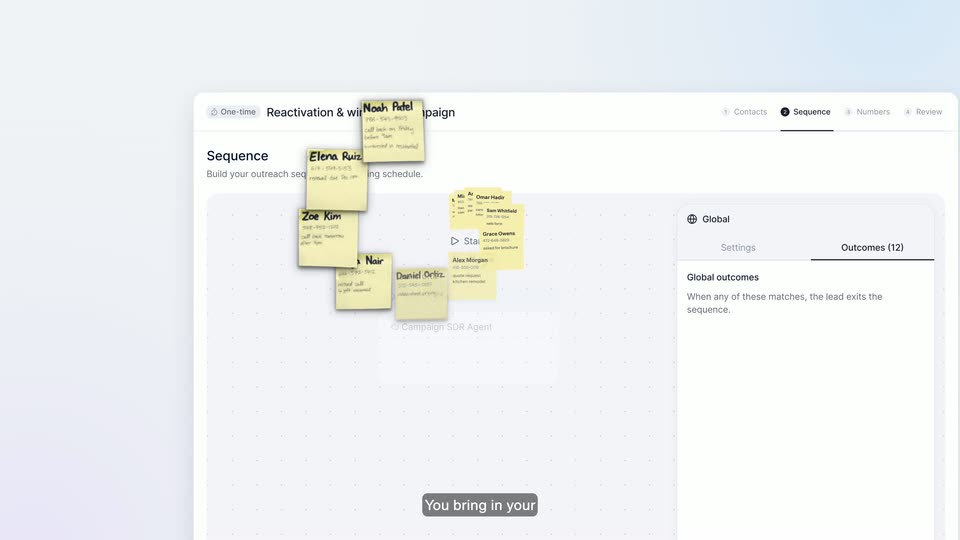
A close-up of the sequence builder UI, overlaid with yellow sticky notes, zooms out to a centered full-window view as the notes clear. A bottom caption swaps from “You bring in your” to “contacts, set the rules,”.
On-screen text: “You bring in your”, “contacts, set the rules,”
Techniques: UI zoom
Camera: Static
Split screen: a woman in a denim shirt gestures on the left while the Sequence builder on the right scrolls up to reveal enrollment cards and a tabbed panel. White captions lock to the bottom edge.
On-screen text: “contacts, set the rules,”, “create the call dispositions,”
Techniques: Split screen, UI zoom
Camera: Static
A dimmed woman speaks at left while a bright product screen fills the right, showing a sequence flowchart with a Start node and an SDR Agent card beside a settings panel. A caption bar sits at the bottom.
On-screen text: “create the call dispositions,”
Techniques: Split screen
Camera: Static
A woman speaks at left against a darkened plant backdrop while a tilted 3D panel of the campaign sequence builder slides in at right. The panel shows a flow diagram and a global outcomes list; a caption runs along the bottom.
On-screen text: “create the call dispositions,”, “and automatically trigger what happens”
Techniques: 3D mockup, Split screen
Camera: Pan
A campaign sequence builder fills the screen, then zooms into the flowchart as yellow contact notes and small status chips pop in beside nodes. The camera pans down the branches and back up, ending on the full view with the outcomes panel.
On-screen text: “and automatically trigger what happens”, “next in your campaign.”, “No answer?”, “Send a follow-up text and leave a”, “personalized voice message.”, “They ask for time tomorrow at 2 PM?”, “Schedule a callback”, “Not interested yet?”, “Try a different approach”, “with another voice agent. Every outcome is automatically captured”
Techniques: UI zoom
Camera: Pull out
The sequence builder screen shows a flow diagram on the left and a Global outcomes panel on the right. A dark caption pill at the bottom reveals the line word by word, then the view zooms into the right panel where a Synced to your CRM badge appears.
On-screen text: “Every outcome is automatically captured and synced to your CRM.”
Techniques: Kinetic type, UI zoom
Camera: Push in
The view opens on a Global outcomes panel beneath a green Synced to your CRM badge, then zooms out to bring a contacts table into frame on the right, with a row for Leah Smith.
Techniques: UI zoom
Camera: Static
A white contacts table card floats on a pale lavender background. The list scrolls upward, revealing rows for Sam Whitfield, Grace Owens and Alex Morgan. A dark caption pill with white text sits at the bottom of the frame.
On-screen text: “tagging on follow-up quotes”
Camera: Static
A contacts table with colored lead-status pills gives way to a number-rotation panel showing two toggles and a phone-number pool. A dark caption pill at the bottom reads “tagging on follow-up quotes” throughout.
On-screen text: “tagging on follow-up quotes”
Camera: Static
A number-pool settings panel highlights the Boston row with a caller-ID tooltip, then cuts to a campaign analytics dashboard showing stat cards and a purple bar chart. A gray caption pill at the bottom reads on winning back customers that went quiet.
On-screen text: “and no disconnections”, “on winning back customers that went quiet”
Camera: Static
A white campaign analytics dashboard fills the frame; a funnel chart builds from one purple bar into colored labeled flows, and a bottom caption reads “and Retell handles the rest”. The screen dissolves to a woman on a video call as the headline “Making the call” appears.
On-screen text: “you set the game plan”, “and Retell handles the rest”, “Making the call”
Camera: Static
A woman in a light blue shirt sits at a table in a dim, plant-filled office, gesturing as she speaks to camera. White captions build word by word in the top left, matching her words. At the end a white dot spinner forms over her chest as the frame darkens.
On-screen text: “Making the call is only the beginning,”, “Because what happens next is really what matters.”
Techniques: Kinetic type
Camera: Static
On a black background, a ring of white dots contracts and the white wordmark Retell appears beside it, the pair settling into a centered logo lockup as the sign-off.
On-screen text: “is really”, “what matters.”, “Retell”
Camera: Static