
0:51
Explore
00:00:00 / 01:13:18
- Length
- 1:13
- Scenes
- 20 · 3.7 s avg
- Product on screen
- 0:28
- Voiceover
- Yes
- Views
- 218 on YouTube
as of November 20, 2026
Retell AI’s 1:13 launch film runs 20 scenes, about 3.7 s each. The product shows up at 0:28. There is no explicit call to action; a voiceover carries the film. The video alternates the presenter's direct address in a dim plant-filled office with flat pale-gradient motion graphics and slow UI screen tours, using the yellow contact note and the dot-ring logo as recurring visual anchors. Pacing is calm and measured around 90 bpm, with signature moves of notes snapping into grids, dots assembling into the ring, and gentle zoom-ins on the interface.
Footage neededEstimated needs: 2 capture groups — your screens or recordings · 1 official logo — reused across the film · 5 filmed passages — shoot, supply or replace · 3 graphic passages — draw or supply
Is this your launch? to your site or press kit.
More like this

0:35

Cursor - We’re introducing the Cursor SDK so you can build agents with the sam
Cursor · Developer tools · Apr 2026
0:56
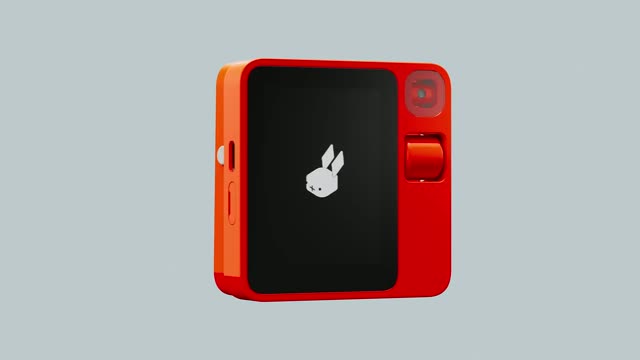

rabbit r1: $199, no subscription.
Rabbit · Hardware · Jan 2024
Similar soundtrack
Films whose music sounds like this one, voice left out
1:44

Penpot - 💥 Penpot 2.0 is now available! Explore & enjoy the unique featur
Penpot · Electronic, Funk/Jazz-Fusion
0:29

High-Converting Job Search Launch Video | Tsenta
Tsenta · Upbeat indie pop / modern electronic
1:36
Resin: A new electronics firm
Resin · Upbeat electronic
Build an AI Dialer That Calls, Texts, and Follows Up With Every Lead, scene by scene
· 20 scenes as text
01 · Hook · 0:00–0:01
A woman holds a yellow sticky note with a handwritten name and phone number up to the camera, her face blurred behind it in a dim plant-filled room. A white caption sits at the bottom.
On-screen text: “So you want more leads.”
Camera: Static
02 · Problem · 0:01–0:09
A hand places a yellow sticky note among scattered handwritten contact notes on a white wall; the notes snap into a neat grid, then most fade to gray with a minus badge while two stay highlighted with a blue check.
On-screen text: “Naturally, you end up making more outbound calls.”, “But more calls doesn't always mean more conversions.”
Camera: Pull out
03 · Problem · 0:09–0:10
A 3 by 4 grid of gray contact cards on a pale field of scattered yellow notes multiplies into a dense wall of cards, then fades as the large number 1,000 forms in the center and the word calls slides in beside it.
On-screen text: “1,000 calls”
Techniques: Kinetic type
Camera: Pull out
04 · Problem · 0:10–0:11
A matrix of small pale yellow squares covers the frame. The dark navy serif text “1,000 calls” slides in at center and settles, holding for the rest of the clip.
On-screen text: “1,000 calls”
Techniques: Kinetic type
Camera: Static
05 · Problem · 0:11–0:13
A woman in a light blue shirt sits at a desk in a plant-filled office, gesturing with both hands while speaking. White text lines build up on the left side of the frame, one after another.
On-screen text: “What matters”, “is what happens”, “after each one.”
Techniques: Kinetic type
Camera: Static
06 · Problem · 0:13–0:20
A yellow sticky note with a handwritten name and phone number sits on a pale background. A hand-drawn arrow branches right as four white pill labels with small icons pop in one by one, while gray caption boxes cycle questions at the bottom.
On-screen text: “Did they pick up?”, “Were they interested?”, “Did they ask for a callback?”, “Or were they simply not ready yet?”, “What matters is what happens after each one.”
Techniques: Kinetic type
Camera: Static
07 · Problem · 0:20–0:25
A row of twelve yellow sticky notes with names sits on a pale blue gradient. A blue line draws across them, the serif title 'Batch calls' blurs into focus above, and gray 'Call ended' labels fade in under each note.
On-screen text: “Until now, outbound”, “campaigns look like”, “Batch calls”, “but they couldn't”
Camera: Static
08 · Problem · 0:25–0:28
A woman in a light blue shirt sits at a table in a plant-filled room, speaking and gesturing toward the camera. A white headline builds line by line on the left, then a small caption appears at the bottom.
On-screen text: “They couldn’t decide what to do next.”, “based on how each conversation went.”
Techniques: Kinetic type
Camera: Static
09 · Product intro · 0:28–0:33
On a pale blue gradient, navy dots snap into a ring as the serif wordmark Retell Dialer wipes in. A gray caption pill shows That's why we built, then the first AI outbound campaign. The logo shrinks left while a white circle and name sticky notes pop in around it.
On-screen text: “That's why we built”, “the first AI outbound campaign”
Techniques: Kinetic type
Camera: Static
10 · Product intro · 0:33–0:34
A pale gradient background holds a radial diagram: a white hub with a ring of dark dots at the center, thin lines radiating to yellow sticky notes that orbit slowly around it. A dark caption bar sits at the bottom.
On-screen text: “orchestrator for voice agents.”
Camera: Static
11 · Demo · 0:34–0:35
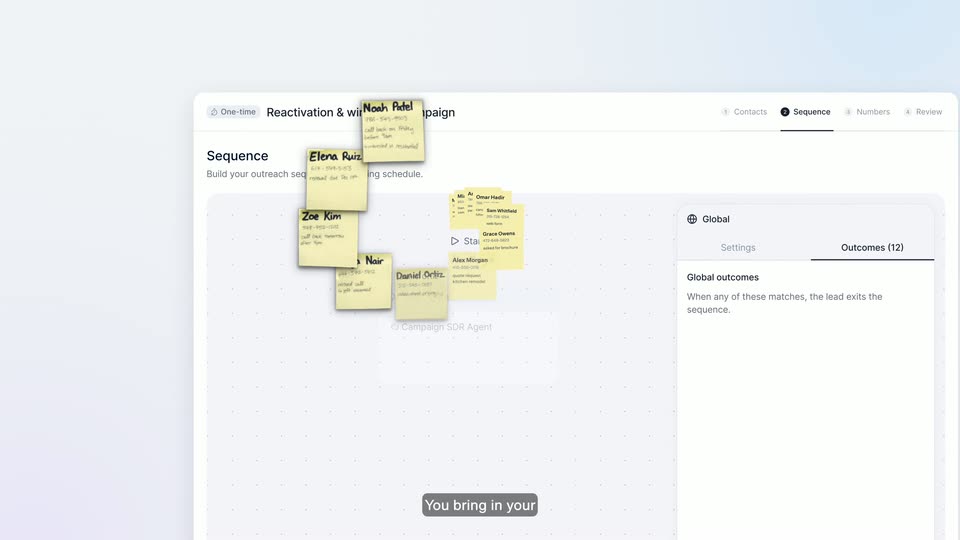
A sequence builder shows yellow sticky notes with names orbiting a central hub, then the notes scatter outward and a Start button fades in at the center. The right panel switches from Settings to an Outcomes tab. A gray caption pill slides up at the bottom.
On-screen text: “You bring in your”
Camera: Pull out
12 · Demo · 0:35–0:36
A light sequence-builder screen fills the frame as it zooms in, moving past the campaign title toward the node canvas and the outcomes panel on the right. A dark pill caption at the bottom carries the narration.
On-screen text: “You bring in your”, “contacts, set the rules,”
Techniques: UI zoom
Camera: Static
13 · Demo · 0:36–0:38
Split screen: a woman in a blue shirt gestures on the left while a product panel on the right switches from a sequence flowchart to an enrollment filter card. The bottom caption reads the voiceover line.
On-screen text: “contacts, set the rules,”
Techniques: Split screen, UI zoom
Camera: Static
14 · Demo · 0:38–0:57
Presenter on the left, sequence builder UI on the right; the screen then fills the frame and zooms into the flowchart. Yellow contact notes and status chips pop in beside nodes, a dropdown opens, then the view pulls back to the outcomes panel.
On-screen text: “create the call dispositions,”, “and automatically trigger what happens”, “next in your campaign.”, “No answer?”, “Send a follow-up text and leave a”, “personalized voice message.”, “They ask for time tomorrow at 2 p.m.?”, “Schedule a callback.”, “Not interested yet?”, “Try a different approach with another voice agent. Every outcome is automatically captured, and synced to your CRM.”
Techniques: Split screen, UI zoom
Camera: Push in
15 · Demo · 0:57–0:58
A light product interface shows a sequence setup card with a green synced badge and an outcomes list, then reframes right to a contacts table with a lead status dropdown. A dark caption bar with white text slides up at the bottom.
On-screen text: “So there's no manual”
Techniques: UI zoom
Camera: Static
16 · Demo · 0:58–0:59
A flat white contacts table on a pale gradient background fills row by row. Names and colored status pills fade in from the top down, while a dark caption bar at the bottom updates with the line.
On-screen text: “So there's no manual tagging and now updates”
Camera: Static
17 · Demo · 0:59–1:00
A white contacts table with colored status labels sits on a pale gradient background. A second panel titled Number rotation slides in from the right, covering the table, while a dark caption pill stays fixed at the bottom.
On-screen text: “tagging on follow-up quotes”
Camera: Static
18 · Demo · 1:00–1:04
A number-rotation settings card sits on a pale gradient background; a tooltip points to the Boston line, then the panel cuts to a win-back campaign dashboard showing dialed, connected and converted counts.
On-screen text: “and no disconnections”, “on winning back customers that went quiet”
Camera: Static
19 · Demo · 1:04–1:07
The campaign analytics dashboard fills the frame as the disposition mix chart draws in and bottom captions swap, then the screen dissolves into a live shot of a headset agent under the headline “Making the call”.
On-screen text: “you set the game plan”, “and Retell handles the rest”, “Making the call”
Camera: Static
20 · Outro · 1:07–1:13
A woman in a light blue shirt sits at a table in a plant-filled office, gesturing as she speaks, while white captions change phrase by phrase on the left. The shot fades to black and the Retell logo with its dot mark appears centered.
On-screen text: “Making the call”, “is only the”, “beginning,”, “Because what”, “happens next”, “is really”, “what matters.”
Techniques: Kinetic type, Particles
Camera: Static