0:45

Introducing Appshots in Codex
OpenAI · AI · May 2026
Glass Health · Jul 2025 · 0:56 · Full motion · AI-annotated
Glass Health’s 0:56 launch film runs 10 scenes, about 5.6 s each. The product is on screen from the first frame and 1 feature is revealed. There is no explicit call to action; a voiceover carries the film. A single-feature walkthrough built from slow push-ins and pull-outs on a floating app window over a lavender-to-blue gradient, with dark caption pills carrying the narration at a low cut rate. Signature moves are the continuous zoom between the settings panel and the generated clinical note, and the closing ring-logo morph.
Is this your launch? to your site or press kit.
OpenAI · AI · May 2026
Retool · Developer tools · Sep 2023
Notion · Productivity · Jan 2024
Films whose music sounds like this one, voice left out
Playgent · Corporate tech demo / Explainer
Cal.com · Upbeat electronic
A white Glass Health chat window, labeled AI Clinical Decision Support, sits on a purple field, then the view zooms into its central prompt box and action buttons. A dark caption pill rests at the bottom.
On-screen text: “With Glass, you can now customize”
Techniques: UI zoom
Camera: Push in
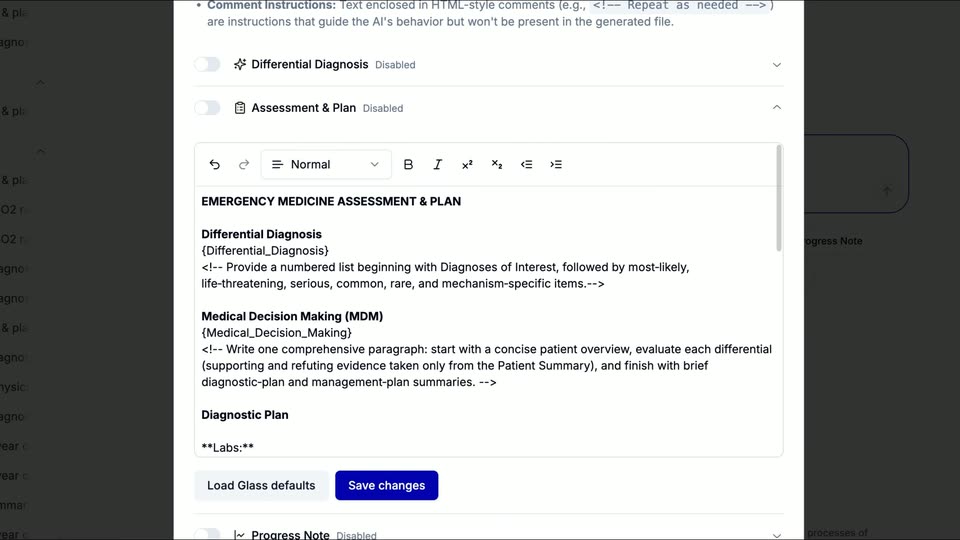
The Glass Health app zooms into its Customization panel and scrolls to Custom File Templates, where the Assessment & Plan editor expands. The default template text is highlighted and swapped for a new one, then a cursor clicks Save changes and toggles Differential Diagnosis on.
On-screen text: “your global AI preferences”, “and create custom file templates.”, “Simply replace the default file”, “template with your desired template.”, “Then save your changes”, “and click the toggle to enable.”
Techniques: UI zoom, Cursor demo
Camera: Push in
A close-up of a template settings panel shows two toggles labeled Disabled. A cursor clicks the Assessment & Plan toggle, flipping it blue and switching the label to Enabled, then the view zooms out to reveal the full Glass Health chat interface with a history sidebar.
On-screen text: “and click the toggle to enable.”, “Now, Glass will use your custom file template.”
Techniques: Cursor demo, UI zoom
Camera: Pull out
A flat view of the Glass Health interface reframes onto the central prompt panel, the left sidebar blurring out. The Draft A&P button fills blue and two clinical example prompts appear below the input box. A dark caption bar holds the bottom.
On-screen text: “Now, Glass will use your custom file template”
Techniques: UI zoom
Camera: Push in
A white prompt view pulls back to reveal the Glass Health chat window on a purple backdrop; status steps tick off while an assessment document fills in and scrolls. The camera zooms into the workspace editor, and bottom captions narrate the flow.
On-screen text: “when generating AI responses.”, “Here's an example of an assessment and plan”, “that's been customized”, “for the emergency medicine use case.”, “After generating your file,”, “you can open it in the Workspace panel”, “to directly edit or revise its content”
Techniques: UI zoom
Camera: Pull out
A two-pane product interface fills the frame. The left pane holds a prompt box with a clinical case; the right pane shows a document editor titled Assessment & Plan whose medical note auto-scrolls upward, from differential diagnosis to the management plan. A dark caption pill sits at the bottom.
On-screen text: “to directly edit or revise its content.”
Camera: Pull out
A close-up of a clinical document with overlapping, updating text pulls back to reveal the full Glass Health app window, tilted in 3D perspective on a blue background.
Techniques: UI zoom, 3D mockup
Camera: Pull out
A tilted 3D mockup of a clinical chat interface, with a sidebar, prompt field and document editor, hovers on a blue gradient. A dark pill caption reading “Customization gives you” fades in at the bottom center.
On-screen text: “Customization gives you”
Techniques: 3D mockup
Camera: Pull out
A tilted 3D mockup of the Glass Health interface floats on a purple gradient. The view pushes in on the clinical document, a 'Used Custom File Template' tooltip pops in beside a file icon, then pulls back out as the interface fades to white.
On-screen text: “Customization gives you”, “clinical decision support and documentation”, “that's perfectly tailored to”, “your needs and clinical practice.”
Techniques: 3D mockup, UI zoom
Camera: Pull out
On a soft lavender gradient, the Glass Health wordmark and ring logo sit centered, then the wordmark fades as the background deepens to blue. The ring logo morphs into a rounded-square icon, shrinks, and dissolves.
On-screen text: “GLASS HEALTH”, “Lab”
Techniques: Morph
Camera: Static