1:33

NotebookLM launches Audio Overviews in over 50 new languages
Google · AI · Apr 2025
Playgent’s 1:58 launch film runs 9 scenes, about 13 s each. The product is on screen from the first frame and 2 features are revealed. The call to action lands at 1:38 (83% in), over a voiceover. The video bookends a long product walkthrough with founder-to-camera shots, moving from a stylized call card into live dashboard zooms that tick checklist items in sync with the AI voice. Its signature moves are the green-framed card system, the animated waveform, and smooth zoom transitions between inbox, thread, and PMS views.
Is this your launch? to your site or press kit.
Google · AI · Apr 2025
Notion · Productivity · Nov 2022
Films whose music sounds like this one, voice left out
Probe · Electronic, Corporate
AgentMail · Electronic
Two men sit at a desk before a large wall monitor, framed by a green border. They talk to camera; the man in the green polo gestures, the man in the blue sweater keeps arms crossed. White name plates slide in at the bottom near 2 seconds.
On-screen text: “Neer Jain | CEO”, “Aniruddh Sriram | CTO”
Camera: Static
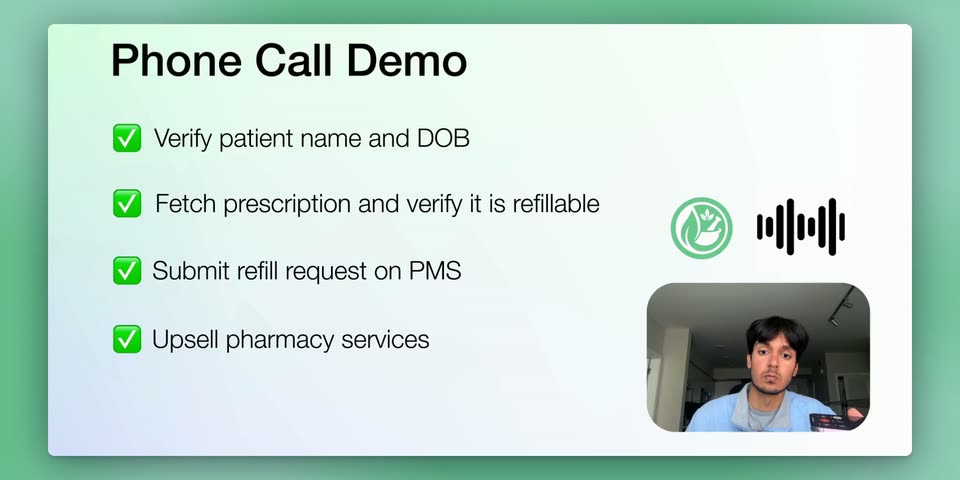
A light gradient card on a green background holds the title while a five-item checklist builds up with green checkmarks. A leaf logo and animated audio waveform sit above a rounded video inset of a man in a blue shirt holding a phone; italic captions pop in top right.
On-screen text: “Phone Call Demo”, “Verify patient name and DOB”, “Providing information”, “Name: Hudson Delacruz”, “DOB: 3/14/2008”, “Fetch prescription and verify it is refillable”, “Submit refill request on PMS”, “Upsell pharmacy services”, “Prefer to pickup, scheduling it for next week”, “Schedule pickup for next week”
Techniques: Kinetic type
Camera: Static
The Pharmie AI inbox fills the frame, then the view zooms out to reveal the whole white card on a green background. A cursor hovers over the green Refill Request badge on the Hudson Delacruz row while the patient list stays static.
On-screen text: “Phone Call Demo”, “Verify patient name and DOB”, “Fetch prescription and verify it is refillable”
Techniques: UI zoom, Cursor demo
Camera: Static
The Pharmie AI inbox opens on the Hudson Delacruz thread, a green refill-request card and prescription cards loading in. The view zooms into the inbound-call summary, then the chat log scrolls through the AI conversation while the presenter's webcam sits in the corner.
Techniques: UI zoom
Camera: Pull out
A white pharmacy app screen on a green background crossfades into view, split into a prescription list with a circular video-call avatar on the left and a chat panel on the right; a green assistant bubble appears at the bottom right reporting the refill was submitted.
Techniques: Cursor demo
Camera: Push in
A zoomed-in two-panel view of a patient record and AI call results pulls back to the full Pharmie AI dashboard, then a Make Group Call modal opens while four patient rows get checked. A presenter's webcam circle stays in the lower left.
Techniques: UI zoom, Cursor demo
Camera: Pull out
A screen capture of the Pharmie AI dashboard shows a 'Make Group Call' dialog over a patient list, with a small circular webcam feed of the presenter at lower left. A cursor selects a template, the prompt fills in, two checkboxes tick, then the cursor moves to the close icon.
Techniques: Cursor demo
Camera: Static
Two men sit side by side in an office, talking to camera before a dark monitor on a green wall. The man in the green polo gestures while the man in the blue sweater and cream cap sits with arms crossed, the static shot framed by a green border.
Camera: Static
A green gradient card holds the white Pharmie AI logo, a circular mark of a hand cradling a mortar and pestle with a sprout, beside the bold wordmark, the tagline, and the URL. The frame stays locked and static throughout.
On-screen text: “Pharmie AI”, “less admin, more care”, “www.pharmie.app”
Camera: Static