0:42
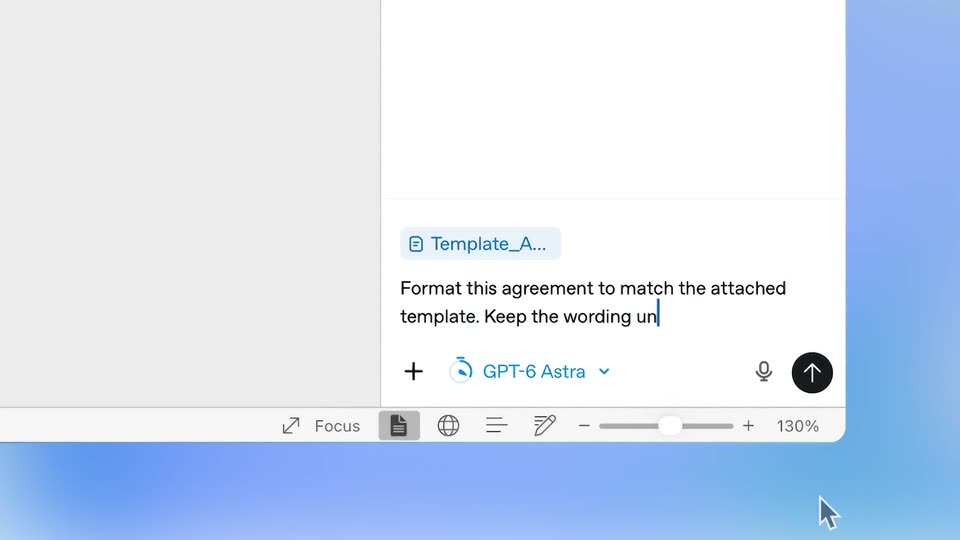

ChatGPT for Word is now available
OpenAI · AI · Sep 2026
Figma · Mar 2026 · 0:28 · Full motion · AI-annotated
Figma’s 0:28 launch film runs 18 scenes, about 1.6 s each. The product is on screen from the first frame and 1 feature is revealed. The call to action lands at 0:21 (74% in). The video is built as a static headline card, a rapid-cut feature demo on a pale mint field, and a black end card with a word-by-word availability line and a morphing logo sting. Pacing runs near 19 cuts per minute, driven by a black cursor and magenta selection frames that track the UI, while the closing slows to a single static logo hold.
Is this your launch? to your site or press kit.
OpenAI · AI · Sep 2026
OpenAI · AI · Sep 2026
Nothing · Hardware · Oct 2025
Films whose music sounds like this one, voice left out
Touchmark · Electronic dance music with a retro-futuristic, high-energy style
Fitbit · Electronic dance music
Google · Upbeat electronic dance-pop with funk and hip-hop influences
On a pale green background, a large left-aligned headline reads 'Design more flexible' in gray and purple, then settles to solid black as a second line, 'components with slots,' appears beneath it. The frame stays locked off and the text holds still.
On-screen text: “Design more flexible”, “components with slots”
Techniques: Kinetic type
Camera: Static
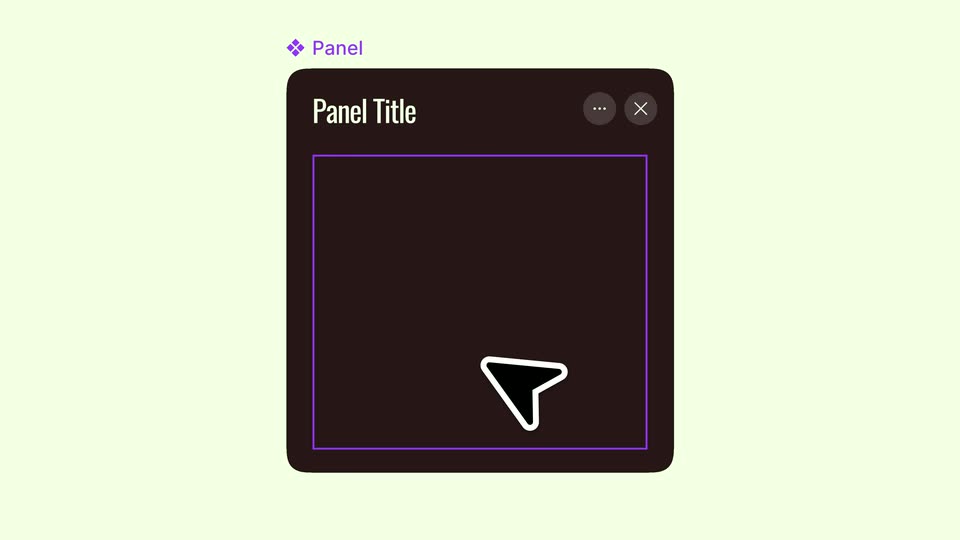
A dark rounded panel with a white title and two icon buttons slides down onto a pale mint background. A purple selection frame with square corner handles expands around its content area, then a white-outlined arrow cursor glides in and exits to the right.
On-screen text: “Panel”
Techniques: Cursor demo
Camera: Static
A row of black outline icons on white: plus in a square, hexagon node, dashed squares, half-filled circle, three dots. A large black cursor arrow glides in, hovers the plus icon, which tints blue under a light blue highlight, and a dark 'Convert to slot' tooltip pops above it.
Techniques: Cursor demo
Camera: Static
On a pale green field, a dark rounded panel titled Panel Title sits under a small Panel label. A black cursor glides to the close button as the magenta selection outline widens and narrows, then a small magenta plus tile pops into the panel's center.
On-screen text: “Panel”
Techniques: Cursor demo
Camera: Pan
A dark Up Next panel lists saved clips inside a magenta outline. A purple Panel label with a diamond icon slides in above it, while a large black cursor arrow with a white outline travels from the middle of the list down to the bottom right corner.
On-screen text: “Panel”
Techniques: Cursor demo
Camera: Static
A dark rounded artist profile panel on a pale green background, with a purple Panel label and diamond sliding in above it and a black cursor below. The panel shows an avatar, the name Luna, a follow button, and three stat numbers in a magenta outline box.
On-screen text: “Panel”
Camera: Static
A dark rounded UI card sits on a pale green field. It switches from a music player view, with circular artwork and a green pause button, to a dashboard bar chart. A purple “Panel” tag with a diamond icon slides above the card.
On-screen text: “Panel”
Camera: Static
A dark rounded panel on a pale green background morphs from a bar-chart dashboard view into a notification card with body copy and a lime Continue button. A small purple Panel label with a diamond icon slides right above the card.
On-screen text: “Panel”
Techniques: Morph
Camera: Static
A dark rounded UI panel sits on a pale green field, framed by a magenta outline and tagged with a purple Panel label that slides down. The panel content swaps from a Play History donut chart to a Discover featured-playlists card.
On-screen text: “Panel”
Camera: Static
A dark tablet mockup in 3D perspective sits on a pale green field, its screen framed by a purple selection box with corner handles. The view zooms into a panel and scrolls down through genre tags, artist circles, playlist cards and download rows, then back to the top.
On-screen text: “Panel”
Techniques: 3D mockup, UI zoom
Camera: Push in
A dark downloads list scrolls upward, revealing new track rows with album art, titles and durations, while a magenta selection frame with corner handles travels up the screen.
Camera: Push in
A tight crop on a music file list with a magenta selection box around the Asleep row pulls back to reveal the full dark app interface: a Downloads panel on the left, the list in the center, and a Discover panel with a playlist card on the right.
Techniques: UI zoom
Camera: Pull out
A light green field holds a grid of dark rounded UI panels, each marked by a purple 'Panel' tag. The view drifts vertically, sliding the bar chart, track lists, a pink placeholder box, and a circular player in and out of frame.
On-screen text: “Panel”
Camera: Pull out
A locked-off black card builds two lines of text word by word; the active word flashes magenta, then the phrase settles to white, reading “Slots is in open beta” over “Rolling out this week.”
On-screen text: “Slots is in open beta”, “Rolling out this week”
Techniques: Kinetic type
Camera: Static
On a black field, a small checkered square holding a white dot stretches into a horizontal bar. A green circle with a red swap arrow appears at its left end while a gray circle drops in below it.
Techniques: Morph
Camera: Static
A black screen shows a red and white 'Aa' logo scaling up on the left. On the right, a dashed rectangle contains a magenta pill with a left arrow sliding down, above a white pill with a red double arrow. At the bottom, a row of colored circles slides right, with hex codes appearing.
On-screen text: “Aa”
Camera: Static
On black, a red and white Aa specimen stacks in three sizes at left, a dashed blue frame holds three arrow buttons at right, and a hex-coded palette sits below. Arrows slide out, pills and swatches morph into plain circles, and every element shrinks to a smaller set.
Techniques: Morph
Camera: Static
A small multicolored logo mark holds centered on a black background. The mark stacks a red-orange pill above a purple and blue circle and a green circle. It stays static for the full clip.
Camera: Static