0:38

Karan Singhal - Today, we’re bringing ChatGPT closer to the systems, information, and
OpenAI · AI · Sep 2026
OpenAI · Sep 2026 · 0:42 · Full motion · AI-annotated
OpenAI’s 0:42 launch film runs 13 scenes, about 3.2 s each. The product is on screen from the first frame and 3 features are revealed. The call to action lands at 0:35 (84% in). The video is built as a minimal title card, three consecutive in-app demos (formatting, tracked changes, skills) each driven by a typed prompt and a zoom on the send button, then a scrolling use-case recap and an app-icon call to action. Signature moves are the slow zoom into the composer, the document reflow that standardizes messy text, and the animated spiral logo closing on white.
Is this your launch? to your site or press kit.
OpenAI · AI · Sep 2026
OpenAI · AI · Nov 2026
OpenAI · AI · Nov 2026
Films whose music sounds like this one, voice left out
Endeavor Optical Network · Electronic
Manus · Modern electronic, cinematic
On a plain white background, the centered headline reads “Introducing ChatGPT” with “for Microsoft Word” below it. The words fade in from light gray to solid black in sequence, settling into a static two-line lockup.
On-screen text: “Introducing ChatGPT”, “for Microsoft Word”
Techniques: Kinetic type
Camera: Static
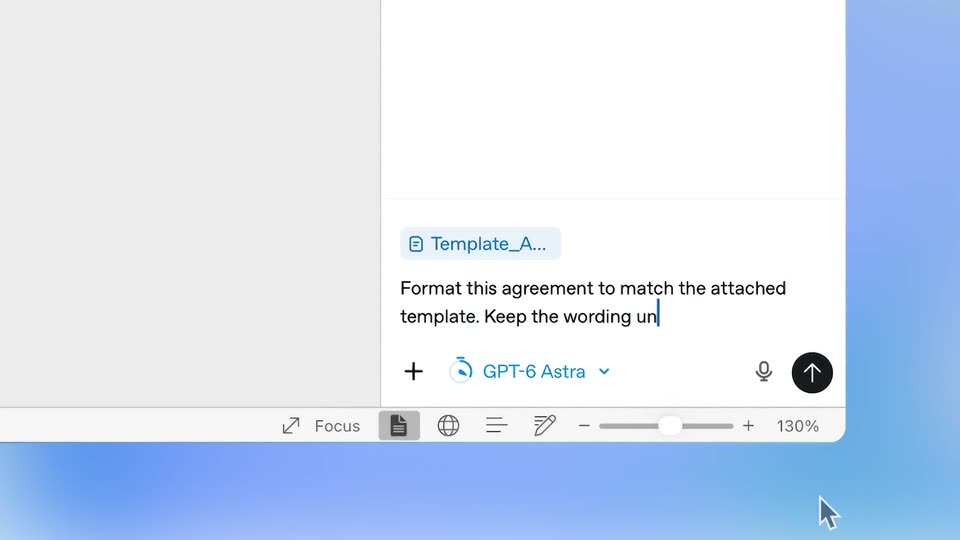
A Microsoft Word window showing a Client Services Agreement document with the ChatGPT sidebar open zooms into the chat input at the bottom right. A cursor types a prompt asking to format the agreement to match an attached template, then clicks the send button.
Techniques: UI zoom, Cursor demo
Camera: Push in
A word processor interface displays a document with messy, inconsistent formatting. An AI sidebar on the right shows a processing state. The document text then reflows and standardizes into a clean, uniform layout.
Camera: Static
A word processor window shows the Client Services Agreement document. The page scrolls down through numbered sections, from scope of services to confidentiality, while a small GPT-6 MIO label stays locked in place.
On-screen text: “GPT-6 MIO”
Camera: Pan
Close-up of a chat composer in a document app. A prompt about revising payment terms types out word by word, then a cursor glides in from the bottom right and clicks the black round send button.
Techniques: Cursor demo
Camera: Static
A word processor window on a pale gray backdrop displays a Client Services Agreement. A ChatGPT panel on the right runs a working timer and checks off task lines one by one, while a red-highlighted line in the Fees section is rewritten in place.
Camera: Static
A white document panel sits on a soft blue gradient. Two overlapping layers of gray body text crossfade at the start, resolving into a clean bulleted list about payment revisions that then holds still.
Camera: Static
A hand cursor opens the plus menu, moves to Skills, and selects Contract Review, which inserts as a blue chip in the composer. The sentence types itself out, then the arrow cursor slides to the black send button.
Techniques: Cursor demo
Camera: Static
A white task card on a light background lists three checklist items. The first two gray markers fill with green checks as the header count ticks from 1/3 to 2/3, then a loading spinner appears on the third item.
Camera: Static
A document editor window sits centered on a pale gray backdrop. The agreement text scrolls down the page while the right-hand assistant panel switches from a working timer to three green completed-task checkmarks.
Camera: Pan
A black headline “Use ChatGPT for” holds left on a white background while a column of gray words (Drafting, Formatting, Planning, Summarizing, Editing, Charting, Redlining, Work) scrolls upward on the right. The frame then cuts to “Get started for free today” centered.
On-screen text: “Use ChatGPT for”, “Drafting”, “Formatting”, “Planning”, “Summarizing”, “Editing”, “Charting”, “Redlining”, “Work”, “Get started for free today”
Techniques: Kinetic type
Camera: Static
A centered dark gray headline on a white background holds still while a blue Word icon scales in below it, followed by green Excel and red PowerPoint icons popping in. The frame cuts to a black line-drawn logo mark centered on white.
On-screen text: “Get started for free today”
Camera: Static
A thin black outline mark sits centered on a plain white field. Its open spiral petals rotate and fold inward, tightening into a closed flower of rounded lobes around a small hexagon, then the shape holds still.
Techniques: Morph
Camera: Static