1:52

Phone (3a) Series: Power in Perspective
Nothing · Hardware · Mar 2025
Manus · Jun 2025 · 1:16 · AI-annotated
Manus’s 1:16 launch film runs 37 scenes, about 2.1 s each. The product shows up at 0:05 and 1 feature is revealed. The call to action lands at 1:04 (85% in), over a voiceover. The video opens as a slow cinematic lunar prologue, then flips into rapid interface cuts and a three-panel reel before settling on locked-off black cards. Its signature moves are the dust-kicked footfalls, the ember-glow wordmark, and the side-by-side vertical panels.
Is this your launch? to your site or press kit.
An astronaut in a white suit walks away across a gray lunar surface, passing in front of the 3D word INTRODUCING set on the horizon. A blue Earth sits in the black sky at upper left. The scene fades in from black as the figure moves forward.
On-screen text: “INTRODUCING”
Camera: Static
A suited astronaut walks away across a gray lunar surface, Earth hanging in the black sky above. The white word INTRODUCING spans the middle of the locked-off frame, partly hidden behind the astronaut's back as he moves toward the horizon.
On-screen text: “INTRODUCING”
Camera: Static
Locked-off low close-up of an astronaut's boots stepping across a dark, cracked lunar surface, each footfall kicking up a puff of dust. A centered white label fades in over the feet and holds steady through the walk.
On-screen text: “MANUS VIDEO GENERATION”, “INTRODCING”
Camera: Push in
A dark glossy pebble sits on a gray regolith surface beside a blurred white suit. In slow motion, a gloved hand descends, lifts the pebble, and crushes it into a cloud of dust that scatters across the ground.
On-screen text: “MANUS VIDEO GENERATION”
Camera: Push in
A close-up of a dark, pebble-like textured surface with the lowercase serif wordmark “manus” engraved into it. A soft beam of light sweeps across the surface from right to left, catching the carved edges, while the shot slowly pushes in on the mark.
On-screen text: “manus”
Techniques: Light sweep, Kinetic type
Camera: Static
The lowercase serif wordmark “manus” glows amber on a dark, grainy background. A warm light travels across the letters from left to right while the word scales up slightly, the glow flickering like embers.
On-screen text: “manus”
Techniques: Light sweep, Kinetic type
Camera: Static
A lowercase serif word “manus” glows in molten gold on a black background, its edges flickering like burning embers. The whole word scales up slowly over the shot, the inner light pulsing through the strokes.
On-screen text: “manus”
Techniques: Kinetic type
Camera: Push in
An astronaut in a white suit stands on a dark lunar plain, back to camera, beneath the word 'manus' formed from flickering golden particles in the black sky. The particle wordmark holds its shape and drifts gently as loose embers scatter around it.
On-screen text: “manus”
Techniques: Particles
Camera: Static
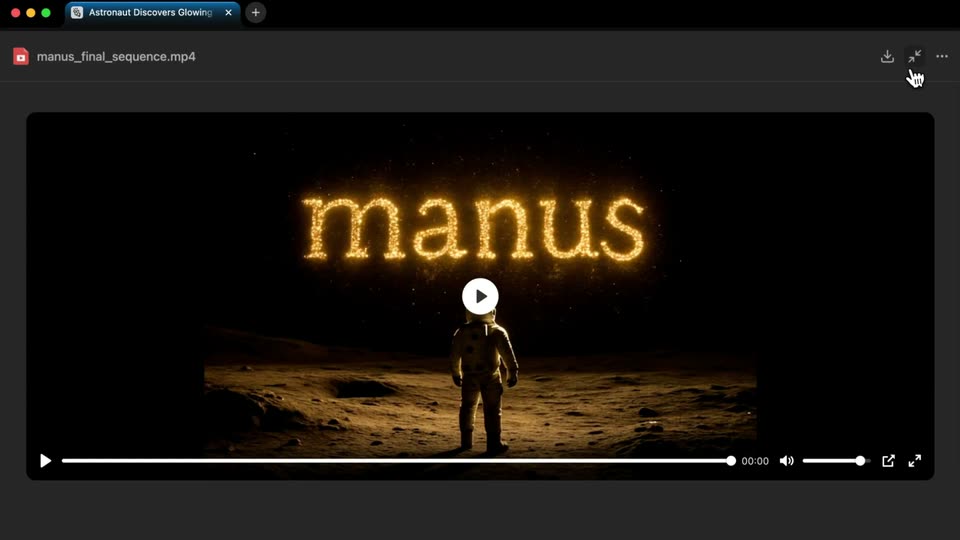
A dark browser window shows a paused video of an astronaut on the lunar surface beneath a glowing particle wordmark. The cursor hovers over the minimize icon, then the view reframes to reveal the Manus chat panel on the left with a scene list and two buttons.
On-screen text: “manus”
Techniques: Particles, Cursor demo, UI zoom
Camera: Pull out
A dark app window fills the frame, split into a chat pane on the left listing a numbered storyboard and a video player on the right showing a thumbnail of glowing golden letters over a moon scene. A status bar at the bottom offers two buttons. The interface stays static.
Camera: Static
A dark product interface with a chat message, a numbered list, and a video preview thumbnail fills the frame. A bold white credit line sits centered over it. The interface fades to black, leaving the line on a plain black field.
On-screen text: “This opening video was co-created by Manus & the team”
Camera: Static
A single white caption line is centered on a black field and holds still, then fades to black across the shot. The frame is locked-off with no camera movement.
On-screen text: “This opening video was co-created by Manus & the team”
Camera: Static
On a black background, the white headline “This is Manus” holds center, then gives way to a smaller gray credit line reading “This opening video was co-created by Manus & the team.”
On-screen text: “This is Manus”, “This opening video was co-created by Manus & the team”
Techniques: Kinetic type
Camera: Static
A black screen holds centered white text. “This is Manus” dissolves into “Your Vision,” and the frame stays locked off.
On-screen text: “This is Manus”, “Your Vision”
Camera: Static
Black screen, locked-off. The white line “Your Vision” fades in at center, then gives way to “Rendered Into Reality,” which holds static in the middle of the frame.
On-screen text: “Your Vision”, “Rendered Into Reality”
Techniques: Kinetic type
Camera: Static
Split layout on black: a gray prompt card sits on the left while a phone on the right shows the Shan Hai Jing app, its vertical feed scrolling from a feathered bird creature to a mossy stone mountain god.
Techniques: Split screen
Camera: Static
A dark chat screen resolves from a ghosted double of the prompt into a two-column layout. The left holds the task brief and a checklist, the right a terminal panel printing commands and a filling progress bar.
Techniques: Split screen
Camera: Pan
A flat browser window shows the man.us interface: a task list on the left fills and scrolls while the right panel, labeled Manus's Computer, switches from a Wikipedia article to a generated image of a mythical bird. A bottom status bar reads Manus is replaying the task.
Camera: Static
A dark browser window shows the Manus interface. The left task log scrolls past lines about generating creature videos, while the right media viewer swaps a painted red-eyed eagle for a green serpent on a gold background.
On-screen text: “manus.im/share/2uvzDaaT78Yi3DYToMheEqo?replay=1”
Camera: Static
A dark two-panel product interface replays a task: the left list scrolls past steps tagged with red Generating Video labels, while the right computer view flips from a research checklist to CSS code beside a creature image.
Camera: Static
A split-screen interface displays a task list and a browser window, which quickly transition into terminal windows showing code and commands.
Techniques: Split screen
Camera: Static
A browser window shows a markdown file announcing the live mythical-creatures site, with a hand cursor resting on the project link. The view tightens to a closer crop of the document and the Manus editor panel, which previews the red-headed Shan Hai Jing page.
Techniques: UI zoom
Camera: Push in
Three phone screens stand side by side on black, each displaying the Shan Hai Jing page with a red header and footer. The painted creatures, Human-Fish, Tiangu and Zhi-Pig, move and blink inside their frames.
Techniques: Split screen
Camera: Static
Three flat phone mockups sit side by side on a black background, each showing the same Shan Hai Jing webpage. The creature illustrations cycle through different mythical beasts, with a slow vertical pan inside each frame.
Techniques: Split screen
Camera: Pan
A woman in a dark sculptural one-shoulder gown stands between two burning cars in thick smoke. The camera tilts down from her face to the full dress as the fabric drifts, flames flickering and embers rising behind her.
Camera: Pull out
A bearded man in a white shirt leans over a dark workbench, holding a small black tool with a white tip above a golden watch movement. His hands move slowly and precisely while the blurred workshop behind holds scattered tools, a green chair and a window.
Camera: Static
Two gold wristwatches sit side by side on a dark brown background. The left has a white dial with black Roman numerals and black hands; the right shows a skeletonized dial with gold hands and an exposed mechanical movement.
Camera: Static
A gold watch with a cream dial and a brown leather strap rests on a black pedestal, lit by a warm orange glow from the right against a dark backdrop. The camera holds a static three-quarter view of the piece.
Techniques: 3D mockup
Camera: Static
A man in a cream suit and dark tie stands in a wood-beamed hotel lobby, gazing off to the left. Period-dressed men in hats mill about behind him beneath a ceiling fan. The camera pushes in slowly on his face.
Camera: Push in
Three vertical panels on black hold period-drama frames side by side: a couple in 18th-century dress with a dog at left, two women in gold and dark gowns holding a lit candle in a basket at center, and a woman in gold raising her arm over a crouching woman in red at right.
Techniques: Split screen
Camera: Static
Three vertical panels of live-action period footage stand side by side, showing costumed figures in a gilded room and a candlelit interior. The middle panel fades out as the white title MANUS VIDEO GENERATION scales in at the center.
On-screen text: “MANUS VIDEO GENERATION”
Techniques: Kinetic type
Camera: Static
A black screen holds two vertical video panels of costumed figures at the left and right edges, while the white title MANUS VIDEO GENERATION and a small hand logo scale in at the center.
On-screen text: “MANUS VIDEO GENERATION”
Techniques: Kinetic type, Split screen
Camera: Static
A black frame holds the white Manus logo and the centered title MANUS VIDEO GENERATION. A faint, dark figure on the left dissolves into the black while the lockup scales gently. The camera stays locked off.
On-screen text: “MANUS VIDEO GENERATION”
Techniques: Kinetic type
Camera: Static
A black frame holds a single centered line of dark gray text that fades in from black and holds still. The line reads as a quiet end-card note, with no other elements or motion.
On-screen text: “Early Access for Basic, Plus, Pro Members”
Camera: Static
A black background holds a single centered line of white bold sans-serif text that fades in from dark gray to full white, then holds still. The line reads “Early Access for Basic, Plus, Pro Members”.
On-screen text: “Early Access for Basic, Plus, Pro Members”
Techniques: Kinetic type
Camera: Static
A black background holds a centered white line, “Early Access for Basic, Plus, Pro Members,” which exits, then “Coming Soon for Everyone” appears in the same spot and holds to the end.
On-screen text: “Early Access for Basic, Plus, Pro Members”, “Coming Soon for Everyone”
Camera: Static
A black screen holds the gray line Coming Soon for Everyone, then swaps to Stay Tuned! in the same centered sans. The new line brightens to white and dims back to gray, then fades out to black.
On-screen text: “Coming Soon for Everyone”, “Stay Tuned!”
Camera: Static