1:54
Explore
Netlify - Build your way. Ship on one platform. Start with a prompt or your ed
Netlify · Apr 2026 · 1:39 · AI-annotated
- Length
- 1:39
- Scenes
- 31 · 3.2 s avg
- Product on screen
- 0:09
- Features shown
- 3
- Call to action
- 1:34 · 96%
- Voiceover
- Yes
00:00:00 / 01:39:02
Netlify’s 1:39 launch film runs 31 scenes, about 3.2 s each. The product shows up at 0:09 and 3 features are revealed. The call to action lands at 1:34 (96% in), over a voiceover. The video is built as a chain of typed prompts that spawn 3D-tilted UI panels, with each role's path (product manager, developer, designer) flattening into the same white app mockup before converging on a platform tour and a typographic close. Signature moves: monospace typing, glowing teal outlines, camera pushes from perspective to flat front view, and blur-to-focus text reveals.
No filming indicatedEstimated needs: 6 capture groups — your screens or recordings · 1 official logo — reused across the film · 11 3D passages — build or supply
Is this your launch? to your site or press kit.
More like this
Netlify - Build your way. Ship on one platform. Start with a prompt or your ed, scene by scene
· 31 scenes as text
01 · Hook · 0:00–0:09
A teal caret blinks on a dark teal gradient, then types “Build me a health tracking app” in monospace beside a small diamond mark. The line then settles into a UI panel: a Product Manager badge and an input box with a send icon fade in around it.
On-screen text: “Build me a health tracking app”
Techniques: Kinetic type
Camera: Static
02 · Product intro · 0:09–0:14
A glowing teal card holding a Netlify prompt and a typed request floats on a dark stage. The camera pushes in as a cursor clicks the corner, spawning a user chip and a preview button, then a teal bar wipes the card away.
Techniques: UI zoom, Cursor demo, Masking
Camera: Push in
03 · Demo · 0:14–0:17
A white app window fades in over a dark teal gradient as a teal light beam sweeps across it. The schedule grid, progress ring and health charts slide in from the right with motion blur, then the whole window blurs out as a teal-outlined panel enters.
Techniques: Light sweep
Camera: Pull out
04 · Feature reveal · 0:17–0:26
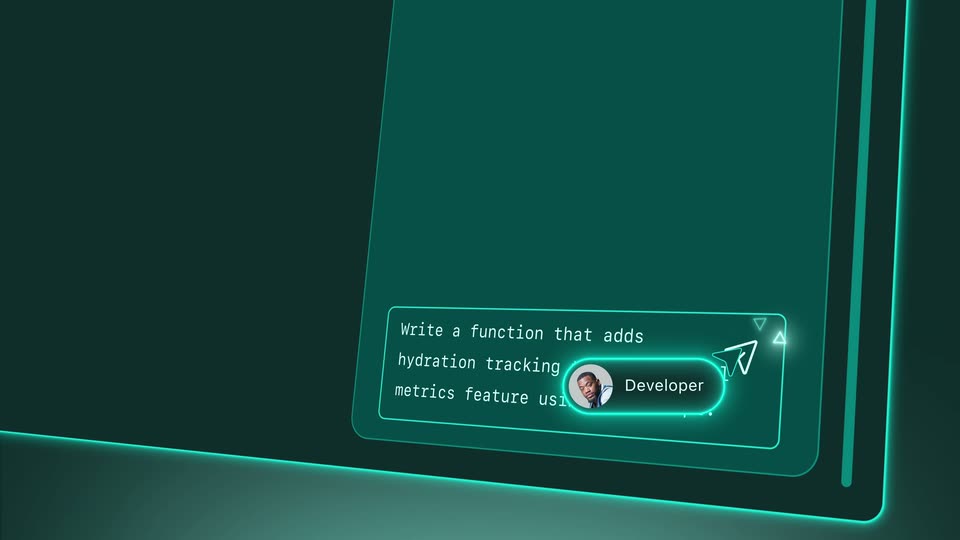
A teal chat panel tilts in 3D perspective. A cursor drops a 'Developer' chip into the prompt box, types a code request, and taps the send icon. The view flattens to a front-on chat log showing the prompt and the AI reply.
Techniques: 3D mockup, Cursor demo, UI zoom
Camera: Static
05 · Feature reveal · 0:26–0:35
A dark code editor framed by a glowing teal border types out JavaScript line by line, a soft glow marking the active line. The block completes, a circular Developer avatar badge pops into the center, then a fragment on line 7 flashes yellow as it is edited.
On-screen text: “Developer”
Techniques: Kinetic type
Camera: Pan
06 · Feature reveal · 0:35–0:38
Floating dark-teal UI panels with glowing outlines: code on the left, a chat panel on the right. A cursor drifts from a Developer pill toward a Create Pull Request button as the camera zooms in on the panel.
Techniques: Cursor demo, UI zoom
Camera: Pull out
07 · Feature reveal · 0:38–0:38
A tight view of a code panel and a chat box pulls back, reframing to a white Health App dashboard that floats in 3D perspective, its ring chart and small cards settling into place. A Create Pull Request button rests at the lower left.
Techniques: UI zoom, 3D mockup
Camera: Pan
08 · Feature reveal · 0:38–0:40
A white health dashboard on a dark teal field opens blurred and zoomed in on the 79% ring, then pulls back to show a weekly schedule strip, a bar chart, four metric tiles, and a right list of diet, supplements and exercise.
Techniques: UI zoom
Camera: Push in
09 · Feature reveal · 0:40–0:45
A glowing terminal log fills a dark teal frame, lines of build output stacking from the top down. The view zooms in as a Merge button and a cursor appear top right, then a Netlify chat panel slides over the log.
Techniques: UI zoom, Cursor demo
Camera: Push in
10 · Feature reveal · 0:45–0:51
A teal-outlined chat card slides in from the right and locks to center on a dark teal field. A cursor sits in the input while a design prompt types out across three lines; a Designer avatar chip slides to the lower corner as a white panel pushes in.
Techniques: Kinetic type, Cursor demo
Camera: Pan
11 · Feature reveal · 0:51–0:52
A white rounded panel with a top bar slides up against a dark green background and racks into focus. The centered label Take action settles into place as the frame stays locked.
Techniques: Kinetic type
Camera: Static
12 · Feature reveal · 0:52–0:54
A white app window with traffic-light dots sits in 3D perspective on a dark green field; it rotates and pulls from blur into a sharp, locked-off frame, revealing a MyHealth App schedule grid and a right-hand action list.
On-screen text: “Take action”
Techniques: 3D mockup
Camera: Pull out
13 · Feature reveal · 0:54–1:08
The MyHealth App dashboard mockup tilts in 3D on a dark teal background. Glowing badges for Product Manager, Developer, Designer and AI pop in around it with chat bubbles. The AI badge then slides into the window as the view zooms in and new UI elements appear.
On-screen text: “Product Manager”, “Developer”, “Designer”, “AI”, “Add a banner on the homepage”, “Let's change the icons to a filled style”, “Help me add another health widget”, “Sure, let's get this done!”
Techniques: UI zoom
Camera: Pan
14 · Demo · 1:08–1:10
A dark teal application interface floats in 3D perspective, tilted with a glowing cyan edge. A sidebar shows a logo, search field and menu items while an Overview panel sits to the right; the camera drifts slowly across the surface.
Techniques: 3D mockup
Camera: Static
15 · Demo · 1:10–1:14
A glowing teal dashboard panel floats in 3D perspective, tilting from a steep angle to a flat front view. Green bars grow into a chart, stat cards and a monospace request log fade in, then the panel rotates back into perspective.
Techniques: 3D mockup
Camera: Pan
16 · Demo · 1:14–1:15
A white browser window showing a MyHealth App dashboard tilts in 3D and crossfades into a Projects screen with a left sidebar and a grid of six project cards, all on a dark green background.
Techniques: 3D mockup
Camera: Pull out
17 · Demo · 1:15–1:17
A product interface panel, with a left sidebar and a white dashboard card, floats in 3D against a dark teal backdrop with a glowing ring. The camera orbits and pushes in, tilting the panel to a sharp angle as a second dark view slides in on the right.
Techniques: 3D mockup
Camera: Static
18 · Demo · 1:17–1:21
A tilted 3D interface in dark teal lists projects. A green outline traces the first row, then two more rows, Documentation and Blog, slide in as the camera pans down. Each row pairs a white app thumbnail with an owner badge.
Techniques: 3D mockup
Camera: Pull out
19 · Feature reveal · 1:21–1:22
Two flat browser windows sit stacked on a dark green field. The front window shows a health app landing page with a stretching woman, while a second window slides up from the bottom edge to reveal a support ticket triage page.
Camera: Pull out
20 · Feature reveal · 1:22–1:23
Two pale browser windows stack on a dark green field. The top, scaled down, shows a Support ticket triage page with gray skeleton cards; the bottom slides up to reveal a Customer Portal login with an email being typed.
Camera: Pull out
21 · Feature reveal · 1:23–1:24
On a dark green gradient, two tilted browser windows stack vertically and settle into place; the top shows a clean Customer Portal login form, the lower layers the same form over a photo of a person stretching. A headline and caption slide in beside them.
On-screen text: “Support ticket triage”, “Prioritize, assign, and resolve incoming support tickets.”
Techniques: 3D mockup
Camera: Pull out
22 · Other · 1:24–1:25
On a soft green gradient, the line “The workflow” sharpens from a blur at center, then “stays the same.” settles in below it. Both lines hold still in dark sans-serif on the locked-off frame.
On-screen text: “The workflow”, “stays the same.”
Techniques: Kinetic type
Camera: Static
23 · Other · 1:25–1:26
A two-line headline in dark teal sits on a soft green gradient, the top line scaling gently. The frame then darkens and the blurred Netlify wordmark fades in at center.
On-screen text: “The workflow”, “stays the same.”
Techniques: Kinetic type
Camera: Static
24 · Other · 1:26–1:26
The Netlify wordmark in light silver 3D letters sits centered on a dark green gradient. It scales slightly as it brightens from a metallic extruded look to a flat glowing white.
On-screen text: “Netlify”
Techniques: Kinetic type
Camera: Static
25 · Other · 1:26–1:30
On a dark green gradient, the Netlify logo scales up blurred behind the text. The sentence then builds phrase by phrase, each line sliding in as the previous blurs and recedes, with the word launch flashing green before settling to white.
On-screen text: “Netlify”, “becomes where you”, “and your team”, “build and launch from.”
Techniques: Kinetic type
Camera: Pull out
26 · Other · 1:30–1:31
A dark green gradient fills the frame as the previous line, build and launch from., slides out. The new headline, However you build,, sharpens into focus at center, then holds still on a locked-off frame.
On-screen text: “build and launch from.”, “However you build,”
Techniques: Kinetic type
Camera: Static
27 · Other · 1:31–1:32
On a green gradient, the white Netlify wordmark holds center under the line “However you build,”. The phrase “gets you to production” then slides across the frame in oversized type, blurring as it moves.
On-screen text: “However you build,”, “Netlify”, “gets you to production”
Techniques: Kinetic type
Camera: Pan
28 · Other · 1:32–1:33
On a dark green gradient, the phrase 'gets you to production' slides in, the word 'to' in bright green. The line blurs out as a large light-green 'fast.' fades in at center.
On-screen text: “gets you to production”, “fast.”
Techniques: Kinetic type
Camera: Static
29 · Other · 1:33–1:34
The word fast. in a large pale sans-serif sits centered on a dark green gradient. It scales up slowly over the clip, with a soft glow and a vertical fade from white to teal.
On-screen text: “fast.”
Techniques: Kinetic type
Camera: Static
30 · CTA · 1:34–1:35
A soft mint gradient with a white center glow holds the tagline Start building today in dark teal sans, which starts out of focus and offset, then pulls sharp and centers while scaling up slightly.
On-screen text: “fast.”, “Start building today”
Techniques: Kinetic type
Camera: Static
31 · Outro · 1:35–1:39
A bright white burst with horizontal light streaks flashes at center, resolving into the white netlify wordmark beside its teal radial-dash mark. The gray netlify.com sits below on a dark teal field, then the frame holds still.
On-screen text: “netlify.com”
Techniques: Light sweep
Camera: Pull out