0:31

Introducing Spline for ChatGPT 🚀
Spline · Design · Oct 2026
Melius · Oct 2026 · 0:37 · AI-annotated
Melius’s 0:37 launch film runs 23 scenes, about 1.6 s each. The product shows up at 0:06 and 4 features are revealed. The call to action lands at 0:32 (86% in), over a voiceover. The video opens with a UGC-style creator clip, names the product with a two-card reveal, then runs a cursor-driven tour of the workflow (script, avatar, voice, generate) on a dark dot grid before revealing the generated video inside the app and closing on the Melius logo. Its signature moves are rounded cards and 3D-tilted UI panels, scrolling text lists with a traveling highlight, and cross-dissolves that blur the line between live footage and the generated avatar.
Is this your launch? to your site or press kit.
Spline · Design · Oct 2026
Lovio · Jan 2026
Webflow · Design · Sep 2026
A young man in a gray hoodie with white over-ear headphones around his neck speaks to the camera in a dark room lit by purple and blue LEDs, with monitors and an RGB PC glowing in the background. The shot is a steady selfie-style medium close-up.
Camera: Pull out
Three rounded video panels sit on a dark dotted background, the center one taller. The same curly-haired young man appears in each, talking to camera, holding a white earbud box and white over-ear headphones. The clips cut between shots of him presenting the products.
Techniques: Split screen
Camera: Static
Three vertical clips of the same creator sit side by side on a dark dotted background. Left shows him with white headphones around his neck under purple light; center shows him lifting them from an open box; right shows him holding them up.
Techniques: Split screen
Camera: Push in
A flat Instagram post mockup shows a person holding white over-ear headphones above an open box. The card scrolls upward, revealing the Meta_Coach ad label, a circular progress ring and a pause icon at the bottom.
Camera: Push in
A black field with a faint dot grid holds the word Introducing in white sans, centered. The word slides horizontally into place on a locked-off frame.
On-screen text: “Introducing”
Techniques: Kinetic type
Camera: Static
On a white field, the word Cast holds centered in black. The word Introducing slides in near it, then the frame locks off.
On-screen text: “Cast”, “Introducing”
Techniques: Kinetic type
Camera: Static
A young man in an olive cardigan holds white over-ear headphones and speaks to camera, framed in a rounded rectangle on a white background. The card tilts as the footage cuts to a second pose with his hands raised.
Camera: Static
A rounded vertical card frames a smiling young man in a dark hoodie with white headphones at his neck, giving a thumbs up against a purple-lit desk. The card fades out and the line Consistent characters for slides into the center of the white field.
On-screen text: “Consistent characters for”
Techniques: Kinetic type
Camera: Static
A vertical list of use-case phrases scrolls upward on a dark dotted background. The line at the center glows white while the lines above and below fade to gray, so the highlight travels down the list as it moves.
On-screen text: “Consistent characters for”, “Ad campaigns”, “UGC content”, “Brand mascots”, “Dramas”, “Films”, “Web series”, “Course content”, “And a lot more”
Techniques: Kinetic type
Camera: Pan
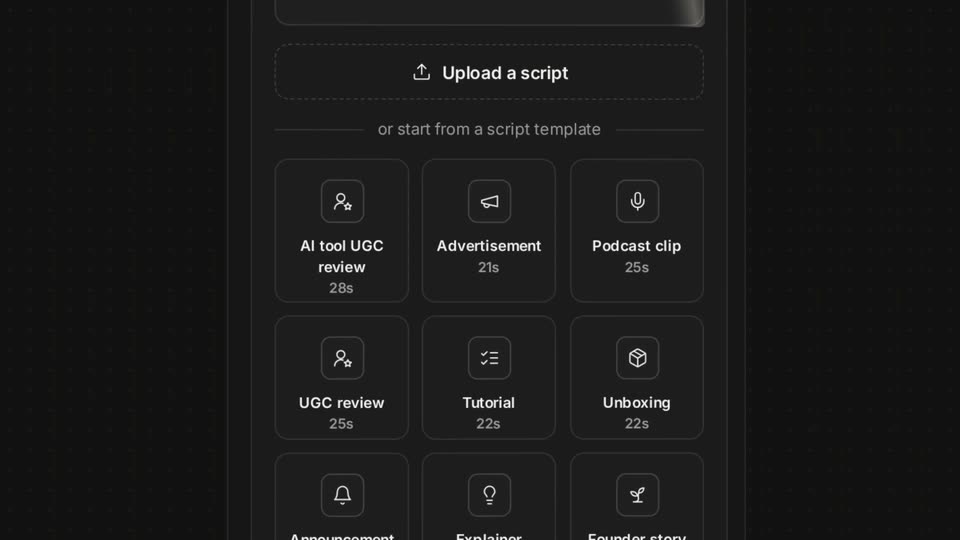
A dark script card fills the frame as a testimonial types out word by word, then the view pulls back to reveal the full interface: an upload button and a grid of script template tiles with icons and durations.
Techniques: Kinetic type, UI zoom
Camera: Pull out
A dark UI panel tilted in 3D perspective zooms forward to a flat row of three avatar cards. A cursor then moves to the middle card and clicks it, drawing an orange outline around the portrait.
Techniques: 3D mockup, UI zoom, Cursor demo
Camera: Pull out
On a black dotted grid, a centered profile card with a thin red border holds a headshot of a dark-haired young man above the name Julian and a one-line caption. A white cursor hovers over the card as the whole card scales up slightly.
Techniques: Cursor demo
Camera: Static
A dark dotted grid holds a centered profile card: a headshot over the name Julian and a short bio, with a white outlined cursor on the photo. The frame zooms in, sliding the card off left and revealing a Select voice bar as the cursor moves right.
Techniques: UI zoom, Cursor demo
Camera: Static
On a dotted black background, a dark voice-selection dropdown scales up and slides into frame. Its list of named voices scrolls upward while a white cursor glides to hover over the Filters button.
Techniques: UI zoom, Cursor demo
Camera: Static
A dark Add custom voice modal sits on a dotted black background. The form crossfades between a voice description layout and a name plus audio samples layout with a red Create voice button, while a white cursor moves across the Clone and Design tabs.
Techniques: Cursor demo
Camera: Pull out
On a dark dotted grid, a white-outlined cursor moves onto a red Generate button showing a coin icon and 685. The view then zooms in on the button, filling the frame with the enlarged label and the settings gear.
Techniques: Cursor demo, UI zoom
Camera: Static
A teal cursor hovers over a Generate button and a 685 counter on a curved red band, the interface tilted in 3D perspective against a green field. The band and cursor shift from red and teal to coral and green as the cursor drifts right.
Techniques: 3D mockup, Cursor demo
Camera: Pull out
A young man with white over-ear headphones around his neck talks to the camera in a room with purple ambient light. The shot opens with a close-up face cross-dissolving into a medium selfie frame, then at the end the picture shrinks into a vertical card with black side bars.
Techniques: Masking
Camera: Pull out
A generated video of a young man pointing at white headphones around his neck in a purple-lit room fills the frame, then the view zooms out to reveal the app interface, with a script panel on the left and a cast settings panel on the right.
Techniques: UI zoom
Camera: Pull out
A dark app interface shows a script panel left and a cast panel right, framing a generated video of a young man with white headphones in a purple-lit room. The center video card scales up to fill the screen as he talks.
Techniques: UI zoom
Camera: Push in
A dark settings list scrolls up on the right, revealing Voice, Background, Prop, Tone and Aspect ratio rows, beside a 3D render of a hooded figure with white headphones that pans up in sync on a dotted grid.
Camera: Push in
A dark dotted background holds centered white text. The word Cast scales into place, then the smaller line Live now on appears beneath it. The frame stays locked off throughout the short title card.
On-screen text: “Cast”, “Live now on”
Techniques: Kinetic type
Camera: Static
The black Melius logo mark holds center on a pale field, then slides left as the bold Melius wordmark reveals beside it. The tagline Exactly as you imagined appears below, words lighting up left to right, before the frame cuts to black.
On-screen text: “Melius”, “Exactly as you imagined”
Techniques: Kinetic type
Camera: Static