1:40

The new MacBook Pro with M5 Pro and M5 Max
Apple · Hardware · Mar 2026
BridgeOpsOne · Jun 2026 · 1:18 · AI-annotated
studio SaaS Animate
The video alternates locked-off blur-to-focus text cards with 3D-tilted interface mockups that flatten into frontal views, pairing each feature headline on the left with a demo panel on the right. Pacing is measured at about three cuts per minute, with slow camera settles and word-by-word text reveals as the signature moves.
Apple · Hardware · Mar 2026
Warp · Developer tools · Feb 2026
F4 · Jun 2026
A dark cybersecurity dashboard of floating red and grey panels brightens from a near-black frame, a central Critical Error dialog anchoring the middle while a red vignette glow builds at the edges. The layout stays locked off as the exposure rises.
Camera: Pull out
A soft blue gradient with a slow drifting glow fills the frame. Centered white sans-serif text snaps from blur to focus word by word, first reading 'But operational communication', then 'often falls behind'.
On-screen text: “But operational communication”, “often falls behind”
Techniques: Kinetic type
Camera: Static
The phrase “often falls behind” sits centered on a dark blue gradient field. The frame stays locked off while the text remains still.
On-screen text: “often falls behind”
Camera: Static
On a blue gradient background with a faint grid, the white word “Introducing” types out letter by letter in the center, then scales down to a smaller size. The frame stays locked off throughout.
On-screen text: “Introducing”
Techniques: Kinetic type
Camera: Static
A dark blue grid background holds the word “Introducing” scaling in at center. It gives way to the BridgeOps mark, a white and blue B, above the bold wordmark “BridgeOps,” then “One” appears in blue.
On-screen text: “Introducing”, “BridgeOpsOne”
Techniques: Kinetic type
Camera: Static
A dark blue gradient fills the frame as two centered lines of light text sharpen from a soft blur into focus, holding still on a locked-off shot.
On-screen text: “An operational”, “communication platform”
Camera: Static
A centered white tagline on a blue gradient gives way to a blue grid, with 'Designed for NOCs' at left and a tilted BridgeOpsOne interface mockup at right.
On-screen text: “An operational communication platform”, “Designed for NOCs”
Techniques: 3D mockup
Camera: Static
A dark blue grid backdrop holds a 3D-tilted app panel on the right, displaying the BridgeOpsOne interface with mode and input sections. On the left, the headline Designed for NOCs sits static, with NOCs in light blue. The scene is held without motion.
On-screen text: “Designed for NOCs”
Techniques: 3D mockup
Camera: Static
On a blue grid backdrop, the headline “Designed for SOCs” sits left of the BridgeOpsOne interface card, which shows its command center buttons, mode toggle and input panel. The frame drifts slowly to the right.
On-screen text: “Designed for SOCs”
Camera: Static
A dark blue grid background holds a large white headline at the top. A 3D-tilted dashboard mockup rotates from a side angle to a flat front view, settling into place and revealing stat cards and an incident detail workspace.
On-screen text: “Command centers”
Techniques: 3D mockup
Camera: Static
A white title, Infrastructure teams, sits centered on a smooth blue gradient. The frame stays locked and still for the full beat.
On-screen text: “Infrastructure teams”
Camera: Static
Centered white text on a dark blue gradient. 'Infrastructure teams' holds still, then gives way to 'High-pressure incident environments,' which catches a brief light sweep across its letters.
On-screen text: “Infrastructure teams”, “High-pressure incident environments”
Techniques: Light sweep
Camera: Static
A single centered line reads “High-pressure incident environments” on a smooth blue gradient. The text holds in place with a soft settle before the locked-off frame remains steady.
On-screen text: “High-pressure incident environments”
Camera: Static
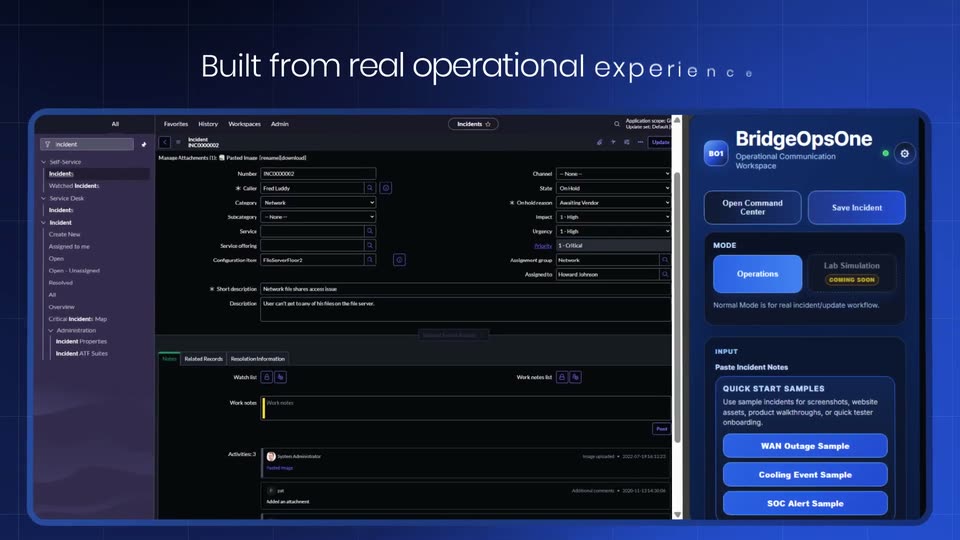
The white headline “High-pressure incident environments” on a dark blue gradient slides up, replaced by a letter-spaced “Built from real”, as two tilted dashboard mockups rise from below, an incident form above a list view beside a BridgeOpsOne panel.
On-screen text: “High-pressure incident environments”, “Built from real”
Techniques: Kinetic type, 3D mockup
Camera: Static
A dark blue grid background holds a centered white headline. Two tilted 3D interface mockups, a desktop incident console and a phone panel, fade in side by side, then scale up and flatten toward a frontal view, filling the frame.
On-screen text: “Built from real operational experience”
Techniques: 3D mockup
Camera: Push in
A dark ticket form and a blue sample panel sit side by side. A white vertical bar wipes leftward across the center, narrowing as it goes, while a cursor arrow hovers over a status text box on the right.
Techniques: Masking, Cursor demo
Camera: Static
A dark blue grid backdrop holds a tilted 3D incident-summary card on the left, its fields and a blue paper-plane icon visible. On the right, the headline “Rough Technical updates into clear” fades in, the word “clear” in blue, as the card eases slightly right.
On-screen text: “Rough Technical updates into clear”
Techniques: 3D mockup, Kinetic type
Camera: Static
A dark document panel on the left scrolls upward through a technical report while a cursor arrow hovers over it. On the right, a white headline reads “Rough Technical updates into clear”, then swaps to “Professional communication in seconds” with the key word in blue.
On-screen text: “Rough Technical updates into clear”, “Professional communication in seconds”
Techniques: Cursor demo, Kinetic type
Camera: Static
A dark document card with bulleted technical notes scrolls upward on the left while a blue cursor hovers over it. On the right, the headline sits on a deep blue grid background and fades out over the shot.
On-screen text: “Professional communication in seconds”
Techniques: Cursor demo
Camera: Static
A phone mockup on a blue grid shows a workflow form; a cursor hovers and clicks Generate Update, and the screen scrolls up to reveal the generated output text. The headline sits on the left with “ready” in blue, fading in with a soft glow.
On-screen text: “Generate leadership ready updates”
Techniques: UI zoom, Cursor demo
Camera: Static
A dark blue grid background holds a white headline on the left and a floating product panel on the right showing an incident timeline with action buttons and an update card. A blue cursor hovers over the update text as the panel settles into place.
On-screen text: “Track incident timelines in real time”
Techniques: Cursor demo
Camera: Static
A 3D-tilted interface card on the right shows an incident timeline panel with a cursor hovering over an update entry, while a large white headline with the last two words in light blue sits over a dark blue grid on the left.
On-screen text: “Track incident timelines in real time”
Techniques: 3D mockup, Cursor demo
Camera: Static
On a blue grid background, the white headline and the dark incident-timeline panel dissolve into a new Executive headline and a leadership-package panel showing a Generate Executive Snapshot button.
On-screen text: “Track incident timelines in real time”, “Executive”
Camera: Push in
A front-facing phone mockup on the right scrolls its feed upward past a blue cursor, revealing status cards, while the left headline fades in line by line over a blue grid background.
On-screen text: “Executive snapshots for operational visibility”
Techniques: Kinetic type, Cursor demo
Camera: Static
Static split layout: the headline “Executive snapshots for operational visibility” sits left, “snapshots” in blue, while a phone mockup on the right shows an incident feed with colored status cards and two buttons. A cursor rests over the card text.
On-screen text: “Executive snapshots for operational visibility”
Techniques: Cursor demo
Camera: Static
A dark BridgeOpsOne dashboard scales down and settles at center over a blue grid as the white headline Centralized command workflow fades in word by word above it. The panel shows incident stat cards, an SLA timer row with four colored buttons, and four text blocks at the bottom.
On-screen text: “Centralized command workflow”
Techniques: Kinetic type
Camera: Static
A crossfade from the full dashboard lands on a close-up of the timeline and incident history panels; the camera then pans slowly across the form while the caption “Designed to support communication” fades in word by word at the bottom and later fades out.
On-screen text: “Designed to support communication”
Techniques: UI zoom, Kinetic type
Camera: Pan
A white headline reveals letter by letter at center on a blue gradient grid as a dark incident-timeline panel wipes out of the left edge.
On-screen text: “Reduce communication delays”
Techniques: Kinetic type
Camera: Pan
A single line of white text holds centered on a deep blue gradient. The darker patch of the gradient drifts slowly from lower left toward upper right while the text stays locked in place.
On-screen text: “Reduce communication delays”
Camera: Static
On a dark blue gradient with a soft glow at the left edge, the phrase scales into the center, resolving from a blurred double exposure to a sharp lock. The frame stays static for the rest of the shot.
On-screen text: “Improve consistency”
Techniques: Kinetic type
Camera: Static
On a blue gradient, the centered headline “Improve consistency” splits and its words drift apart as “Maintain” fades in on the left, while a rounded product panel with monospace log text and an operational-intelligence data block slides in from the right.
On-screen text: “Improve consistency”, “Maintain”
Techniques: Kinetic type
Camera: Static
A dark blue gradient frames the headline “Maintain operational clarity” on the left and a 3D-tilted interface card on the right, the card pairing a terminal readout with an intelligence panel. The headline brightens while the card eases forward.
On-screen text: “Maintain operational clarity”
Techniques: 3D mockup
Camera: Static
A blue gradient background holds centered white text that builds word by word. The line reads “From network outages and failover events,” each word fading in in sequence on a locked-off frame.
On-screen text: “From network outages and failover events”
Techniques: Kinetic type
Camera: Static
On a dark blue gradient background, centered white sans-serif lines crossfade in sequence: first “From network outages and failover events,” then “Security incidents and infrastructure instability.” The motion is slow and quiet, with each line fading in and out in place.
On-screen text: “From network outages and failover events”, “Security incidents”, “and infrastructure instability”
Techniques: Kinetic type
Camera: Static
Two lines of white text sit centered on a deep blue gradient that slowly darkens and shifts. The frame is locked off, and the type holds still throughout the short clip.
On-screen text: “Security incidents”, “and infrastructure instability”
Camera: Static
Centered white text reading “Security incidents and infrastructure instability” sits on a blue gradient background and fades to nothing over the locked-off frame.
On-screen text: “Security incidents”, “and infrastructure instability”
Camera: Static
A stylized white and blue B mark fades in at center on a deep blue gradient as two faint caption lines fade out. The bold BridgeOps wordmark appears beneath the mark, and a second word begins to type in letter by letter.
On-screen text: “Security incidents”, “and infrastructure instability”, “BridgeOps”
Camera: Static
The BridgeOpsOne logo and wordmark sit centered on a blue gradient, then give way to the white caption “The gap between” in the same position.
On-screen text: “The gap between”
Camera: Static
On a deep blue gradient, the white phrase 'The gap between' splits, its words drifting to the top corners. A dim 'Technical Response' caption fades in on the left while a tilted 3D intelligence panel slides in on the right.
On-screen text: “The gap between”, “Technical Response”
Techniques: Kinetic type, 3D mockup
Camera: Static
A dark blue 3D document card, listing operational incident details, tilts into view from the right edge. On the left, the two-line headline Technical Response resolves from a soft overlap into place against a blue gradient.
On-screen text: “Technical Response”
Techniques: 3D mockup
Camera: Static
A dark blue grid background holds a BridgeOpsOne dashboard panel that scales up from a dimmed thumbnail into full view. The white headline Operational communication fades in above it as the panel sharpens and settles.
On-screen text: “Operational communication”
Camera: Pan
A dark blue dashboard titled Operational communication floats in slight 3D perspective over a grid backdrop. The BridgeOpsOne Command Center interface displays incident counters and a detail workspace, held in a static frame.
On-screen text: “Operational communication”
Techniques: 3D mockup
Camera: Static
On a dark blue field, a 3D tablet eases in on the left showing an incident detail card, while the line 'Because during critical incidents...' appears word by word on the right, 'critical' in blue.
On-screen text: “Because during critical incidents...”
Techniques: Kinetic type, 3D mockup
Camera: Pan
On a deep blue field, a tablet in 3D perspective holds an incident report, then turns to show the command center dashboard. To its right, the line Because during critical incidents... sits in white and blue, fading as the device rotates.
On-screen text: “Because during critical incidents...”
Techniques: 3D mockup
Camera: Pan
A tilted 3D dashboard mockup of an incident command center rests on a blue grid backdrop. Above it, a white headline garbles and settles into a single line as the scene holds.
On-screen text: “Clear communication matters”
Techniques: Kinetic type, 3D mockup
Camera: Static
A white and blue R mark holds center on a dark blue gradient with a soft glow at the lower left. The blue bowl of the R peels away into a thin downward arc while the white stem shortens, the logo mid-redraw.
Techniques: Morph
Camera: Static
A white and blue stylized B logo sits centered on a dark blue gradient. The wordmark BridgeOpsOne fades in beneath it, then the URL appears at the bottom edge. The frame stays locked off throughout.
On-screen text: “BridgeOpsOne”, “www.bridgeopsone.com”
Camera: Static