1:14


SaaS Explainer Video for Recruitment Platforms 2026 | JobWriter
JobWriter · May 2026
The video is built as a problem-to-product arc: grainy WWII archival in rounded frames, then blueprint and 3D renders, then founder-led screen demos, closing on a logo and URL end card. Its signature moves are the rounded-window archival clips, the exploded machined disc, and the dark CAD interface with green pass marks and gold accents, all cut at a brisk 160 bpm.
JobWriter · May 2026
Viraj Aero · Nov 2026
Luma AI · Mar 2026
A rounded-rectangle window on a black field shows grainy archival footage of an aircraft carrier deck, parked planes, and the sea. The static frame holds with a faded blue color grade and a thin light border.
Camera: Static
A grainy teal-graded film clip of rows of upright military rockets with white star markings sits in a rounded rectangle frame on black. The camera slowly pushes in as a city skyline stretches across the horizon behind the launch array.
Camera: Static
A grainy, blue-tinted archival clip of a vintage military aircraft plays inside a rounded-rectangle window centered on a black field. The plane, marked with a star insignia and a tail letter, taxis and lifts off, drifting left across the frame.
Camera: Static
Grainy black-and-white archival footage of a factory worker in a cap operating a heavy machine, shown inside a rounded-corner frame on a black background. The clip cuts between close views of the worker's hands and the machine wheel.
Camera: Static
A black-and-white archival clip plays inside a rounded rectangle on a dark background. A lathe tool cuts a metal rod, curling white shavings off the workpiece in a tight close-up.
Camera: Static
Grainy black-and-white archival footage in a rounded rectangle on a near-black background. A close-up of a machine with bright streaks of light radiating from the center. The frame stays static.
Camera: Static
Black-and-white archival footage plays in a rounded frame on a dark field: a machinist in a cap fits a metal truss, then cuts to hands holding a drilled disc as a black technical drawing overlay with tolerance callouts appears.
On-screen text: “Ø 65 ± 0.25”, “Ø 0.1 (M) A D (M) B”
Camera: Static
A light gray rounded card sits on a dark background, holding a GD&T feature control frame. Below it, the gray acronym GD&T expands into the full phrase Geometric Dimensioning & Tolerancing, with the G, D and T set in bold.
On-screen text: “GD&T”, “Geometric Dimensioning & Tolerancing”
Techniques: Kinetic type
Camera: Static
A technical engineering drawing fills a rounded screen on a black field. The view magnifies and drifts across the schematic, bringing dimension lines and GD&T feature control frames into focus while the screen's pixel grid surfaces.
Techniques: UI zoom
Camera: Push in
A white rounded card on black displays a black-line engineering drawing. The sheet pans across, sliding past dimensions and geometric-tolerance callouts to reveal a new section of the print.
Camera: Static
A white engineering drawing fills the frame, covered in black dimension lines, feature control frames and tolerance callouts. The view jumps to a second section of the blueprint, still dense with GD&T symbols and measurement values.
Camera: Static
A black-and-white GD&T technical drawing fills the frame and scales as it dissolves, revealing two founders seated at a table with a laptop while name and title lower-thirds fade in beside each.
On-screen text: “Paul Shin”, “CEO”, “Aidan Cantu”, “CTO”
Camera: Static
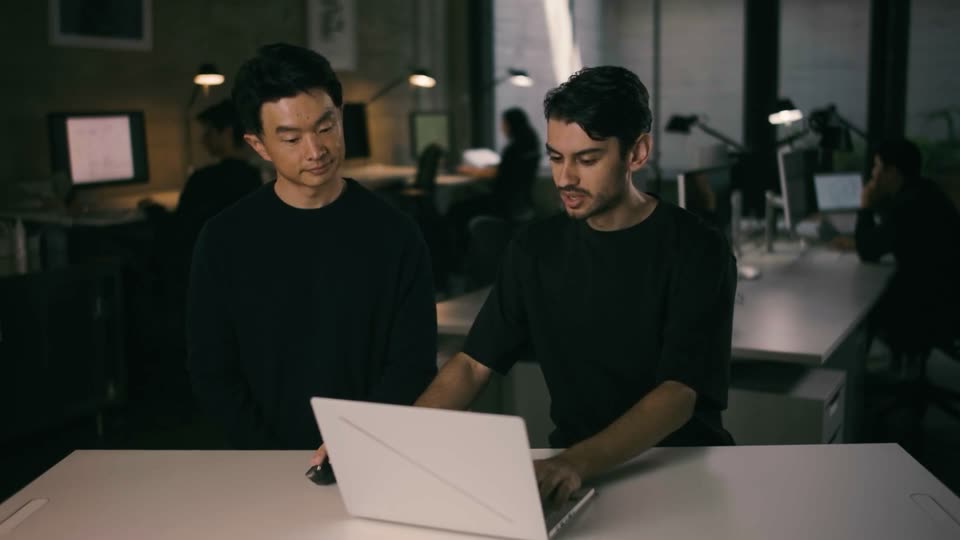
Two men in black shirts stand at a table with a closed white laptop, in a dim open office with blurred coworkers at desks behind them. The man on the right turns his head toward the other. Lower-third name tags identify them.
On-screen text: “Paul Shin”, “CEO”, “Aidan Cantu”, “CTO”
Camera: Static
A metallic flange disc with a hex center and four cutouts sits centered on black; hex nuts and bolts ring its edge, then detach and fly outward past the camera while the disc settles face-on.
Techniques: 3D mockup, Particles, Parallax
Camera: Push in
A metallic cylindrical actuator sits in exploded 3D view on a dark dotted grid, its rings, plates and nozzle separated along the axis while loose bolts drift in space. Thin leader lines tie each part to a small text tag, and the assembly rotates slowly.
On-screen text: “Upper Retaining Ring”, “Liner”, “Case”, “Upper Injector Plate”, “Nozzle”, “Lower Injector Plate”, “Lower Retaining Ring”
Techniques: 3D mockup
Camera: Push in
A 3D exploded view of a cylindrical metal device with floating components. Green text labels point to each part before fading out.
Techniques: 3D mockup
Camera: Static
A 3D render of a black cylindrical strut and a silver perforated disc floats over a glossy black floor with a faint dot grid. The camera swings from a diagonal view of the strut to a front-on view of the disc as loose bolts drift in the air.
Techniques: 3D mockup
Camera: Static
A silver machined disc with a ring of bolt holes tumbles in 3D against a black starfield, then locks flat into a dark brushed-metal panel, a thin crosshair marking its center.
On-screen text: “0”
Techniques: 3D mockup
Camera: Static
A shaded 3D view of a circular machined part flattens into a flat technical line drawing on gray paper, crosshairs centered and a dimension callout sliding in at the top right.
Techniques: Morph
Camera: Static
A technical blueprint of a circular mechanical component on gray paper, drawn in fine black lines with concentric rings and rows of bolt holes. The frame pulls back to reveal dimension callouts and a section view on the right.
Camera: Pull out
A close-up of a technical drawing on white paper drifts across the frame as red handwritten questions, arrows and circles are drawn on top, marking different interpretations. The shallow focus keeps only part of the sheet sharp.
Camera: Pull out
Top-down 3D view of engineering drawings marked with red handwritten questions, pens and colored sticky notes at the edges. The frame pulls back from a tight crop of the central sheet to show the full spread, then darkens to black.
Techniques: Parallax
Camera: Pull out
A rounded phone frame on the left fills with falling gold dollar coins that pile to the top. On the right, cost tiers for Design, Prototyping, Production and Customer slide in with dollar ranges, the list scrolling up. A gold reference line sits top right.
On-screen text: “Reference: Society of Automotive Engineers”, “Design”, “$500 - $1,500”, “Prototyping”, “$5,000 - $50,000”, “Production”, “$100,000 - $1,500,000”, “Customer”, “$1,500,000 - $500,000,000”
Techniques: 3D mockup, Kinetic type, Light sweep
Camera: Pull out
A dark blueprint grid frames a yellow F4 logo inside a white target reticle. Cost-range lines on the right fade out as horizontal measurement scales extend from the center, four vertical terms appear at the corners, and the logo pulses.
On-screen text: “Reference: Society of Automotive Engineers”, “Customer”, “$1,500,000 - $500,000,000”, “Production”, “$100,000 - $1,500,000”, “Prototyping”, “$5,000 - $50,000”, “Fit”, “Function”, “Fabrication”
Techniques: Masking, Light sweep
Camera: Static
A white blocky F4 mark with its wordmark sits centered on a dark blueprint grid of crosshair lines and corner brackets. Four vertical serif words frame the edges. The mark scales up slightly while the grid stays locked.
On-screen text: “Fit”, “Function”, “Fabrication”, “Form”
Camera: Static
Two presenters in black stand behind a white desk with a closed white laptop in a dim office; a white line diagram of a square with a crosshair circle draws itself over the left man, then a red chip with slashes and X.X and a green panel of symbols with a check mark pop in. The overlays clear and the pair look down at the laptop.
On-screen text: “Function”, “Fabrication”, “Form”, “F4 INDUSTRIES”, “X.X”, “XXXX”
Camera: Static
Over-the-shoulder shot of a laptop on a white desk, a hand on a mouse at the right. The screen changes from an empty data panel to a file list as a cursor hovers over the rows.
Techniques: Cursor demo
Camera: Static
Over-the-shoulder, locked-off view of a laptop on a white desk with a hand on a mouse at right; the dark screen shows a file dialog that switches to a centered logo and an empty-state message.
Camera: Static
Inside a CAD application, a black technical drawing of an injector lower fills the canvas while the cursor moves to the Analysis tab. The side panel switches from Properties to an Analysis view, showing green checkmarks for Datum, DRE, FCF, and Tolerance.
Techniques: Cursor demo
Camera: Push in
A dark CAD viewer shows a technical drawing with dimension callouts on the left and an Analysis panel on the right. A cursor clicks the Datum, DRF, FCF and Tolerance tabs in turn, each opening a checklist of green pass marks.
Techniques: Cursor demo
Camera: Push in
Two men in a dark office look at a white laptop, others working at desks behind them. The shot cuts to a close-up of the screen showing a layered blue and purple 3D model on a dark interface, a hand on a mouse at the right.
Camera: Static
A laptop sits angled on a white desk, its dark screen showing a layered blue-and-purple 3D model that rotates slowly. A hand rests on a mouse at the right edge, the camera holding a locked-off side view.
Techniques: 3D mockup
Camera: Static
A dark CAD interface shows a translucent purple 3D disc model with wireframe lines and dashed magenta reference planes, slowly orbiting in the viewport while a right-side analysis panel lists passed DRF checks.
Techniques: 3D mockup
Camera: Static
Over-the-shoulder close-up of a laptop on a white desk. The dark CAD interface shows a 3D ring model with cyan slots that rotates as a hand works the mouse; a dimensions panel with green checkmarks fills the right side.
Camera: Static
Two men in black shirts stand at a white table, one typing on a white laptop while the other looks at the screen. Behind them, a dim open-plan office holds several workers at desks with monitors and task lamps.
Camera: Static
A dark laptop rests on a white desk at an angle, its screen showing a CAD interface with a blue and yellow cylindrical model that slowly rotates. A hand grips a mouse at the right edge while a second hand works the keyboard, the frame locked off.
Camera: Static
A dark CAD inspection screen shows an orange and blue machined cylinder in 3D beside a results panel. The frame zooms in on the panel while a cursor glides to the View Stack Table button and hovers it.
Techniques: UI zoom, Cursor demo
Camera: Push in
A dark tolerance-analysis UI zooms out from a close-up of the results panel to the full screen: a stackup table on the left, an empty 3D viewport, and a tolerance panel with Distance values and PASS results on the right. A cursor rests in the center.
Techniques: UI zoom
Camera: Pull out
A dark app window pairs a tolerance table with a 3D view of an orange cylindrical part. The cursor drags the divider right, widening the table to reveal the full stackup breakdown while the 3D model narrows to a thin sliver.
Techniques: 3D mockup, Cursor demo
Camera: Static
Two men in black tops stand at a white desk in a dim studio, both looking down at an open white laptop whose lid faces the camera. Other workers sit at desks with monitors and lamps in the soft-focus background.
Camera: Static
A dark PDF viewer shows a technical drawing with colored dimension callouts; the view zooms into a section while the properties panel on the right updates, filling green progress bars and marking one frame with a red flag. A cursor rests on the Analysis tab.
Techniques: Cursor demo, UI zoom
Camera: Push in
A dark CAD window splits a technical drawing from an analysis panel. A cursor clicks the FCF tab, the pass/fail list scrolls down, and an error row expands to reveal its message. The drawing pans down to expose the title block.
Techniques: Cursor demo
Camera: Pan
A static medium shot frames two men in black shirts behind a white desk with a closed white laptop, in a dim office with blurred coworkers in the background. The man on the right speaks and gestures with his hands; the man on the left stands still.
On-screen text: “口”
Camera: Static
The app window shows a FAIR table of FCF and dimension rows beside a 2D technical drawing. The view zooms in and scrolls the list down as the cursor moves to the gold Export FAIR Report button.
Techniques: UI zoom, Cursor demo
Camera: Push in
Two men in black shirts stand at a white desk with a closed laptop in a dim office; the right man gestures as “No AI” blurs into focus over them. Then a cut to a dark dotted field where “results” and “can” appear at offset positions.
On-screen text: “No AI”, “results”, “can”
Techniques: Kinetic type
Camera: Static
On a dark dotted grid, a two-line white headline fades in from a soft blur, holds steady, then dissolves away as thin crosshair grid lines briefly frame the center.
On-screen text: “Producing deterministic results”, “engineers can trust.”
Camera: Static
A vertical clip of a rocket engine firing, with an orange flame and drifting smoke, sits centered on a dark grid canvas. Corner selection handles and edge ruler ticks mark it as a selected asset in a design tool.
Camera: Static
A yellow square with selection handles and a dark geometric logo shrinks and fades, revealing a white version of the logo. The text 'F4 INDUSTRIES' appears below it on a dark background with a dot grid and technical lines.
On-screen text: “F4 INDUSTRIES”
Techniques: Kinetic type
Camera: Static
A white F4 mark and the name F4 INDUSTRIES sit centered on a dark, dotted background framed by a thin HUD border with corner brackets and tick marks. Vertical words Fit, Fabrication, Function and Form run along the side edges while the URL types out character by character in a gray bar below the name.
On-screen text: “www.f4.dev/”
Camera: Static