
0:55
Explore
Polymet
Polymet · Aug 2024 · 0:48 · Full motion · AI-annotated
- Length
- 0:48
- Scenes
- 24 · 2.0 s avg
- Product on screen
- 0:05
- Features shown
- 5
- Call to action
- 0:44 · 91%
- Voiceover
- No
- Views
- 12K on YouTube
as of November 26, 2026
00:00:00 / 00:48:17
- Length
- 0:48
- Scenes
- 24 · 2.0 s avg
- Product on screen
- 0:05
- Features shown
- 5
- Call to action
- 0:44 · 91%
- Voiceover
- No
- Views
- 12K on YouTube
as of November 26, 2026
Polymet’s 0:48 launch film runs 24 scenes, about 2.0 s each. The product shows up at 0:05 and 5 features are revealed. The call to action lands at 0:44 (91% in). The video alternates full-frame typographic cards on peach and orange gradients with tight cursor-driven demos of the Polymet editor, each card announcing a benefit and the following UI scenes proving it. Cuts land on a fast 134 BPM grid, and the signature moves are words that scale up or resolve from blur to focus, plus 3D-tilted dashboard panels that rotate into flat view.
No filming indicatedEstimated needs: 4 capture groups — your screens or recordings · 1 official logo — reused across the film · 2 3D passages — build or supply
Is this your launch? to your site or press kit.
More like this
1:05

Palisade: Personalized sales agents for online marketplaces
Palisade · B2B · Aug 2026
1:24


Simular - 2,000,000,000 PCs sit on people's desks today. The next billion comp
Simular AI · Nov 2026
Similar soundtrack
Films whose music sounds like this one, voice left out
0:35


Topaz Labs - Try Astra for FREE 🚀 Our creative upscaler for video is now free to
Topaz Labs · Modern cinematic trailer music blended with electronic dance music
0:24

Jupiter - Most trading bots were built for the last meta. Limited discovery. S
Jupiter · Cinematic Percussion / Sound Design
1:00
Rork - Introducing Rork Max AI that one-shots almost any app for iPhone,
Rork · High-energy electronic dance music with Indian, Latin, and sports-inspired rhythmic elements.
Polymet, scene by scene
· 24 scenes as text
01 · Hook · 0:00–0:01
On a soft peach gradient, bold orange sans-serif text builds up on a locked-off frame. The word Imagine appears center-left, then expands into the line Imagine a world with where ... dropping in below.
On-screen text: “Imagine a world”, “where ...”
Techniques: Kinetic type
Camera: Static
02 · Hook · 0:01–0:03
On a warm orange gradient, the word anyone in cream bold sans starts small and soft, then scales up and sharpens until it fills the frame, while the phrases Imagine a world and where ... hold still around it.
On-screen text: “Imagine a world”, “where ...”, “anyone”
Techniques: Kinetic type
Camera: Static
03 · Hook · 0:03–0:05
A soft peach gradient fills the frame while a centered orange headline builds line by line. The first line reads can create, then stunning designs fades in below it, the final letter easing in last.
On-screen text: “anyone”, “can create”, “stunning designs”
Techniques: Kinetic type
Camera: Static
04 · Product intro · 0:05–0:07
On a peach background, the navy Polymet wordmark with a dotted-triangle mark and the orange tagline fade in at the top. Below, a row of tilted dashboard mockups in dark, white and purple scales up and rises into a 3D perspective row.
On-screen text: “Backed by Y Combinator”
Techniques: 3D mockup
Camera: Push in
05 · Product intro · 0:07–0:08
On a warm orange gradient, the cream headline AI Designer fades to full opacity while the lighter line at your service scales in beneath it. The centered text then holds still on the plain background.
On-screen text: “AI Designer”, “at your service”
Techniques: Kinetic type
Camera: Static
06 · Problem · 0:08–0:10
A pale peach gradient fills the frame behind a centered orange headline. 'No more design' holds still while 'bottlenecks' scales in below it, completing the two-line statement.
On-screen text: “No more design”, “bottlenecks”
Techniques: Kinetic type
Camera: Static
07 · Feature reveal · 0:10–0:14
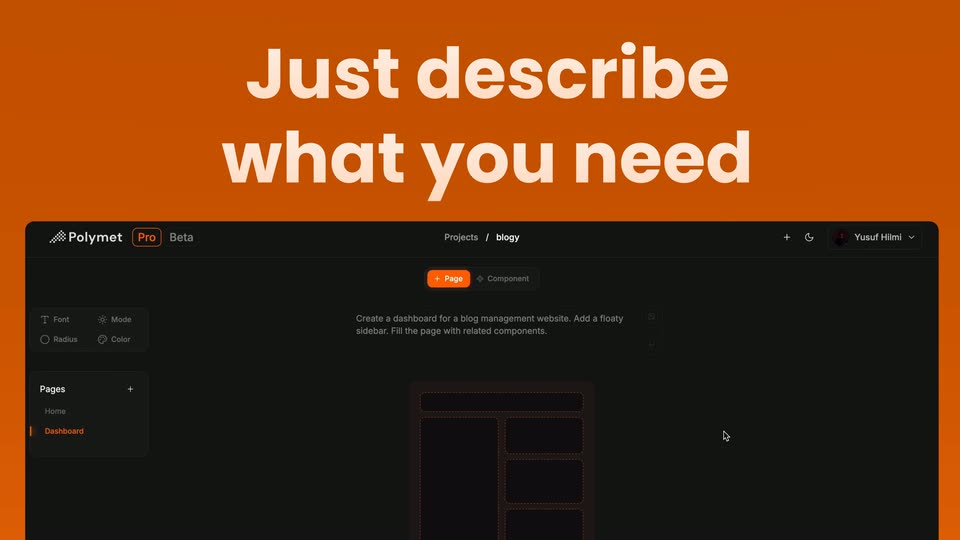
On an orange field, a cream headline builds line by line above a dark Polymet editor. A cursor clicks the orange send button in the prompt box, then the window scales up and rises as a dashed wireframe dashboard assembles beneath it.
On-screen text: “Just describe”, “what you need”
Techniques: Kinetic type, Cursor demo, UI zoom
Camera: Static
08 · Feature reveal · 0:14–0:19
On an orange field, a dark editor window frames a white blog dashboard. The view zooms in and scrolls down, moving from the headline stat cards to the monthly bar chart, then to category bars and a comments list.
Techniques: UI zoom
Camera: Push in
09 · Feature reveal · 0:19–0:22
Bold orange headline builds letter by letter on a peach field. A dark app window slides from the bottom-right corner to the center, scaling up to reveal the full dashboard, while a cursor drifts toward the top toolbar.
On-screen text: “Iterate”, “within seconds”
Techniques: Kinetic type, UI zoom, Cursor demo
Camera: Pan
10 · Feature reveal · 0:22–0:23
A dark app window with a top navigation bar and a white Blog Dashboard card crossfades into place. A cursor then moves to hover the New Subscribers stat card, which gains an orange outline and lifts slightly.
Techniques: Cursor demo
Camera: Push in
11 · Feature reveal · 0:23–0:24
A peach blog dashboard sits inside a dark editor window, showing four stat cards, a bar chart and a posts table. A white cursor arrow drifts right across the stat row while the interface text resolves from a brief blur.
Techniques: Cursor demo
Camera: Static
12 · Feature reveal · 0:24–0:26
Close-up of a blog dashboard with stat cards, a bar chart and a posts table; a cursor hovers over the selected New Subscribers card, then the frame pulls back to reveal the full Polymet app window on a solid orange background.
Techniques: Cursor demo, UI zoom
Camera: Static
13 · Feature reveal · 0:26–0:28
On a solid orange field, the headline Create interactive prototypes fades in line by line above a flat screenshot of the Polymet editor showing a blog dashboard. The interface stays locked at the bottom of the frame while the type resolves from a soft blur to full opacity.
On-screen text: “Create interactive”, “prototypes”
Techniques: Kinetic type
Camera: Static
14 · Feature reveal · 0:28–0:29
On a solid orange background, a cream headline holds at the top while a white card in the lower half settles into frame and fills with a blog dashboard: sidebar menu, three stat cards, a bar chart, and a posts table.
On-screen text: “Create interactive prototypes”
Camera: Static
15 · Feature reveal · 0:29–0:30
On an orange field, the white headline 'Create interactive prototypes' sits above the top edge of a blog-admin dashboard card. The card scales up and slides to center as the background turns white and the headline exits.
On-screen text: “Create interactive prototypes”
Camera: Push in
16 · Feature reveal · 0:30–0:32
A white blog dashboard panel rotates in from the left at a 3D angle over a solid orange background, then settles into a flat front view. The panel holds stat cards, a bar chart, a recent posts table and a comments feed.
Techniques: 3D mockup
Camera: Static
17 · Feature reveal · 0:32–0:34
A peach gradient background holds three centered lines of orange text. The bold headline fades in first, then two lighter sublines fade in below it one after another, then hold in place.
On-screen text: “Share your preview links”, “Do your customer demos”, “Collaborate with your team”
Techniques: Kinetic type
Camera: Static
18 · Feature reveal · 0:34–0:36
An orange screen holds the white headline “Get production-ready frontend code” above a tilted 3D view of the Polymet editor. The camera pushes into the mockup until the Blog Dashboard fills the frame, with its stat cards, bar chart and posts table in focus.
On-screen text: “Get production-ready frontend code”, “Share your preview links”, “Do your customer demos”, “Collaborate with your team”
Techniques: 3D mockup, UI zoom
Camera: Push in
19 · Feature reveal · 0:36–0:38
A dark code editor window fills the frame, its tab bar reading Preview and Code. Syntax-highlighted code scrolls upward through the panel while a mouse cursor hovers across the lines. The view stays locked on the editor.
Techniques: Cursor demo
Camera: Pan
20 · Other · 0:38–0:39
On a peach-to-white gradient, the orange phrase “For startups” sits centered as the second word fades in, then the word is replaced by “enterprises,” which scales up in place.
On-screen text: “For startups”, “For enterprises”
Techniques: Kinetic type
Camera: Static
21 · Other · 0:39–0:40
On a soft peach gradient, the bold orange phrase For enterprises scales and is replaced by For you, which fades in and holds centered on the locked-off frame.
On-screen text: “For enterprises”, “For you”
Techniques: Kinetic type
Camera: Static
22 · Other · 0:40–0:42
On a warm orange gradient, a small caption “For you” is followed by “Design without limits” fading in at center, then “Create with confidence” fading in below it. The two lines hold for a beat, then fade out together.
On-screen text: “For you”, “Design without limits”, “Create with confidence”
Techniques: Kinetic type
Camera: Static
23 · Other · 0:42–0:44
On a warm cream-to-white gradient, the bold orange headline “Idea to prototype” scales in at center, then “within seconds” fades in beneath it in a lighter orange. The frame stays locked off as both lines settle.
On-screen text: “Idea to prototype”, “within seconds”
Techniques: Kinetic type
Camera: Static
24 · CTA · 0:44–0:48
A flat orange gradient fills the frame as the centered headline 'Join Polymet' and the smaller URL 'polymet.ai' below it fade in, hold through the middle of the clip, then fade out.
On-screen text: “Join Polymet”, “polymet.ai”
Camera: Static