3:16


Introducing reMarkable 2 — the paper tablet (2020)
reMarkable · Hardware · Mar 2020
Jupiter · Mar 2026 · 0:24 · AI-annotated
Jupiter’s 0:24 launch film runs 14 scenes, about 1.7 s each. The product shows up at 0:06 and 7 features are revealed. The call to action lands at 0:20 (85% in). The video opens on a particle comet field that assembles a hook question, then holds the product title card before chaining seven feature cards in a rapid montage where each UI panel blurs, slides and crossfades into the next. Signature moves are the scramble and blur title transitions, the row by row button cascades, and the locked dark teal gradient with drifting comet particles that ties every cut together.
Is this your launch? to your site or press kit.
reMarkable · Hardware · Mar 2020
Prime Intellect · Feb 2026
A dark teal particle field drifts and bursts like a comet. White sans-serif text assembles word by word, first posing a question about trading on Telegram, then revealing “Jupiter introduces Comet Trading Bot”.
On-screen text: “Want the fastest trading experience on Telegram?”, “Jupiter introduces Comet Trading Bot”
Techniques: Kinetic type, Particles
Camera: Push in
A dark field of pale particle streaks radiates from the top like a comet tail while a teal glow builds in the lower right. Two centered lines of glowing white text read “Jupiter introduces” above “Comet Trading Bot”, the second line scaling up as it settles.
On-screen text: “Jupiter introduces”, “Comet Trading Bot”
Techniques: Particles, Kinetic type
Camera: Push in
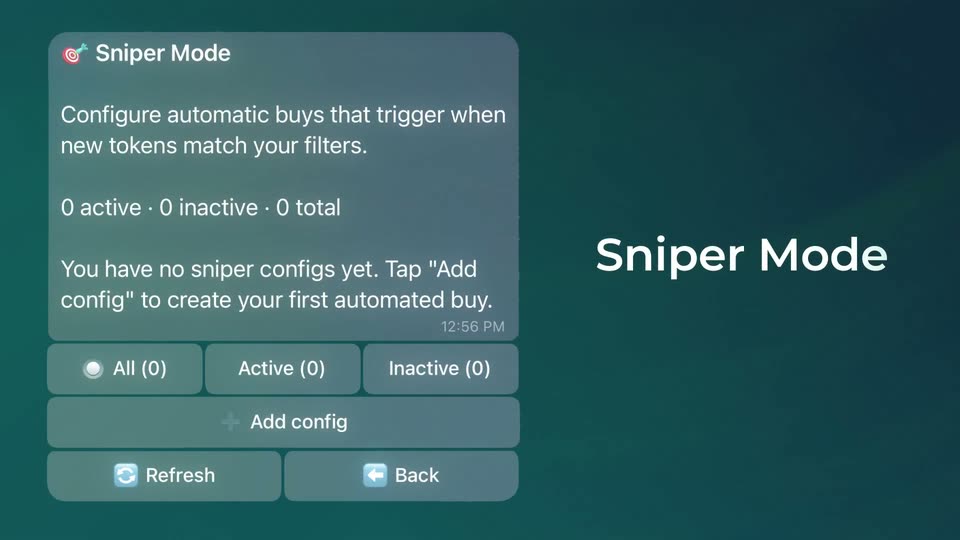
A rounded UI card titled Sniper Mode sits on the left over a teal gradient. A large white title Sniper Mode on the right scrambles its letters as the card blurs and dims.
On-screen text: “Sniper Mode”
Techniques: Kinetic type
Camera: Static
A dark green interface displays a Copy Trader settings card on the left and a matching title on the right. The view then cuts to a dense text layout detailing wallet balances, trade metrics, and security status.
On-screen text: “Copy Trader”
Camera: Static
A dark teal backdrop holds a white headline on the right while a terminal panel on the left scrolls its monospace token report upward, passing wallet, trade and security lines.
On-screen text: “Token Scan”
Camera: Pan
A translucent wallet panel on the left swaps from token security details to a portfolio view, while a white label on the right crossfades from Token Scan to Update Info on a dark teal gradient.
On-screen text: “Token Scan”, “Update Info”
Techniques: Kinetic type
Camera: Pan
A flat portfolio UI card sits on the left over a dark teal gradient, showing a wallet address and zero balances above three buttons. The white headline Portfolio Tracking on the right slides down and blurs out of frame.
On-screen text: “Portfolio Tracking”
Techniques: Kinetic type
Camera: Static
On a dark teal gradient, a glowing white Swap title sits above a grid of grey buttons. The rows cascade in from top to bottom, sharpening one line at a time, ending on a slippage toggle.
On-screen text: “Swap”
Camera: Static
A grid of rounded interface buttons sits on a dark teal field beneath a large title. The title and the upper rows blur and slide left to a new set of labels while the bottom rows hold still.
On-screen text: “Swap”, “DCA”
Camera: Static
On a dark teal gradient, a large white DCA title sits above a grid of muted blue-gray buttons that fade in row by row from top to bottom, finishing with the Main button.
On-screen text: “DCA”
Camera: Static
A teal gradient frame holds a grid of grey control buttons under a large white DCA title; the panel whips sideways in a fast blur as the title swaps to Limit Order and the Limit button gains a green check.
On-screen text: “DCA”, “Limit Order”
Techniques: Speed ramp
Camera: Static
A glowing 'Limit Order' headline sits above a grid of grey control buttons (wallet, DCA, swap, limit, buy, sell, amount and trigger rows) on a teal gradient. The lower rows fade in, then the panel blurs horizontally and the title slides up as the scene exits.
On-screen text: “Limit Order”
Camera: Static
A 3D iPhone mockup tilts at the left, its Comet Trading screen scrolling through security, LP and wallet details, while the headline Available Now crossfades in on the right over a dark teal gradient.
On-screen text: “Available Now”
Techniques: 3D mockup
Camera: Static
A dark teal gradient fills the frame with the white wordmark centered, a striped sphere logo sitting to the right of the text. The lockup holds still on a locked-off frame, brightening slightly into full white.
On-screen text: “Just Use Jupiter”
Camera: Static