0:48

Greg Joswiak - Everyday tasks? No sweat. Faster graphics? Nailed it. On-device AI? Y
Apple · Hardware · Oct 2026
ElevenLabs · Mar 2025 · 3:08 · AI-annotated
ElevenLabs’s 3:08 launch film runs 21 scenes, about 9.0 s each. The product is on screen from the first frame and 1 feature is revealed. There is no explicit call to action; a voiceover carries the film. The video opens on a dark cinematic title card with a dramatic prop and a corner webcam inset, then holds on a single-screen interface walkthrough that uses slow zooms and a cyan word-tracking highlight to follow the demo. A persistent rounded webcam tile in the lower right and a minimal two-bar logo bookend the piece, keeping the layout anchored while the interface carries the action.
Is this your launch? to your site or press kit.
Apple · Hardware · Oct 2026
Riverside · Jun 2024
Perplexity · AI · Nov 2026
Films whose music sounds like this one, voice left out
Aqua Voice · Product demonstration voiceover
Hey Revia · Corporate Tech Demo
A man in a black suit holds a skull and speaks on a dark set, with a small inset at lower right showing a bald man at a microphone. Large white Actor Mode text sits left; the ElevenLabs logo scales in top left, outlined squares mark the corners.
On-screen text: “IIElevenLabs”, “Actor Mode”
Techniques: Split screen
Camera: Static
A dark still of a suited man holding a skull prop fills the frame beside a rounded-corner inset of a bald presenter speaking into a microphone. The title “Actor Mode” gives way to a three-line caption in the first second.
On-screen text: “Actor Mode”, “Precisely control the delivery of a script using your own voice.”
Camera: Static
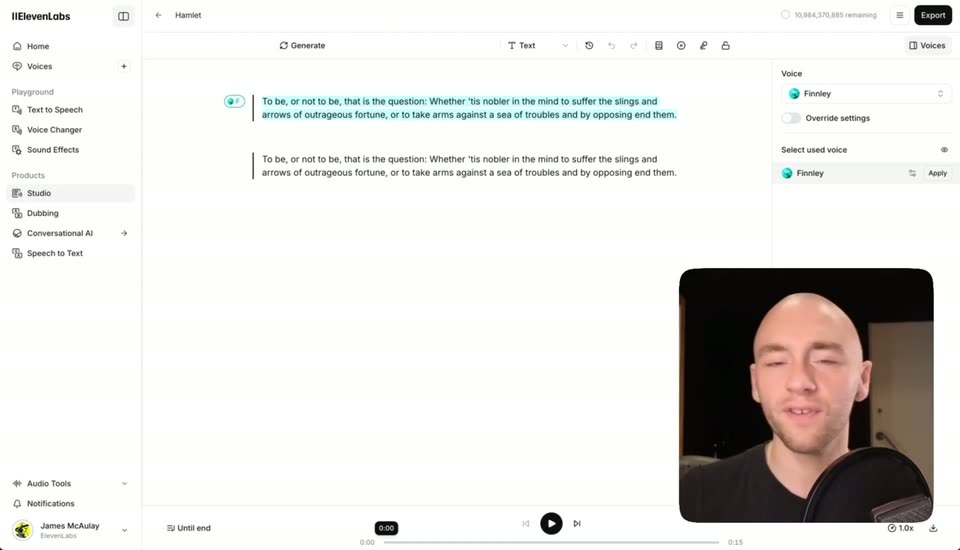
The ElevenLabs Studio screen holds on a Hamlet passage with a webcam inset of a bald man speaking into a microphone. A cursor hovers over the highlighted text, the view then zooms into the text block, and the scene ends on a scaling logo with a three-line headline.
On-screen text: “Precisely control the”, “delivery of a script using”, “your own voice.”
Techniques: Cursor demo, UI zoom
Camera: Push in
A screen recording of the ElevenLabs Studio shows the Hamlet text, top paragraph highlighted cyan, with a webcam video of a speaking man bottom right. The view pulls back to the full app at 13s, then zooms onto the toolbar as the cursor hovers the mic icon, revealing a tooltip.
Techniques: UI zoom, Cursor demo
Camera: Pan
A blurred document editor sits behind a sharp white read-aloud panel in the lower left, its text box holding a Hamlet excerpt. A hand cursor hovers over the top toolbar and a small webcam tile of a bald man with a microphone anchors the bottom right.
Techniques: Cursor demo
Camera: Static
A 'Direct with your voice' modal opens at center over a defocused document editor, the background gradually pulling into focus. A bald presenter speaks in a small rounded webcam window pinned to the lower right.
Camera: Pull out
A centered modal titled “Direct with your voice” sits over a blurred editor, showing a Hamlet excerpt and a Record audio button. A cursor glides from the toolbar to the text box while a bald man talks into a mic in a bottom-right webcam feed.
Techniques: Cursor demo
Camera: Static
A dimmed app screen shows a voice modal with a text box and a record option. A cursor moves down, switches the panel to mic selection, and opens a microphone dropdown. In the bottom right, a bald man speaks into a studio microphone on a small live video tile.
Techniques: Cursor demo
Camera: Static
A blurred document editor with a 'Direct with your voice' modal sits center frame, a cursor hovering inside it. In the bottom right, a video call window shows a bald man in a black shirt speaking into a microphone and raising a hand to gesture.
Camera: Static
A faded app screen centers a 'Direct with your voice' modal; a cursor clicks the Start button and a 3-2-1 countdown ticks in, while a bald man talks into a studio mic inside a rounded window on the right.
Techniques: Cursor demo
Camera: Static
A blurred document editor sits behind a centered 'Direct with your voice' modal. The modal shows a text passage over a recording panel that counts 3, 2, 1, then a stop button and running timer. A webcam inset of a bald man at a microphone occupies the bottom right.
Techniques: Cursor demo
Camera: Static
A modal titled 'Direct with your voice' floats over a blurred notes app, its waveform filling and timer counting up while a man in a bottom-right webcam inset speaks into a microphone. A cursor rests beside the modal.
Camera: Static
A blurred document editor fills the screen behind a centered modal titled Direct with your voice, showing a text box and a recording player with a stop button and moving waveform. A small live video of a bald man at a microphone sits bottom right, his timer counting up.
Camera: Static
A dimmed document editor sits behind a centered modal with a text box and a recording panel. A stop button and a growing waveform sit above a timer that counts up. On the right, a video call window shows a bald man speaking into a microphone.
Camera: Static
A document editor shows a centered 'Direct with your voice' modal with a voice recording in progress, the timer counting down over a waveform. The panel then swaps to a 'Recording.mp4' file with a Generate button. A man speaks into a microphone in a webcam inset at bottom right.
Techniques: Cursor demo
Camera: Static
A blurred editor screen sits behind a centered “Direct with your voice” modal holding a Hamlet passage and an attached Recording.mp4 file. A cursor hovers on the file row. In the bottom right, a video call tile shows a bald man in a black shirt talking into a microphone.
Techniques: Cursor demo
Camera: Static
A blurred app window fills the frame behind a centered white modal card holding a text passage, an audio file row and a Generate button, with a cursor on the file. On the right, a small video inset shows a bald man speaking into a microphone.
Camera: Static
A light product interface displays a 'Direct with your voice' modal containing a quoted passage and an uploaded audio file, while a bald man in a black shirt talks into a microphone in a video inset at the right. A cursor drifts toward the Generate button.
Techniques: Split screen, Cursor demo
Camera: Static
The ElevenLabs Studio interface fills the screen, showing the Hamlet soliloquy in the text editor with a teal highlight that tracks the spoken words as the bottom playback bar advances. A small webcam window in the lower right shows a bald man speaking into a microphone.
Camera: Static
The ElevenLabs Studio interface sits static, a Hamlet passage with its second line highlighted in teal. A hand cursor rests at the center, and a small webcam window at the bottom right shows a bald man in a black shirt speaking into a microphone.
Camera: Static
On a plain white background, two black vertical bars sit centered. The wordmark ElevenLabs fades in beside them to complete the logo, holds for a beat, then fades out, leaving only the two bars.
On-screen text: “ElevenLabs”
Techniques: Kinetic type
Camera: Static