3:27
Explore
00:00:00 / 01:51:28
- Length
- 1:51
- Scenes
- 51 · 2.2 s avg
- Product on screen
- 0:03
- Features shown
- 3
- Call to action
- 1:38 · 88%
- Voiceover
- Yes
- Views
- 35K on X
as of November 18, 2026
Tella’s 1:51 launch film runs 51 scenes, about 2.2 s each. The product shows up at 0:03 and 3 features are revealed. The call to action lands at 1:38 (88% in), over a voiceover. The video is anchored by a single presenter in a glass office, cut rapidly against full-frame title cards, UI demos and 3D or graphics inserts, with a dark caption pill tracking the voiceover in every shot. Its signature moves are the constantly re-dressed presenter framing (sliding panels, torn-paper edges, rounded windows, sticker overlays) and bold glitch-fringed title cards that punctuate each feature.
Footage neededEstimated needs: 3 capture groups — your screens or recordings · 1 official logo — reused across the film · 25 filmed passages — shoot, supply or replace · 5 graphic passages — draw or supply · 2 3D passages — build or supply
Is this your launch? to your site or press kit.
More like this


Similar soundtrack
Films whose music sounds like this one, voice left out
1:35


Introducing Agent Plugins
OpenAI · Modern electronic
3:58
Raycast Just Got You A New Key
Raycast · Tech tutorial / Software demonstration
2:44

Introducing the Knowledge Graph
Google · Modern corporate electronic
Grant - Introducing the sickest agentic video editing setup: Tella Agent, Tel, scene by scene
· 51 scenes as text
01 · Hook · 0:00–0:00
A dissolve opens on a bald man in a black shirt speaking into a microphone in a bright office. He faces the camera, gesturing slightly, while a caption line sits at the bottom of the frame.
On-screen text: “Today we're launching”
Camera: Pull out
02 · Hook · 0:00–0:01
A tilted 3D flip-counter strip on black shows silver digits rolling from 0009 down to 0003. A small caption pill at the bottom syncs to the voiceover, reading the spoken words in sequence.
On-screen text: “Today we're launching”, “3”
Techniques: Kinetic type
Camera: Static
03 · Hook · 0:01–0:03
A bald man in a black shirt speaks into a boom-mounted microphone in a glass-walled office, gesturing with both hands before lowering them. A caption bar at the bottom reads the line he is saying.
On-screen text: “awesome new features:”
Camera: Static
04 · Product intro · 0:03–0:06
A centered wordmark on a white field cycles from Tella to Tella Agent to Tella Motion, alternating black and gray, while a rounded caption pill at the bottom updates to the matching name. The frame stays locked off throughout.
On-screen text: “the Tella Agent,”, “Tella Motion,”
Techniques: Kinetic type
Camera: Static
05 · Product intro · 0:06–0:06
Black background. Bold white
On-screen text: “Auto”, “Capture”, “Auto Capture.”
Techniques: Kinetic type
Camera: Static
06 · Feature reveal · 0:06–0:07
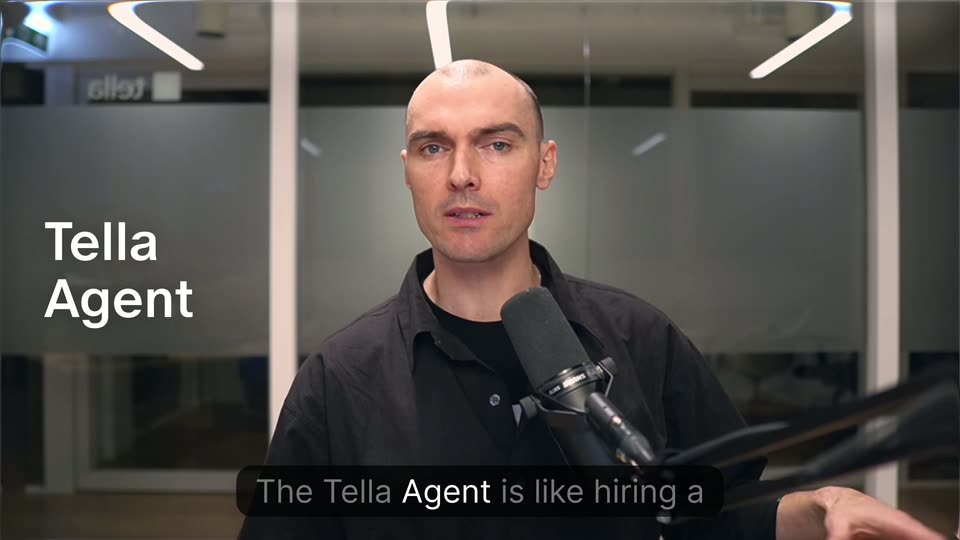
A bald man in a black shirt sits at a microphone in a glass-walled office, speaking to camera. A white title reads Tella Agent on the left while a caption line types the voiceover at the bottom.
On-screen text: “Tella Agent”, “The Tella Agent is like hiring a”
Camera: Static
07 · Feature reveal · 0:07–0:10
A bald man in a black shirt speaks into a studio microphone. A white-outlined panel with an editing desk and the title Tella Agent slides in from the left, then framed studio-room panels slide and settle around him while captions appear at the bottom.
On-screen text: “Tella”, “Agent”, “The Tella Agent is like hiring a”, “professional”, “video editor”
Techniques: Masking
Camera: Static
08 · Feature reveal · 0:10–0:13
A bald man in a black shirt speaks into a studio microphone against a frosted-glass office wall. White and blue chat bubbles reading “u up” and “who is this” pop in around his head while black subtitle captions track his speech along the bottom.
On-screen text: “that you can use”, “u up”, “whenever you like,”, “who is this”, “and they work 100 times faster.”
Camera: Static
09 · Feature reveal · 0:13–0:15
On a plain white background, a dark rounded caption pill sits at the bottom. Large black text reads 100x faster, scaling up from the left into the center while the caption fades out.
On-screen text: “and they work 100 times faster.”, “100x faster”
Techniques: Kinetic type
Camera: Static
10 · Feature reveal · 0:15–0:18
A white tella input card sits on a light background. A recording thumbnail drops in, then a prompt is typed across the field, while a dark caption below swaps from 'Complex video editing tasks' to 'that would normally take hours,' and the frame tilts up with a blur.
On-screen text: “Complex video editing tasks”, “that would normally take hours,”
Techniques: UI zoom
Camera: Static
11 · Feature reveal · 0:18–0:19
A bald man in a black shirt speaks into a studio microphone, gesturing with his hands, set against a frosted-glass office backdrop. A white subtitle sits in a black box along the bottom edge.
On-screen text: “the Agent can do in like 10 minutes.”
Camera: Static
12 · Feature reveal · 0:19–0:21
A white document view, locked off, with a gray pill reading “Tight, punchy cut for YouTube” at top right. Body lines and a second bullet point appear in sequence as if being written, while a dark caption pill at the bottom holds the line about the Agent.
On-screen text: “the Agent can do in like 10 minutes.”
Techniques: Kinetic type
Camera: Static
13 · Feature reveal · 0:21–0:23
A bald man in a black shirt speaks into a shotgun microphone on a boom arm, gesturing with his hands. He stands in an office with frosted glass panels and white columns behind him. A caption line sits in a dark box at the bottom of the frame.
On-screen text: “It can clean up your footage,”
Camera: Static
14 · Feature reveal · 0:23–0:23
On a blue paper background, two film strips slide in from the top and bottom edges and settle horizontal, each holding a row of live-action frames of two people in an office. The caption appears in a black pill at the bottom.
On-screen text: “pick your shots,”
Camera: Static
15 · Feature reveal · 0:23–0:24
Two horizontal film strips on a blue textured background, each holding five frames of an interview between a man in a cap and a woman holding a microphone. The frames advance one step. A dark rounded caption below reads “pick your shots,”.
On-screen text: “pick your shots,”
Camera: Static
16 · Feature reveal · 0:24–0:24
Two black film strips holding interview frames lie on a blue textured surface. The lower strip slides left while a new strip of night-city taxi footage slides in from the right. A dark rounded pill with the caption fades in at the bottom center.
On-screen text: “find and add B-roll,”
Camera: Static
17 · Feature reveal · 0:24–0:26
Two horizontal film strips slide sideways over a textured blue surface. The top strip holds interview clips of a man in a cap and a blonde woman, the bottom strip holds city B-roll clips of a taxi, a bridge, Times Square and a subway. A dark pill caption sits below.
On-screen text: “find and add B-roll,”
Camera: Static
18 · Feature reveal · 0:26–0:27
A bald man in a black shirt speaks into a mounted microphone in front of frosted glass office panels, gesturing with both hands. Subtitles at the bottom read “and it can even,” then “clip your videos for social.”
On-screen text: “and it can even”, “clip your videos for social”
Camera: Static
19 · Feature reveal · 0:27–0:30
A white chat UI: a gray bubble sits top right, a status line changes from Working to Worked for 24s, and a post card with a text field and Skip and Publish buttons fades in below. A dark caption pill at the bottom swaps its phrase mid-clip.
On-screen text: “clip your videos for social”, “and publish them for you.”
Camera: Static
20 · Feature reveal · 0:30–0:32
A white agent chat shows a task row flip from Working to Worked for 9s as a posted result card with a video thumbnail slides in below. A dark caption pill at the bottom holds white words, then blurs and fades out.
On-screen text: “can also for you.”
Camera: Static
21 · Feature reveal · 0:32–0:33
On a black field, the word Motion holds the left with a red and blue glitch fringe while Graphics snaps in beside it. A small gray caption reads motion graphics using our new along the bottom edge.
On-screen text: “Motion”, “motion graphics using our new”, “Graphics”
Techniques: Kinetic type
Camera: Static
22 · Feature reveal · 0:33–0:39
A man in a black shirt speaks into a studio microphone in front of frosted glass office walls. A white Tella Motion label fades in and slides at the left edge, then a blue liquid shape expands across the frame and covers the shot.
On-screen text: “motion graphics using our new”, “motion graphics engine.”, “Tella”, “Motion”, “Motion.”, “Tella Motion was designed for maximum”
Techniques: Kinetic type, Masking
Camera: Static
23 · Feature reveal · 0:39–0:40
A solid blue field with a faint rectangular glow in the upper left. A dark rounded pill at the bottom cycles through the phrases “Tella Motion was designed for maximum”, “creativity”, “and rapid iteration.”, each held still while the voiceover reads the line. Rough mask edges linger at the corners.
On-screen text: “Tella Motion was designed for maximum”, “creativity”, “and rapid iteration.”
Techniques: Kinetic type, Masking, Light sweep
Camera: Static
24 · Feature reveal · 0:40–0:41
A bald man in a black shirt speaks into a studio microphone behind a glass wall, framed by a blue paint splash graphic on the left and a caption pill at the bottom. The locked-off frame holds as he talks.
On-screen text: “and rapid iteration.”
Camera: Static
25 · Feature reveal · 0:41–0:44
A bald man in a black shirt sits before a studio microphone in a glass-walled office, speaking to camera and gesturing with both hands. White subtitle captions change at the bottom of the locked-off medium shot.
On-screen text: “and rapid iteration.”, “dream up”, “and create”
Camera: Static
26 · Feature reveal · 0:44–0:44
A small purple app icon centered on white scales up into a rounded-rectangle window revealing a live-action interview: a man in a green shirt and cap with a mic, and a blonde woman in a striped top. A dark caption bar holds the line at the bottom.
On-screen text: “the craziest motion graphics in the”
Techniques: Masking
Camera: Static
27 · Feature reveal · 0:44–0:45
An isometric exploded diagram of a small device, line art with shaded 3D parts and a COVER leader line, sits on a pale background. It cuts to a dark room revealed only through the cutout letters of the word INSPIRATION.
On-screen text: “the craziest motion graphics in the”, “INSPIRATION”
Techniques: Masking, 3D mockup
Camera: Pull out
28 · Feature reveal · 0:45–0:46
On a black background, a horizontal bar chart titled “Complex object sort” animates: the blue Swift bar and the gray Objective-C and Python bars stretch to the right, each revealing its multiplier at the tip. A gray caption with one bold white word sits at the bottom.
On-screen text: “the craziest motion graphics in the”
Camera: Static
29 · Feature reveal · 0:46–0:47
A bald man in a black shirt stands centered before a boom microphone, gesturing with both hands then dropping them, against a frosted-glass office wall. A dark rounded caption box at the bottom swaps text lines as he speaks.
On-screen text: “exact same place”, “the craziest motion graphics in the”
Camera: Static
30 · Feature reveal · 0:47–0:51
The editor interface zooms into the timeline area. A hand cursor clicks the Add clip button, opening a dropdown menu with clip options, then hovers over one item. A dark caption pill sits at the bottom reading the current line of narration.
On-screen text: “So you don't need to stitch together a”
Techniques: UI zoom, Cursor demo
Camera: Push in
31 · Feature reveal · 0:51–0:54
A bald man in a black shirt speaks into a studio microphone in a glass office, framed by a jagged white torn-paper edge; the area outside the tear shows a slightly zoomed duplicate of the same shot. Subtitle lines swap at the bottom.
On-screen text: “So you don't need to stitch together a”, “bunch of different tools and move around”, “gigantic”
Techniques: Masking
Camera: Static
32 · Feature reveal · 0:54–0:56
A bald man in a black shirt speaks into a microphone as a dark export dialog with a progress bar opens over him through a torn edge, dimming the office. A white caption swaps at the bottom.
On-screen text: “gigantic”, “video files.”
Techniques: Masking
Camera: Static
33 · Feature reveal · 0:56–1:00
A bald man in a black shirt talks into a boom microphone in a frosted-glass office, gesturing with both hands. White subtitle captions in a dark pill appear at the bottom of the frame.
On-screen text: “if you're not sure how to describe”, “the motion graphic that you're after,”
Camera: Static
34 · Feature reveal · 1:00–1:06
A light chat interface shows a prompt bubble and a tweet card with a video thumbnail; white caption phrases cycle in a dark pill at the bottom. The thumbnail then scales up into a full-frame shot of a man at a microphone, wrapped in a refracting rounded glass border.
On-screen text: “you can just”, “add a reference image,”, “or even a link,”, “and the agent”, “will figure it out.”
Techniques: Kinetic type, Morph
Camera: Static
35 · Feature reveal · 1:06–1:11
A bald man in a black shirt speaks into a studio microphone, framed in a rounded rectangle over a streaked blue and orange background. White caption lines swap in at the bottom of the frame as he talks.
On-screen text: “will figure it out.”, “Sometimes you don't need anything fancy”, “you just need a screen recording.”, “But what happens”
Camera: Static
36 · Feature reveal · 1:11–1:12
A person in dark pants and orange ice skates glides across a white frozen surface toward an orange inflatable dolphin on the right. Two chat bubbles sit at the bottom, a white one above a dark one. The shot opens on a brief crossfade of the skater.
On-screen text: “sorry busy”, “if you can't do the screen recording?”
Camera: Static
37 · Feature reveal · 1:12–1:15
A bald man in a black shirt talks into a broadcast mic, shown inside a rounded-corner window over a blurred blue and orange starry background. A white Auto Capture headline slides in from the left while a bottom caption reads we built Auto Capture.
On-screen text: “That's why”, “we built Auto Capture.”, “Auto Capture”
Techniques: Kinetic type
Camera: Static
38 · Feature reveal · 1:15–1:16
A plain white product screen: a gray chat bubble reading “Record a demo of tella.com” sits top right while a “Now” button fades in at the bottom center, then a gray status line “Reading the timeline...” slides in on the left as the button fades out.
On-screen text: “we built Auto Capture.”, “Record a demo of tella.com”
Camera: Static
39 · Feature reveal · 1:16–1:17
On a white field, a gray status line and a record pill sit at the top while a dark caption pill at the bottom reads your agents. The top elements fade out as the caption updates to can do the screen recording, then a hard cut lands on a blue grid.
On-screen text: “Record a demo of tella.com”, “your agents”, “can do the screen recording”
Techniques: Kinetic type
Camera: Static
40 · Feature reveal · 1:17–1:18
A flat browser mockup on a blue grid shows the tella.com homepage. The view zooms into the tabbed video section as a cursor moves from Short form to Product demos, enlarging the split preview of a man and a woman.
On-screen text: “can do the screen recording”
Techniques: UI zoom, Cursor demo
Camera: Push in
41 · Feature reveal · 1:18–1:19
A flat browser window mockup of the tella.com interface sits on a blue grid, showing format options and a video player. The window blurs to white and a dark pill with the label Auto Capture fades in at the bottom.
On-screen text: “Auto Capture”
Camera: Static
42 · Feature reveal · 1:19–1:20
A white product screen shows a recorded demo card with a thumbnail, play icon and specs line. At the bottom center a dark rounded caption pill fades in from a blur, revealing the word makes.
On-screen text: “makes”
Techniques: Kinetic type
Camera: Static
43 · Feature reveal · 1:20–1:21
A bald man in a black shirt speaks into a boom microphone in an office with frosted glass walls. He gestures with his right hand. A white caption on a dark rounded bar reads beautiful 4K at the bottom center, static throughout.
On-screen text: “beautiful 4K”
Camera: Static
44 · Feature reveal · 1:21–1:22
A bald man in a black shirt speaks into a studio microphone, framed chest-up against frosted glass office partitions. A small caption reading 'beautiful 4K' sits at the bottom center of the locked-off shot.
On-screen text: “beautiful 4K”
Camera: Static
45 · Feature reveal · 1:22–1:23
A man in a black shirt speaks into a studio microphone in front of frosted glass office panels. A small black badge reading 60fps sits at the bottom center of the locked-off frame.
On-screen text: “60fps”
Camera: Static
46 · Feature reveal · 1:23–1:31
A man in a black shirt speaks into a broadcast mic before a glass office wall, subtitles at the bottom. A white cursor arrow slides across the frame, then the shot zooms into his head as a cutout cloud sticker pops on top of it.
On-screen text: “screen recordings”, “with zoom effects and animated”, “cursors.”, “It all happens”, “remotely in the cloud,”
Camera: Push in
47 · Feature reveal · 1:31–1:38
A bald man in a black shirt speaks into a studio microphone against frosted glass office walls. A circular blue and white 1Password key logo pops in at the upper left as he gestures with both hands. Subtitles run along the bottom.
On-screen text: “not on your computer,”, “and you can connect 1Password so that”, “your agents can securely”, “record authenticated”, “sites.”
Camera: Static
48 · CTA · 1:38–1:44
A bald man in a black shirt speaks into a studio microphone in front of a frosted glass office wall. Three white labels stack in line by line on the left while a caption bar at the bottom follows his speech.
On-screen text: “Tella Agent”, “The Tella Agent,”, “Tella Motion”, “Tella Motion,”, “Auto Capture”, “and Auto Capture are live today for all”, “customers.”, “Head to tella.com”
Techniques: Kinetic type
Camera: Static
49 · CTA · 1:44–1:46
A white end card. The black wordmark tella sits centered as the gray .com fades in to complete tella.com. Below, a dark rounded pill caption reads Head to tella.com, then blurs and swaps to to try it out.
On-screen text: “Head to tella.com”, “to try it out”
Techniques: Kinetic type
Camera: Static
50 · CTA · 1:46–1:49
On a black field, the URL tella.com glows in white with a red-blue chromatic fringe and slowly scales up, a small grey caption through the MCP. fades in at the bottom, then the text extends to tella.com/mcp.
On-screen text: “tella.com”, “through the MCP.”, “tella.com/mcp”
Techniques: Kinetic type
Camera: Static
51 · Outro · 1:49–1:51
A blurred white URL sits centered on black, then the frame cuts to a plain white background where the purple Tella logo holds center, a soft diagonal gradient drifting slowly across the tile.
On-screen text: “tella.com/map”
Techniques: Light sweep
Camera: Static