1:22

Introducing Lumi, the Product Adoption Agent | Userlens
Userlens · Nov 2026
YouWare · Sep 2026 · 0:52 · AI-annotated
YouWare’s 0:52 launch film runs 46 scenes, about 1.1 s each. The product shows up at 0:03 and 5 features are revealed. The call to action lands at 0:48 (92% in), over a voiceover. The film interleaves warm live-action office shots with flat title cards and 3D document-card motion, announcing each feature with a serif headline before its demo. Signature moves are locked-off highlight tracking on key phrases, paint-stroke wipes, and knot-logo stings that punctuate the fast cut rate.
Is this your launch? to your site or press kit.
A woman in a rust sweater stands at a glass whiteboard, marker in hand, sketching a flowchart of boxes and arrows. Two colleagues watch from the blurred foreground as she gestures and talks in a bright open office.
Camera: Static
A hand in a rust-colored top lays a white Copic marker flat on a light wooden table, then pulls back out of frame. The person behind stays soft and out of focus.
Camera: Static
A low camera angle under a desk frames a person on a white office chair with a green seat, dark wide trousers and brown shoes on a gray carpet. One foot taps the floor as the chair shifts. Green cabinets and potted plants sit blurred behind.
Camera: Static
A woman in a coral top sits at a bright office desk, typing on a laptop beside a large monitor. A blurred green leaf fills the left foreground and an empty green chair sits right, framing the sunlit room with plants and tall windows.
Camera: Static
A motion-blurred close-up of a black knot mark pulls back to a centered lockup, the abstract loop symbol beside the bold wordmark YouWare on a light gray field.
Camera: Static
A black serif headline 'AI Agent' sits centered over a faint YouWare logo on a yellow, green and pink brushstroke collage. The word 'Workspace' then blurs in to the right, completing the title.
On-screen text: “AI Agent”, “Workspace”
Techniques: Kinetic type
Camera: Static
A green and blue torn-paper collage fills the frame. The black serif word “for” sits centered, then is replaced by “Knowledge Workers” as a dark curtain shape wipes in from the edges.
On-screen text: “for”, “Knowledge Workers”
Techniques: Kinetic type
Camera: Static
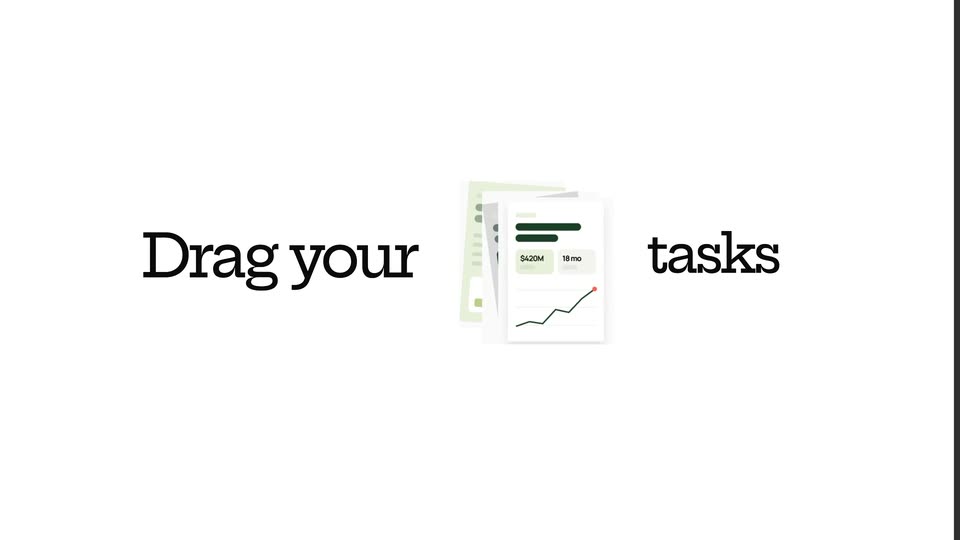
On a white field, the headline Drag your tasks slides together around a small document card. A gray panel then wipes in from the right, carrying a stacked set of document cards with a line chart and three illustrated head icons, with the word Export clipped at the panel edge.
On-screen text: “Drag your”, “tasks”
Techniques: Kinetic type, Masking
Camera: Static
A white serif headline “Expert team” holds at left on a dark gray field beside a 3x3 grid of left-facing head silhouettes at right, each masking a different image: vinyl label, saucer, typewriter, blue sky, orange text panel, hand, spreadsheet. The frame stays locked off.
On-screen text: “Expert team”
Camera: Static
On a flat light blue background, a white circle holding two overlapping head silhouettes, captioned Expert team, sits left. A dark pill slides in from the right, typing GOAL Launch a product, then a white mind map of rounded labeled nodes branches out to the right in stages before clearing to blank.
On-screen text: “Expert team”, “GOAL Launch a product”
Camera: Pull out
On a black background, the white serif word Research sits at left beside three stacked dots. At right, a fan of 3D document cards, a black report with an orange border over white and green cards, settles into place.
On-screen text: “Research”
Techniques: 3D mockup, Kinetic type
Camera: Pan
On a black background, a white serif word list on the left cycles, with Design sliding in above Analyze beside a vertical dot indicator. On the right, a 3D stack of report cards, yellow, white and dark, rotates in perspective to reveal covers and a bar chart.
On-screen text: “Analyze”, “Design”
Techniques: 3D mockup, Kinetic type
Camera: Static
On black, a tilted stack of 3D document cards (yellow, green, white) sits right of the serif word Design, then pulls back into a deep field of blurred floating file cards as the headline Every kind of work in one fades in at center.
On-screen text: “Design”, “Every kind of work in one”
Techniques: Kinetic type, 3D mockup, Parallax
Camera: Static
A black screen frames a collage of white document and dashboard cards around the centered line “Every kind of work in one place”. The flat arrangement quickly tilts into 3D perspective as the camera pushes in, making the cards recede at angles.
On-screen text: “Every kind of work in one place”
Techniques: 3D mockup
Camera: Static
A tilted close-up of an interface text view, locked off and still. A purple bar sits at the top, with a Boxing label and a red Add Topic pill button, above large italic serif body copy that names Reliable Source.
Camera: Static
A tight close-up of a document view reframes across serif body copy, the words Reliable Source marked in orange, as the top menu bar with Tags, Fold and Share comes into view.
Techniques: UI zoom
Camera: Static
A close-up of a printed page keeps the orange-highlighted phrase Reliable Source locked at center while the serif body copy and a colored header bar slide past with heavy motion blur, the page tilting slightly between frames.
On-screen text: “Reliable Source”
Camera: Static
A paper-textured document with navigation tabs and topic pills scrolls horizontally at high speed while the orange-highlighted word Reliable Source stays locked in the center. The top bar and body lines slide past, swapping STORIES and VISUALS for RHYTHM, FRAGMENT and CHANNEL.
On-screen text: “Reliable Source”
Techniques: Parallax
Camera: Static
A shallow-focus close-up of a white paragraph; the phrase Reliable Source rests on an orange highlight while surrounding black text lines slide and blur past it, and a faint tab bar with Design, Research, Motion runs along the top edge.
Techniques: Parallax
Camera: Static
A tilted website mockup in 3D perspective crossfades into a second layout, the nav bar shifting from magenta to olive. A large dark caption fades out over the page while the frame stays locked.
On-screen text: “and it flowed — to move that”
Techniques: 3D mockup
Camera: Static
On a pale blue background, the black line 'One brief goes in' holds centered. Then 'the whole thing comes out' scales up in the same spot, backed by a yellow highlight bar that grows with it.
On-screen text: “One brief goes in”, “the whole thing comes out”
Techniques: Kinetic type
Camera: Static
A tight crop on the central AI Workplace Market Report card pulls back to reveal a light-blue canvas scattered with file cards, each showing an icon, filename and one-line summary. A mouse cursor rests at the lower right.
On-screen text: “the whole thing comes out”
Techniques: UI zoom, Cursor demo
Camera: Pull out
A pale blue workspace holds scattered white file cards and colored app icons that drift slowly; two white hand cursors rest on Open file buttons. Small pill labels, Research, Proposal, Report, sit between the cards.
Techniques: Cursor demo
Camera: Static
Split-screen view of an AI coding agent: the left pane lists completed steps and a tweakingCode task, while the right pane shows a webpage whose headline text is being retyped live.
Techniques: Split screen
Camera: Static
A split view shows an agent task feed on the left, with status chips and Boost and Auto-Fix buttons, beside a Japanese document on the right whose heading sits inside a blue selection box. The left feed scrolls up a few lines while the table on the right stays still.
Techniques: Split screen
Camera: Static
A woman in a yellow sweater sits at a long wooden table in a sunlit brick loft, typing on a laptop. Large windows cast grid shadows on the wall behind her. A blurred mug and a small plant sit nearby, and she works steadily while the shot holds.
Camera: Static
Over-the-shoulder close-up of two hands typing on a laptop keyboard. The screen shows a dashboard with a bar chart and a data table. A coffee cup sits blurred in the foreground as the hands move steadily.
Camera: Static
A woman in profile leans close to a laptop, hands resting on the keyboard as she reads the screen. The display, soft and out of focus, shows a dashboard with a small bar chart. A gold hoop earring catches the light against a bright, blurred background.
Camera: Static
A split screen pairs a document editor on the left, its thumbnail list scrolling past a Japanese slide with a blue text box, with a man in a cap typing on a laptop by a bright window on the right.
Techniques: Split screen
Camera: Push in
A white rounded prompt box sits centered over a top-down desk photo washed in green paint strokes. A black serif prompt types out word by word, naming Notion, Google Drive and Gmail with their icons, while a plus sign, a document thumbnail and a circular send arrow hold still at the box's base.
On-screen text: “Organize these reports in my Notion, upload them to Google Drive, then send Sam an email notification via Gmail.”
Techniques: Kinetic type
Camera: Static
A light gray field of integration logos (Notion, ChatGPT, Gmail, Slack, Google Drive, GitHub, Slack) scales into view and drifts around two blue Composio icons held at the center. The marks float at varied sizes while the central pair eases rightward as the frame settles.
On-screen text: “Organize these reports in my Notion, upload them to Google Drive, then send Sam an email notification via Gmail.”
Camera: Pull out
A scattered field of small app icons on a light gray background blurs into soft color blobs while the centered headline, Up to 1,300+ Connectors are included, sharpens into view. The text holds still in a locked-off frame.
On-screen text: “Up to”, “Connectors are included”, “1,300+”
Camera: Pull out
A white knot logo draws itself at center on a black field dotted with red points. It dims to gray and dissolves as red streaks radiate outward, while two small UI cards blur in at the top and lower right.
On-screen text: “Up to”, “1,300+”, “Connectors are included”, “器”
Techniques: Particles
Camera: Pull out
A white looped logo sits at the center of a black dotted grid while tilted report and dashboard cards float in 3D space around it, drifting slowly. Bright glints sweep across a few cards as the field eases forward.
Techniques: 3D mockup, Light sweep, Parallax
Camera: Pull out
A woman in a rust sweater types on a silver laptop at a light wooden table in a bright office. Green seating and desktop monitors sit softly blurred behind her.
Camera: Static
A man in a denim shirt and dark cap types on a laptop at a sunlit wooden counter, smiling. A cat's head sits blurred in the foreground as he works by a row of windows.
Camera: Static
Over-the-shoulder view of a man in a cream shirt and glasses typing on a laptop balanced on his lap. The screen shows a document layout with a left sidebar. A plant, a desk monitor and green chairs fill the bright office background.
Camera: Static
Side profile of a person in a mustard sweater typing on a laptop at a long wooden table in a brick-walled loft. Warm sunlight streams through tall windows, casting bright rectangles on the wall. A potted plant sits to the right; a mug and coiled cable blur in the foreground. The camera holds a static medium shot.
Camera: Static
A woman in a mustard sweater and a man with glasses in a cream shirt sit side by side in the top half of the frame, both looking down. The right panel wipes in beside the first, leaving a black field below.
Techniques: Split screen
Camera: Static
A 2x2 split screen shows four people in bright offices, each looking down at a screen. The bottom-left panel fades in from black. Soft natural light and shallow depth of field, with static framing on each face.
Techniques: Split screen
Camera: Static
A circular wordmark holds the center as the backdrop shifts from a red-inked photo of books and a water glass to a retro teal illustration of a UFO above a head silhouette. The mark changes from sage green loops to white brushstrokes.
Techniques: Morph
Camera: Static
A dark head silhouette filled with a ring of pale brush letters sits on a gray field, then a hard cut lands on an orange background where the mark, now with a white four-pointed star, floats over stacked heavy black headline text.
On-screen text: “BRIEF IN.”, “FINISHED”, “WORK OUT.”, “EDITABLE.”, “CHECKED”
Camera: Static
A white prompt card with a typed task and a blinking caret sits over a green brushstroke background, then the scene cuts to an outdoor billboard carrying the YouWare logo and a large black serif headline.
On-screen text: “Bring the task. Expert Agents take it from here”
Camera: Static
The white YouWare wordmark holds centered on a black field, static and locked off, then fades out to a fully black frame.
On-screen text: “YouWare”
Camera: Static
On a black background, a white serif tagline fades in word by word from left to right. The frame then cuts to the white flower-shaped YouWare logo centered, with the gray URL youware.com at the bottom.
On-screen text: “From answers to outcomes.”, “youware.com”
Techniques: Kinetic type
Camera: Static
A white circular logo of eight loop shapes sits centered on a black background, with the URL youware.com beneath it. The frame holds still as a sign-off.
On-screen text: “From answers to outcomes.”, “youware.com”
Camera: Static