0:52
Explore
Introducing Insta360 Flow 2 Pro - Your Pocket AI Filmmaker
Insta360 Flow 2 Pro · Jan 2025 · 3:10 · AI-annotated
- Length
- 3:10
- Scenes
- 121 · 1.6 s avg
- Product on screen
- 0:02
- Features shown
- 25
- Call to action
- 3:00 · 95%
- Voiceover
- Yes
- Views
- 1.7M on YouTube
as of November 22, 2026
00:00:00 / 03:10:23
- Length
- 3:10
- Scenes
- 121 · 1.6 s avg
- Product on screen
- 0:02
- Features shown
- 25
- Call to action
- 3:00 · 95%
- Voiceover
- Yes
- Views
- 1.7M on YouTube
as of November 22, 2026
Insta360 Flow 2 Pro’s 3:10 launch film runs 121 scenes, about 1.6 s each. The product shows up at 0:02 and 25 features are revealed. The call to action lands at 3:00 (95% in), over a voiceover. A fast-cut product tour: a two-shot hook, a named intro, then a long chain of single-feature beats each announced by a lower-left caption and proven with live-action or UI demos, capped by a recap montage, a 3D hero card, a logo end card, and a subscribe/learn-more end screen. The style is defined by steady gimbal footage, recurring characters and locations, split-screen comparisons, and clean white sans-serif captions over a warm, saturated palette.
Footage neededEstimated needs: 2 capture groups — your screens or recordings · 1 official logo — reused across the film · 108 filmed passages — shoot, supply or replace · 8 3D passages — build or supply
Is this your launch? to your site or press kit.
More like this




Similar soundtrack
Films whose music sounds like this one, voice left out
1:20


Meet Ramp: The finance automation platform that saves you time & money
Ramp · Modern electronic
0:59

Introducing Gemini for Google TV
Google · Upbeat electronic pop
2:16


The Microsoft 365 Copilot AI Event in Less than 3 Minutes
Microsoft · Upbeat electronic
Introducing Insta360 Flow 2 Pro - Your Pocket AI Filmmaker, scene by scene
· 121 scenes as text
01 · Hook · 0:00–0:01
A smartphone mounted on a handheld gimbal stands against a blurred dusk city skyline. The camera racks focus from the screen, showing a red record button, to the gimbal arm, then closes in on its glowing white LED strip and printed model label.
Camera: Static
02 · Hook · 0:01–0:02
Extreme close-up of a beige smartphone's rear camera lens, angled in 3D. The glossy lens reflects a person in a white shirt holding a camera on a sunset pier, the reflection sharpening as the shot settles. The multi-lens camera module sits blurred behind.
Techniques: 3D mockup
Camera: Static
03 · Product intro · 0:02–0:03
A low-angle shot frames a person in a denim jacket against a cloudy sky. They reach down and extend a white handheld gimbal toward the lens, fingers gripping it, presenting the device to the camera.
Camera: Push in
04 · Product intro · 0:03–0:04
A woman in dark blue crouches on a skateboard at an outdoor concrete skate park, raising a white handheld gimbal toward the camera as a second skater glides past behind her. The label Flow 2 Pro fades in on the right.
On-screen text: “Flow 2 Pro”
Camera: Push in
05 · Product intro · 0:04–0:06
A woman in denim crouches in a concrete skate bowl, holding a phone on a gimbal and smiling toward the camera as it tracks her. White labels appear on each side of her: Insta360 on the left, Flow 2 Pro on the right.
On-screen text: “Insta360”, “Flow 2 Pro”
Techniques: Kinetic type
Camera: Push in
06 · Feature reveal · 0:06–0:06
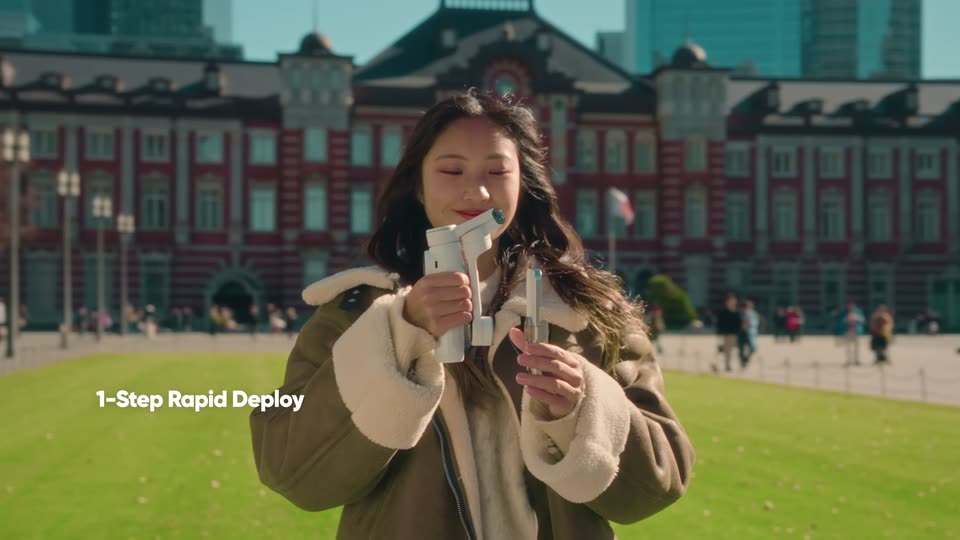
A woman in a brown shearling coat stands on a lawn before a red-brick museum, holding the white Flow 2 Pro in one hand and its separate handle in the other. She brings the handle to the camera and snaps it on in one motion. The caption 1-Step Rapid Deploy holds in the lower left.
On-screen text: “1-Step Rapid Deploy”, “Flow 2 Pro”, “Insta360”
Camera: Pan
07 · Feature reveal · 0:06–0:07
A woman in a green top and orange shorts stands in front of a climbing wall, holding a folded white drone in one hand and a small controller in the other. She looks down at the device, preparing to unfold it. The caption sits statically at the lower left.
On-screen text: “1-Step Rapid Deploy”
Camera: Push in
08 · Feature reveal · 0:07–0:08
A woman in a red floral blouse holds a white phone gimbal at chest height, then pulls its two arms apart to unfold it, lifting the phone overhead. She smiles against a soft-focus plaza with a stone tower. White caption '1-Step Rapid Deploy' sits at lower left.
On-screen text: “1-Step Rapid Deploy”
Camera: Pan
09 · Feature reveal · 0:08–0:10
A woman in a yellow top stands on a sunlit street in front of a building and unfolds a white phone gimbal from a compact form into a deployed stabilizer. A white caption reads 1-Step Rapid Deploy at lower left, then clears. The camera pans left.
On-screen text: “1-Step Rapid Deploy”
Camera: Pan
10 · Feature reveal · 0:10–0:11
A woman in a denim jacket walks through a concrete skate bowl holding a phone on a gimbal, while a skater crouches on the right edge. The camera tracks her from behind. A white caption sits at lower left and a name handle slides in.
On-screen text: “3-Axis Stabilization”, “CaliFannia”
Camera: Pan
11 · Feature reveal · 0:11–0:12
A skateboarder in a black shirt and tan pants rides down the curved wall of a concrete bowl. The camera tracks the skater with motion blur across the background. White text reads 3-Axis Stabilization in the lower left.
On-screen text: “3-Axis Stabilization”
Camera: Pan
12 · Feature reveal · 0:12–0:15
A split screen compares two takes of a skater carving a concrete bowl. The left Handheld panel shakes and blurs with the motion, while the right Insta360 Flow 2 Pro panel tracks the same ride smoothly. A 3-Axis Stabilization caption anchors the bottom left at the start.
On-screen text: “3-Axis Stabilization”, “Handheld”, “Insta360 Flow 2 Pro”
Techniques: Split screen
Camera: Pull out
13 · Feature reveal · 0:15–0:18
A man in a dark green polo shirt stands on a rooftop at dusk, city skyline and low sun behind him. He holds a phone on a gimbal and extends the built-in selfie stick, shifting his grip as the frame tightens on the device.
On-screen text: “Handheld”, “Insta360 Flow 2 Pro”, “Built-In Selfie Stick”
Camera: Pan
14 · Feature reveal · 0:18–0:21
A man in a green shirt stands on a rocky waterfront holding the camera at arm's length, framing the distant city skyline across the water. He turns his head to face the lens and smiles. A white caption sits at the lower left.
On-screen text: “Built-In Selfie Stick”
Camera: Push in
15 · Feature reveal · 0:21–0:25
A hand holds a white phone gimbal over a river, pulls out its tripod legs, then sets it on a railing post and steps away. The gimbal stands alone against a bridge and skyline. White text 'Built-In Tripod' sits at lower left.
On-screen text: “Built-In Tripod”
Camera: Pull out
16 · Feature reveal · 0:25–0:27
A white robotic arm holding a smartphone is filmed outdoors against a soft green bokeh background. The arm's black joints shift slightly as it tracks, while a white caption stays fixed in the lower left.
On-screen text: “Diverse Tracking with Apple DockKit”
Camera: Static
17 · Feature reveal · 0:27–0:28
A hand holds an iPhone mounted on a white gimbal against a blurred outdoor backdrop. A finger taps the screen, switching from the home screen to the camera app with its red record button. A white caption sits in the lower left.
On-screen text: “Diverse Tracking with Apple DockKit”
Camera: Static
18 · Feature reveal · 0:28–0:30
A white handheld gimbal with tripod base holds an iPhone in landscape, its screen showing the camera app framing a woman in a red floral dress who walks into frame from the right. A small camera icon and red timer sit top right, and a white caption sits lower left while the gimbal tracks her.
On-screen text: “Diverse Tracking with Apple DockKit”, “Filming with iPhone Native Camera”
Camera: Static
19 · Feature reveal · 0:30–0:31
A small white robotic camera rig sits in sharp focus on a wooden ledge, its screen showing a live feed of a woman in a red floral dress who poses in the soft-focus background before a stone building. A tiny viewfinder inset with a red timestamp floats beside the rig.
On-screen text: “Filming with iPhone Native Camera”
Camera: Pull out
20 · Feature reveal · 0:31–0:33
A woman in a red floral dress walks across an open stone plaza, the camera tracking her from the side. A basilica with twin towers stands at left, apartment blocks at right under a blue sky. A white caption holds at lower left.
On-screen text: “Filming with iPhone Native Camera”
Camera: Pull out
21 · Feature reveal · 0:33–0:34
A bearded man in an orange shirt sits on the pavement, smiling toward a phone clamped to a white gimbal resting on a wooden bench. Blurred pedestrians walk past in the sunny background. The caption holds still at lower left.
On-screen text: “FaceTime & Video Calls”
Camera: Pull out
22 · Feature reveal · 0:34–0:37
A man sits at a wooden table outdoors, talking and gesturing towards a smartphone mounted on a white selfie stick. The phone displays an active video call with a woman, showing standard call controls. A board game and playing cards are scattered on the table.
On-screen text: “FaceTime & Video Calls”
Camera: Static
23 · Feature reveal · 0:37–0:39
A vertical selfie clip shows a man in a rust shirt on a park bench, a child behind him, waving at the camera, while a rounded video-call inset of a smiling woman in red stays fixed in the lower right corner.
On-screen text: “FaceTime & Video Calls”
Camera: Pan
24 · Feature reveal · 0:39–0:41
A woman in a white shirt gestures behind a conference table while a seated colleague listens. A white robotic arm holds a smartphone in the foreground, its screen showing her, with small UI icons floating beside it. White text 'Online Meetings' sits at lower left.
On-screen text: “Online Meetings”
Techniques: 3D mockup
Camera: Push in
25 · Feature reveal · 0:41–0:42
A tilted live-action shot of a woman in a white shirt with a phone mockup showing a climber, then the phone turns horizontal in a hand. The view pushes into the screen as a starburst of shards breaks open over the climbing footage, with white captions at the lower left.
On-screen text: “Online Meetings”, “Live Streaming and More”
Techniques: UI zoom, Masking
Camera: Push in
26 · Feature reveal · 0:42–0:43
A low-angle shot frames a climber on an indoor bouldering wall, reaching up to a colored hold against geometric panels. White text sits in the lower left. The climber shifts upward between frames.
On-screen text: “Live Streaming and More”
Camera: Push in
27 · Feature reveal · 0:43–0:45
A white robotic phone arm stands on a mat before a climbing wall, holding a phone that shows a live stream of the wall. Instagram, LIVE and 10K badges float beside the phone, the LIVE badge popping in with a scale. A white caption sits at the lower left.
On-screen text: “Live Streaming and More”, “LIVE”, “10K”
Camera: Static
28 · Feature reveal · 0:45–0:46
A white robotic phone mount holds a smartphone streaming a climb against a climbing wall, with floating Instagram, LIVE and 10K badges and the caption Live Streaming and More at lower left. The shot cuts to a climber on the wall.
On-screen text: “Live Streaming and More”
Techniques: 3D mockup
Camera: Static
29 · Feature reveal · 0:46–0:46
A hand holds a phone in landscape against a blurred grass field. A finger taps the Insta360 icon on the camera screen, which highlights as it is selected.
Camera: Static
30 · Feature reveal · 0:46–0:47
A phone held up in a sunlit grassy field, background softly blurred, its screen tilts into focus as the Insta360 app icon opens into a white splash screen. The Insta360 wordmark and Think bold. tagline sit above an illustration of a running figure amid teal and orange shapes.
Camera: Static
31 · Feature reveal · 0:47–0:48
A white handheld phone gimbal on a tripod stands on a yellow checkered picnic blanket in a sunlit grass field, its phone aimed at a distant child in yellow. The shot holds steady as the white caption sits at the lower left.
On-screen text: “Al-Powered Deep Track 4.0”, “Insta360”, “Think bold.”
Camera: Pull out
32 · Feature reveal · 0:48–0:49
A hand holds a phone in landscape on a white grip against a blurred green field. A finger taps the screen over a live field view, and a green tracking box locks onto a subject. White text sits at lower left.
On-screen text: “AI-Powered Deep Track 4.0”
Camera: Static
33 · Feature reveal · 0:49–0:50
A horizontal phone on a white gimbal is held against a blurred green field. Its screen shows a person in a meadow framed by a green tracking box, with a zoom column on the right. A finger taps that column. A white caption holds at lower left.
On-screen text: “AI-Powered Deep Track 4.0”
Camera: Static
34 · Feature reveal · 0:50–0:51
A person in a yellow jacket runs across a grassy hill while a green tracking box locks onto their head. A camera app overlay sits on the right with a zoom slider and red record button, a red timer pill at the bottom, and a white headline on the left.
On-screen text: “Active Zoom Tracking”, “Precise Tracking to 5x and Beyond”, “Only for shooting with a tripod.”
Camera: Pan
35 · Feature reveal · 0:51–0:53
A man in a white suit and a child in a yellow top run across a sunlit grassy slope, a green tracking box with a target icon follows them. A camera UI overlay shows a zoom scale and red record button on the right and a red timer pill at the bottom, with a white caption in the lower left.
On-screen text: “Active Zoom Tracking”, “Precise Tracking to 5x and Beyond”
Camera: Pan
36 · Feature reveal · 0:53–0:55
Two children chase a soccer ball across a sunlit field as a green tracking box locks onto one face. A vertical zoom slider and red record button sit at right, a timer pill at bottom, and a headline reads at left.
On-screen text: “Active Zoom Tracking”, “Precise Tracking to 5x and Beyond”
Camera: Pan
37 · Feature reveal · 0:55–0:57
A camera app viewfinder frames three people chasing a soccer ball up a grassy slope. A green tracking box locks onto the middle runner's face as they move right, with a speed menu, red record button, and bottom timer pill on the overlay.
Camera: Pan
38 · Feature reveal · 0:57–0:59
Four young people walk across a sunlit parking lot in front of a drive-in theater. One in a yellow shirt follows them with a phone on a gimbal, then crouches to point it at the ground. A white caption appears lower left.
On-screen text: “00:57”, “Multi-Person Tracking”
Camera: Static
39 · Feature reveal · 0:59–1:01
Three women stand before a drive-in theater sign. The center woman in a yellow top lifts her hand, and a green glowing outline traces her fingers to show tracking. A white caption reads Multi-Person Tracking at lower left.
On-screen text: “Multi-Person Tracking”
Camera: Static
40 · Feature reveal · 1:01–1:02
Four women stand in a row before a pastel retro diner set as a white phone gimbal in the foreground holds them in frame, its screen mirroring the shot. A white caption reads Multi-Person Tracking at lower left.
On-screen text: “Multi-Person Tracking”
Camera: Static
41 · Feature reveal · 1:02–1:06
A split screen compares two shots of four dancers in front of a California facade. The left panel tracks the central dancer with a small green box, the right panel holds the full group in a wider white box as the camera pans.
On-screen text: “Other gimbal”, “Insta360 Flow 2 Pro”
Techniques: Split screen
Camera: Pull out
42 · Feature reveal · 1:06–1:08
Split-screen comparison of a mountain DJ set: the left Other gimbal frame crops tightly on the DJ, while the right Insta360 Flow 2 Pro frame tracks the whole group with green subject brackets, keeping all dancers in view.
On-screen text: “Other gimbal”, “Insta360 Flow 2 Pro”
Techniques: Split screen
Camera: Static
43 · Feature reveal · 1:08–1:10
A split screen compares two vlog clips of two women on a sunny street. The left clip, labeled Other gimbal, tracks one face, while the right, labeled Insta360 Flow 2 Pro, keeps both faces inside green and white tracking boxes that follow their movement.
On-screen text: “Other gimbal”, “Insta360 Flow 2 Pro”
Techniques: Split screen
Camera: Static
44 · Feature reveal · 1:10–1:12
Two laughing women hold a white phone gimbal toward the camera on a sunny city street, waving, then point at the rig as a car passes behind them; the shot stays level and keeps both faces centered in frame.
On-screen text: “Other gimbal”, “Insta360 Flow 2 Pro”
Camera: Push in
45 · Feature reveal · 1:12–1:15
A woman holds a phone on a white gimbal, tracking pedestrians along a city overpass. The shot opens blurred, then resolves to a sharp wide view with a red-and-white tower on the horizon. The phone's screen shows the live framing as the subjects walk past.
On-screen text: “Person Re-Identification”
Camera: Pull out
46 · Feature reveal · 1:15–1:16
A smiling woman in a striped sweater waves from a city overpass as a green bounding box with a crosshair tracks her, a photographer in the foreground. The caption 'Person Re-Identification' holds at lower left.
On-screen text: “Person Re-Identification”
Camera: Static
47 · Feature reveal · 1:16–1:17
A boy in a black shirt kicks a soccer ball on a sunny lawn while three others run toward him. A green bounding box with a small corner icon tracks him as a branch and a bicycle wheel cross the frame, then the camera reframes on the group.
On-screen text: “Person Re-Identification”
Camera: Pan
48 · Feature reveal · 1:17–1:18
A woman holds a phone on a selfie stick, filming a friend who poses and gestures on a paved park path. Tokyo Tower, a temple and city towers fill the bright background.
On-screen text: “Person Re-Identification”
Camera: Static
49 · Feature reveal · 1:18–1:22
A landscape phone on a gimbal, angled in 3D, shows a camera app viewfinder of a woman walking a park path. A finger taps the screen; a green box locks to her face and the viewfinder zooms in. Caption “Pro Framing Grid” sits bottom left.
On-screen text: “Pro Framing Grid”
Techniques: Cursor demo, UI zoom
Camera: Push in
50 · Feature reveal · 1:22–1:25
A woman in a striped sweater turns on a park path, Tokyo Tower behind, while a green tracking box with an X handle follows her face and the camera pans to hold her centered. A small caption scales in.
On-screen text: “Click to switch preset tracking center point”
Camera: Push in
51 · Feature reveal · 1:25–1:27
Two women on a rooftop terrace, one holding a small remote and gesturing as the other walks toward her. A white phone stabilizer on a table in the foreground shows their live view on its screen, with a blurred city skyline behind.
On-screen text: “Smartphone Remote Control”
Camera: Static
52 · Feature reveal · 1:27–1:28
A hand holds a smartphone in close-up against a blurred background; the screen shows the camera app with two people in the live view. A finger taps the screen near the red record button. White caption reads at left.
On-screen text: “Smartphone Remote Control”
Camera: Static
53 · Feature reveal · 1:28–1:30
Two women in winter jackets pose in a blurred plaza, one holding a white phone and flashing a peace sign. A phone on a white and orange gimbal at right shows their live view; an orange dotted line links the two phones, then fades. White caption lower left.
On-screen text: “Smartphone Remote Control”
Camera: Static
54 · Feature reveal · 1:30–1:31
Two women in brown shearling jackets stand on a rooftop terrace, waving and posing for the camera. A yellow Tower Records sign sits behind them under a clear blue sky. The frame stays locked off.
On-screen text: “Smartphone Remote Control”
Camera: Static
55 · Feature reveal · 1:31–1:32
Two women stand on a sidewalk in front of a yellow Tower Records sign, smiling and posing, one flashing a peace sign and the other waving. The vertical locked-off shot opens overexposed to white, then settles to full color as they hold the pose.
Camera: Static
56 · Feature reveal · 1:32–1:32
A hand holds a white smartphone gimbal at chest height, the phone screen showing a recording view of a man in a beige vest. The blurred background cuts from a hazy mountain ridge to a concrete skate park as the man goes from standing to skateboarding.
Camera: Static
57 · Feature reveal · 1:32–1:33
A hand holds a white phone gimbal against a pale sky, the phone mounted in landscape showing a live camera viewfinder with a red record button. Blurred red and teal shipping containers fill the lower frame. The shot stays steady with a slight handheld drift.
Camera: Static
58 · Feature reveal · 1:33–1:35
A man in a cap leans out of a dark SUV's window, lowering a silver camera arm with a rose gold phone attached, positioning it against the body. A white caption 'Apple Watch Control' appears at lower left while the frame stays locked off.
On-screen text: “D”, “Apple Watch Control”
Camera: Pull out
59 · Feature reveal · 1:35–1:37
A top-down view of a white drone with a phone clamped to its controller over a blurred sand surface, then a cut to a close-up of an Apple Watch on a wrist showing the camera control screen. A white caption “Apple Watch Control” holds in the lower left.
On-screen text: “Apple Watch Control”
Camera: Pan
60 · Feature reveal · 1:37–1:39
Close-up of a wrist wearing an Apple Watch with a gray loop band against a dark car interior. The watch screen shows a car driving on a road with a red recording timer and time. A white caption reads Apple Watch Control at lower left.
On-screen text: “Apple Watch Control”
Camera: Static
61 · Feature reveal · 1:39–1:40
A hand holds a phone gimbal at road level, its screen showing the camera viewfinder on an approaching blue sports car, while the dark car's rear wheel slides past on the right as the shot tracks forward along the road.
On-screen text: “Apple Watch Control”
Camera: Pull out
62 · Feature reveal · 1:40–1:42
A blue Porsche roadster drives toward camera on a country road, shot from a low tracking angle. A white lane arrow and grassy hills pass behind it. The image lifts from a dim grade to bright daylight. “Apple ProRes” sits static in the lower left.
On-screen text: “Apple ProRes”
Camera: Pull out
63 · Feature reveal · 1:42–1:43
A low-angle side view of a blue sports car, the front wheel with yellow calipers and the fender filling the frame as the car drives forward past a cloudy sky. The static label sits at the lower left.
On-screen text: “Apple ProRes”
Camera: Pull out
64 · Feature reveal · 1:43–1:45
Low-angle shot of a blue Porsche driving on a country road with the Apple ProRes label at lower left. A fast whip blur transitions into an indoor skatepark with blue LED strips and rabbit graffiti as the camera glides past ramps and rails.
On-screen text: “Apple ProRes”
Camera: Push in
65 · Feature reveal · 1:45–1:46
A skater in an orange hoodie and grey pants grinds a black rail across an indoor skate park. White ramps and grey walls carry cartoon rabbit graffiti and the words LET'S SK8. The locked-off camera holds the wide frame as the skater moves from right to center.
Camera: Static
66 · Feature reveal · 1:46–1:48
A hand in a yellow sleeve lowers a white phone gimbal onto the concrete floor of a skate bowl, then releases it so the device stands on its small legs. The phone screen shows a live camera view. The frame stays locked off.
On-screen text: “360° Infinite Pan Tracking”
Camera: Static
67 · Feature reveal · 1:48–1:49
A skateboarder in an orange hoodie rides down a concrete bowl in an indoor skatepark; the wide-angle camera pans to keep him centered as he closes in and passes the lens. A green tracking box with an X follows his head while a caption sits at lower left.
On-screen text: “360° Infinite Pan Tracking”
Camera: Static
68 · Feature reveal · 1:49–1:53
A white robotic-arm phone gimbal on a tripod stands in a concrete skate bowl, its arm spinning a full turn to track a skater in an orange hoodie riding the rim. An orange arc graphic labeled 360°+ rotates around the base while the phone screen shows the live shot.
On-screen text: “360° Infinite Pan Tracking”, “360°+”
Camera: Static
69 · Feature reveal · 1:53–1:56
A man in an orange hoodie skateboards through an indoor bowl while a fisheye camera tilts and swings to follow him. A green tracking box with an X icon locks onto his face the whole time.
On-screen text: “360°+”
Camera: Push in
70 · Feature reveal · 1:56–1:56
A person with long blonde hair and a black beanie crouches before a blue shipping container, holding a phone gimbal and tilting it through its range. White text reads Free Tilt Mode in the lower left corner.
On-screen text: “Free Tilt Mode”
Camera: Pan
71 · Feature reveal · 1:56–1:59
A hand holds a phone gimbal outdoors against blurred blue and red shipping containers. The arm rotates the device, turning the phone so its screen, showing a camera viewfinder with a red record button, faces the viewer. White text “Free Tilt Mode” sits at the lower left.
On-screen text: “Free Tilt Mode”
Camera: Pull out
72 · Feature reveal · 1:59–2:00
A hand holds a white robotic gimbal arm with a phone clamped to its end. The arm tilts and rotates through a wide range against a blue sky and blurred buildings, while white text reads Free Tilt Mode at the lower left.
On-screen text: “Free Tilt Mode”
Camera: Pan
73 · Feature reveal · 2:00–2:01
A man in a black shirt leaps up and lands on a black padded box bearing a blue logo, filmed from a low angle against a clear blue sky. The white caption sits still at the lower left.
On-screen text: “Free Tilt Mode”
Camera: Static
74 · Feature reveal · 2:01–2:02
A person in black does a backflip off a row of shipping containers, seen from a high vantage point with a camera rig at the right edge. Trees and low industrial buildings fill the background under a clear blue sky. The label Free Tilt Mode sits in the lower left.
On-screen text: “Free Tilt Mode”
Camera: Static
75 · Feature reveal · 2:02–2:03
A person in dark clothing leaps across the tops of stacked shipping containers while a black drone arm fills the right edge of the frame. The label stays fixed lower left against a clear blue sky and distant trees.
On-screen text: “Free Tilt Mode”
Camera: Static
76 · Feature reveal · 2:03–2:06
A woman in a striped sweater walks across the Shibuya crossing, tracked from a low ground angle that tilts up to frame her and the neon billboards behind. A white caption reads Free Tilt Mode in the lower left.
On-screen text: “Free Tilt Mode”
Camera: Push in
77 · Feature reveal · 2:06–2:07
A white smartphone gimbal stands on a wooden table outdoors. A hand enters from the right, grips the handle and turns it, panning the mounted phone. Colorful cards lie scattered in the foreground while the green background stays out of focus.
On-screen text: “360° Pan Shot”
Camera: Static
78 · Feature reveal · 2:07–2:09
People play Uno around a wooden picnic table; a white 360 camera with a yellow ring and phone holder sits on a mini tripod at the center. An orange '360' label scales up around the device while a white '360° Pan Shot' caption holds in the lower left.
On-screen text: “360° Pan Shot”, “360”
Techniques: Kinetic type
Camera: Static
79 · Feature reveal · 2:09–2:12
A 360° orbit around a man and woman playing Uno at a wooden picnic table in a sunny autumn park. The camera sweeps past a second man in an orange shirt who holds up a card, then a large “360” label scales in on the left.
On-screen text: “360° Pan Shot”, “360”
Techniques: Kinetic type
Camera: Pull out
80 · Feature reveal · 2:12–2:14
Close-up of a hand gripping a white spherical 360 camera mounted on a silver pole, thumb pressing the top button. Soft gray out-of-focus background. A small caption sits at the lower left while the hand holds the device steady.
On-screen text: “360° Panorama”
Camera: Static
81 · Feature reveal · 2:14–2:16
A hand holds a phone on a white gimbal stick in front of a blurred arched glass building. The phone rotates through a full turn, showing its back and front, while white text reads 360° Panorama at the lower left.
On-screen text: “360° Panorama”
Camera: Push in
82 · Feature reveal · 2:16–2:19
A 360° panorama rotates from a low angle on a curved glass building to reveal a couple on a wooden deck. A white circle with a yellow dot drifts left and fades; the woman raises her arm to wave.
On-screen text: “360° Panorama”
Camera: Pull out
83 · Feature reveal · 2:19–2:20
A hand holds a smartphone at an angle against a dark blue backdrop with a red glow, its screen showing a video editor home page with a yellow Auto Edit card. A blurred finger reaches toward the display while a white AI Editing label holds at the lower left.
On-screen text: “AI Editing”
Techniques: 3D mockup
Camera: Static
84 · Feature reveal · 2:20–2:21
A hand holds a beige iPhone Pro up in sharp focus, its triple camera facing the lens, while a blonde woman stays softly blurred behind against a dark blue backdrop. The label AI Editing sits at the left edge as the phone tilts slightly.
On-screen text: “AI Editing”
Camera: Static
85 · Feature reveal · 2:21–2:22
Over-the-shoulder view of a blonde woman in a red floral jacket holding a phone up to a dusk waterfront. She lifts and tilts the phone, hand opening, while the blurred city lights stay in the background.
On-screen text: “AI Editing”
Camera: Static
86 · Feature reveal · 2:22–2:28
A woman in a red floral dress sits on a concrete bench by the harbor at dusk. A scattered cloud of video thumbnails rises, aligns into a 3D grid, then flattens into an editing timeline with timecodes and a waveform. “AI Editing” sits in the lower left.
On-screen text: “AI Editing”
Techniques: 3D mockup, Morph
Camera: Push in
87 · Feature reveal · 2:28–2:29
A hand in a red floral sleeve lowers a beige phone with a white ring mount onto a pale stone ledge, tilting it upright. The background building stays softly out of focus.
On-screen text: “Magnetic Phone Mount”
Camera: Static
88 · Feature reveal · 2:29–2:30
A hand holds a white iPhone with a silver magnetic mount on its back, while a second index finger points at the device. The close-up is shot against a blurred dark outdoor background. White caption text sits at the lower left.
On-screen text: “Magnetic Phone Mount”
Camera: Static
89 · Feature reveal · 2:30–2:31
A woman in a red floral dress stands by a reflecting pool, holding a white phone in one hand and a white gimbal in the other. She brings the phone to the gimbal and snaps it onto the mount. A caption sits on the left.
On-screen text: “Magnetic Phone Mount”
Camera: Pull out
90 · Feature reveal · 2:31–2:32
A woman in a red floral top holds a white selfie stick with a mounted phone, turning it slightly as she looks at it. The blurred waterfront and a pale building sit behind her. White text reads Built-In Selfie Mirror at the left.
On-screen text: “Built-In Selfie Mirror”
Camera: Pull out
91 · Feature reveal · 2:32–2:33
A phone mounted on a white stick spins from landscape to portrait in 3D, its screen showing a camera app framing a river and quay. A white caption reads Built-In Selfie Mirror at the lower left while the device turns.
On-screen text: “Built-In Selfie Mirror”
Techniques: 3D mockup
Camera: Static
92 · Feature reveal · 2:33–2:34
A rose-gold phone on a white selfie stick fills the frame, triple camera facing right. Its round mirror reflects a woman in red holding a gift box on a boat. The caption Built-In Selfie Mirror holds at the lower left as the camera drifts slowly.
On-screen text: “Built-In Selfie Mirror”
Camera: Static
93 · Feature reveal · 2:34–2:36
A woman in a red floral dress holds a white selfie stick, a phone mockup on its arm shows her live view. The blurred harbor background stays soft as the phone tilts and the frame reframes slightly. A white caption sits at the left.
On-screen text: “Built-In Selfie Mirror”
Techniques: 3D mockup
Camera: Static
94 · Feature reveal · 2:36–2:37
A woman in a red floral dress holds the camera selfie-style on a stone pier, talking and gesturing, with a harbor, moored boats and a stone fort behind her under an overcast sky.
On-screen text: “Built-In Selfie Mirror”
Camera: Static
95 · Feature reveal · 2:37–2:38
A phone held in landscape shows a live video call while a small white spotlight hangs from a loop beneath it. A hand with a ring slides in from the right and rests under the device. Dark background with warm bokeh; a white Spotlight label sits in the lower left.
On-screen text: “Spotlight”
Camera: Static
96 · Feature reveal · 2:38–2:39
A hand holds a landscape phone above a small white spotlight against a dark city bokeh. The spotlight ignites, flooding the phone and hand with warm light. The phone screen shows a woman filming herself over a night skyline. The label Spotlight holds at left.
On-screen text: “Spotlight”
Camera: Static
97 · Feature reveal · 2:39–2:41
A woman stands on a rooftop at night, city skyline lit behind her. She smiles at the camera and raises one finger, gesturing as she speaks. The word Spotlight sits in the lower left corner.
On-screen text: “Spotlight”
Camera: Static
98 · Feature reveal · 2:41–2:41
A hand holds a small white cylindrical charger with a USB cable feeding a phone on a slatted wooden table, a folded white drone resting behind. The caption “Emergency Power Bank” scales in over the dark phone screen.
On-screen text: “Emergency Power Bank”
Techniques: Kinetic type
Camera: Static
99 · Feature reveal · 2:41–2:44
Top-down view of a smartphone and a white gimbal on a wooden slat table. A hand enters from the right, touches the gimbal, and exits as the phone's lock screen lights up with the time and a charging icon. A white cable connects the two.
On-screen text: “Emergency Power Bank”
Techniques: Kinetic type
Camera: Static
100 · Demo · 2:44–2:45
A woman in a green fleece-collared coat smiles and waves at a phone clamped to a selfie stick, framed mid-shot against a wall of glowing billboards. The camera holds a locked-off frame while she moves, the busy street softly blurred behind her.
Camera: Pan
101 · Demo · 2:45–2:45
A white phone gimbal on a small tripod stands on a car hood, its screen showing the neon-lit street ahead. The background crowd and signs stay softly blurred while the camera holds a low, steady angle.
Camera: Static
102 · Demo · 2:45–2:47
A DJ works a Pioneer mixer at left and a woman in a red-and-black top dances at right, while a white phone on a gimbal stand sits centered on a black speaker. Blurred green hills fill the background; the camera holds a static medium shot.
Camera: Pull out
103 · Demo · 2:47–2:47
A woman in a denim shirt stands in a park, holding a white handheld gimbal with a phone clipped to the top. She rotates the phone from portrait to landscape, then smiles at the device.
Camera: Static
104 · Demo · 2:47–2:48
A woman in a cream coat stands in a sunny park, lowering a white phone gimbal from her face and glancing at it with a smile. Blurred red brick buildings and bare trees fill the background.
Camera: Pan
105 · Demo · 2:48–2:49
A woman in a green tank top stands before a blurred climbing wall, holding a white phone gimbal with a mounted smartphone. She smiles and looks down at the device, then gestures with her free hand.
Camera: Static
106 · Demo · 2:49–2:49
A woman in a yellow and pink crop top holds a small white gimbal camera in one hand and a phone in the other. The shot frames her torso against a striped outdoor wall as she shifts the device.
Camera: Static
107 · Demo · 2:49–2:51
A hand in a cream fleece cuff tucks a small white cylindrical device into the chest pocket of an olive green jacket, then pulls away, leaving the pocket empty. Tight close-up, sunny park background with red-leafed trees.
Camera: Static
108 · Demo · 2:51–2:51
Point of view from inside a striped bag as a hand reaches in holding a small white device. The hand descends toward the lens, silhouetting against the bright opening until the light narrows to a sliver.
Camera: Static
109 · Outro · 2:51–2:53
A white title on black scales down over a dark 3D render of the gimbal body, then the camera pulls back to reveal the full stabilizer with its handle and camera head against a light gray backdrop.
On-screen text: “Insta360 Flow 2 Pro”
Techniques: Kinetic type, 3D mockup
Camera: Pull out
110 · Outro · 2:53–2:54
A white phone gimbal renders in 3D on a light gray field. The camera pulls back from the head to reveal the handle and a phone on top, its screen showing two people on video. The product locks off at right as the headline and tagline appear at left.
On-screen text: “Insta360 Flow 2 Pro”, “Your pocket AI filmmaker.”
Techniques: 3D mockup
Camera: Pull out
111 · Outro · 2:54–2:57
Two white phone gimbals float in 3D on a pale gray field, the left cradling a landscape phone playing a clip of two people, the right showing a phone's triple-lens back on a tripod. The units settle into pose while a static headline and tagline hold left.
On-screen text: “Insta360 Flow 2 Pro”, “Your pocket AI filmmaker.”
Techniques: 3D mockup
Camera: Static
112 · Outro · 2:57–2:58
A black screen holds, then the white tagline appears centered and stays static through the end of the clip.
On-screen text: “Think bold.”
Camera: Static
113 · Outro · 2:58–3:00
A black end card: the white Insta360 wordmark and the tagline Think bold. fade in centered, then hold still on a locked-off frame.
On-screen text: “Think bold.”
Camera: Static
114 · CTA · 3:00–3:02
Two women on a city street film themselves with a white phone on a handheld gimbal as the camera pushes in. White overlay links SUBSCRIBE and LEARN MORE with arrow icons hold on the right. The clip ends on a locked-off card with the tagline Think bold. and the Insta360 logo.
On-screen text: “SUBSCRIBE”, “LEARN MORE”, “Think bold.”, “Insta360”
Camera: Static
115 · CTA · 3:02–3:04
A motion-blurred live-action shot resolves into a woman with long dark hair in a grey sweater, seen from behind, walking on a rooftop balcony toward a city skyline, following a person in a striped sweater. Two white labels with play icons sit on the right.
On-screen text: “SUBSCRIBE”, “LEARN MORE”
Camera: Pull out
116 · CTA · 3:04–3:05
A defocused street scene shows a smiling woman in a green coat waving at a selfie stick in front of city signage. Two white text links, SUBSCRIBE and LEARN MORE, each with a small triangle, sit stacked on the right and remain still.
On-screen text: “SUBSCRIBE”, “LEARN MORE”
Camera: Pan
117 · CTA · 3:05–3:06
A phone on a small tripod stand stands in the foreground against a blurred street crowd. White labels SUBSCRIBE and LEARN MORE with play icons sit on the right, static.
On-screen text: “SUBSCRIBE”, “LEARN MORE”
Camera: Static
118 · CTA · 3:06–3:07
A man adjusts DJ mixers on the left and a woman dances on the right against a hilly backdrop. A phone on a stand and a speaker sit in the foreground, slightly blurred. White text overlays read SUBSCRIBE and LEARN MORE on the right.
On-screen text: “SUBSCRIBE”, “LEARN MORE”
Camera: Static
119 · CTA · 3:07–3:09
A close-up of a dark blue sports car shows the front wheel and headlight. Two white text overlays, SUBSCRIBE and LEARN MORE, with play icons, are static on the right side.
On-screen text: “SUBSCRIBE”, “LEARN MORE”
Camera: Pull out
120 · CTA · 3:09–3:10
A blue sports car drives along a road with a motion-blurred background. Two white text labels, 'SUBSCRIBE' and 'LEARN MORE', remain static on the right side of the frame.
On-screen text: “SUBSCRIBE”, “LEARN MORE”
Camera: Static
121 · CTA · 3:10–3:10
A black screen holds two white text labels on the right, SUBSCRIBE above LEARN MORE, each followed by a small play triangle. Both lines stay static for the duration.
On-screen text: “SUBSCRIBE”, “LEARN MORE”
Camera: Static