1:08

Coming Soon: Playdate System 3.0
Playdate · Hardware · Jul 2025
Google’s 0:59 launch film runs 46 scenes, about 1.3 s each. The product shows up at 0:01 and 3 features are revealed. There is no explicit call to action; a voiceover carries the film. Tone is warm, domestic and conversational, alternating live-action home footage with crisp dark UI cards on a black field. The structure is a repeating three-beat pattern (benefit title card, spoken query in a glowing pill, Gemini answer resolving to a TV clip) at a steady ~120 bpm cut rate, with the Gemini spark and gradient-bordered logo as the signature bookends.
Is this your launch? to your site or press kit.
Films whose music sounds like this one, voice left out
Alkera AI · Upbeat, modern electronic promotional music
Insta360 Flow 2 Pro · Upbeat electronic
A small four-pointed star with an orange-to-blue gradient glows at the center of a black field. It brightens and dims in a pulse while tiny dots drift around it.
Techniques: Particles
Camera: Static
The white Google TV wordmark sits inside a rounded rectangle with a glowing four-color border on black. The mark scales up from the center until the border reaches the frame edges and the text grows large and soft.
On-screen text: “Google TV”
Techniques: Kinetic type
Camera: Static
On a black background, the line “Chat with Gemini to discover more” opens zoomed in on the word “Chat” and scales down to full width, with “Gemini” in blue beside a multicolor sparkle icon. The finished line holds, then blurs out of focus.
On-screen text: “Chat with Gemini to discover more”
Techniques: Kinetic type
Camera: Static
Black screen. The white line “Gemini to discover more” slides in at center, then swaps to “on your biggest”, where the blue word “biggest” scales up larger while “on your” stays small and soft.
On-screen text: “Gemini to discover more”, “on your biggest”
Techniques: Kinetic type
Camera: Static
The words “biggest” and “screen” sit centered on a black background in two stacked lines. They scale in place while their fill alternates between blue and white, swapping color between the two words.
On-screen text: “biggest”, “screen”
Techniques: Kinetic type
Camera: Static
White lowercase text “biggest screen” sits on black, then scales up and blurs out as a glowing RGB rectangle opens to reveal a person reclining on a couch holding a phone.
On-screen text: “biggest screen”
Techniques: Kinetic type, Masking
Camera: Static
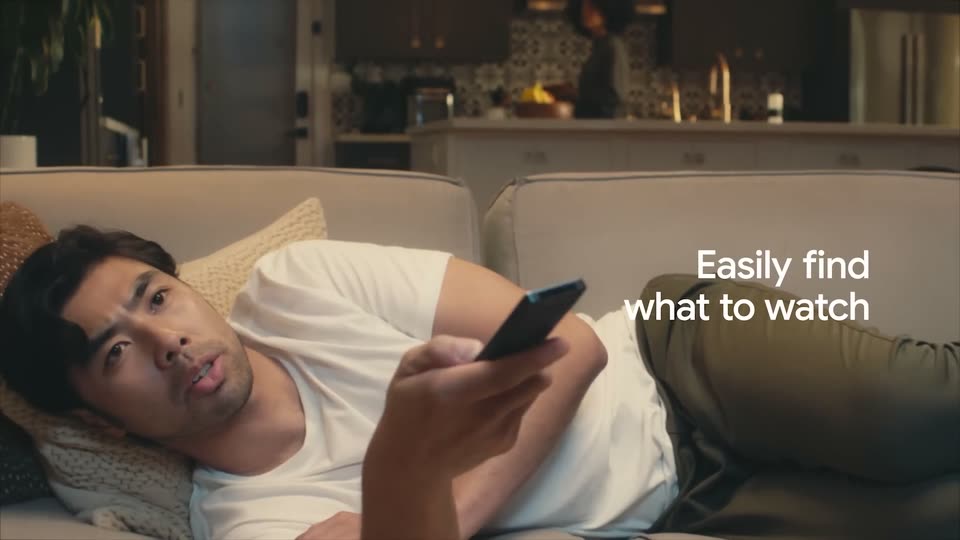
A man lies on a cream sofa holding a phone, a kitchen and two figures blurred behind. The camera drifts left to reveal his face as two lines of white text slide in on the right.
On-screen text: “Easily find”, “what to watch”
Techniques: Kinetic type
Camera: Pan
A man in a white t-shirt sits on a couch and snaps his head toward camera with a startled expression. A woman beside him holds a bowl of popcorn, her face partly out of frame. The living room is lit by warm pendant lamps.
Camera: Static
A man and a woman sit close on a beige couch in a dim living room, the man holding a remote, the woman a bowl of popcorn. Both gaze forward toward an unseen screen while warm pendant lamps glow behind them.
On-screen text: “Available for select devices, countries, and languages. Setup, Google account, and internet connection required. Android TV OS 14+. Results for illustrative”, “purposes and may vary. Check responses for accuracy. Sequences shortened. The Gemini for TV experience is optimized for large screen experiences.”
Camera: Static
A black rounded search bar floats over a sunlit coastal village photo, ringed by a blue glow. A blue sparkle mark sits in the bar, then the bar stretches wide as white text types out a query, the glow turning white.
On-screen text: “Available for select devices, countries, and languages. Setup, Google account, and internet connection required. Android TV OS 14+. Results for illustrative”, “purposes and may vary. Check responses for accuracy. Sequences shortened. The Gemini for TV experience is optimized for large screen experiences.”
Techniques: Kinetic type
Camera: Push in
Locked-off shot of a couple on a couch watching TV; the man holds a remote, the woman a bowl of popcorn. A black caption box at the bottom holds their voiceover line, with small legal text below it.
On-screen text: “Find us a new hospital show, something that's realistic,”, “Available for select devices, countries, and languages. Setup, Google account, and internet connection required. Android TV OS 14+. Results for illustrative”, “purposes and may vary. Check responses for accuracy. Sequences shortened. The Gemini for TV experience is optimized for large screen experiences.”
Camera: Pull out
A man and woman sit on a couch in a warm living room, gazing up at a screen; the woman lifts her hand in a gesture. A dark rounded bar at the bottom scrolls the voice command in white text, with a small legal line beneath.
On-screen text: “Find us a new hospital show, something that's realistic, a cool storyline, and”, “Available for select devices, countries, and languages. Setup, Google account, and internet connection required. Android TV OS 14+. Results for illustrative”
Camera: Static
A coastal cliff video plays behind a dark rounded search field with a glowing white border. The typed query scrolls left inside the field until it settles on the final phrase, while a small legal disclaimer stays fixed at the bottom.
On-screen text: “Available for select devices, countries, and languages. Setup, Google account, and internet connection required. Android TV OS 14+. Results for illustrative”, “purposes and may vary. Check responses for accuracy. Sequences shortened. The Gemini for TV experience is optimized for large screen experiences.”
Camera: Pan
A flat TV in a bright living room plays a colorful coastal town image. A rounded caption bubble at the bottom holds the user's prompt, and as the camera pushes in, a faded answer line about a hospital show slides in on the right.
Techniques: UI zoom
Camera: Push in
A dark Gemini chat screen fades in. A user prompt about a hospital show scales in at the top, then a response recommending The Pitt slides in below it. Reaction buttons and a Recommended by Gemini tag appear, and a video card slides up from the bottom edge.
Techniques: Kinetic type
Camera: Static
On a dark interface, two lines of chat text slide up and out of frame while a recommendation card settles into view, showing speaker, thumbs up and thumbs down buttons, a The Pitt thumbnail and a 95% score.
Techniques: UI zoom
Camera: Push in
A recommendation card for The Pitt, tagged Recommended by Gemini with a 95% match, fills the screen then reframes outward to reveal the TV in a wooden living room set. The card dissolves as the screen settles on a Pittsburgh skyline at sunset.
Techniques: UI zoom
Camera: Pull out
A wide locked-off shot of a wall-mounted TV above a wooden console, playing a clip of a man in a black hoodie walking down a hallway. Decorative giraffe figures, a plant and a lamp flank the screen.
Camera: Static
A locked-off shot frames a wall-mounted TV on a wooden cabinet in a warm, lamp-lit room; on the screen, nurses in black scrubs walk down a hospital hallway. The HBO Max logo sits top right and a 'The Pitt' title card sits bottom left.
On-screen text: “HBO”, “max”, “The Pitt”, “Now Streaming on HBO Max”
Camera: Static
A man and woman relax on a couch in a warm, kitchen-lit living room. The man holds a remote; the woman leans against him with a bowl of popcorn, her arm stretched along the backrest as she talks. The camera stays locked off.
On-screen text: “The Pitt”
Camera: Static
A man in a white tee holds a remote while a woman in a gray top holds popcorn; both sit on a couch and talk, turning their heads toward each other in a warm-lit living room with pendant lamps behind.
Camera: Static
A wall-mounted TV on a wooden cabinet plays a hospital scene with doctors in scrubs. The HBO Max logo sits top right as the The Pitt title card scales in at bottom left. Lamps and giraffe figurines flank the cabinet.
Camera: Static
A white grid of rounded panels shows a woman reading on a sofa and a man in a kitchen. The panels give way to a single frame of two nurses in a hospital corridor as the HBO Max logo and The Pitt title card scale in.
On-screen text: “HBO”, “max”, “The Pitt”, “Now Streaming on HBO Max”
Techniques: Split screen, Kinetic type
Camera: Pull out
A man in a brown striped shirt bends into an open refrigerator in a bright kitchen, locked-off shot. Left, a white two-line caption holds 'Get help' while the second line swaps and scales through 'with fitness', 'with a new skill', 'with cooking'.
On-screen text: “Get help”, “with fitness”, “with a new skill”, “with cooking”
Techniques: Kinetic type
Camera: Static
A man in a brown shirt leans into an open refrigerator, staring straight at the camera with a surprised, open-mouthed look while extending his arm toward the lens. A white bottle and a glass jar sit on the door shelf. A bright kitchen with windows fills the background.
Camera: Static
A black rounded pill with a glowing blue rim floats over a blurred coastal scene. A blue four-pointed sparkle icon sits at its center, then white text slides in across the pill: the user's question about a quick chicken breast meal.
Techniques: Kinetic type, Masking
Camera: Push in
A man in a brown polo shirt leans into an open refrigerator in a sunlit kitchen. At the bottom center, a black pill-shaped caption with white text slides in word by word, spelling out his question about a quick chicken meal.
On-screen text: “What's an easy meal I can make with chicken breast under an hour, that's healthy but not bland?”
Techniques: Kinetic type
Camera: Static
A man in a brown polo leans into an open refrigerator in a bright kitchen, then straightens up and looks aside. A black caption pill with a white border at the bottom scrolls the question leftward.
On-screen text: “that's easy, can I make a meal with chicken breast under an hour, that's healthy but not bland?”
Techniques: Kinetic type
Camera: Static
A man in a brown polo stands in a dim kitchen, then the frame tilts up to a wall TV showing a recipe list over a coastal town photo. A dark rounded caption pill slides in across the bottom.
On-screen text: “ith chicken breast under an hour, that's healthy but not bland?”
Camera: Push in
A dark video-player interface fills the frame, showing a question and two chicken-recipe bullet points in white text that pan horizontally to reveal the full lines. A row of circular volume, like and dislike buttons sits at the lower left above a red play icon and a “Recommended by Gemini” tag.
Techniques: Kinetic type
Camera: Push in
A dark assistant chat shows a large white question about a quick chicken meal, two bulleted recipe lines, and three round icon buttons above a 'Recommended by Gemini' tag. The view scrolls down to reveal a row of video thumbnails.
Camera: Push in
A dark video app interface scrolls up slightly, revealing a row of recipe thumbnails under a Recommended by Gemini label. Two cards show plated dishes, the second with a presenter and a thumbnail title. Mute, like and dislike icons sit at the top.
Camera: Pan
A tight crop of a recipe app's recommended video row, showing food thumbnails and a recipe list, pulls back to reveal the TV on a stand in a living room. The interface stays static while the frame widens to include the soundbar, wooden table, and a plant.
Techniques: UI zoom
Camera: Pull out
A flat-screen TV above a wooden console displays a close-up of roasted chicken legs, potatoes, and asparagus in a warm living room. The shot is locked off and static.
Camera: Static
A glazed salmon fillet rests on a white oval plate with roasted squash chunks and green beans, set on a white tablecloth. The shot holds steady as the frame takes on rounded corners and the channel watermark scales up in the lower left.
On-screen text: “Island Vibe Cooking”
Camera: Pull out
A white interface shows a grid of rounded-corner video tiles playing live footage. The grid scrolls, repositioning the clips so a glazed fish dish and a man lying on a couch come into focus. A small white label sits on the food tile.
Camera: Push in
A woman with curly hair reclines on a cream sofa, reading a book, while a wall-mounted TV behind her shows a landscape painting with a small corner clock. A white caption sits at the left edge. The frame is locked off and holds still.
On-screen text: “Just speak like you”
Camera: Static
A woman with curly hair sits on a beige couch in a home, holding a blue book, talking and glancing upward. A person works at the kitchen counter behind her. The shot is a locked-off medium frame with a static tagline held over the image.
On-screen text: “Just speak like you”
Camera: Push in
A dark rounded icon with a blue four-point star sits over a dimmed oil-painting landscape. The icon glows, fills with the word We're, then stretches horizontally into a wide dark bar revealing the full caption while the painting stays dark behind.
On-screen text: “We're”, “We're moving to Houston in”
Techniques: Morph, Masking
Camera: Push in
A woman with curly hair in a tan top sits in a kitchen, a man blurred at the sink behind her. A black rounded caption pill with white text appears at the bottom and shrinks from a wide bubble to a slim bar as she speaks.
On-screen text: “We're moving to Houston in a couple months.”
Camera: Pull out
A woman with curly hair sits on a couch in a sunlit kitchen, talking, while a man stands blurred at the counter behind her. A dark rounded pill with white text scrolls leftward across the lower frame.
On-screen text: “We're moving to Houston in a couple months. What neighborhoods would you recommend?”
Camera: Pull out
A wall-mounted TV in a living room shows a caption with the user's question about Houston neighborhoods. The camera pushes in on the screen as the Gemini answer, listing neighborhoods and a top-ten card, appears.
Techniques: UI zoom
Camera: Push in
A dark Gemini response scrolls up to reveal three video thumbnails in a row. The center thumbnail, a Houston skyline clip, gains a white border and zooms to fill the frame.
Techniques: UI zoom
Camera: Push in
A wall-mounted TV in a beige room plays an aerial city view, framed by a soundbar, giraffe figurines and books. The caption 'From watching' sits over the screen, white and small, then scales up and turns blue as the camera pushes in on the TV.
On-screen text: “Texas”, “From watching”
Techniques: 3D mockup, Kinetic type
Camera: Static
A wall-mounted TV in a styled living room shows a sunlit park and skyline. The picture dims to near black while bold centered text builds word by word, reading 'From watching to'.
On-screen text: “From watching to”
Techniques: Kinetic type
Camera: Static
White text on black reads “From watching to exploring”, then switches to “with Gemini” beside a rainbow four-point spark. The spark shrinks to a pin, then a rounded TV outline with a gradient border forms around it with “Google TV” inside, fading to black.
On-screen text: “From watching to exploring”, “with Gemini”, “Google TV”
Techniques: Particles, Morph
Camera: Static