1:21

All the launches at Config 2025 | Figma
Figma · Design · May 2025
OpusClip · Feb 2024 · 0:44 · AI-annotated
OpusClip’s 0:44 launch film runs 26 scenes, about 1.7 s each. The product shows up at 0:05 and 7 features are revealed. There is no explicit call to action; a voiceover carries the film. A fast-cut feature montage on black: each feature is announced with a title card or UI element and demoed in three to five seconds, joined by flash, blur, and radial-burst transitions. Signature moves are the white outlined cursor, the filmstrip with green selection boxes, type-on wordmarks, and parallax 3D card galleries.
Is this your launch? to your site or press kit.
Figma · Design · May 2025
Loom · Productivity · Aug 2023
Playdate · Hardware · Jul 2025
On a black field, a thin glowing white line in the center expands into a rounded rectangle with a white border. The text “Drop a long video and...” slides in inside the box.
On-screen text: “Drop a long video and...”
Techniques: Kinetic type
Camera: Static
A top video thumbnail cycles through YouTube thumbnails above a “Drop a long video and…” caption and purple “Get Clips” button. A white cursor hovers at the button while four short clips with platform icons appear below and refresh, then the thumbnails and clips clear, leaving the caption and button on black.
On-screen text: “Drop a long video and…”
Camera: Pan
A white horizontal band opens across a black frame, expanding to fill the screen and turn the background white, revealing the centered word Introducing in black. A blurred logo band lingers along the bottom edge as the reveal settles.
On-screen text: “Introducing”
Techniques: Masking
Camera: Static
A gray wall of the word MORE fills a black frame, centered on a white circular logo with a dark P-shaped mark, framed by white bars top and bottom. The logo and bars disappear, then the frame cuts to black as the white OpusClip wordmark scales into the center.
On-screen text: “OpusClip 3.0”
Techniques: Masking, Kinetic type
Camera: Static
On a black background, a white 3D blob morphs and drifts toward the lower left while the brand name scales in at center. The frame stays locked off.
On-screen text: “OpusClip 3.0”
Techniques: Kinetic type, Morph
Camera: Static
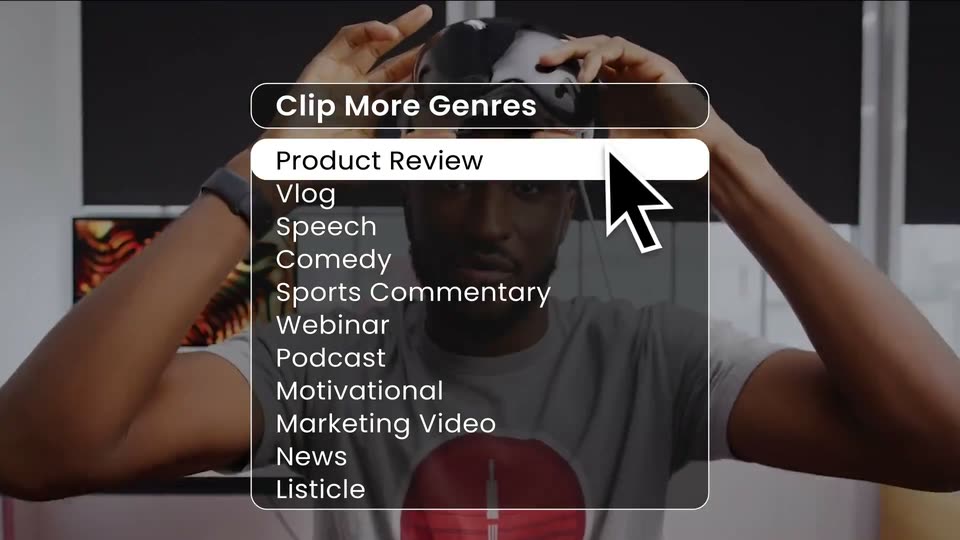
A white title 'OpusClip 3.0' scales and fades on black. A rounded dropdown menu titled 'Clip More Genres' expands over a dimmed shot of a man putting on a VR headset, a white cursor resting on the 'Product Review' row.
On-screen text: “OpusClip 3.0”, “Clip More Genres”
Techniques: Kinetic type, Cursor demo
Camera: Static
A dark dropdown menu titled 'Clip More Genres' sits over live-action footage. A white cursor arrow slides down the list from Vlog to Speech while the background cuts from two laughing people to a speaker on a stage.
Techniques: Cursor demo
Camera: Static
A dark dropdown menu titled Clip More Genres sits over a live-action clip of a man dancing on a stage lit in orange and purple; a white cursor arrow rests on the highlighted Comedy row while the background video keeps moving.
Techniques: Cursor demo
Camera: Static
A dark dropdown menu of clip genres, cursor resting on it, collapses, and the scene cuts to two men at a table with microphones against a striped yellow wall, then a fast horizontal-blur punch-in tightens the frame.
On-screen text: “Clip More Genres”, “Product Review”, “Vlog”, “Speech”, “Comedy”, “Sports Commentary”, “Webinar”, “Podcast”, “Motivational”, “Marketing Video”
Techniques: Cursor demo, Speed ramp
Camera: Pull out
A horizontal film strip of repeated frames showing two people against a warm background scrolls across black, then a bright yellow flash flares in the center as the strip fades out to black.
Camera: Static
On a black background, a film strip of small video frames, two framed in green boxes, sits above the static headline. The strip and headline slide up out of frame as two larger blurred video cards with green borders rise from the bottom.
On-screen text: “More Relevant Moments”
Camera: Static
On a black background, a filmstrip scrubber sits above two rounded interview clips shown side by side beneath the white headline “More Relevant Moments.” The left clip expands to fill the frame, crossfading the two panels into one.
On-screen text: “More Relevant Moments”
Techniques: Split screen, Morph
Camera: Static
Two podcast video clips stack on the left while a dark panel slides in on the right, its green score counting up to 99/100 above Hook, Flow, Engagement and Trend tabs. A white cursor arrow hovers across the tabs as a large headline blurs into focus below.
On-screen text: “More Length Options”
Techniques: Split screen, UI zoom, Cursor demo
Camera: Push in
A dark insights panel headed More Virality Score Insights shows Hook, Flow, Engagement and Trend grades with a cursor on Trend; blurred video thumbnails sit left, then the panel blurs and wipes to black.
Techniques: Cursor demo
Camera: Pull out
On a black background, the white headline “More Length Options” sits above a filmstrip of video thumbnails. A green selection box expands from one frame to full width, and below, “Clips up to 15 minutes” fades in as green dollar signs grow from one to nine.
On-screen text: “More Length Options”, “$$$$$$$$$$$”, “Clips up to 15 minutes”
Techniques: Kinetic type
Camera: Push in
A glowing rounded box on black holds the white title AI B-Roll Generator, then cuts to a full-frame 3D render of a dog in sunglasses riding a motorcycle in space, with a dark caption bar reading the prompt.
On-screen text: “AI B-Roll Generator”, “Cute dog riding motorcycle in space”
Camera: Static
A dog in sunglasses and helmet rides a motorcycle through a teal space scene, a white caption box centered on it. The image then shifts into 3D perspective as floating panels, an astronaut card and a beach photo, drift past at different depths.
On-screen text: “Cute dog riding motorcycle in space”
Techniques: 3D mockup, Parallax
Camera: Pull out
A 3D gallery of image cards floats on a black background. Blurred foreground cards, including an octopus and a coffee cup, shift with parallax depth, while a central card clearly shows a dog riding a motorcycle.
Techniques: Parallax
Camera: Pull out
A masonry grid of vertical video clips on black resolves into a horizontal carousel. The center card stays sharp while blurred side cards slide past. Bold colored words, MORE, FROM, YOUR, CELEBS, pop onto the center clip one at a time.
On-screen text: “MORE”, “FROM”, “YOUR”, “CELEBS”
Techniques: Kinetic type, Parallax
Camera: Pull out
A row of rounded video cards on a black background, with a central clip of a man speaking into a microphone and blurred clips on either side. The green word CELEBS is overlaid on the central card.
On-screen text: “CELEBS”
Camera: Static
A radial burst of light streaks flares outward from the center, shifting from near-black to bright gray, while a line of widely spaced dark text stays locked across the middle.
On-screen text: “CELEBS”, “CREAT”, “3”
Camera: Static
A centered black headline, Clip 3X Faster, with each letter doubled in a ghosted echo, sits over a radial starburst of gray streaks. The burst brightens from dark to white as the lines radiate outward from the center.
On-screen text: “Clip 3X Faster”
Camera: Static
On a white field, thin radial lines burst from the center behind the centered black text; the lines fade, the letters tighten from wide tracking, then the whole line zooms in until it fills the frame.
On-screen text: “Clip 3X Faster”
Techniques: Kinetic type
Camera: Static
On a black, locked-off frame, white bold sans-serif text types out character by character at center, building the wordmark OPUS CLIP 3.0 from a single O to the full string, the final zero landing as a clean circle.
On-screen text: “Clip 3X Faster”, “OPUS CLIP 3.0”
Techniques: Kinetic type
Camera: Static
On a plain white background, a black logo mark morphs from an open hook into a closed letter P, a white wedge carving the bottom of the bowl. The frame stays locked off as the mark settles into place.
Techniques: Morph
Camera: Static
A white P-shaped mark fills the black frame, then shrinks to the center as the lowercase wordmark opus.pro appears below it. The lockup holds still for the rest of the clip.
On-screen text: “opus.pro”
Camera: Static