0:59


Introducing Gemini for Google TV
Google · AI · Sep 2025
Playdate · Jul 2025 · 1:08 · Full motion
Playdate’s 1:08 launch film runs 34 scenes, about 2.0 s each. The product shows up at 0:03 and 4 features are revealed. There is no explicit call to action. The video is built as a steady beat of hard cuts between flat yellow type cards and locked off front facing 3D shots of the yellow Playdate, each card naming a feature before the device demos it. Its signature moves are the dithered pixel transitions on the e ink screen and the heavy black headlines that punctuate every demo, all held to a single yellow and black palette.
Is this your launch? to your site or press kit.
Films whose music sounds like this one, voice left out
Superhuman · Funk, disco, and dance music
Text.ai · Modern electronic dance music, specifically nu-disco, indie dance, and deep house.
Gusto · Electronic, Synth-pop, Funk, Latin House, Eurodance
A solid yellow background holds a centered two-line black headline that remains static throughout the shot.
On-screen text: “there's something”, “new in...”
Camera: Static
A flat yellow card holds the black Playdate wordmark dead center, static for the full duration as the closing sign-off.
On-screen text: “there's something”, “new in...”
Camera: Static
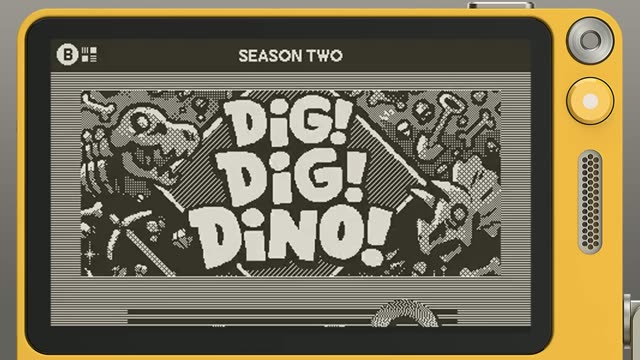
A flat yellow handheld device frames a pixel-art title card. A diamond shape forms behind the stacked white title and the letters pop with a hard offset shadow while the dino skull and shovel pixel art hold still.
On-screen text: “SEASON TWO”, “DiG!”, “DiG!”, “DiNO!”
Techniques: Morph
Camera: Static
A yellow handheld device mockup fills the frame, its monochrome screen showing a pixelated title card: SEASON TWO above stacked DiG! DiG! DiNO! lettering. The screen content then flips to a pixel-art scene with a shield and DEFENDER label as the title block slides down.
On-screen text: “SEASON TWO”, “DiG!”, “DiG!”, “DiNO!”
Camera: Static
A yellow retro handheld faces the camera against a plain gray background. Its monochrome screen scrolls a pixel-art feed downward: a doodle strip reading WHEEL SPIN enters from the top, the FULCRUM DEFENDER logo drops, and a patterned ticker at the bottom swaps DiG! for DiNO!.
Techniques: 3D mockup
Camera: Static
A flat yellow handheld device is locked off, its screen showing a black-and-white doodle illustration with the hand-drawn title WHEELSPRUNG and a SEASON TWO header. Sketchy doodles of a bike rider, pizza slice and sun shift gently.
On-screen text: “SEASON TWO”, “WHEELSPRUNG”
Camera: Static
A flat yellow field holds a centered black headline: just press on top, a black disc with a white B in the middle, and on the home screen below. The composition is static with no motion.
On-screen text: “just press”, “B”, “on the home screen”
Camera: Static
A yellow handheld device fills the frame on a gray background, front-facing and static. Its screen plays a looping black-and-white doodle collage titled WHEELSPRUNG under a SEASON TWO bar, with small doodles drifting. Instructional captions read just press and on the home screen.
On-screen text: “just press”, “on the home screen”
Camera: Static
A yellow handheld device fills the frame, its monochrome screen showing a grid of game library tiles. The device stays locked in a front-facing 3D mockup while the cursor tile shifts slightly.
Techniques: 3D mockup
Camera: Static
The word FOLDERS. in heavy black type sits centered on a flat yellow background. The frame is locked off and the text remains static for the full shot.
On-screen text: “FOLDERS.”
Camera: Static
A yellow handheld device mockup sits in 3D perspective, its screen filled with a grid of game library tiles. The view then zooms into the display, where radial lines burst outward around a large 0:360 counter.
Techniques: 3D mockup, UI zoom
Camera: Static
A yellow handheld device with an e-ink screen holds a b360 logo over a radiating line pattern, then a dithered pixel transition swaps it for a title card reading Season 01 and SYSTEM.
Techniques: Masking
Camera: Static
A yellow handheld device fills the frame in a locked-off close-up. Its screen shows a grid of dark tiles with white pixel labels, all GAMES, ALPHA BETICAL, RECENTLY PLAYED, SEASON 2, Season 1, SYSTEM, that scroll slightly upward, revealing a white tile reading Regularly.
On-screen text: “6360”
Camera: Static
A yellow handheld device with a pixel-grid screen fills the frame on a gray backdrop. The screen shows a grid of monochrome text tiles; the top row blurs and swaps to new lettering while the middle and bottom rows hold still.
Techniques: 3D mockup
Camera: Static
A yellow handheld console sits centered on a flat gray background, its dark screen showing a pixelated GAME LIBRARY title framed by stylized bookshelf graphics under a SYSTEM header. The shot is locked off and static.
Camera: Static
A flat yellow field fills the frame with a centered two-line black headline that holds still for the full shot. The locked-off composition shows no motion, no camera move, and no other elements.
On-screen text: “and a whole new app”
Camera: Static
A yellow handheld device is framed in a locked-off close-up. Its screen shows a pixelated GAME LIBRARY title over stylized book spines, then the display slides left to a folders list with game categories and counts.
Camera: Static
A yellow handheld console in 3D perspective holds a folder list on its screen. The list scrolls up as the dark selection bar moves down from All Games through Recently Played to Roguelike at the bottom.
Techniques: 3D mockup
Camera: Static
Close-up of a yellow handheld console screen showing a file manager: a header reads ROGUELIKE and a row lists Fulcrum Defender, 24.7 MB. A white selection box slides down the left icon column from the edit folder to the grid icon, and a dashed outline appears around the file row.
Camera: Static
A yellow handheld device is shown front-on, its screen displaying a file list under a 'Roguelike' header with a folder icon and a 'SEASON TWO' section. The entry 'Fulcrum Defender' carries a checkmark. The frame holds still with no motion.
Camera: Static
A solid yellow background holds the centered text “make CUSTOM folders”. The words “make” and “folders” are bold sans-serif, while “CUSTOM” is larger and handwritten.
On-screen text: “make”, “CUSTOM”, “folders”
Camera: Static
Close-up of a yellow handheld; its monochrome screen cycles a carousel of game icons beneath a Roguelike label, then cuts to a folder list where a new Roguelike folder appears highlighted at the bottom. The make CUSTOM folders headline sits over the frame.
On-screen text: “make”, “CUSTOM”, “folders”
Camera: Static
A yellow retro handheld in 3D perspective shows a monochrome screen reading GAME LIBRARY, then the display glitches into a menu screen with SYSTEM and PLAY as the device tilts.
Techniques: 3D mockup, Masking
Camera: Static
A yellow handheld game device fills the frame, its monochrome scanline screen showing a grid of dark folder tiles in white pixel type. The grid scrolls up: the top row exits, the Season tiles rise, and a Roguelike tile with crossed swords plus an Edit Folders button appear below.
Camera: Pan
On a flat yellow background, black text stacks in the center. The word organize holds the frame, then categorize and editorialize drop in below it. The words remain static once placed.
On-screen text: “organize”, “categorize”, “editorialize”
Techniques: Kinetic type
Camera: Static
A yellow retro handheld on a gray backdrop shows a monochrome folder browser with season folders and a Roguelike tile. A toolbar with plus, grid, phone, and trash icons slides in from the left edge of the screen as “Loading Games...” appears.
On-screen text: “organize”, “categorize”, “editorialize”
Techniques: 3D mockup
Camera: Static
A yellow PDA's screen fills the frame, its file manager showing a FOLDERS list with counts. The view cross-dissolves into the Season Two folder as the highlight bar jumps from All Games to Dig Dig Dino!.
Techniques: Morph
Camera: Static
Static close-up of a yellow handheld device. Its screen shows a game list; a detail panel for Blippo+ slides in from the right, scrolls down to the INCLUDE IN FOLDERS section, the Roguelike checkbox ticks on, then the panel slides out to return to the list.
Camera: Static
A yellow handheld console fills the frame, its screen showing a game library list under SEASON TWO with Blippo+ highlighted. A dropdown menu fades in over the list, offering All Games, Alphabetic, Recently Played, System and Life.
Camera: Static
Close-up of a yellow handheld device screen showing a FOLDERS list with six rows and item counts. The list stays still while a dotted selection marker fades in beside the down-arrow icon in the left toolbar.
Camera: Static
Close-up of a yellow handheld device, its screen showing a monochrome grid of folder tiles. The list scrolls downward, bringing a top row of three tiles into view as the bottom tile slides off the screen.
Camera: Static
A locked-off title card on a black background. The words “system update” sit in white, stacked on two lines, above a large yellow “3.0”. The text holds still for the full duration with no animation.
On-screen text: “system update 3.0”
Camera: Static
A black lowercase sans-serif tagline, “coming later this year”, sits centered on a flat yellow field, then cuts to the “play date” wordmark with a registered mark in the same position.
On-screen text: “coming later this year”, “play date”
Camera: Static
The black playdate wordmark holds centered on a flat yellow field, static and locked off. A small black tagline, coming later this year, sits beside the mark, also still.
On-screen text: “coming later”, “this year”
Camera: Static