
0:41
Explore
Introducing AI Mode: A New Experiment in Google Search
Google · Apr 2025 · 1:37 · Full motion · AI-annotated
- Length
- 1:37
- Scenes
- 54 · 1.8 s avg
- Product on screen
- 0:00
- Features shown
- 6
- Call to action
- 1:25 · 88%
- Voiceover
- Yes
- Views
- 336K on YouTube
as of November 20, 2026
00:00:00 / 01:37:03
- Length
- 1:37
- Scenes
- 54 · 1.8 s avg
- Product on screen
- 0:00
- Features shown
- 6
- Call to action
- 1:25 · 88%
- Voiceover
- Yes
- Views
- 336K on YouTube
as of November 20, 2026
Google’s 1:37 launch film runs 54 scenes, about 1.8 s each. The product is on screen from the first frame and 6 features are revealed. The call to action lands at 1:25 (88% in), over a voiceover. The video opens by naming the product, then alternates short lowercase tagline cards with UI demos of distinct queries (comparison, text, image, real time, follow up), and closes on a where to find it card and the logo. Its style is a near black canvas lit by soft multicolor glow blobs, with thin gradient lines and a traveling dot as the signature transition, slow deliberate pacing, and text that types in while the interface zooms and scrolls to reveal answers.
No filming indicatedEstimated needs: 9 capture groups — your screens or recordings · 1 official logo — reused across the film · 8 graphic passages — draw or supply · 2 3D passages — build or supply
Is this your launch? to your site or press kit.
More like this

Similar soundtrack
Films whose music sounds like this one, voice left out
1:39
Self - At Self Labs, we’ve been using agents since day one Our agentic web
Self · Modern electronic
1:59

Introducing Prism, a free workspace for scientists to write and collaborate on research
OpenAI · Upbeat, polished electronic pop with funk and disco influences
0:35
Google Gemini - Today, we’re releasing a significant upgrade to our specialized reaso
Gemini 3 Deep Think · Electronic dance music
Introducing AI Mode: A New Experiment in Google Search, scene by scene
· 54 scenes as text
01 · Product intro · 0:00–0:04
On a near-black background, a thin gradient ring with a white dot at its tip draws itself and rotates. “Introducing AI Mode” scales in at the center, holds, then fades as the ring keeps spinning and a smaller inner ring forms.
On-screen text: “Introducing AI Mode”
Techniques: Kinetic type
Camera: Static
02 · Demo · 0:04–0:05
A thin blue four-pointed star outline sits centered on a near-black background, then contracts rapidly into a single point and vanishes, as a faint dark rounded panel begins to fade in behind it.
Camera: Static
03 · Demo · 0:05–0:06
A dark Google search interface sits centered on a near-black field. The query fills the search bar letter by letter, the orange highlight trailing the cursor, while a small orb beneath it cycles from blue to red to green.
Camera: Static
04 · Demo · 0:06–0:12
A dark Google search UI types a sleep-tracking query, then zooms down through a 11-sites pill and result cards as an answer sentence types out, ending on three photos of a ring, a watch and a sleeper.
Techniques: UI zoom, Kinetic type
Camera: Push in
05 · Feature reveal · 0:12–0:14
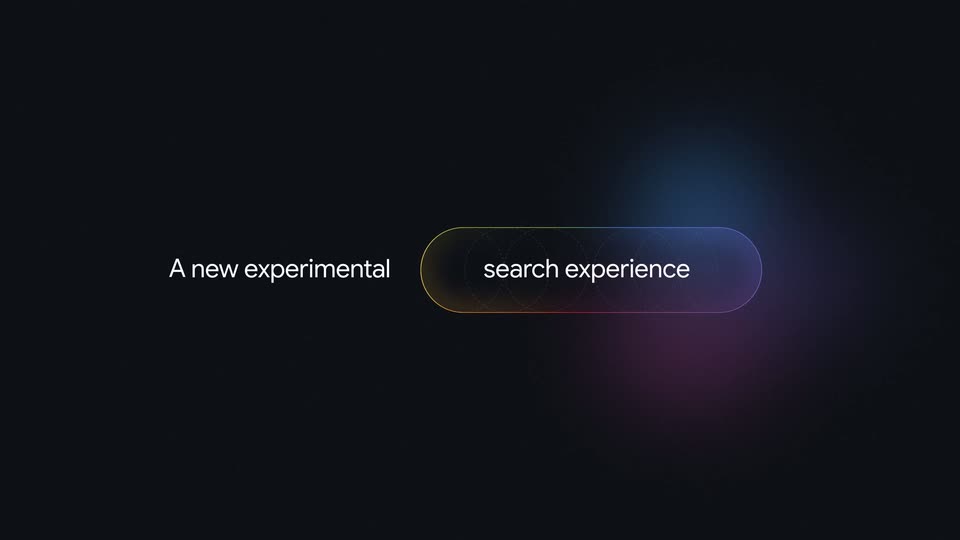
On a near-black field, the line “A new experimental” slides in at left while a pill-shaped search bar labeled “search experience” fades in at right, its thin gradient outline brightening into a glowing blue-purple capsule.
On-screen text: “A new experimental”, “search experience”
Techniques: Kinetic type
Camera: Static
06 · Feature reveal · 0:14–0:15
On a near-black background, the lowercase phrase “helping people connect” scales in word by word on the left with a small dot, while “experimental” and a thin pill-shaped outline fade in on the right. The text then dissolves back to black.
On-screen text: “A new experimental”, “search experience”, “helping people connect”
Techniques: Kinetic type
Camera: Static
07 · Feature reveal · 0:15–0:16
On a near-black background, the lowercase phrase helping people connect sits left of center with a soft green glow behind it. A thin green line draws out to the right, ending in a small white dot.
On-screen text: “helping people connect”
Camera: Static
08 · Feature reveal · 0:16–0:17
A green connector line draws itself from the left tagline across a vertical seam, tracing a rounded rectangle that opens as a mask to reveal a tweet card with a thumbnail and title. The Twitter post text sits blurred behind on the right.
On-screen text: “helping people connect”
Techniques: Masking, Split screen
Camera: Pan
09 · Feature reveal · 0:17–0:17
A dark feed interface displays a row of article cards beneath a caption; the row slides left while a glowing rounded outline locks onto the sleep-tracking card, its border shifting from blue to pink. A faint caption scales in at the left edge.
On-screen text: “helping people connect”
Camera: Pan
10 · Feature reveal · 0:17–0:19
A dark social feed displays a sleep-tracking post with two thumbnail cards. The right card is highlighted with a pink glow while the left blurs out, and a blue line extends rightward as the caption 'to the best of the web' appears word by word.
On-screen text: “to the best of the web”
Techniques: Kinetic type
Camera: Static
11 · Feature reveal · 0:19–0:19
A blurred dark feed panel slides right on the left while the white tagline to the best of the web holds on the right, a thin line drawing out from the text to a small dot.
On-screen text: “to the best of the web”
Camera: Pan
12 · Feature reveal · 0:19–0:20
On a black background, a glowing white diamond slides right along a thin horizontal line, leaving a gradient streak and a curved sparkle arc, while the caption slides out of frame to the left.
On-screen text: “to the best of the web”
Camera: Static
13 · Feature reveal · 0:20–0:22
On a dark background, a dashed line expands into a four-pointed star shape with glowing, multicolored edges. The text 'with the best of Gemini' slides into the center, with 'Gemini' in blue.
On-screen text: “with the best of Gemini”
Techniques: Kinetic type, Morph
Camera: Static
14 · Feature reveal · 0:22–0:23
A dark field holds a glowing blue-green node on a thin horizontal line with a dot at its end; dashed star curves sit behind the white tagline, which slides left as the glow widens and faint app cards fade in at the right edge.
On-screen text: “with the best of Gemini”
Techniques: Kinetic type, Light sweep
Camera: Static
15 · Demo · 0:23–0:24
A dark content feed scrolls upward, bringing a row of article cards and a Detailed comparison section into view. Three cards for Smart Rings, Smartwatches and Trackers rise with their images and purple Strengths captions.
Camera: Pan
16 · Demo · 0:24–0:25
A dark comparison page scrolls upward in a centered column, revealing three cards labeled Smart Rings, Smartwatches and a third cut off at the right, each with a photo and a Strengths list beneath it.
Camera: Pan
17 · Demo · 0:25–0:26
A dark Google search panel fades in on black, its rounded card holding the AI Mode tab and three columns of result text. The list then scrolls upward, bringing the Weaknesses section into view.
Camera: Static
18 · Demo · 0:26–0:27
A dark Google search results page fills the frame in close-up. Columns of feature text and a Weaknesses block slide horizontally, their words doubled and ghosted as the layout shifts.
Camera: Static
19 · Feature reveal · 0:27–0:29
On a near-black field, the line “AI Mode will let you ask” slides in left of center. A dot at its end draws a dashed line rightward that glows blue to red, then dissolves as the words “whatever is” fade in to the right.
On-screen text: “AI Mode will let you ask”, “whatever is”
Techniques: Kinetic type
Camera: Static
20 · Feature reveal · 0:29–0:31
On a black field, a horizontal gradient light beam carries a dashed sine wave with white words riding its peaks. The caption AI Mode will let you ask slides left and exits while the phrase whatever is on your mind drifts along the wave, then the frame blurs to black.
On-screen text: “AI Mode will let you ask”, “whatever is on your mind”
Techniques: Kinetic type
Camera: Static
21 · Feature reveal · 0:31–0:32
A glowing gold-to-red wave ripples across a white field with a peach glow at right. The glow fades to white as the multicolor Google logo appears left, the wave turns red-to-blue, and a faint search bar with menu tabs fades in below.
Techniques: Morph
Camera: Static
22 · Feature reveal · 0:32–0:33
A white Google search page holds still while the query types out word by word in the rounded search bar, ending with the word memory in gold. The Google logo sits left, the tab row and mic and Gemini icons sit right, and a soft rainbow glow fades across the top edge.
Techniques: Kinetic type
Camera: Static
23 · Feature reveal · 0:33–0:37
A Google AI Mode page fades in on a white background. Status lines stack up, then the answer body and a right-hand column of source cards appear beneath the query heading.
Camera: Pull out
24 · Feature reveal · 0:37–0:39
A document interface with a right-hand related links rail scrolls downward. Bold subheadings pass by, and a blue brain graphic with a red highlighted area plus a footer line enter at the bottom.
Camera: Pan
25 · Feature reveal · 0:39–0:39
A document view with headings and a brain illustration fades to a plain white field as the tagline types in at center, word by word.
On-screen text: “In whatever way is natural”
Techniques: Kinetic type
Camera: Static
26 · Feature reveal · 0:39–0:40
A thin vertical line holds the centered tagline, then the line widens into a flat black phone mockup that reveals a vertical video of a pink animal in water. The tagline splits into two halves flanking the phone, and a circular search icon sits at the bottom of the screen.
On-screen text: “In whatever way is natural to you”
Techniques: Masking
Camera: Static
27 · Feature reveal · 0:40–0:43
A centered phone mockup on white shows a Google Lens view of a pink axolotl, flanked by the static captions 'In whatever way' and 'is natural to you'. The query 'why are these so popular?' slides in over a multicolored circular button, then the phone tilts into 3D with a green and purple glow.
On-screen text: “In whatever way”, “is natural to you”
Techniques: 3D mockup
Camera: Pan
28 · Feature reveal · 0:43–0:44
A dark phone mockup at the bottom slides out of frame while a multicolor gradient logo sharpens in the center behind centered gray text. A thin connector line with two red dots sits to the right of the logo on the white background.
On-screen text: “You will get an Al powered answer”
Camera: Static
29 · Feature reveal · 0:44–0:45
A dark gray caption scales over a faint blurred color wash, then a rounded phone mockup with a Google search screen scales into the center of the frame.
On-screen text: “You will get an AI powered answer”
Techniques: Kinetic type
Camera: Static
30 · Feature reveal · 0:45–0:51
A Google AI Mode search card for 'why are these so popular?' fades in blurred over soft blue and orange glows, then the view pushes in and scrolls down. The answer types in with blue-highlighted phrases, ending on two axolotl source cards.
Techniques: UI zoom
Camera: Pan
31 · Feature reveal · 0:51–0:54
A dimmed search results page holds the static headline while small white dots travel a dashed orbit. The page dissolves to black over soft color glows, then a 3D Google search card tilts into view with a query typed in the bar.
On-screen text: “Get real time information”
Techniques: 3D mockup
Camera: Static
32 · Feature reveal · 0:54–0:55
A dark Google search panel fills the lower half of a black frame with a faint green glow at left. The query in the search bar types out, ending with “to Milwaukee” in orange, while the AI Mode tab stays underlined.
Techniques: Kinetic type
Camera: Static
33 · Feature reveal · 0:55–0:57
A dark Google AI Mode search screen fades in from black. A large white query about a train to Milwaukee sits static, while small grey status lines stack up one by one beneath it.
Camera: Static
34 · Feature reveal · 0:57–0:59
A dark AI Mode search screen shows the user's question about a train from O'Hare to Milwaukee with “Organizing the info...” below, then scrolls down to reveal the generated answer, a University of Michigan source card, and a “From O'Hare to Union Station” card with a photo.
Camera: Pan
35 · Feature reveal · 0:59–1:00
A dark text panel scrolls up, showing numbered steps for a train ride and a walk to Union Station, then a time estimate; a phrase in the estimate is highlighted in blue.
Camera: Pan
36 · Feature reveal · 1:00–1:02
A dark chat interface scrolls upward through a travel summary. Blue-highlighted phrases and a row of captioned image cards pass by, then a departures list with timestamps appears.
Camera: Pan
37 · Feature reveal · 1:02–1:04
A dark-mode text panel scrolls upward, revealing new paragraphs about Amtrak travel. A blue selection highlight sweeps across the opening line, then a small train photo card slides in at the bottom edge.
Camera: Pan
38 · Feature reveal · 1:04–1:05
A dim transit-info list fades to black, then a soft multicolor glow blooms behind a small constellation of dots and lines. The line “And explore more” holds at left in white, dimming slightly as the glow spreads.
On-screen text: “And explore more”
Camera: Static
39 · Feature reveal · 1:05–1:07
A blurred multicolor ring rotates slowly around a dark center, framing the static white line 'And explore more'. Thin dotted spokes with small dots at their ends radiate outward and shift position. The scene ends on a black frame.
On-screen text: “And explore more”
Camera: Static
40 · Feature reveal · 1:07–1:08
A dark interface list of travel cards scrolls upward, bringing a Show all button and a feedback row into view above the fixed Ask AI Mode input bar.
Camera: Pan
41 · Feature reveal · 1:08–1:09
Close-up of a dark interface showing a TripSavvy chip, a Show all button and an Ask AI Mode field over a blurred colored backdrop. A glowing gradient ring rises from the bottom and docks into the field beside the text.
Camera: Static
42 · Feature reveal · 1:09–1:12
A dark transit app screen shows an Ask AI Mode input panel with a gradient border. A query types out letter by letter, then the panel shrinks to a thin bar and the view pulls back to reveal the station list.
Techniques: Kinetic type, UI zoom
Camera: Pull out
43 · Feature reveal · 1:12–1:13
A dark Google AI Mode screen holds a query with orange, red and blue highlighted words. The frame pulls back slightly and a 'Thinking about this...' line fades in below the text.
Techniques: UI zoom
Camera: Static
44 · Feature reveal · 1:13–1:16
A flat phone mockup on a dark blurred gradient background shows Google AI Mode. The typed query sits above a thinking status, then the answer scrolls up into view, revealing a heading and three image cards.
Camera: Pull out
45 · Feature reveal · 1:16–1:19
A close-up of the AI search interface with result cards holds the centered headline. The interface slowly zooms out and fades to black, then the gradient word “research” scales in beneath the headline.
On-screen text: “AI Mode will help you”, “research”
Techniques: UI zoom, Kinetic type
Camera: Static
46 · Feature reveal · 1:19–1:19
A defocused dark interface with colored light glows fills the frame while a sharp white word sits centered. The label scales from “research” to “plan” as the blurred search bars and suggestion pills drift and shift behind it.
On-screen text: “research”, “plan”
Techniques: Kinetic type, UI zoom
Camera: Static
47 · Feature reveal · 1:19–1:21
A dark abstract search view glows with soft green, orange and red light. A large white keyword scales in the center, cycling from plan to learn, while rounded suggestion pills, a mic icon and a search icon drift around it.
On-screen text: “plan”, “learn”
Techniques: Kinetic type
Camera: Push in
48 · Feature reveal · 1:21–1:22
Search-suggestion pills and circular icon buttons float in a dark space with soft colored glows, drifting at different depths. The white word “brainstorm” scales out at center and is replaced by “answer” with a thin red underline.
On-screen text: “brainstorm”, “answer”
Techniques: Kinetic type, Parallax
Camera: Push in
49 · Feature reveal · 1:22–1:24
A blurred dark search interface with a question bar, icons and small chips defocuses and fades out, then the tagline 'search anything effortlessly' fades in word by word over a soft multicolor glow.
On-screen text: “search anything effortlessly”
Techniques: Kinetic type
Camera: Static
50 · Feature reveal · 1:24–1:25
A line of white lowercase text sits centered on a near-black field. A soft glow of red and blue light pulses behind the words as the text fades in, holds, then fades out. The frame stays locked.
On-screen text: “search anything effortlessly”
Camera: Static
51 · CTA · 1:25–1:27
A small white caption builds word by word, reading “And it's right here,” over a dark field with a soft colored glow on the left. The line fades out as a Google search page, with its logo and result tabs, fades in from black.
On-screen text: “And it's right here”
Techniques: Kinetic type
Camera: Static
52 · CTA · 1:27–1:30
A dark Google search panel fills the right side, showing its logo, search bar and tab row, with the caption “And it's right here” on the left. The panel brightens then dims as a multicolor underline shifts under the tabs, ending on black.
On-screen text: “And it's right here”
Camera: Static
53 · CTA · 1:30–1:32
A dark navy background holds a centered pill button reading “In Google Search”. A faint gray Q glyph scales at the pill's left end and fades, while a thin green line with a leading dot traces the pill's outline, then disappears.
Camera: Static
54 · Outro · 1:32–1:37
A small blue spark glows at the center of a near-black field. It gives way to the multicolor Google G logo, which materializes with a brief ring of fine colored particles. The particles fade and the logo holds still, centered.
Techniques: Particles
Camera: Static