1:27
Sona8 (F26) - Launch & Demo
Sona8 · B2B · Nov 2026
Gemini 3 Deep Think · Feb 2026 · 0:35 · AI-annotated
Gemini 3 Deep Think’s 0:35 launch film runs 23 scenes, about 1.5 s each. The product is on screen from the first frame and 1 feature is revealed. There is no explicit call to action. The video is built as one continuous end to end demo: a title card names the product, a hand drawn sketch is fed into a chat prompt, the model's thinking and code scroll past, and the result resolves from a 3D render to a printed object before closing on the brand wordmark. Its signature moves are the drifting dot wave that bookends the piece, the flat to 3D camera tilts on the interface cards, and the scroll driven reveal of long text and code blocks.
Is this your launch? to your site or press kit.
Sona8 · B2B · Nov 2026
Bernard · B2B · Aug 2026
A blue headline reads “Gemini 3 Deep Think” at center on a pale background, scaling up as it settles. Small blue dots drift in wave shapes along the bottom left and right corners.
On-screen text: “Gemini 3 Deep Think”
Techniques: Kinetic type, Particles
Camera: Static
On a plain off-white background, the blue headline scales in at center above a white pill button holding a head icon with circuit lines, while a wave of small blue dots drifts along the bottom, a few green dots appearing at the center.
On-screen text: “Gemini 3 Deep Think”
Techniques: Kinetic type, Particles
Camera: Push in
A blue title and a white Deep Think button rest on a pale field above a curved wave of blue and green particles. The title slides left as two hand-drawn sketch cards of a wedge laptop stand slide in from the right.
On-screen text: “Gemini 3 Deep Think”, “WEDGE LAPTOP STAND”, “GYROID LATTICE STRUCTURE”, “LIGHTWEIGHT & BREATHABLE”
Techniques: Kinetic type, Particles
Camera: Push in
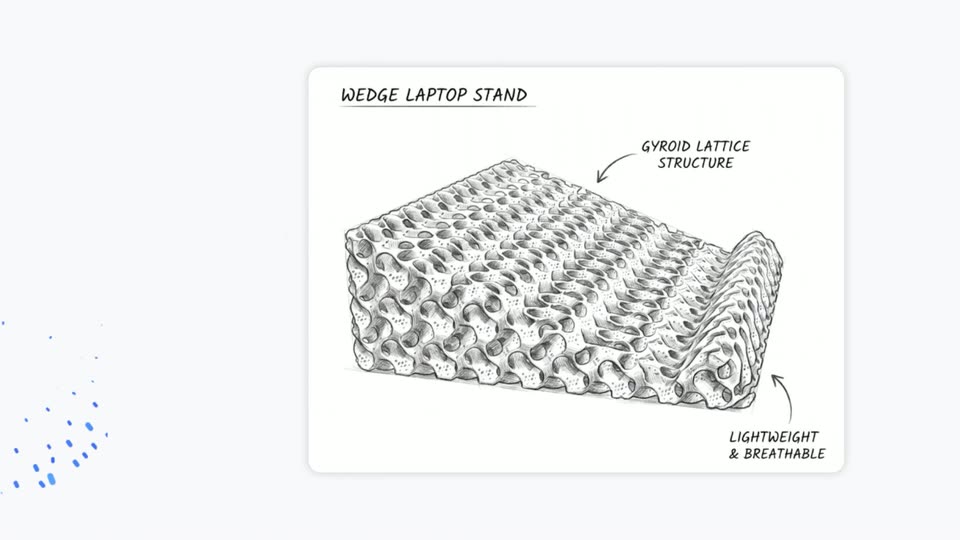
A hand-drawn sketch of a wedge laptop stand with a honeycomb lattice sits on a white card. Handwritten labels with arrows, WEDGE LAPTOP STAND, GYROID LATTICE STRUCTURE and LIGHTWEIGHT & BREATHABLE, slide horizontally into position.
On-screen text: “WEDGE LAPTOP STAND”, “GYROID LATTICE STRUCTURE”, “LIGHTWEIGHT & BREATHABLE”
Camera: Pull out
A hand-drawn sketch card of a wedge laptop stand with handwritten labels scales down and slides to the top-left corner as a rounded chat card with a Deep Think input pill expands in below it on a pale gray background.
On-screen text: “WEDGE LAPTOP STAND”, “GYROID LATTICE STRUCTURE”, “LIGHTWEIGHT & BREATHABLE”
Camera: Pull out
A white rounded prompt card floats on a pale gray field, a sketch thumbnail pinned to its top left. The prompt line types out letter by letter while the Deep Think toggle, Pro label and send button hold still.
On-screen text: “Sequences shortened and screen images simulated throughout. Results for illustrative purposes and may vary. Compatibility and availability varies.”
Techniques: Kinetic type
Camera: Static
A single line of large black text scrolls leftward across a plain white background, revealing the phrase about sketching into a high-fidelity, functional 3D laptop. A small grey disclaimer line stays fixed along the bottom edge.
On-screen text: “Sketch into a high-fidelity, functional 3D laptop”
Techniques: Kinetic type
Camera: Static
Large black headline text scrolls left across a white background, reading “…ed sketch into a high-fidelity, functional 3D laptop stand. Generat…”. A small gray disclaimer line sits at the bottom, and a thin interface bar with “think” and “Pro” fades in at the end.
On-screen text: “ed sketch into a high-fidelity, functional 3D laptop stand. Generat”, “Sequences shortened and screen images simulated throughout. Results for illustrative purposes and may vary. Compatibility and availability varies.”
Techniques: Kinetic type
Camera: Pull out
A white chat card sits on a light gray field. A small lattice sketch anchors the top corner while a multi-line prompt types in line by line across the body. A toolbar with a Deep Think toggle, a Pro menu and a send button lines the card base.
On-screen text: “Sequences shortened and screen images simulated throughout. Results for illustrative purposes and may vary. Compatibility and availability varies.”
Techniques: Kinetic type
Camera: Push in
A white rounded chat card holding a long 3D-modeling prompt rests flat on a pale gray background, then rotates into a 3D tilt. The body text stretches and overlaps as the plane turns, framing the interface in perspective.
On-screen text: “Sequences shortened and screen images simulated throughout. Results for illustrative purposes and may vary. Compatibility and availability varies.”
Techniques: 3D mockup
Camera: Static
A document view fades in from faint to full opacity, revealing a title, a Show thinking toggle, and three headed paragraphs of generated text. A legal caption stays fixed at the bottom edge.
On-screen text: “Sequences shortened and screen images simulated throughout. Results for illustrative purposes and may vary. Compatibility and availability varies.”
Camera: Static
A white document view titled 3D Laptop Stand Generation scrolls upward, revealing section headings and paragraphs while a blue dot on a left timeline track slides down and lower text fades to white.
Camera: Pan
A light markdown document scrolls upward, its section headings and body paragraphs sliding off the top while a code block tagged HTML rises into view at the bottom, its CSS rules for a download button appearing line by line.
Camera: Pan
A light documentation page scrolls upward, settling on a syntax-highlighted CSS code block beneath a short paragraph of prose. A copy icon sits at the top right corner of the code panel.
Camera: Static
A light webpage with article body text and a CSS code block scrolls upward, then the view zooms into a rounded-corner photo of a white 3D-printed gyroid lattice, which fills the frame.
Techniques: UI zoom
Camera: Pull out
A white 3D-printed lattice plate turns and pulls back on a black rounded panel, which then expands to full screen. A pale download button pops in at the bottom, the view reframes upward to center it on a light gray field, and a hand cursor appears beside it.
On-screen text: “DOWNLOAD PRINT-READY STL”
Techniques: 3D mockup, Cursor demo
Camera: Pan
A light gray rounded button carrying the dark gray all-caps label DOWNLOAD PRINT-READY STL sits centered on a white field and slides gently side to side. A black hand cursor icon hovers at the button's lower right corner.
On-screen text: “DOWNLOAD PRINT-READY STL”
Techniques: Kinetic type
Camera: Static
A light gray pill button reading DOWNLOAD PRINT-READY STL slides left across a white screen beside a hand cursor, while a rounded video of a 3D printer bed holding a white lattice print slides in from the right.
On-screen text: “DOWNLOAD PRINT-READY STL”
Techniques: Kinetic type
Camera: Pan
A rounded video card on a white field holds footage of a Bambu Lab printer head over a white honeycomb lattice. The camera pushes in steadily while the head glides left, the perforated grid swelling to fill the frame.
Camera: Pan
A rounded-corner clip of a dark printer chamber, showing a white honeycomb lattice on the bed with the print head above, slides left. A spray of blue dots bursts out from its right edge onto the white background.
Techniques: Particles
Camera: Pan
A dark rounded screen exits left as a wave of blue particles ripples across a white field. The gemini.google wordmark materializes at center, sharpening from a soft blur into crisp blue gradient type.
On-screen text: “gemini.google”
Techniques: Particles
Camera: Pan
A white frame holds the blue gemini.google wordmark centered and locked, while a thin wave of small blue and green dots drifts along the lower edge. A small gray disclaimer line sits at the bottom.
On-screen text: “gemini.google”, “Sequences shortened and screen images simulated throughout. Results for illustrative purposes and may vary. Compatibility and availability varies.”
Techniques: Particles
Camera: Static
The blue gemini.google wordmark sits centered on a white field while small blue and green dots drift in low waves along the bottom and edges. A fine gray disclaimer line runs across the base. The logo stays locked and static throughout.
On-screen text: “gemini.google”, “Sequences shortened and screen images simulated throughout. Results for illustrative purposes and may vary. Compatibility and availability varies.”
Techniques: Particles
Camera: Static