1:00

horizontal. (YC F26): AI agents that run factory operations
horizontal. · Industrials · Oct 2026
Sona8 · Nov 2026 · 1:27 · AI-annotated
The video walks one running example (a service repair logged four times) through a fixed pipeline of setup, invitation, interview, capture, analysis, AI handoff and follow-up, with the Sona8 logo pinned top-left throughout. Motion is mostly flat 2D UI mockups with occasional 3D tilts, driven by a black caption pill that swaps phrases in sync with the voiceover at about seven cuts per minute.
horizontal. · Industrials · Oct 2026
Craft · Productivity · Nov 2025
Apollo · Sep 2026
A pale lavender frame holds a black serif headline above a white chat card titled AI interview, showing Sona's prompt and the employee's reply with purple waveforms. A black caption bar at the bottom reads Sona8 interviews employees and.
On-screen text: “Before you improve a workflow, ask the people doing it.”, “Sona8 interviews employees and”
Camera: Static
A pale layout pairs a serif headline with two product cards: an AI interview transcript on the left and a captured workflow on the right that slides in, its middle step highlighted purple. A black caption pill at the bottom swaps phrases in sync with the voiceover.
On-screen text: “Before you improve a workflow, ask the people doing it.”, “Sona8 interviews employees and”, “captures their workflows,”, “what needs to change.”
Techniques: Kinetic type
Camera: Static
A white screen shows a serif headline over three team cards, the first highlighted purple, plus a row of use cases. The view crossfades to the Sona8 interview setup interface while a bold bottom caption swaps text.
On-screen text: “Strategy and operations teams,”, “consultants and PE operations”
Camera: Static
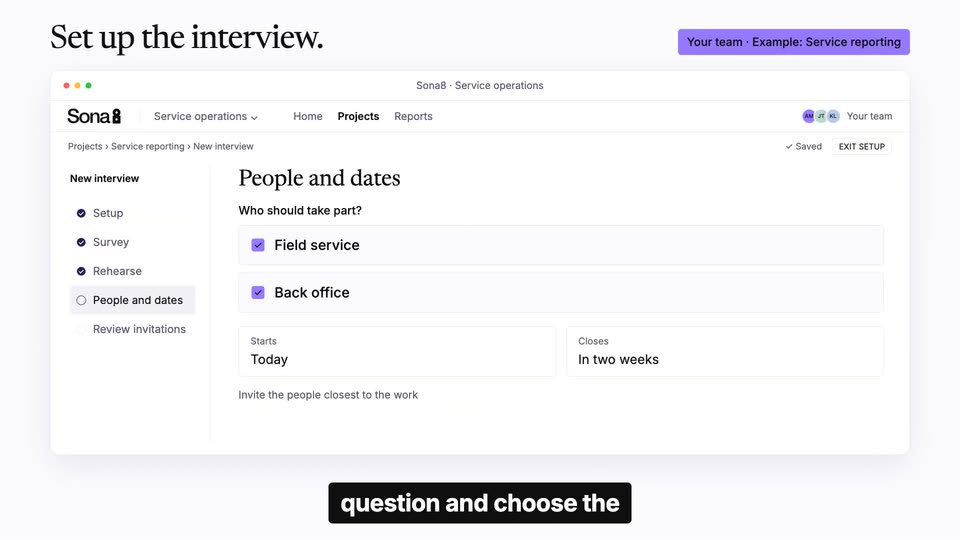
A browser window of the Sona8 setup screen steps through the interview flow: a question is typed, people and dates are checked, then a review summary with a send button appears. A serif headline and purple pill sit above; black caption boxes update below.
On-screen text: “Set up the interview.”, “Your team · Example: Service reporting”, “consultants and PE operations”, “questions start with a”, “question and choose the”
Camera: Static
Flat front view of the Sona8 service-operations interface on the Review invitations page. A cursor clicks the purple Send invitations button, which flips to a dark Sent state, while a black caption bar at the bottom updates from 'question and choose the' to 'employees.'
On-screen text: “Set up the interview.”, “Your team - Example: Service reporting”, “question and choose the”, “employees.”
Techniques: Cursor demo
Camera: Static
A plain white frame holds a serif headline that scales up and darkens, then a flat invitation card fades in beneath it on the left. A black caption pill with white text sits at the bottom center.
On-screen text: “Invite the people who do the work.”, “Employees receive an invitation”
Techniques: Kinetic type
Camera: Static
A serif headline sits top-left above flat email, Slack and SMS invitation cards that slide into place on a light background. A black caption pill at the bottom cycles through phrases while a cursor moves to the purple Start interview button and presses it.
On-screen text: “Employees · Invitation to an AI interview”, “Invite the people who do the work.”, “by email,”, “Slack or SMS,”, “or join by phone.”, “In an AI interview,”, “they explain in their”, “own language what makes”
Techniques: Kinetic type, Cursor demo
Camera: Static
Three overlapping product windows (email, interview, chat) sit under a serif headline. The side windows fade and the central interview screen expands to fill the frame as the headline cross-fades to a new line, while a black caption bar updates at the bottom.
On-screen text: “Employees · Invitation to an AI interview”, “Invite the people who do the work.”, “work difficult and what”, “could help.”, “One repair. Recorded in several places.”
Techniques: UI zoom
Camera: Static
A chat interface mockup tilts into 3D perspective as conversation text and a flow diagram animate in. The left message updates to a new question while a phrase is highlighted on the right.
On-screen text: “Example: Service reporting - Employee interview”, “One repair. Recorded in several places.”, “For example,”, “a technician finishes a”, “repair and records the”, “job in several places.”, “Sona8 asks them to”, “show the steps.”
Techniques: 3D mockup, Kinetic type
Camera: Static
A screen-share dialog fades to a ghost over a ServiceHub report form, revealing the full interface as a cursor hovers the serial number field with a tooltip. A serif headline sits top-left and a dark caption reads “During the interview,” at the bottom.
On-screen text: “Example: Service reporting · Live screen share”, “Share your screen. Explain the step.”, “During the interview,”
Techniques: Cursor demo
Camera: Static
A flat service-report form sits on a light background, the Serial number field highlighted purple with a cursor and tooltip. A left column fades in with an avatar, a serif question and a short transcription. A Paper-to-SAP flow appears below the form while black caption pills crossfade.
On-screen text: “Example: Service reporting · Live screen share”, “Share your screen. Explain the step.”, “they share their screen”, “Where do you enter this again?”, “Sona”, “Technician”, “Here. Then the office copies it into SAP.”, “they copy which fields”, “Paper · SV-0248 → ServiceHub · SV-0248 → SAP · SV-0248”, “they copy it into another system”
Techniques: Cursor demo
Camera: Static
The screen-share example fades out as a serif headline and a flat mockup of the Sona8 desktop app fade in: a service visit report window inside an employee computer frame, with a running-app pill and a day timeline. A black caption “The Sona8 desktop app” holds at the bottom.
On-screen text: “The Sona8 desktop app”, “Employees - Desktop app”, “Captures workflows in the background.”
Camera: Static
A flat desktop-app window shows a service-visit form with a purple-highlighted serial field. The day clock ticks from 09:54 to 11:53 as the form crossfades into an Update service record view, while a black caption box reads the background.
On-screen text: “Employees · Desktop app”, “Captures workflows in the background.”, “Employee computer · Sona8 desktop app”, “The Sona8 desktop app”, “the background,”
Camera: Static
A flat desktop-app diagram swaps a SAP form for a Word form as the clock ticks and a step list fills, while a black caption pill cycles the narration. It cuts to a phone mockup framing a camera view of an electrical panel.
On-screen text: “Employees · Desktop app”, “Captures workflows in the background.”, “capturing how employees work”, “across apps throughout the”, “without a live interview.”, “Example: Service reporting · Live interview on your phone”, “Show the physical workspace.”, “For physical work,”
Techniques: Kinetic type
Camera: Static
A tilted phone mockup on the left plays a first-person clip of a hand flipping breakers on an electrical panel. On the right, a chat panel builds in sequence: a header, a speaker line with waveform, a large serif question, body copy, three chips, and a detail card, while captions swap at the bottom.
On-screen text: “Example: Service reporting · Live interview on your phone”, “Show the physical workspace.”, “For physical work,”, “they open the interview”, “show the equipment and”, “the task as it”
Techniques: 3D mockup
Camera: Static
A browser-framed Sona8 report sits flat under a serif headline and a row of context chips. The report switches through three tabs, finding, charts, and a quote card, while a black pill caption at the bottom swaps phrases in time with the voiceover.
On-screen text: “Your team · Shared analysis”, “Explore a finding. Check the evidence.”, “Shared context”, “Interview”, “Screen share”, “Phone camera”, “Background capture”, “Analyse everything together.”, “Explore a finding,”, “compare teams and locations,, and check the evidence behind it.”
Techniques: Kinetic type
Camera: Static
A serif headline and three quote cards sit on white, then give way to a row-based flow diagram: Paper log, ServiceHub, SAP and Word form cards appear with purple arrows, a dark tag pops in, and a purple pill lands bottom left.
On-screen text: “For your team · Example: Service reporting”, “The same repair is recorded four times.”, “Field service”, “First, I write it on paper.”, “Back office”, “We enter it again in SAP”, “Customer service”, “Then we prepare the form.”, “Sona8 connects the steps and finds that the same repair is recorded”, “Paper log / At the customer site / Job SV-0248 / ServiceHub / Enter the details again / SAP / Office retypes the record / Word form / Another copy in Word / Re-”
Techniques: Kinetic type
Camera: Static
A flat dashboard screen: a horizontal bar chart of themes fills in row by row on the left while an evidence panel on the right assembles tabs, a quote and a link. A cursor hovers the top bar; a black caption pill appears at the bottom.
On-screen text: “Themes show how often”, “problems come up across”
Techniques: Cursor demo
Camera: Static
Beneath a static serif headline, a Sona8 card settles on the left while a purple panel wipes away to reveal a Claude or ChatGPT card, linked by an MCP arrow; a black CTA button drops in below.
On-screen text: “Go deeper in Claude or ChatGPT.”, “Your team · Connected to Sona8”, “Connect Sona8 to Claude”
Techniques: Masking
Camera: Static
A light-gray explainer layout: a black serif headline sits top left above two white info cards linked by a purple MCP arrow, with a black CTA pill below. The pill text cycles, then a flat Claude browser mockup slides in at the top right as the cards shift.
On-screen text: “Go deeper in Claude or ChatGPT.”, “Your team · Connected to Sona8”, “Connect Sona8 to Claude”, “or ChatGPT through MCP”
Camera: Static
A static Claude interface mockup sits below a large serif headline and a row of small pill labels. A black caption pill at the bottom reads “or ChatGPT through MCP”, switches to “to analyze the findings”, then disappears.
On-screen text: “Go deeper in Claude or ChatGPT.”, “Your team - Connected to Sona8”, “Choose output”, “Process map”, “Product specification”, “AI instructions”, “or ChatGPT through MCP”, “to analyze the findings”
Camera: Static
A flat browser window shows a Claude table comparing problem themes across functions, with the Duplicate entry row and Service column tinted purple. A serif headline sits above the window and a black caption pill fades in below it.
On-screen text: “Go deeper in Claude or ChatGPT.”, “Your team · Connected to Sona8”, “Choose output”, “Process map”, “Product specification”, “AI instructions”, “Compare functions and locations.”
Camera: Static
A flat Claude window shows a work-comparison table under a static serif headline. The group-by toggle switches from Function to Location, the column headers and numbers swap, the Process map pill highlights, and a dark pill caption appears at the bottom.
On-screen text: “Go deeper in Claude or ChatGPT.”, “Choose what you need:”
Camera: Static
A flat Claude window shows a four-row process map of connected step boxes, two highlighted purple, beneath a serif headline and a row of output tabs; a black caption pill sits below.
On-screen text: “Go deeper in Claude or ChatGPT.”, “Your team · Connected to Sona8”, “Choose output”, “Process map”, “Product specification”, “AI instructions”, “a detailed process map,”
Camera: Static
A product page shows a Claude window holding a mobile service app specification; the left table and right column fill in line by line while a black caption pill at the bottom reads a product specification.
On-screen text: “Go deeper in Claude or ChatGPT.”, “a product specification,”
Camera: Static
A product page shows a Claude browser window with a dark purple instructions card and a four-step checklist that completes as the last row fades in. Below it, a black caption box updates its white text in step with the voiceover.
On-screen text: “or reusable instructions for”, “AI agents”
Camera: Static
Under a serif headline, a white job card sits left while a chat window fades in on the right, revealing a question, an employee quote, then two verdict pills; the left card fades out. A black pill at the bottom cycles caption phrases.
On-screen text: “Implementation + follow-up”, “Your company makes the change. Sona8 checks the result.”, “Your company updates its”, “service system so staff”, “enter the job once.”, “Sona8 asks employees again”, “to check whether it”
Techniques: Kinetic type
Camera: Static
Light gray card with the Sona logo top-left. A solid purple panel slides off the right edge, revealing the line 'move forward' beneath 'Listen and' and a small gray icon of a circle, a square and a curved arc on the right.
On-screen text: “Listen and”, “move forward”
Techniques: Masking
Camera: Static
A white field holds the Sona logo in the top left corner. A large black serif headline reads Listen and move forward on the left, while a small abstract face built from a circle, a square and a curved line sits on the right. The frame stays locked and still.
On-screen text: “Listen and move forward”
Camera: Static