1:20

Healthcare Product Explainer Video | American Heart Association x MotionCue
American Heart Association · Jul 2026
horizontal. · Oct 2026 · 1:00 · AI-annotated · YC Fall 2026
Founder-led live action on an industrial path alternates with flat 2D diagrams on a pale grid and isometric 3D interface renders, all cut to a steady mid-tempo beat. Signature moves are the blue-circle wipe transitions, pop-in uppercase text and speech bubbles, and the recurring five-card system row that anchors every diagram.
American Heart Association · Jul 2026
Item · Oct 2026
Perplexity · AI · May 2024
Two men in black walk toward the camera on a path between industrial buildings, speaking to camera. An orange Y Combinator lockup appears top left, then bold white and blue text lines build the sentence over them, ending with the lowercase horizontal. wordmark.
On-screen text: “Y Combinator”, “TO BUILD THE FUTURE”, “OF HOW”, “ENTERPRISE MANUFACTURERS”, “OPERATE ON THE SHOP FLOOR”, “FULLY MODULAR”, “ON TOP OF YOUR SYSTEMS”, “NIKLAS”, “JAKOB”, “horizontal.”
Techniques: Kinetic type
Camera: Pull out
Five flat system cards wobble into place above five labeled team icons on a grid, blue outlines circling three of them. The camera then pushes in to the team at a brown table as two speech bubbles pop up.
On-screen text: “My numbers say something else.”, “Didn't we decide this last week?”
Camera: Push in
A light blue grid board holds tilted paper cards for ERP, MESS, QMS, CMMS and Excel, each with an icon and data lines; five gray person icons sit below. The view pans right as the Excel filename updates to Plan_v38_FINAL, then a speech bubble pops up from the Logistics icon.
On-screen text: “Is this the latest version?”
Camera: Push in
Two men in black walk and talk toward the camera on a paved path beside a rusty fence. White notification chips, Line 2 stopped and Rush order, scale and slide in on either side, then a light-blue grid circle wipes open to mask the frame and collect both chips.
On-screen text: “Line 2 stopped”, “Rush order”
Techniques: Masking
Camera: Pull out
A close-up of the MES production card and its Line 2 stopped alert zooms out to a full board: ERP, QMS, CMMS and Excel cards on a light grid with red ripple rings, a Rush order alert, and Planner and Maintenance avatars at the bottom.
Techniques: UI zoom
Camera: Pull out
A flat illustration on a gray grid shows five system cards (ERP, MES, QMS, CMMS, Excel) above five role icons. A corner clock ticks from 9:53 to 17:55, red alert rings fade out, and speech bubbles pop in one by one as the frame drifts left.
Camera: Push in
A man in a black zip-up jacket stands on a paved path in front of a corrugated metal wall, gesturing with both hands as he speaks. The camera slowly pulls back, widening the view to a glass building in the background.
Camera: Pull out
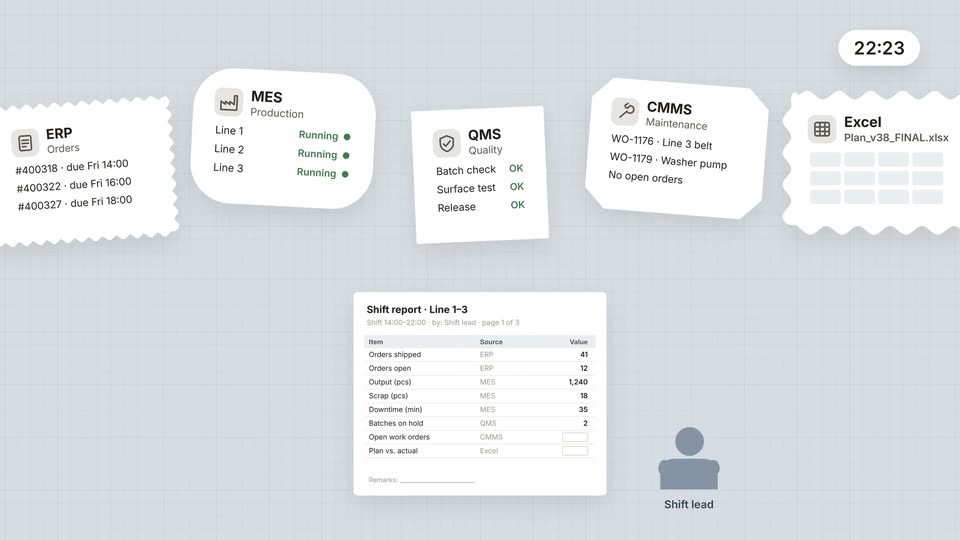
A flat grid workspace holds five system cards (ERP, MES, QMS, CMMS, Excel) around a shift report table. The cards fade and drift to new spots while values fill the report rows and the corner clock ticks forward.
Camera: Static
A blond man in a black sweater talks to camera in front of a rusty corrugated wall, gesturing with both hands. Large white words flash over his face in sequence while a blue circle grows from his chest to fill the frame, then clears.
On-screen text: “OUR”, “AGENTS”, “OF”, “TO”
Techniques: Kinetic type, Masking
Camera: Pull out
A blue circle shrinks from the center to reveal a pale grid background holding five white paper cards, ERP, MES, QMS, CMMS and Excel, in a row above a shift report table and a shift lead icon.
Techniques: Masking
Camera: Static
Five flat cards labeled ERP, MES, QMS, CMMS and Excel drift right across a pale blue field, linked by a line with a moving blue dot, while a blue highlight box hops between them. A shift report sheet and a shift lead avatar pan along below.
Camera: Static
Five source cards (ERP, MES, QMS, CMMMS, Excel) feed blue lines into a central node. On the right, a shift report card crossfades into a stack of four green-checked task bars and a recommendation card, while a shift lead avatar gains a blue glow.
Camera: Static
A hub diagram links five system cards (ERP, MES, QMS, CMMIS, Excel) to a central node that branches to a checklist and a 'Move 2 orders to Line 1' recommendation above a Shift lead icon. The diagram scales down and slides left, revealing a larger panel behind it.
Camera: Pull out
An isometric factory illustration fades in on the left as a white horizontal. Workflows card appears on the right; its five task rows fill with blue progress bars and statuses flip from Queued to role names with check marks, then the card fades out, leaving the factory.
Camera: Static
A small isometric stack of blue layers sits at center-left, then grows and its top layers flatten outward into one large tilted blue plane that fills the frame, all on a pale gray background.
Techniques: 3D mockup
Camera: Static
A factory dashboard floats in 3D perspective over a pale background. The camera pushes into the outlined task card, a confirmation panel pops in on the right, and a cursor rests on its Approve button before the frame eases back out.
Techniques: 3D mockup, UI zoom, Cursor demo
Camera: Push in
A tilted 3D dashboard interface floats on a pale background. A central card reads OEE plus 10% while a green line chart draws itself left to right, finishing with a dot at the peak.
Techniques: 3D mockup
Camera: Push in
Two men in black walk toward camera on a paved path, speaking. White ETH and blue TUM wordmarks appear beside them, then the red Stanford S. A blue pill button with a cursor, “See horizontal. in action,” appears at the bottom, then turns green with a check.
On-screen text: “ETH”, “TUM”, “S”, “See horizontal. in action”
Techniques: Cursor demo
Camera: Pull out
The wordmark horizontal. in white lowercase letters, closed by a blue dot, sits centered on a plain black field. The frame holds locked off as a closing sign-off.
On-screen text: “horizontal.”
Camera: Static