1:35

Next-Gen AI Infrastructure Explainer | YugaByte Meko Product Launch Video
YugaByte · Oct 2026
Self · Oct 2026 · 1:39 · AI-annotated
Self’s 1:39 launch film runs 53 scenes, about 1.9 s each. The product shows up at 0:47 and 4 features are revealed. The call to action lands at 1:35 (96% in), over a voiceover. A stranded traveler's failed booking opens as a tense live-action short, then the video snaps into a dark, purple-lit motion-graphics world that walks through tokenisation, logins and assistant compatibility one feature at a time. Its signature is the thin white crosshair grid that frames both the human shots and the UI, with glitch tears marking every jump between the two worlds.
Is this your launch? to your site or press kit.
YugaByte · Oct 2026
TagadaRx · Nov 2026
A man in a black coat walks away down a dim airport corridor, rolling a suitcase, as a uniformed flight attendant strides toward camera on the right. The frame brightens from black; a UK-flag caption and a timecode sit centered over him.
On-screen text: “Heathrow Airport”, “09:39 AM”
Camera: Push in
A man in a black zip-up fleece walks toward the camera through an airport terminal. He glances at his wrist, then pulls out a white phone and smiles down at it. An older man reads a newspaper in the blurred background. Small captions scale in over the shot.
On-screen text: “A20”, “BAA Heathrow”, “Gate closed”
Camera: Static
An over-the-shoulder shot of a hand holding a phone; a white message card with an avatar and text appears at right while the background stays soft.
On-screen text: “Client - Jacob”, “now”, “Morning! Team's arriving shortly, really excited for our meeting this afternoon.”
Camera: Pan
A man in a black coat walks in profile through an airport terminal, one hand in his pocket, the other resting on a rolling suitcase handle. The camera tracks him past rows of seats and blurred travelers beneath a yellow departure sign.
Camera: Pull out
A man in a black zip jacket walks toward the camera through a sunlit airport terminal, rolling a suitcase. A blurred passenger in a red jacket with a backpack crosses the left foreground, partially blocking him as he looks down.
Camera: Static
A man in a black jacket walks through a bright transit hall, head down on his phone. On the right, a translucent panel holds two stacked notification cards that slide in: a client message, then a flight-cancelled alert.
Camera: Static
A man in a black jacket looks down at an airport while two notification cards overlay the right side, a client message and a flight cancellation alert. Thin horizontal lines cross the frame. The image blurs out at the end.
Camera: Push in
A man in a black coat sits on an airport bench beside a silver suitcase, checking his phone. Thin white grid lines cross the frame as the caption 'Now that's a tough situation' appears, the second line scaling in. Other passengers sit blurred in the background.
On-screen text: “Now that's a”, “tough situation”
Techniques: Kinetic type
Camera: Push in
A man in a black coat sits on airport seating, scrolling his phone, a silver suitcase at his side. A white caption scales in over a thin grid frame, then clears as the locked-off shot holds.
On-screen text: “Now that's a”, “tough situation”
Techniques: Kinetic type
Camera: Static
A close-up of two hands holds an iPhone against a plain gray backdrop. The right thumb swipes across the home screen, and the app icons shift into a new layout as the Calendar date changes.
Camera: Push in
A close-up of a dark phone chat shows a user prompt and an “I found it!” reply, then pulls back to the full device as the bot's flight answer scrolls. The reply text lifts out of the screen into two blocks framed by dashed crop marks on black.
Techniques: UI zoom, Morph
Camera: Push in
A black screen with faint scattered symbols shows a centered message block with dashed selection handles, two lines shaded gray. Two white callout labels slide inward from top and bottom, each trailing a curved arrow to its line.
On-screen text: “Either do manually”, “Or give your credentials to random apps”
Camera: Pull out
A dark phone mockup in 3D perspective floats over a black field of faint scattered symbols. The Grok Bot chat scrolls as the user sends “share me the links to book” and the bot replies with a list of booking links, then the camera pushes in on the screen.
Techniques: 3D mockup, UI zoom
Camera: Pull out
A man in a black coat looks down at a blurred phone in his hands, filmed in a bright indoor space. To his right, a 3D phone mockup shows a flight search screen, and the results list scrolls upward, swapping airline names and prices.
Techniques: 3D mockup
Camera: Static
A horizontal glitch tear rips across the frame and settles into a static airport terminal. A man in black sits on a seat row, holding an open book and a phone, a silver suitcase at his feet. Passengers read and scroll in the blurred background.
Camera: Static
A phone held in a blurred airport waiting area shows a payment screen with a green toggle and a blue Pay button. A translucent tap circle hovers on the button as the camera zooms in, the screen scrolls to the card number field, and the background fades to white.
Techniques: Cursor demo, UI zoom
Camera: Pan
A white product screen shows a blue gradient spinner rotating left of the bold black text “Processing payment,” which slides into place and locks off.
Techniques: Kinetic type
Camera: Static
A blue circular spinner rotates left of the dark gray text “Processing payment” on a white background. The text slides in, then a red warning triangle with a white exclamation mark pops in above the spinner.
On-screen text: “Processing payment”
Techniques: Kinetic type
Camera: Static
A locked-off error state on a plain white background. A red warning triangle with an exclamation mark sits above red text 'Booking failed' and gray text 'The flight is fully booked. Please try for another date/time.' No motion occurs.
Camera: Static
A young man in a dark jacket sits in an airport waiting area, frowning at the phone in his hands, a white suitcase at his side. The locked-off shot uses shallow depth of field, blurring the seat rows and distant travelers behind him.
On-screen text: “Booking failed”, “The flight is fully booked.”, “Please try for another date/time.”
Camera: Static
Locked-off shot in an airport gate. A man in a black zip hoodie sits in a row of seats, leans forward to set down his phone, then slumps back with eyes shut and hands on his lap. A silver suitcase stands at his side; a departure board hangs behind.
Camera: Static
A close-up of a young man in a dark sweater sits in a blurred, warmly lit lounge. He covers his face with both hands, then lowers them and looks upward with wide, surprised eyes.
Camera: Static
A man with clasped hands gazes upward in a blurred public space, the frame covered in pixel noise. The shot fractures into horizontal color bands of magenta and cyan, and the white word Meet surfaces in the center.
On-screen text: “Meet”
Techniques: Kinetic type
Camera: Static
White 'Meet' holds sharp and centered over a black field with a magenta glow, while 'Agent Vault' below it pulls into focus from a soft blur into a pink-lavender gradient. A thin blue-purple light line glides in along the bottom edge.
On-screen text: “Meet”, “Agent Vault”
Techniques: Light sweep
Camera: Static
The title Meet Agent Vault sits in pale yellow pixelated type over a dark blue to pink gradient. The frame then corrupts into a heavy glitch, breaking into red and cyan bokeh dots and a dark central shape with strong RGB shift.
On-screen text: “Meet”, “Agent Vault”
Camera: Static
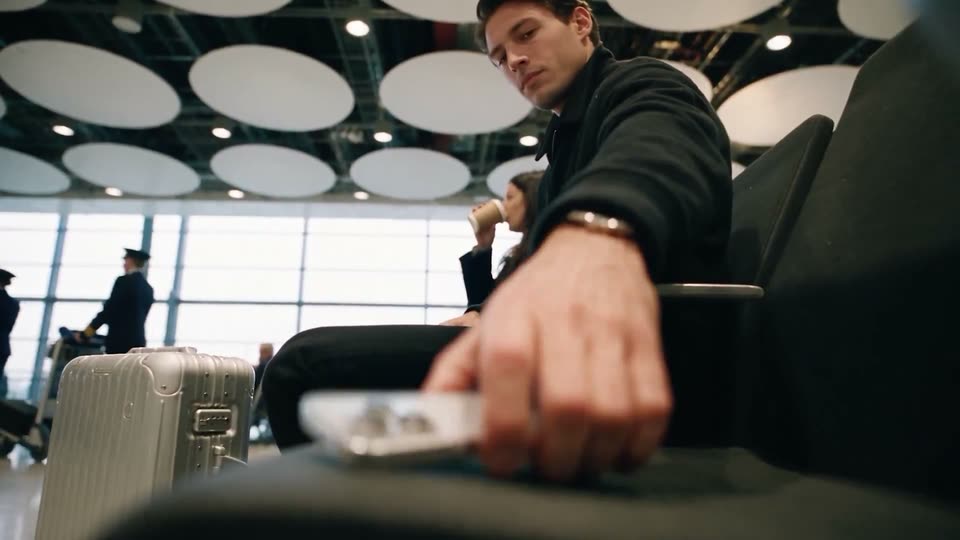
A man in a black jacket sits on a dark airport bench and reaches forward to lift a small silver device from the seat. The low-angle shot keeps the device sharp while a woman sips coffee and a silver case blur in the background under round ceiling lights.
Camera: Static
A man in a black jacket sits in a blurred transit terminal, looking at his phone. White viewfinder lines and corner marks draw in around him, with caption boxes pointing to the device. It cuts to an over-the-shoulder view of the phone home screen as a thumb taps an app.
On-screen text: “Protected by”, “Agent Vault”
Camera: Static
Over-the-shoulder shot of a person holding a smartphone in a blurred public hall; the thumb rests on the iOS home screen while a static caption reads Agent Vault and Protected by.
On-screen text: “Agent Vault”, “Protected by”
Camera: Push in
A dark smartphone mockup in 3D perspective shows a chat screen with a sent message bubble and an input bar, centered over a purple-to-magenta gradient with small floating symbols drifting in the background.
Techniques: 3D mockup, Particles
Camera: Push in
A phone chat UI on a purple gradient types a flight-booking reply word by word, then the frame reframes onto that reply, which now reads as large white text beside the device.
Techniques: UI zoom
Camera: Push in
A white chat message on black reads 'to book it using your information via Agent Vault?' with a callout 'Now this changes everything.' pointing at the bold phrase. The message then glows purple as its text scrambles and resolves, and a gray 'Sure, lets book it' bubble appears.
On-screen text: “Now this changes everything.”
Techniques: Kinetic type
Camera: Static
Small white keyboard glyphs drift across a dark purple field of swirling smoke. A thin frame with corner ticks opens in the center, and a white desktop monitor materializes from a purple glow inside it.
Techniques: Particles, 3D mockup
Camera: Push in
A dark credit card mockup floats center frame inside a thin crosshair frame, glowing purple along its lower edge. The card begins out of focus and racks into sharp focus, revealing the Agent Vault mark, card number and holder name.
Techniques: 3D mockup
Camera: Static
A dark Agent Vault card sits in a thin frame with corner crosshairs. A purple beam sweeps across it as the number scrambles into a token string, and white caption boxes on each side type out the tokenising and vault messages. The shot blurs out at the end.
On-screen text: “TOKENISING THE CARD”, “ONLY TOKEN IS VISIBLE TO AGENTS”, “CREDENTIALS ARE STORED IN AGENT VAULT”
Techniques: Light sweep, Particles
Camera: Static
On a dark grid, a vertical timeline builds: a blue Booking.com icon and pink bullet precede each step as 'Logging in Booking.com', 'Filling in details' and 'Proceeding to payment' type in. A white token disc and a tilted Agent Vault card with a V mark drift across the grid.
On-screen text: “Logging in Booking.com”, “Filling in details”, “Proceeding to payment”
Techniques: Kinetic type
Camera: Static
On a black grid, a purple gradient 'Agent Vault' card glides upward past a 'Card details' form, drifting over the 'Proceeding to payment' caption at the top, while the form fields and their token values scroll up with it.
On-screen text: “Proceeding to payment”
Camera: Push in
A dark payment form on a black grid background fills in the cardholder name and card number, then the whole form scrolls upward as a thin vertical line with two pink markers appears at the left edge.
Camera: Pan
A card payment form slides up out of a dark grid as the blue B. logo and white 'Payment complete' headline slide to center and lock off. A tilted phone mockup then rises into frame over the headline, its screen showing a chat that books a flight.
On-screen text: “Payment complete”
Techniques: Kinetic type, 3D mockup
Camera: Static
A 3D iPhone mockup sits centered on a dark field with purple and magenta glows and drifting punctuation symbols. Its screen shows a Grok Bot chat where a user asks for the earliest Heathrow to Berlin flight and the bot replies it found a 13:15 LHR to BER option via Agent Vault.
Techniques: 3D mockup, Particles
Camera: Static
A phone mockup displays a chat where an agent confirms a flight booking. The device is centered on a purple gradient with small floating dots, and the frame pulls back to widen the view.
Techniques: 3D mockup, Particles
Camera: Static
A man in a black jacket sits in an airport lounge, smiling at his phone. On the right, a dark chat panel shows an agent confirming a booked flight, the message bubbles settling into place.
Camera: Static
A man in a black jacket sits on black airport waiting chairs, crosses his legs and looks around. A silver suitcase stands at his side beneath a ceiling of round white light discs, with a gate sign reading A20 in the blurred background.
Camera: Static
A man in a dark shirt leans on a metal railing inside an airport terminal, holding a phone in his hand. Through the large window behind him, a white plane sits at the gate in warm, low sunlight.
Camera: Static
A man in a black jacket looks down at his phone in a dim cafe. A white notification card labeled Muse slides in from the right and locks off at the lower right, asking to reschedule movie tickets for later in the evening.
On-screen text: “Muse”, “now”, “Do you want to reschedule your movie tickets”, “for later in the evening?”
Camera: Static
A dark phone mockup tilts from an angled 3D view to face the camera, then the frame zooms into the chat screen. A question bubble, a yes reply, and a status message appear in sequence over a faint field of symbols.
Techniques: 3D mockup, UI zoom
Camera: Pan
A white rounded icon with a purple V cutout sharpens from a bright blur into focus at center over a dark-to-pink gradient. A halo of small purple dots sits behind it.
Techniques: Particles
Camera: Static
A white rounded-square icon with a purple V sits centered on a purple-to-magenta gradient, flanked by the text “Agent Vault works with” left and “your favourite assistants” right. Small dots form a V above the icon; thin framing lines with corner ticks overlay the shot.
On-screen text: “Agent Vault works with”, “your favourite assistants”
Camera: Static
A horizontal row of rounded app icons, joined by plus signs, scrolls left across a purple gradient dotted with small squares. The icon at the center scales up as the next one arrives, cycling through a new set of icons.
Camera: Static
A row of seven rounded-square assistant app icons, separated by small plus signs, sits on a purple gradient with a dotted burst above. The locked-off frame dims and fades to black.
Camera: Static
A man in a black jacket faces the camera while holding a phone at the bottom of the frame. He sits in a dim airport-like space with circular ceiling lights and a blurred background, holding a calm, slight smile.
Camera: Static
A man in a black jacket walks away from the camera through a bright airport terminal, pulling a white rolling suitcase. Behind him, a group of people wave and take photos near the windows, with an airplane visible on the tarmac.
Camera: Static
A man in a dark jacket walks away through a sunlit airport terminal, pulling a white suitcase past empty seats. The frame then distorts with RGB glitch bands as a red V mark and the word AGENT flash into view.
On-screen text: “AGENT”
Camera: Static
On a black grid backdrop with crosshair marks, three horizontal bars stack in the center: a dark bar with the V logo and AGENT VAULT, then a dark bar with the tagline, then a purple bar with the URL. The bars slide up into place and the whole lockup dims.
On-screen text: “AGENT VAULT”, “Superpowers for your agents”, “agentvault.io”
Techniques: Kinetic type
Camera: Static