0:44
Explore
Reasoning across a 402-page transcript | Gemini 1.5 Pro Demo
Gemini · Feb 2024 · 1:52 · Full motion · AI-annotated
- Length
- 1:52
- Scenes
- 17 · 6.6 s avg
- Product on screen
- 0:00
- Features shown
- 1
- Call to action
- 1:44 · 92%
- Voiceover
- Yes
- Views
- 211K on YouTube
as of November 22, 2026
00:00:00 / 01:53:00
- Length
- 1:52
- Scenes
- 17 · 6.6 s avg
- Product on screen
- 0:00
- Features shown
- 1
- Call to action
- 1:44 · 92%
- Voiceover
- Yes
- Views
- 211K on YouTube
as of November 22, 2026
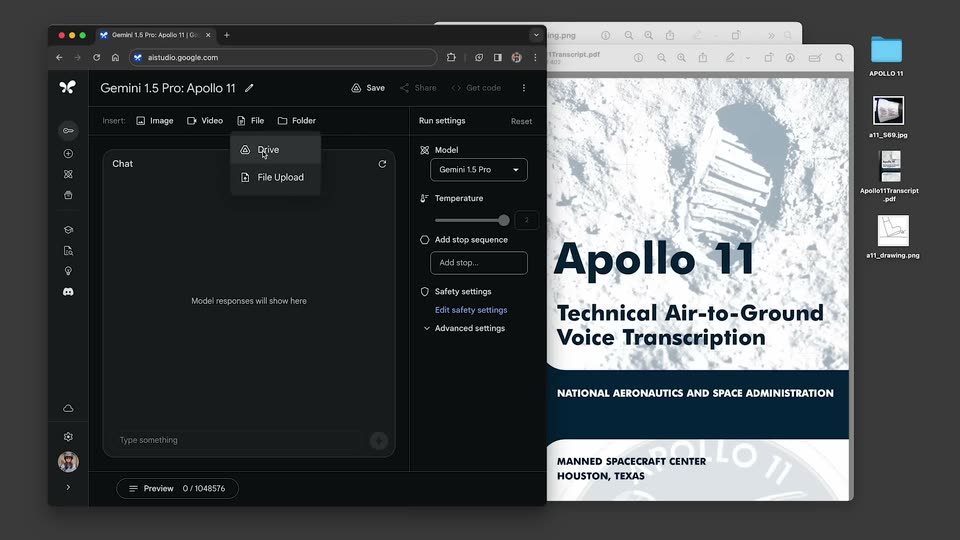
Gemini’s 1:52 launch film runs 17 scenes, about 6.6 s each. The product is on screen from the first frame and 1 feature is revealed. The call to action lands at 1:44 (92% in), over a voiceover. The video opens on a black token-count infographic that names the product and its 1 million token window, then hands off to a single continuous screen recording that walks through three prompts against a 402 page Apollo 11 PDF, each timed on screen. It closes with a centered spec card, a URL, and a glowing Google mark, keeping the whole piece on a flat black field with white and blue type and slow fade-in text.
No filming indicatedEstimated needs: 1 capture group — your screens or recordings · 1 official logo — reused across the film · 1 graphic passage — draw or supply
Is this your launch? to your site or press kit.
More like this
1:24

Introducing Notion AI
Notion · Productivity · Nov 2022
0:36
Framer Convert: Understand, Test, and Optimize.
Framer Convert · Mar 2026
Similar soundtrack
Films whose music sounds like this one, voice left out


Reasoning across a 402-page transcript | Gemini 1.5 Pro Demo, scene by scene
· 17 scenes as text
01 · Product intro · 0:00–0:01
Black screen. A white Gemini 1.5 Pro wordmark with a blue sparkle icon sits top left, a metadata block top right. A large token count and a thin progress bar fade in below, the bar filling left to right as the text brightens.
On-screen text: “Gemini 1.5 Pro”, “Test”, “Apollo 11 Transcript”, “Feature”, “Long context understanding (experimental)”, “Date”, “Recorded Feb 14, 2024”, “Format”, “Continuous recording of live model interaction, sequences shortened with response times shown”, “326,914 tokens / 1,000,000 tokens”
Camera: Static
02 · Product intro · 0:01–0:17
Black infographic: “Gemini 1.5 Pro” and a blue star mark top-left, metadata block top-right. A large blue-to-white gradient “326,914 tokens” with “/ 1,000,000 tokens” beside it. A bar with blue and tan segments, page thumbnails, and a 0 to 1M scale fade in over the first second, then hold.
On-screen text: “Gemini 1.5 Pro”, “Test Apollo 11 Transcript”, “Feature Long context understanding (experimental)”, “Date Recorded Feb 14, 2024”, “Format Continuous recording of live model interaction, sequences shortened with response times shown”, “326,914 tokens”, “/ 1,000,000 tokens”, “326,658 tokens”, “256 tokens”, “402 pages 1 image 0 100k 200k 500k 1M”
Camera: Static
03 · Feature reveal · 0:17–0:18
A dark AI chat window sits left of an open Apollo 11 PDF cover. A cursor hovers the File button, a gray tooltip fades in, then the cursor clicks and a small two-item dropdown opens.
Techniques: Cursor demo
Camera: Static
04 · Feature reveal · 0:18–0:20
A dark browser window shows a Gemini upload dialog. A cursor drags a PDF thumbnail from the desktop file list on the right into the dialog box. A NASA cover page titled Apollo 11 sits open behind the dialog.
Techniques: Cursor demo
Camera: Static
05 · Feature reveal · 0:20–0:21
A screen capture shows Google AI Studio with a file upload dialog open. A PDF icon labeled Apollo11Transcript.pdf rests on the blue cloud drop zone as the upload target. To the right, the Apollo 11 NASA transcription document and a desktop file list stay static.
Camera: Static
06 · Feature reveal · 0:21–0:23
A browser window opens an AI Studio session where a file dialog shows a 2.2M PDF progress bar filling to full. To the right, an Apollo 11 document cover and a file panel listing project images sit static on a dark desktop.
Camera: Static
07 · Feature reveal · 0:23–0:47
A flat screen capture of a Gemini web app: a cursor types a prompt beside an attached Apollo 11 transcript, then a timer counts up as the model streams a numbered list of quotes. A caption notes the sequences are shortened.
On-screen text: “Sequences shortened throughout.”
Techniques: Cursor demo, Speed ramp
Camera: Static
08 · Feature reveal · 0:47–0:48
A desktop screen shows a dark Gemini browser window on the left and an Apollo 11 transcript document on the right. The PDF document window then slides forward, partially covering the browser.
Camera: Static
09 · Feature reveal · 0:48–0:49
A macOS desktop shows two windows side by side: a Gemini chat panel on the left and a PDF cover page on the right. The mouse types a quote into the PDF viewer's search field.
Techniques: Cursor demo
Camera: Static
10 · Feature reveal · 0:49–0:53
Two desktop windows sit side by side: a Gemini chat panel listing comedic moments from the Apollo 11 transcript, and a PDF viewer of the same document with yellow highlights and a search bar. A cursor glides from the search field down to the highlighted coffee quote.
Techniques: Split screen, Cursor demo
Camera: Static
11 · Feature reveal · 0:53–0:55
A desktop screen shows the Gemini app on the left and a PDF transcript on the right. The PDF window slides down while a black hand-drawn sketch animates across its top, exposing the Gemini chat panel with two bullet points.
Camera: Static
12 · Feature reveal · 0:55–0:58
A static macOS desktop shows three overlapping windows: a Gemini chat on the left, an image viewer with a black line drawing in the center, and a Finder panel on the right. A cursor moves, and a thumbnail of the drawing drops into the chat input.
Techniques: Cursor demo
Camera: Static
13 · Feature reveal · 0:58–1:29
A dark AI chat window sits left of a white panel holding a line drawing of a boot and a highlighted transcript. The chat scrolls as the model answers the boot question, then a prompt is typed into the input field and a second answer with a timecode appears.
Techniques: Cursor demo
Camera: Static
14 · Feature reveal · 1:29–1:39
A dark Gemini chat panel sits beside a PDF transcript viewer. The viewer zooms from the full page to the highlighted line 'THAT'S ONE SMALL STEP FOR (A) MAN, ONE GIANT LEAP FOR MANKIND,' beside timecode 04 13 24 48, while the chat stays static.
Techniques: UI zoom
Camera: Static
15 · Feature reveal · 1:39–1:44
On a black background, the line 1 million multimodal tokens fades in centered, then in Gemini 1.5 Pro fades in below it. Both lines hold briefly and fade out to black. Locked-off frame, no camera move.
On-screen text: “1 million multimodal tokens”, “in Gemini 1.5 Pro”
Techniques: Kinetic type
Camera: Static
16 · CTA · 1:44–1:48
On a black field, the line “Learn more at” fades in at center, then the URL “deepmind.google/gemini” fades in beneath it. Both lines hold still, then fade out to black.
On-screen text: “Learn more at”, “deepmind.google/gemini”
Camera: Static
17 · Outro · 1:48–1:52
A point of light blooms at the center of a black frame, swelling into the Google G logo wrapped in a soft rainbow glow. The glow fades and the mark snaps to its flat four-color form, then holds still in the middle of the black field.
Camera: Static