0:50

October 2026 Launch: Slack
Airtable · Productivity · Oct 2026
Edge0 · Nov 2026 · 0:44 · AI-annotated
Edge0’s 0:44 launch film runs 26 scenes, about 1.7 s each. The product is on screen from the first frame and 2 features are revealed. The call to action lands at 0:39 (88% in). The video is a proof ladder: a white promise card, then raw screen recordings of the app going offline, streaming a long document, and coding a playable voxel game, with lime green callouts and a persistent offline badge stamping each claim. Hard cuts at about 36 per minute keep the pace brisk, and the signature moves are the pop in green labels, metrics that scale up in green, and a 16x time lapse of the generated text.
Is this your launch? to your site or press kit.
Airtable · Productivity · Oct 2026
Rive · Design · Jan 2026
A black laptop sits closed on a white background beneath a static two-line headline. It opens on its hinge to reveal a dark boot screen with the edgeO logo centered and a faint blue horizon glow.
On-screen text: “A 145B Model”, “Running on a Laptop”
Techniques: 3D mockup
Camera: Static
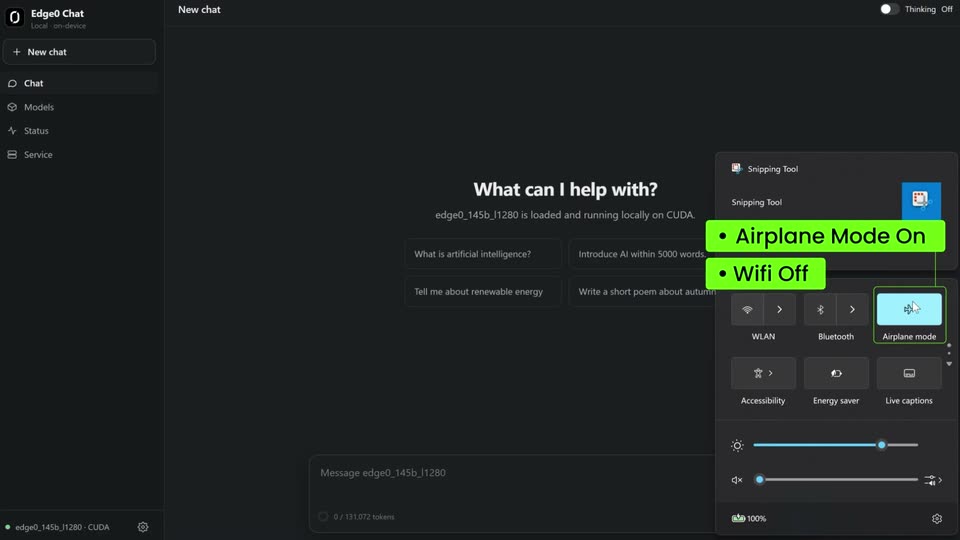
A dark chat app fills the frame, sidebar left, centered “What can I help with?” prompt, quick settings panel at right. A cursor clicks the WiFi toggle, then the Airplane mode toggle; green callout labels “Wifi Off” and “Airplane Mode On” pop in beside each.
On-screen text: “Wifi Off”, “Airplane Mode On”
Techniques: Cursor demo
Camera: Static
A dark chat interface fills the frame as a cursor clicks a prompt chip, and an article streams in word by word under a green Real-time tag. The view jumps to 16x speed, the document scrolling fast through numbered sections beside a black Offline · On-Device · 145B badge.
On-screen text: “Real-time · no speed up”, “Offline · On-Device · 145B”, “16x playback speed”
Techniques: Cursor demo, Speed ramp
Camera: Static
A dark-themed chat interface displaying generated text cuts to a status dashboard with performance metrics. A green label for playback speed and a black label for model info persist on screen.
On-screen text: “16x playback speed”, “Offline · On-Device · 145B”
Camera: Static
A dark status dashboard fills the frame. A cursor moves across the sidebar and stats as the view reframes toward the totals row and token-speed values scale up in green.
Techniques: Cursor demo, UI zoom
Camera: Static
A dark split-screen UI pairs a terminal on the left with a live status dashboard on the right. A lime-green callout pops in top left. The terminal types a prompt, the pixel logo scrambles out, code scrolls in, and the right panel's metrics tick up in green.
On-screen text: “Offline · On-Device · 145B”, “Now, vibe coding in your favorite agent.”
Techniques: Split screen
Camera: Static
A dark terminal on the left scrolls code, file paths and thought lines while a dark dashboard on the right ticks green token-rate and memory numbers. A black pill with a paper-plane icon sits bottom right.
On-screen text: “Offline · On-Device · 145B”
Techniques: Split screen
Camera: Static
A split screen shows a code editor on the left and a status dashboard on the right. A green caption banner scales down into the top center reading Vibe coding done! Time to enjoy your game. A black pill badge sits at the bottom right.
On-screen text: “Vibe coding done! Time to enjoy your game.”, “Offline · On-Device · 145B”
Techniques: Split screen
Camera: Static
A dark desktop shows a PowerShell terminal on the left and the EdgeO Status dashboard on the right beneath a green caption. A Godot game window titled VoxelCraft pops open in the center, revealing the Godot logo.
On-screen text: “Vibe coding done! Time to enjoy your game.”, “Offline · On-Device · 145B”
Camera: Static
A dark desktop frames a terminal, a voxel game window and an AI status panel. A lime-green caption reads “Vibe coding done! Time to enjoy your game.” A cursor moves to the game window as a pause menu appears.
On-screen text: “Vibe coding done! Time to enjoy your game.”, “Offline · On-Device · 145B”
Techniques: Cursor demo
Camera: Static
A centered pause menu with six buttons sits over a dimmed voxel landscape. The mouse cursor drifts in from the right and hovers the Resume Game button, which lights up as it is selected.
Techniques: Cursor demo
Camera: Static
A first-person voxel world of green grass blocks, cube trees, dirt cliffs, sand and water under a flat blue sky. A dark debug readout fills the top-left corner and a nine-slot hotbar with a highlighted grass block runs along the bottom. The view yaws gently to the right.
Camera: Static
First-person view of a blocky voxel landscape: green grass plains and stepped dirt hills under a pale sky. A debug HUD sits top-left, a nine-slot hotbar lines the bottom. The camera pans right across the terrain.
Camera: Static
A first-person view advances across a green voxel terrain of stepped grass hills. A debug HUD lists controls in the top-left and a nine-slot hotbar sits at the bottom, with a crosshair centered on a grass block.
Camera: Static
First-person view of a voxel landscape with bright green grass blocks and brown dirt walls forming a narrow valley. The camera pans right and tilts down toward the gap while a crosshair holds center and a block hotbar rests at the bottom.
Camera: Push in
First-person view of a blocky voxel landscape, green grass and brown dirt blocks forming a small ledge. A dark HUD panel and a nine-slot hotbar with a Grass Block label frame the screen, a white crosshair sits at the center. The camera drifts forward and pans slightly.
Camera: Static
A first-person voxel world shows green grass and brown dirt blocks. The player places a gray cobblestone block into a gap in the terrain as the view shifts slightly. A debug overlay sits in the top left and a nine-slot hotbar lines the bottom edge.
Camera: Static
First-person view inside a blocky green voxel world. The camera turns right from a gray cobblestone wall to a brown tree trunk. The held block in the lower corner swaps from cobblestone to oak log, and the hotbar highlight jumps from slot one to slot four.
Camera: Pull out
First-person view of a blocky voxel world: a thin waterfall of blue water blocks flows down a dirt cliff between green grass blocks. The camera drifts forward and pans slightly. A debug text block fills the upper left, and a nine-slot hotbar runs along the bottom.
Camera: Static
A first-person view glides forward and pans right across a grassy voxel cliff, revealing rolling green plains and blocky trees under a pale sky. A debug HUD panel and a nine-slot hotbar stay fixed at the top left and bottom.
Camera: Static
The view pans right across a blocky voxel world, starting on a leafy tree and opening to a river, waterfall and rolling green hills. A dark debug HUD panel sits top-left and a nine-slot block hotbar runs along the bottom edge.
Camera: Static
A first-person view pans across a bright voxel grassland with a small pond and a distant pyramid, a debug HUD in the top corner and a nine-slot hotbar below. The crosshair targets a grass block that cracks and breaks into a dark pit while the held block switches to cobblestone.
Camera: Static
First-person view over a bright green voxel field. A gray cobblestone block is placed into a 2x2 hole in the ground, and the camera pans slightly right to reveal a river and trees. A debug overlay and a nine-slot hotbar frame the view.
Techniques: 3D mockup
Camera: Static
A first-person voxel view shows a grassy hillside of blocky green and brown terrain. A cobblestone block is held in the lower right corner. The camera pans right and tilts down toward the ground. A debug panel fills the top left and a nine-slot hotbar runs along the bottom.
Camera: Static
On a black background, a green line and a white line of bold text snap from a blurred scale into focus above two search pills labeled edge0. A large gray S-shaped stroke then draws across the center.
On-screen text: “Cloud-Class Intelligence.”, “Right On Your Device.”, “edge0”, “edge0”
Techniques: Kinetic type
Camera: Static
A glowing white oval mark with diagonal notches floats over a wireframe mountain range in purple mist under a starry sky. The mark shrinks and settles above the central peak as the lowercase wordmark edge0 fades in below it, then the frame holds still.
On-screen text: “Cloud-Class Intelligence.”, “Right On Your Device.”
Camera: Pull out