1:13

Suno Studio – The first-ever generative audio workstation
Suno · AI · Sep 2025
Airtable · Oct 2026 · 0:50 · AI-annotated
The video alternates locked-off magenta headline cards with dark Slack UI panels that slide in and out of frame, each feature introduced by a full-frame title before its demo. Signature moves are the orange bar wipes, the crosshair framing, and the final logo lockup resolving from a small tile.
Suno · AI · Sep 2025
Raycast · Productivity · May 2023
Rive · Design · Sep 2026
On a flat purple field, horizontal orange bars of mixed thickness slide in, shift into a cross shape, then clear away to reveal a small orange dot and the centered headline in muted purple.
On-screen text: “Bring Omni 2.0 into”
Camera: Static
A solid purple card holds an orange pill badge reading @Airtable in Slack above the white headline Bring Omni 2.0 into. The line your team chat fades in and rises slightly beneath it on a locked-off frame.
On-screen text: “@Airtable in Slack”, “Bring Omni 2.0 into”, “your team chat”
Techniques: Kinetic type
Camera: Static
A dark Airtable-for-Slack panel rises from the bottom of a magenta, line-striped backdrop, a cursor gliding to its New Chat button, then the panel exits upward. A faint background wordmark stays static in the opened space.
On-screen text: “your team chat”
Techniques: Cursor demo
Camera: Pan
A dark Airtable chat card on a magenta striped background slides in with motion blur, holds to show the message and three action buttons, then scrolls and slides off the top of the frame as the pink lines drift.
Techniques: Speed ramp
Camera: Pan
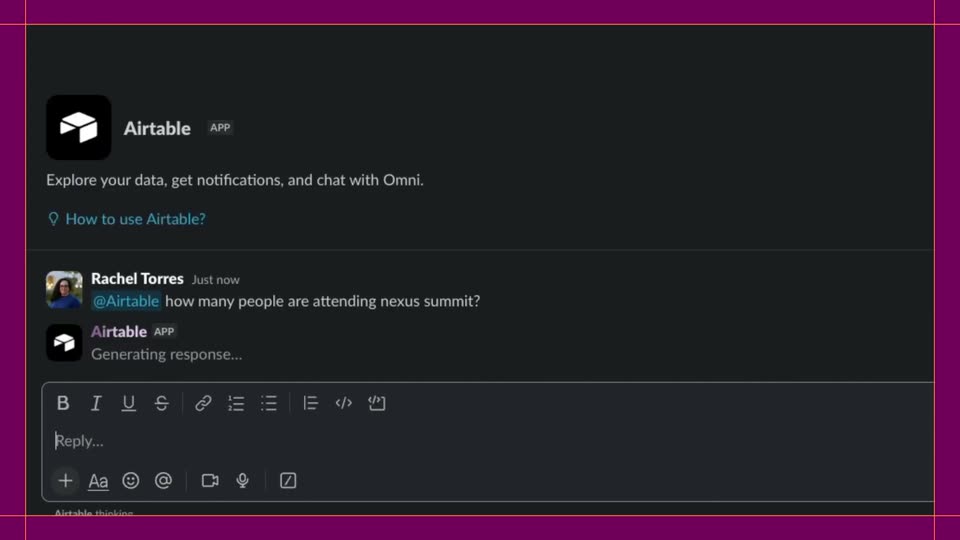
A white headline fades in and out on a purple field, then orange guide lines frame a dark chat panel. The Airtable app card loads, a question is typed into the input, and the app posts an answer with a highlighted number.
On-screen text: “Talk to your data with AI”
Techniques: Kinetic type
Camera: Pull out
A solid magenta field holds a single white headline that scales up from a small centered line to full frame width, then holds steady.
On-screen text: “Make updates via message”
Techniques: Kinetic type
Camera: Pull out
A purple field holds the white headline text at right. Thin pink horizontal lines draw across the frame while a dark chat panel slides up from the bottom, revealing a prompt line and three rounded buttons.
On-screen text: “Make updates via message”
Camera: Static
A dark chat panel on a magenta lined background types a command to @Airtable, then scrolls through the bot's replies as it lists three sessions and confirms the change. A cursor hovers the toolbar, and the panel slides up out of frame.
Techniques: Cursor demo
Camera: Pan
A flat magenta field with three faint horizontal lines at the bottom. The lines clear as the white phrase 'Know how data changes' fades in at center, holds, then dissolves out left-to-right. Locked-off frame.
On-screen text: “Know how data changes”
Camera: Static
A solid purple field with thin orange crosshair lines running vertically and horizontally through the center. The lowercase phrase how data changes fades in at the center in white sans-serif, then holds. The frame stays locked off.
On-screen text: “how data changes”
Techniques: Kinetic type
Camera: Push in
A dark chat interface shows a message list on the left and a thread on the right. The cursor hovers over the top thread, then the view zooms into the thread panel, enlarging the Airtable update message and revealing a row of reaction icons.
Techniques: Cursor demo, UI zoom
Camera: Pan
A tilted 3D Slack thread panel showing an Airtable status update sits on a magenta background crossed by an orange grid, then the whole interface zooms out to a small centered frame.
Techniques: 3D mockup
Camera: Pull out
On a flat magenta field, thin orange crosshairs mark the center, then the title 'Airtable Omni 2.0' wipes in left to right with a ghosted edge. It is replaced by 'Now in Slack', and a small white rounded square pops in at the center.
On-screen text: “Airtable Omni 2.0”, “Now in Slack”
Techniques: Kinetic type
Camera: Static
On a solid magenta field, a small white rounded-square tile with a cut-out a sits centered, then resolves into the Airtable lockup as the cube icon forms and the wordmark slides in, holding static.
Techniques: Kinetic type
Camera: Static