1:38

Branching just got a whole lot easier!
Supabase · Developer tools · Jul 2025
Dydema · Oct 2026 · 2:40 · AI-annotated · YC Fall 2026
Handheld founder introductions give way to a locked split screen that pairs the EEG-capped CTO with the software he drives by thought, letting the interface type, move chess pieces, and send an email in real time. Pacing is slow and conversational, with white serif captions narrating each decoded thought while the demos play out uncut.
Supabase · Developer tools · Jul 2025
Linear · Productivity · Sep 2024
Context.dev · Developer tools · Oct 2026
A young man in a white EEG cap and brown hoodie sits at a cluttered desk, smiling and speaking to a locked-off camera; a mannequin head on a stand and a monitor fill the background. A hand waves into the foreground.
On-screen text: “Hey y'all, we're Dydema and we're”, “building personal programmable”, “brain-computer interfaces.”, “So you can choose a thought and it can”, “become an input to any program.”
Camera: Pan
A handheld shot shakes through a room with white paneled walls. A person in a brown jacket sits at a desk, then the frame whips to a tight close-up of a man's face on the left, a hanging jacket at the right edge.
On-screen text: “become an input to any program.”, “I'm Julian, I'm the CEO.”
Camera: Static
A blond man fills the frame in a tilted close-up, speaking to camera. A quick blur cut reveals a man in a brown hoodie wearing a white sensor headband, standing in a room. Subtitles name them CEO and CTO.
On-screen text: “I'm Julian, I'm the CEO.”, “And I'm Chris, the CTO.”
Camera: Push in
A young man in a white sensor cap and brown hoodie stands in a cluttered office, pointing at his chest. A mannequin head on a stand and two monitors fill the background. A white caption slides in at the bottom.
On-screen text: “And I'm Chris, the CTO.”
Camera: Static
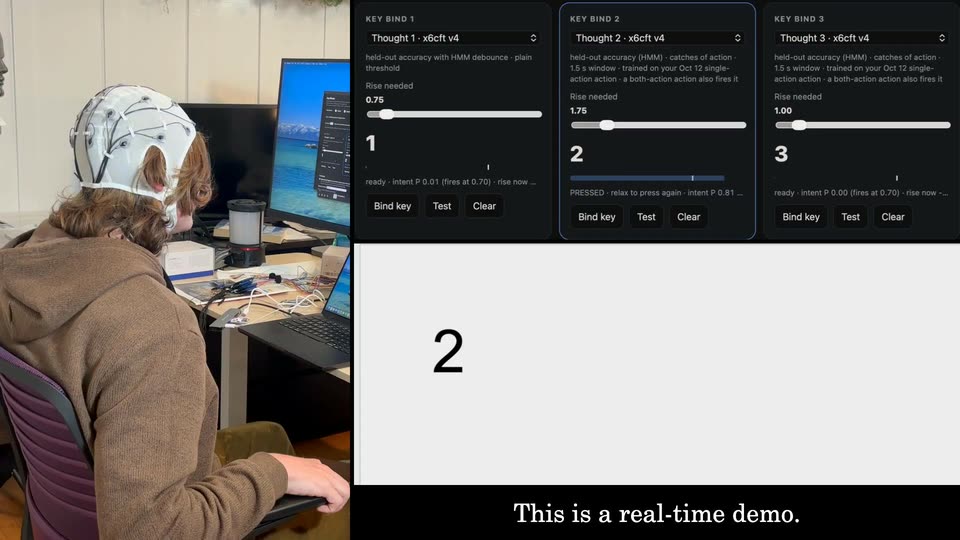
Split screen: a man in a white EEG cap sits at a desk on the left, the software's key-bind panels and a white text field on the right. Digits 2, 23, 231 type themselves into the field as he thinks, while white serif captions line the bottom.
On-screen text: “And I'm Chris, the CTO.”, “Chris is wearing a 16-channel EEG cap that”, “picks up voltage changes on his scalp.”, “He's learned to imagine three”, “movements, and our model decodes”, “each one into a key press.”, “Let's start with two.”, “Give it some time to warm up.”, “There it is. Oh, no time needed.”, “Three. This is a real-time demo. Perfect. One. Perfect. Wonderful. Now let's go to something else.”
Techniques: Split screen
Camera: Static
A split screen pairs a dark chess.com board on the left with a person wearing an EEG cap on the right, under a Yes/Stop/Navigate control bar. The chess window zooms to fill the left half while a white caption sits along the bottom.
On-screen text: “Now let's go to something else.”
Techniques: Split screen, UI zoom
Camera: Push in
Split screen: a green chess board left, a man in a white cap with black wires right. A dark panel above him updates, a blue move suggestion appears and buttons change from Stop to Rethink as a cursor hovers. Subtitles sit at the bottom.
On-screen text: “Not to be so just something else.”, “a numerical interface.”
Techniques: Split screen, Cursor demo
Camera: Static
A chess board fills the left half; the right half stacks a dark prompt box with buttons over a live-action shot of a man in a white wired helmet talking. The box text updates, then a white pawn slides to d4 and a black pawn to c5.
On-screen text: “We were just playing around”, “with computer use earlier today.”, “Yeah. So let's play some chess.”, “Yeah.”, “Now we've hooked up a computer use agent.”, “It reads the screen and suggests”, “an action up in that box.”
Techniques: Split screen
Camera: Static
Split-screen layout: a static green-and-cream chess board fills the left half, a dark command card sits top right, and a man in a white EEG cap is filmed bottom right. He turns in profile, then the cut shows him from behind at a desk with monitors.
On-screen text: “an action, up in that box.”, “Okay.”, “Chris answers with the same”, “three thoughts: yes, rethink,”, “or navigate to another app.”, “Yeah, I like that move.”, “Hmm.”, “Yeah, okay, I'll go for that.”
Techniques: Split screen
Camera: Static
Split screen: a green chess board fills the left, a dark suggestion panel with buttons sits top right, and a person in a white EEG cap sits at a desk bottom right. The board stays static until a white knight hops to c3 and a black pawn recaptures, while the panel text updates and the person turns their head.
On-screen text: “The model waits until it's confident before it presses,”, “so a choice can take a few seconds.”, “There it is. Nice.”, “You know, I did send you an email, though.”, “Yeah, I'll respond to your email.”
Techniques: Split screen
Camera: Static
A chess board fills the left half while a prompt card and a man in a BCI cap share the right. The card's text changes from a move suggestion to “Go to email”, the man turns his head, and the board shrinks to a small window beside his close-up face.
On-screen text: “Maybe navigate over to the email.”, “Yep. That's, there it is.”
Techniques: Split screen
Camera: Pull out
Split screen: the Gmail inbox on the left zooms in as a cursor hovers over an email row, while on the right a person in a white brain-computer headpiece talks; a dark panel above shows the agent's prompt with Yes, Rethink and Navigate buttons.
On-screen text: “And now, let's tell”, “the agent to find your email.”, “Yep. It's pretty important to respond”, “to your co-founder's emails, I think.”, “I'd agree. I'd agree.”
Techniques: Split screen, UI zoom, Cursor demo
Camera: Static
A split screen shows a Gmail inbox on the left and a man wearing a headset on the right, with a dark text card above him. A cursor rests on an email row while the man shifts his head.
Techniques: Split screen
Camera: Static
A split screen shows a Gmail inbox on the left with a hand cursor hovering over a row, while the right stacks a dark Dydema interpretation card above a live shot of a person wearing a white BCI headband.
Techniques: Split screen, Cursor demo
Camera: Static
A split screen pairs a Gmail inbox list on the left, with a cursor resting on one row, against a right column holding a dark AI summary card above a live webcam of a man in a room.
Techniques: Split screen
Camera: Static
Split screen: left shows a Gmail inbox where a search field types from:julian, the list filters and an email opens; right top is a dark caption panel with Yes, Stop, Navigate buttons; right bottom shows a person in a white BCI headband at a desk.
On-screen text: “You're reading your Dydema Mail inbox in Gmail, with 1,323 unread, going through recent messages about the launch, BCI applicants and Vanta billing. Check Jul”, “There it is. Okay.”, “There's the email.”, “So what's it suggesting I do next?”
Techniques: Split screen, Cursor demo
Camera: Static
Split screen: a Gmail thread titled “launch” from Julian Weaver holds static on the left. On the right, a dark status card updates with a suggested reply above a live shot of a person in a white neural cap, who turns toward the camera as it pushes in. Subtitles roll along the bottom.
On-screen text: “Oh.”, “Yeah, are you excited?”, “Yeah.”, “Alright, let's see.”
Techniques: Split screen
Camera: Static
Split screen of an inbox email on the left, a dark AI reply panel on the top right, and a live-action close-up of a person in a white mesh cap on the bottom right. The suggested reply updates, and white serif subtitles appear at the bottom.
On-screen text: “Nervous, but mostly”, “excited on the long road.”, “Hmm.”, “That's better. I had to rethink that one.”, “I am perfectly down to grab”
Techniques: Split screen
Camera: Static
Split screen: the left panel shows an email thread where a cursor clicks Reply and the reply sentence types itself; the right panel shows a person in a white neural headband talking, under a dark instruction card.
On-screen text: “I am perfectly down to grab”, “a drink with you after we launch.”, “Yep,”
Techniques: Split screen, Cursor demo
Camera: Static
Split screen: an email client on the left types and sends a reply to Julian Weaver, while a caption panel top right narrates the action and a person in a brain-computer headband sits at a multi-monitor desk below. Subtitles track the voiceover.
On-screen text: “You're reading Julian's email asking if you're excited about launching Dydema.”, “Reply to Julian: 'Can't wait! Let's grab a drink to celebrate after'...”, “Yep,”, “there it is. All right.”, “Are you sure?”, “Clicking Send”, “Yeah. Let's send that.”, “Perfect. Perfect.”, “There it is. Ah, it's so cool.”
Techniques: Split screen
Camera: Static
A person in a white EEG cap and brown hoodie sits at a desk, smiling and giving a thumbs up toward a laptop. The handheld camera follows their reaction as they watch the screen.
On-screen text: “There it is. Ah, it's so cool.”
Camera: Pull out
On a black background, the DYDEMA logo lockup, an inverted triangle mark with three dots beside the wordmark, brightens from dim gray to full white. The URL DYDEMA.COM sits centered below in smaller type. The frame stays locked and still.
On-screen text: “DYDEMA.COM”
Camera: Static