
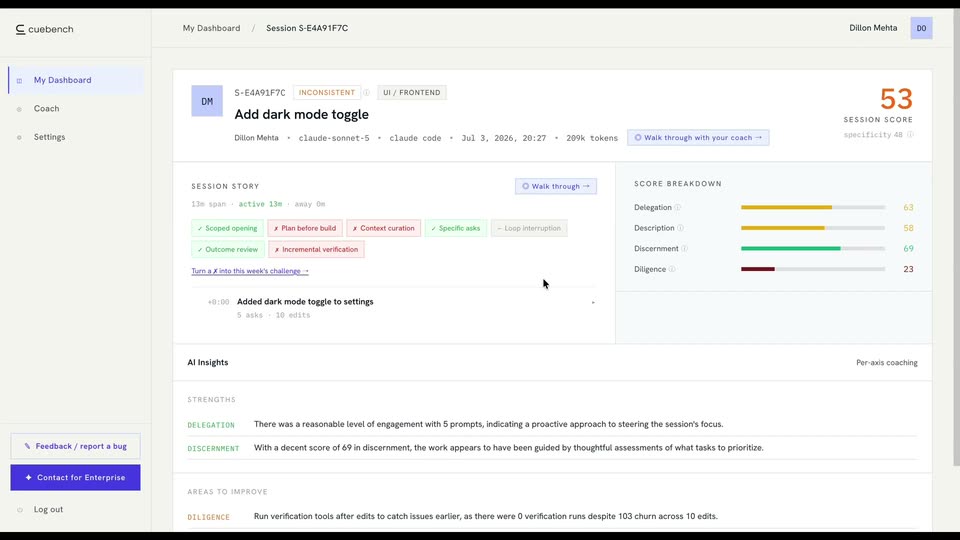
1:06
Explore
CueBench for Developers Demo
CueBench · Jul 2026 · 1:28 · Full motion · AI-annotated
- Length
- 1:28
- Scenes
- 8 · 11.0 s avg
- Product on screen
- 0:00
- Features shown
- 2
- Voiceover
- Yes
- Views
- 136 on YouTube
as of November 23, 2026
00:00:00 / 01:28:04
- Length
- 1:28
- Scenes
- 8 · 11.0 s avg
- Product on screen
- 0:00
- Features shown
- 2
- Voiceover
- Yes
- Views
- 136 on YouTube
as of November 23, 2026
CueBench’s 1:28 launch film runs 8 scenes, about 11 s each. The product is on screen from the first frame and 2 features are revealed. There is no explicit call to action; a voiceover carries the film. A linear screen-recording tour that moves from the landing page through onboarding modals, dashboard, session detail, and coach, cutting at a steady pace of about three cuts per minute. Its signature moves are cursor-led micro-interactions, such as hover tooltips, modal step-throughs, and score counters, on a cream interface with indigo buttons and orange numerals, closing on an enterprise contact button.
No filming indicatedEstimated needs: 5 capture groups — your screens or recordings
Is this your launch? to your site or press kit.
More like this
CueBench for Developers Demo, scene by scene
· 8 scenes as text
01 · Product intro · 0:00–0:09
A two-column landing page: left, a headline and three stat blocks; right, a talking-head video above a Google sign-in button. The video crossfades to a heading, the cursor glides to the button, and a cut lands on a Terms of Use modal over the dashboard.
Techniques: Cursor demo
Camera: Static
02 · Demo · 0:09–0:12
A dimmed dashboard sits behind a centered white Terms of Use modal. A cursor hovers over the terms, then ticks the agreement checkbox and presses the black Join the Beta button.
Techniques: Cursor demo
Camera: Static
03 · Demo · 0:12–0:14
A white onboarding modal titled Tell us who you are overlays a dimmed dashboard. A cursor drifts across the form fields, then hovers over and presses the black Continue button.
Techniques: Cursor demo
Camera: Static
04 · Demo · 0:14–0:17
A white setup modal titled 'Connect your sessions permanently' sits centered over a dimmed dashboard, showing explanatory copy, a dark code block with a curl command, and a copy button. The shot holds static.
Camera: Static
05 · Demo · 0:17–0:53
A flat white cuebench dashboard fills in with an orange score of 51, a radar chart and a line graph, then the cursor scrolls down the page and hovers metric rows to pop up definition tooltips.
Techniques: Cursor demo
Camera: Pan
06 · Feature reveal · 0:53–1:02
A session detail page titled Add dark mode toggle shows a score of 53 and a four-metric breakdown. The cursor hovers over the breakdown to reveal a tooltip, clicks a story row to expand it, then opens a coach walkthrough modal.
Techniques: Cursor demo
Camera: Static
07 · Feature reveal · 1:02–1:12
A dimmed dashboard sits behind a centered walkthrough modal that opens on a 'coach is reviewing' loading state, then steps through five coaching screens as a cursor clicks NEXT. DONE closes it to reveal the Coach page; the counter and dots advance each step.
Techniques: Cursor demo
Camera: Static
08 · Feature reveal · 1:12–1:28
The cuebench Coach dashboard fills the frame. A session list populates the left card, the view scrolls down to the chat box, and a cursor glides to the Contact for Enterprise button.
Techniques: Cursor demo
Camera: Pan