
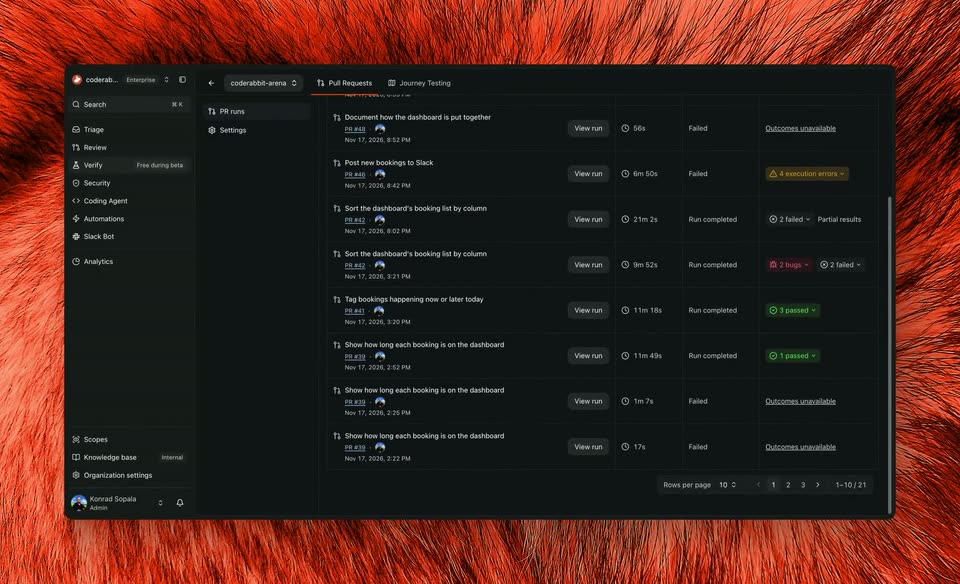
1:01
Explore
CodeRabbit - Introducing CodeRabbit Verify Don't let your users be the first test
CodeRabbit · Nov 2026 · 1:22 · Full motion · AI-annotated
- Length
- 1:22
- Scenes
- 22 · 3.8 s avg
- Product on screen
- 0:00
- Features shown
- 3
- Voiceover
- No
- Views
- 1.6M on X
as of November 22, 2026
00:00:00 / 01:22:53
- Length
- 1:22
- Scenes
- 22 · 3.8 s avg
- Product on screen
- 0:00
- Features shown
- 3
- Voiceover
- No
- Views
- 1.6M on X
as of November 22, 2026
CodeRabbit’s 1:22 launch film runs 22 scenes, about 3.8 s each. The product is on screen from the first frame and 3 features are revealed. There is no explicit call to action. The video is one continuous product tour: a 3D pull-request card opens on a red fur field, then the camera pushes into dark UI panels and whips between them with motion blur, walking through the verify report, the coding agent, and user journeys before settling on the logo. Its signature moves are push-in zooms on small UI details, blur-whip transitions between panels, and a white cursor that triggers every action, all cut at a brisk ~12 cuts per minute.
No filming indicatedEstimated needs: 3 capture groups — your screens or recordings · 1 official logo — reused across the film · 1 3D passage — build or supply
Is this your launch? to your site or press kit.
More like this

Similar soundtrack
Films whose music sounds like this one, voice left out
0:35

Granola - Introducing Agent Briefs. Every night, Granola crunches everything it
Granola · Electronic, deep house
0:52
Aqua Voice - Introducing Aqua Notetaker. Available today on MacOS, Windows, iOS a
Aqua Voice · Electronic, lo-fi hip-hop, deep house
2:00

Alex - Xcode AI Coding Assistant
Alex · Deep house / Tech house
CodeRabbit - Introducing CodeRabbit Verify Don't let your users be the first test, scene by scene
· 22 scenes as text
01 · Product intro · 0:00–0:08
A dark pull-request card floats over a red fur backdrop while an ASCII rabbit animates in the bot comment. The camera zooms into the CodeRabbit Verify report, then pulls back as a cursor hovers the Review Evidence button.
Techniques: UI zoom, 3D mockup, Cursor demo
Camera: Pan
02 · Feature reveal · 0:08–0:11
A dark app window showing a PR-runs table rests on a red fuzzy backdrop, resolving from a horizontal motion blur into a sharp frame, then the view pushes in on the list of pull requests and their status badges.
Techniques: UI zoom
Camera: Pull out
03 · Feature reveal · 0:11–0:17
A dark test-run list zooms in on a red “2 bugs” badge over a red backdrop; a hand cursor clicks it and a “Run breakdown” popover opens. The view pulls back, the cursor clicks “View run,” and the screen switches to the Verify page with a test-scenario table.
Techniques: UI zoom, Cursor demo
Camera: Pull out
04 · Feature reveal · 0:17–0:24
A dark test-evidence panel fills the right of the frame as the view zooms past a blurred dashboard on the left. Inside, an embedded session video plays, showing a Room Bookings table with rows reordering while dev tools sit open at the right.
Techniques: UI zoom
Camera: Push in
05 · Feature reveal · 0:24–0:26
A dark app window over an orange textured backdrop holds a centered modal titled 'Initial booking order and When indicator', displaying a Room Bookings screenshot. The modal opens blurred and sharpens into focus across the clip.
Camera: Pull out
06 · Feature reveal · 0:26–0:32
A dark test-report interface on a screen set against a red fibrous backdrop. The camera zooms into the Checks panel, then scrolls past green Passed preconditions, a red Failed assertions block, and numbered test steps.
Techniques: 3D mockup, UI zoom
Camera: Push in
07 · Feature reveal · 0:32–0:39
A dark test-report panel cycles through its top tabs, Test steps, Observations, then Recurrences, each swap blurring and settling on new lists. A white cursor enters and clicks the Fix with Coding Agent button, reframing to the scenario detail header.
Techniques: Cursor demo, UI zoom
Camera: Push in
08 · Feature reveal · 0:39–0:42
A dark product window on a red fur backdrop slides in with motion blur, snaps into focus, and holds as a cursor clicks the send button under the centered build prompt. The view then reframes right, blurring the left column.
Techniques: Cursor demo, UI zoom
Camera: Pull out
09 · Feature reveal · 0:42–0:46
A dark agent workspace panel on a red textured background shows a review-instruction card, then scrolls to a summary of fixed bugs and edited files. The panel slides left with motion blur as a second screen slides in from the right.
Camera: Pull out
10 · Feature reveal · 0:46–0:50
A dark product window floats on a red textured backdrop, then the view zooms into the User journeys list until it fills the frame. A soft white cursor appears and hovers over the first row's description text.
Techniques: UI zoom, Cursor demo
Camera: Push in
11 · Feature reveal · 0:50–0:54
A dark QA dashboard panel floats over a blurred red fiber backdrop. Inside, an embedded session video plays the deskdrop store, cycling from a hero banner to a product grid. The panel scales up to fill the frame as the left sidebar blurs behind it.
Camera: Pan
12 · Feature reveal · 0:54–0:56
A dark document panel with white text detailing a user goal and test steps floats over a red abstract background. The view starts blurry and sharpens into focus to reveal the structured content.
On-screen text: “Goal”, “Steps (4)”, “Assertions (5)”
Camera: Push in
13 · Feature reveal · 0:56–0:57
A dark control panel hovers over a website mockup on a red textured background. The frame sharpens from motion blur as it settles. The cursor moves onto the Run button, which lights up, while Edit, Manage journey, and history buttons sit to the right.
Techniques: UI zoom, Cursor demo
Camera: Push in
14 · Feature reveal · 0:57–1:00
A dark modal dialog titled Run verifier fills the frame, fading in from a blur. A white cursor glides to the Run 1 journey button and clicks it, the button switching to a loading spinner.
Techniques: Cursor demo
Camera: Pull out
15 · Feature reveal · 1:00–1:03
A dark app window floats over a red grass field, then the frame pushes in on the middle column. The testing-journey log shows status lines and a paragraph of body copy while the red texture stays at the edges.
Techniques: UI zoom
Camera: Pull out
16 · Feature reveal · 1:03–1:04
A dark testing log fills the frame, static paragraphs of light-gray text on near-black with collapsible command rows. A small timer near the top counts up from 2m 9s to 2m 10s, the only motion in the shot.
Camera: Static
17 · Feature reveal · 1:04–1:07
A dark test-results screen holds static. A summary block lists a failed and a passed scenario line, then a row of four output cards shows two video players and two product-grid screenshots, each with a download icon.
Camera: Static
18 · Feature reveal · 1:07–1:10
A dark app window rests on a red fur backdrop, with a centered modal player titled evidence/19-recording.mp4. Inside, a screen recording scrubs forward: a blank page loads into a desk-products site, then scrolls to reveal a developer tools panel. The outer interface stays locked.
Camera: Pull out
19 · Feature reveal · 1:10–1:11
A dark results panel rushes in from heavy motion blur and locks into focus, showing a pass-fail summary and a grid of nine output thumbnails. A cursor rests over one screenshot.
Techniques: Cursor demo
Camera: Push in
20 · Feature reveal · 1:11–1:12
A static dark modal displays a web page screenshot with four product cards: a plant, laptop stand, desk mat, and pencil holder. The filename and pagination sit at the top and bottom.
Camera: Static
21 · Feature reveal · 1:12–1:17
A dark bug-tracker window sits on a red abstract background; the camera zooms into the findings table, then a cursor hovers the Tickets button in the first row, which expands into a Create ticket button as the screen dims.
Techniques: UI zoom, Cursor demo, Morph
Camera: Push in
22 · Outro · 1:17–1:22
A small orange circle with a white rabbit mark spins and grows in the center of a pale field, then the wordmark CodeRabbit fades in beside it as the background shifts to gray.
On-screen text: “CodeRabbit”
Camera: Static