1:21

All the launches at Config 2025 | Figma
Figma · Design · May 2025
Adobe · Jun 2023 · 1:01 · Full motion · AI-annotated
Adobe’s 1:01 launch film runs 45 scenes, about 1.4 s each. The product is on screen from the first frame and 1 feature is revealed. There is no explicit call to action; a voiceover carries the film. The video is a single-feature montage: a brand logo and a feature title card lead into five back-to-back demos of the same Generative Recolor dialog applied to a floral label, 3D type, a hand icon, a forest and a portrait, each recoloring live from a typed prompt. Cuts run at roughly 45 per minute on the beat, with hue-snapping flat backgrounds, the red frame reveal, real-time palette swaps and 3D fold-outs as the recurring moves.
Is this your launch? to your site or press kit.
Figma · Design · May 2025
Krea Ad Studio · Oct 2026
Shopify · Business software · May 2026
Films whose music sounds like this one, voice left out
Airtable · Funk-rock / Indie rock / Electronic dance
Snowfire · Modern funk, disco, and electronic dance music
Otter.ai · Electronic dance, funk
The red Adobe wordmark sits centered on a white background. A vertical red bar slides across the middle of the wordmark, masking the letters as it passes.
On-screen text: “Adobe”
Techniques: Masking
Camera: Static
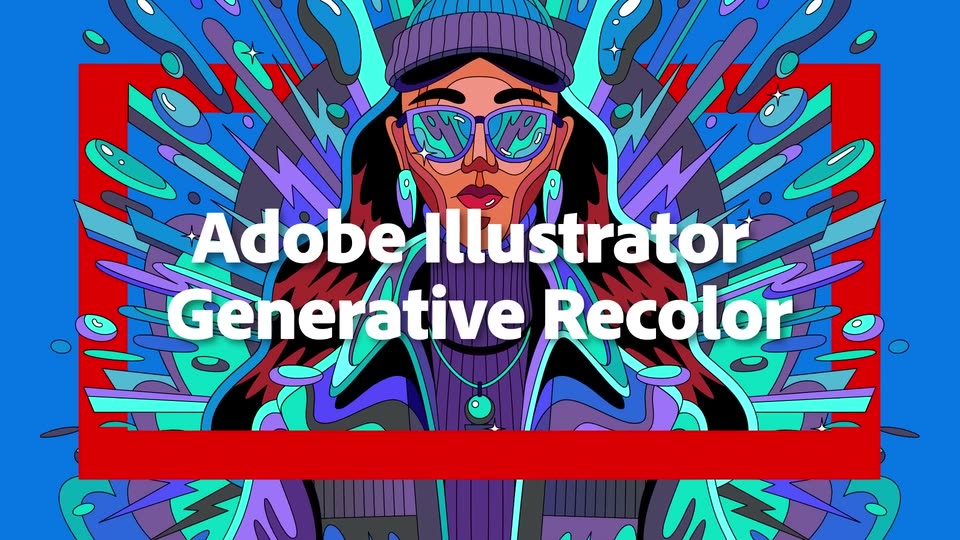
A white two-line title sits on a small red panel over a flat blue field, then a vibrant illustration of a woman in sunglasses and a beanie, ringed by a burst of colorful shapes, scales up to fill the frame. The text stays locked while the artwork settles.
On-screen text: “Adobe Illustrator”, “Generative Recolor”
Camera: Push in
Locked-off view of the Adobe Illustrator workspace: a grayscale floral bouquet fills the canvas while a translucent duplicate of it slides left and fades out. The Quick Actions panel stays put on the right, and the headline text holds still.
On-screen text: “Generative Recolor”, “Adobe Illustrator”
Camera: Push in
Inside a dark design-app interface, a black-and-white floral line-art canvas is split by a vertical gap. A cursor drags the Petals Tea Co. label from the bottom left onto the artwork as the two halves slide together and the view zooms in on the canvas.
Techniques: Cursor demo, UI zoom
Camera: Static
A design editor canvas shows a black-and-white floral illustration with a tea label on the left. A cursor drags a selected Ingredients text box from the center to the right while a second box is positioned at the bottom.
Techniques: Cursor demo
Camera: Static
In a vector editor, a floral tea-label artwork sits on the canvas. The cursor clicks Recolor in the Quick Actions panel, a small dialog opens, then the illustration's outlines shift to blue. A selection frame reappears around the canvas.
Techniques: Cursor demo
Camera: Static
A dark Generative Recolor dialog overlays a floral poster layout. The cursor types “peaceful pastels” into the prompt field, clicks Generate, and the dialog collapses into a row of four recolored palette swatches of the same flowers.
Techniques: Cursor demo, Morph
Camera: Static
A comic-style floral poster fills the frame behind a gray filmstrip of five tinted flower thumbnails. A white arrow cursor hovers over the first frame, which carries a purple selection outline, and drifts slightly right.
Techniques: Cursor demo
Camera: Static
A floral illustration with a Petals label fills the canvas of a design app, a left toolbar of tools sits at the edge, and a horizontal strip of four color swatches rests at the bottom while a cursor hovers over it. The frame is locked off.
Techniques: Cursor demo
Camera: Static
A flat design-software canvas shows a pink floral illustration with a Petals label and a four-swatch color bar. A star-shaped cursor glides left and rests on the middle swatch, which holds a blue selection outline. The left tool panel stays fixed.
Techniques: Cursor demo
Camera: Static
A design tool canvas displays a two-page floral tea box spread. A selected strip of five label color variations disappears, the cursor clicks the pen tool on the left, and the main Petals Tea Co. label remains selected with blue handles.
Techniques: Cursor demo
Camera: Static
A flat two-panel tea box layout, floral artwork on the left and a yellow ingredients panel on the right, sits on a dark canvas beside a design toolbar. The panels fold and rotate into a 3D box mockup as the toolbar fades out.
Techniques: 3D mockup
Camera: Static
Three floral tea boxes in teal, magenta and yellow stand in a row on a pale lavender ground, with two pyramid tea bags resting at the left. The camera orbits slowly around the group, holding a low three-quarter angle.
Techniques: 3D mockup
Camera: Static
On a dark canvas, the extruded 3D word BEST with a blue-teal gradient and pink stripe fill switches to a blue wireframe inside a selection box with corner handles, a cursor hovering over the letters. A dark panel titled Generative Recolor with a prompt field and Generate button scales in below.
On-screen text: “BEST”
Techniques: 3D mockup, Cursor demo, Morph, Masking
Camera: Static
A dark dialog labeled Generative Recolor is centered over large teal 3D letters with blue wireframe outlines. An arrow cursor hovers in the prompt field, then the prompt vivid 80's vaporwave is typed in letter by letter behind a caret.
Techniques: Cursor demo
Camera: Static
A dark gray Generative Recolor panel sits over large blue 3D wireframe letters, showing a prompt field reading vivid 80's vaporwave and a Generate button. The frame stays locked off with a slight scale.
Camera: Static
A 3D wireframe BEST in blue and purple sits on a dark canvas inside a blue selection box. A Generative Recolor panel below shows a prompt field, then swaps to three color swatches of the word as a cursor hovers the first.
Techniques: Cursor demo
Camera: Static
On a flat orange field, a large 3D BEST in pink-to-orange gradient with red extruded sides scales up, a white outline copy layered on top. Below, a small three-pane window holds BEST in orange, teal and purple, a white cursor arrow resting on the first pane.
On-screen text: “BEST”, “BESTBESTBEST”
Techniques: Kinetic type
Camera: Static
Large 3D extruded BEST wordmark with orange sides and a long shadow sits on turquoise, overlaid by a thin white outline. Below, a small 3D monitor shows three BEST panels in orange, teal, and purple; a white cursor slides from the middle panel to the right as the wordmark scales.
On-screen text: “BEST”, “BESTBESTBEST”
Techniques: Kinetic type, 3D mockup, Cursor demo
Camera: Static
A 3D extruded BEST logo in pink-to-yellow gradient floats above a small three-tile style panel with a cursor on a dark purple field. The logo scales down as a retro poster assembles around it: header, DANCE NIGHT title, address, 30 MAR date, and a pink band of performer names.
On-screen text: “BEST”, “Retro Store Presents”, “DANCE NIGHT”, “2701 Willow Oaks Lane Lake Charles, LA”, “30 MAR”, “Starting at 5PM - 11PM at @retrostore.sp”, “Special Performances by:”, “Linda Brown | Elizabeth Jones | Nelly Dean”, “Isabella Linton | Catherine Earnshaw”, “Hindley Earnshaw | Elizabeth Jones”
Techniques: Kinetic type, Cursor demo
Camera: Static
A pink and blue geometric peace-sign hand on a teal canvas scales up as a blue selection box with corner handles snaps around it. A Generative Recolor panel slides in at the bottom showing a prompt field and a Generate button.
Techniques: Cursor demo
Camera: Static
A dark panel titled Generative Recolor sits below a pink and blue geometric illustration. A cursor clicks the prompt field, the field turns white, and the words red bold cyberpunk type in. The cursor then moves down to the Generate button.
Techniques: Cursor demo
Camera: Static
A dark gray Generative Recolor panel sits on a red field beneath a geometric cyberpunk face. The cursor rests on the Generate button while the prompt field types pink bold cyberpunk, and the face and background shift from red to pink.
Techniques: Cursor demo
Camera: Static
A dark gray panel titled Generative Recolor with a prompt field and Generate button sits on a pink background behind a geometric pink and blue illustration. A white cursor hovers over the Generate button.
Techniques: Cursor demo
Camera: Static
A flat peace-sign hand filled with geometric shapes floats on a pink field above a dark UI card. The prompt field types out a phrase while a cursor rests on the Generate button, and the hand's palette shifts from pink to purple as the wording changes.
Techniques: Cursor demo
Camera: Static
A low-poly peace-sign illustration sits on a purple field above a dark recolor panel showing a prompt field and a Generate button with a cursor. The panel drops away and the illustration and background snap to a teal palette.
Camera: Static
A hand illustration making a two-finger peace sign, filled with a geometric mosaic, sits centered on a flat background. The background shifts from orange to purple while the mosaic palette flips from warm to cool tones.
Camera: Static
A faceted low-poly hand throws up two fingers in a peace sign, its orange, blue and purple geometric facets outlined in white, bobs lightly on a flat purple field.
Camera: Static
A flat vector forest illustration fills the locked-off frame while a mouse cursor hovers over it. Thin blue outlines trace every shape, then a dark prompt panel scales in at the bottom center with a title, text field, and Generate button.
Techniques: Cursor demo
Camera: Static
A dark Generative Recolor dialog sits over a flat illustrated forest. The word autumn is typed into the prompt field, then a white cursor moves to the Generate button as the frame zooms out to reveal the full scene.
Techniques: UI zoom, Cursor demo
Camera: Pull out
A flat autumn forest illustration in orange and brown tones fills the frame. A dark gray panel sits at the bottom center with a prompt field and a Generate button. A cursor drifts from the panel down into the trees.
Techniques: Cursor demo
Camera: Static
A flat autumn forest illustration with blue selection outlines fills the frame. A dark Generative Recolor panel sits at bottom center with a prompt field reading autumn and a Generate button. A white cursor hovers just above the panel and drifts slightly.
Techniques: Cursor demo
Camera: Static
A dark “Generative Recolor” panel floats over a flat orange forest illustration. The prompt field shows “autumn” typed, then “winter,” while the mouse cursor moves from the field down to the Generate button.
Techniques: Cursor demo
Camera: Static
A dark Generative Recolor dialog with the prompt winter and a cursor on the Generate button overlays a stylized snowy forest. The dialog scales out, revealing the full winter forest illustration, which slowly pushes in.
Techniques: Cursor demo
Camera: Static
A vibrant illustrated portrait on orange sits inside a dashed selection box with corner handles. A dark Generative Recolor dialog with a prompt field and Generate button appears at the bottom center while a cursor hovers over it.
Techniques: UI zoom, Cursor demo
Camera: Static
A dark gray modal titled Generative Recolor sits over a vibrant psychedelic portrait. A cursor types neon spray paint into the prompt field, which turns white as the text completes.
Techniques: Cursor demo
Camera: Static
A vibrant illustration of a person in a pink beanie and glasses, surrounded by a radial burst of neon shapes, with a dark Generative Recolor dialog overlaid, its prompt field reading neon spray paint. A white cursor glides to the Generate button.
Techniques: Cursor demo
Camera: Static
A psychedelic portrait of a woman on a blue field holds a dark prompt panel reading neon spray paint, with a cursor at the Generate button. The panel then swaps for a row of three recolored thumbnails of the same portrait.
Techniques: Cursor demo
Camera: Static
A flat illustration of a woman with glasses and a beanie, centered on a pink field of radiating abstract shapes. A dark bar of three color-variant portraits sits at her chest, a cursor arrow over the middle. The frame is locked-off and still.
On-screen text: “M”
Camera: Static
A psychedelic illustration of a woman in a beanie and glasses sits centered on a yellow field, ringed by a burst of stars, blobs and rays. A translucent strip of three character thumbnails across her chest slides out, revealing her green turtleneck, jacket and pendant.
Techniques: Masking
Camera: Static
A stylized portrait of a person in a beanie and tinted glasses sits centered on a flat cyan field. An abstract halo of teal, blue and purple shards, floating blobs and sparkles radiates behind the figure. The illustration holds a steady pose with no visible motion.
Camera: Static
A flat 2D illustration of a woman in a green beanie and blue sunglasses holds center frame, ringed by a radiating burst of teal, blue and gray abstract shapes on a solid green field. The portrait stays still while the halo of shapes pulses gently.
Camera: Static
A colorful illustration of a woman in a pink beanie and oversized glasses holds center frame, backed by a radiant burst of abstract pink, teal and purple shapes on a solid blue field. The image stays static throughout the clip.
Camera: Static
A flat vector portrait of a woman in a beanie and glasses sits centered on a radial burst of colorful shapes. The palette shifts from pink to orange, then a red band opens across the middle to reveal the white headline, then collapses.
On-screen text: “Dream Bigger.”
Techniques: Masking
Camera: Push in
A red square with a white A cutout sits centered on a white field. The red fill contracts to the letter's shape, leaving a solid red A. Locked-off frame.
Techniques: Morph
Camera: Static