
1:10

Introducing ClickUp 3.0
ClickUp · Productivity · Jun 2022
Adobe · Feb 2025 · 0:56 · AI-annotated
The video opens on the Firefly home screen, then stacks single-line feature claims, each followed by a fast montage of generated clips and a tight UI demo, and closes on the wordmark. Pacing runs at about 35 cuts per minute on a 117 BPM track, with locked-off hero shots, centered white headlines and quick UI zooms as the signature moves.
ClickUp · Productivity · Jun 2022
TagadaRx · Oct 2026
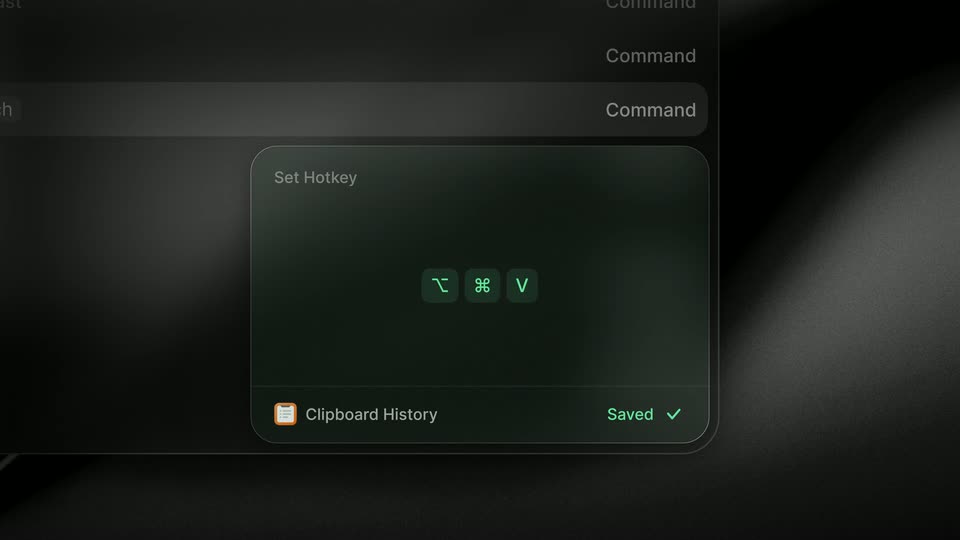
Raycast · Productivity · Dec 2025
A dark Adobe Firefly interface fades up in 3D perspective, a colorful fish illustration fills the top banner as the white product title and a row of category tabs settle into place.
Techniques: 3D mockup
Camera: Static
The Adobe Firefly home screen fills the frame on a dark interface. A colorful goldfish hero image sits behind the product wordmark, and a row of generated thumbnails fades in beneath the category tabs.
Camera: Static
Two dark feature cards sit side by side, an AI portrait on the left and a parrot on the right, each with a caption and chevron. A large white headline resolves across the center.
On-screen text: “The ultimate in”
Techniques: Kinetic type
Camera: Static
A large white headline, “The ultimate in creative AI,” holds center over a dark grid of AI feature cards. The card grid scrolls slowly upward beneath the fixed text, revealing more thumbnails and labels.
On-screen text: “The ultimate in creative AI.”
Camera: Pull out
A grid of dark feature cards with thumbnails and labels scrolls slowly upward. A large white headline sits centered over the grid, holding still against the moving cards.
On-screen text: “The ultimate in creative AI.”
Camera: Static
A macro shot of a colorful parrot, red and white head, blue and yellow wings, on a dark background. The bird turns its head and opens its beak as the white text scales up across the center of the frame.
On-screen text: “Now with video.”
Techniques: Kinetic type
Camera: Static
A white-haired anime child in a silver puffer jacket and flower crown stands centered between cherry blossom branches against a dark blue sky. A bold white headline scales down over the face.
On-screen text: “Now with video.”
Techniques: Kinetic type
Camera: Static
Concentric rings in blue, teal, purple and orange rotate behind drifting translucent dots. The white headline sits centered; the word “video” shrinks from an extra-bold size to a lighter weight over the half second.
On-screen text: “Now with video.”
Techniques: Kinetic type, Particles
Camera: Static
A misty lake at dawn, pine trees and mountains reflected in still water under a soft orange sky. The white headline sits centered over the locked-off shot and scales up in place.
On-screen text: “Now with video.”
Techniques: Kinetic type
Camera: Static
Abstract 3D render: a white petal flower and glossy iridescent chrome blobs drift and deform over a dark field split by a bright vertical band. The caption “Now with video.” scales in at the center while the camera stays locked off.
On-screen text: “Now with video.”
Techniques: Kinetic type
Camera: Static
Green aurora waves over a snow-capped mountain and pine silhouettes at night. Large white text “Get even more” scales down while “creative control” appears below it.
On-screen text: “Get even more”, “creative control”
Techniques: Kinetic type
Camera: Pull out
A dark camera-settings panel floats over an aurora preview image. The view zooms into the Motion grid while a cursor glides to the Pan right thumbnail, which lights up with a white outline.
Techniques: UI zoom, Cursor demo
Camera: Push in
A left control panel listing camera angles with sunflower thumbnails and a cursor sits over a dark aurora preview; the panel and bottom prompt bar fade out to reveal the full green aurora over a snowy mountain and pine trees.
Camera: Pull out
A radial kaleidoscope of colored glass cuts to a detailed snake-and-flowers illustration while bold white text reveals across the center with a soft halo glow.
On-screen text: “Make stunning images.”
Techniques: Kinetic type
Camera: Push in
A white poppy in dry grass cuts to a star-filled nebula sphere. The centered white headline holds across both images, a pink-to-gold glow flaring along its letters in the first frame.
On-screen text: “Make stunning images.”
Techniques: Kinetic type, Light sweep
Camera: Static
A bold white headline sits centered over a fast montage of full-bleed generated images: a glossy butterfly, rainbow feather fans, then a portrait, each cutting in turn while the text scales gently.
On-screen text: “Make stunning images.”
Techniques: Kinetic type
Camera: Static
A furry 3D animal in a clear helmet on a pink set hard cuts to a 3D red panda in a knit hat on a dark set, both centered close-ups. The white headline scales slightly across the cut.
On-screen text: “Make stunning images.”
Camera: Static
A white headline over a swirling paint image cuts to a grid of colorful AI pictures. A dark prompt bar types the words 'Colorful soccer cleats covered in flowers, floating in clouds' while a white cursor clicks the blue Generate button.
On-screen text: “Make stunning images.”
Techniques: UI zoom, Kinetic type, Cursor demo
Camera: Pull out
A dark interface shows a text prompt above four generated images of flower-covered cleats. The cursor moves to the third image, which glows and zooms to fill the screen, revealing a Style panel with sliders and a Generate button.
Techniques: Cursor demo, UI zoom
Camera: Static
A dark backdrop with a magenta glow; a Style panel with two sliders sits on the left while a cursor drags the Visual intensity knob to the right, and a 3D floral sneaker floating on a teal card shifts from muted to vivid colors.
Techniques: 3D mockup, Cursor demo
Camera: Static
Three iridescent striped hot-air balloons drift against a black void, small glassy bubbles floating around them. A large white bold sans headline “Generate videos.” holds centered and still over the scene.
On-screen text: “Generate videos.”
Camera: Static
A locked-off shot of a blue iceberg floating on calm water under a pale sky. Large white text is centered over the frame and remains still.
On-screen text: “Generate videos.”
Camera: Static
A toucan with a large orange beak perches on a mossy branch among yellow and red flowers, rain falling against a blurred green jungle. The white text “Generate videos.” sits centered over the frame and stays still.
On-screen text: “Generate videos.”
Camera: Static
A wet city street at night, with cars and streetlights reflecting on the road, holds in a locked-off frame as the headline sits centered over the scene.
On-screen text: “Generate videos.”
Camera: Static
A close-up of a backlit orange flower fills the frame, its petals glowing against a soft blue-green background. The white text 'Generate videos.' sits centered across the middle, still and locked off for the full duration.
On-screen text: “Generate videos.”
Camera: Static
A dark interface shows a horizontal carousel of feature cards scrolling left, each pairing a generated image (anime figure, parrot, white robot, blue monster) with a label and caption, while a cursor drifts toward the chevrons.
On-screen text: “Generate videos.”
Techniques: Cursor demo
Camera: Pull out
A grid of colorful AI images fills the frame behind a dark rounded prompt bar. The prompt text types in letter by letter, then a cursor glides to the blue Generate button and the shot zooms in on it as the grid blurs out.
Techniques: Cursor demo, UI zoom
Camera: Pan
A dark prompt bar with white text and a blue Generate button sits over a blurred grid of images. A white cursor hovers the button as the bar fills with a colorful gradient, then the bar fades out, leaving only the button.
Techniques: Cursor demo
Camera: Static
A black horse with a silver bridle stands in profile against a dark, misty backdrop. White fog drifts across the frame while the horse blinks and turns its head toward the camera.
On-screen text: “soft fog drifting slowly surrounding the black horse, eye blink and subtle head turn motion”
Camera: Pull out
A white cursor drags a waterfall photo card over a dark two-column panel and drops it into the Frame slot, where it shrinks into a square thumbnail, then carries the card back down. The Prompt column holds a static line of text. A blurred photo grid fills the background.
Techniques: Cursor demo
Camera: Static
A close-up of a prompt panel with a cursor pulls back to reveal the full editor: a left settings sidebar listing camera motions, and a large preview of a waterfall framed by red autumn trees. A blue Generate button sits at the bottom right.
Techniques: UI zoom
Camera: Static
A smiling woman in a denim jacket talks in front of shelves of amber bottles and jars. The white headline builds word by word across the lower frame on a locked-off shot.
On-screen text: “Translate in a click.”
Techniques: Kinetic type
Camera: Static
A woman in a denim jacket stands before shelves of jars, speaking, while a dark Translate audio panel is composited at left. Its source and target language dropdowns cycle through German, Chinese and Spanish as a white cursor hovers over them.
Techniques: Cursor demo
Camera: Pull out
A woman in a denim jacket speaks to camera in front of shelves of jars. A translucent translate-audio panel at left shows its source-language dropdown sliding from German to Spanish, then fades out, while a dark audio bar with a growing blue waveform overlays her chest.
Camera: Static
A glowing jellyfish drifts on a dark blue field as white headlines swap phrase by phrase. The frame then pulls back to reveal the image inside a Photoshop web window, with an Edit menu and a cursor on the left.
On-screen text: “Take your creativity”, “further”, “with the apps you love.”
Techniques: Kinetic type, Cursor demo, UI zoom
Camera: Pull out
Over a still jellyfish photo, the Photoshop web UI assembles: the Ps badge scales in at the top left, a vertical tool rail and a bottom layer bar slide in, and a white cursor glides across the canvas.
Techniques: Cursor demo
Camera: Static
A dark photo editor UI frames a glowing jellyfish photo with a left tool rail and a bottom layer bar. It cuts to the same photo on an outdoor billboard, where large white letters read And Ads over the image.
On-screen text: “And Ads”
Techniques: 3D mockup
Camera: Pull out
A locked-off dusk billboard mockup shows a blue jellyfish drifting on a dark screen. Centered white text builds line by line: And it's, commercially, safe.
On-screen text: “And it's”, “commercially”, “safe.”
Techniques: Kinetic type, 3D mockup
Camera: Static
A person holds a smartphone in both hands, the screen filling the frame with an app card showing a glowing jellyfish and event details. The background blurs the person's crossed legs and a wooden chair. The shot stays locked off, hands steady.
Camera: Static
A vertical digital billboard on a city sidewalk, shown in 3D perspective, displays a glowing jellyfish over dark blue water. The headline and event dates sit in the lower half. The street behind is blurred with moving cars; the camera stays locked off.
On-screen text: “Underwater ballet at the aquarium”, “5 April thru 10 May 2025”, “Daily 10:00am - 17:30pm”
Techniques: 3D mockup
Camera: Static
A locked-off wide shot of an outdoor billboard on a hedge wall. A pink-and-blue jellyfish drifts over a dark blue field inside a thin cyan frame, its long tentacles swaying. Headline and dates sit at lower left, a small circular logo at upper right.
On-screen text: “Underwater ballet at the aquarium”, “5 April thru 10 May 2025”, “Daily 10:00am- 17:30pm”
Techniques: Kinetic type
Camera: Static
A billboard in a blurred night city shows a pink and blue jellyfish on a dark blue field. The white headline fades in word by word across the center while the camera stays locked off.
On-screen text: “All the creative AI you need”
Techniques: Kinetic type
Camera: Static
The Adobe Firefly interface displays a glowing jellyfish above three feature cards. Large white text builds up to read “All in one place.” A red border frames the screen at the end.
On-screen text: “All in one place.”
Techniques: Kinetic type, UI zoom
Camera: Pull out
A red square holding a small dark video window with the word one shrinks and morphs into red geometric logo letterforms on a white background.
Techniques: Morph
Camera: Static
The Adobe Firefly wordmark lockup is centered on a plain white background and holds. The red “Adobe” sits left of the black “Firefly”; the mark is static in a locked-off frame.
On-screen text: “Adobe Firefly”
Camera: Static