1:27

TectoAI (YC S25)
TectoAI · B2B
Zapier’s 2:26 launch film runs 14 scenes, about 10 s each. The product is on screen from the first frame and 4 features are revealed. There is no explicit call to action; a voiceover carries the film. The video is a host-led update show: a talking-head intro, then a rapid tour of product updates where each feature gets a cursor-driven screen demo with the host's webcam pinned in a corner, ending in a brief sign-off and black beat. Pacing is brisk at about two cuts per minute, with blur transitions marking each feature change and the recurring picture-in-picture inset as the signature move.
Is this your launch? to your site or press kit.
Films whose music sounds like this one, voice left out
Affinity · Upbeat corporate electronic
Cursor · Upbeat electronic music
OpenAI · Electronic
A bearded man in a dark green henley stands centered against a blurred home office with wooden cabinets and books. He speaks to the camera, smiling, and makes small hand gestures near his chest. Static medium shot with shallow depth of field.
Camera: Static
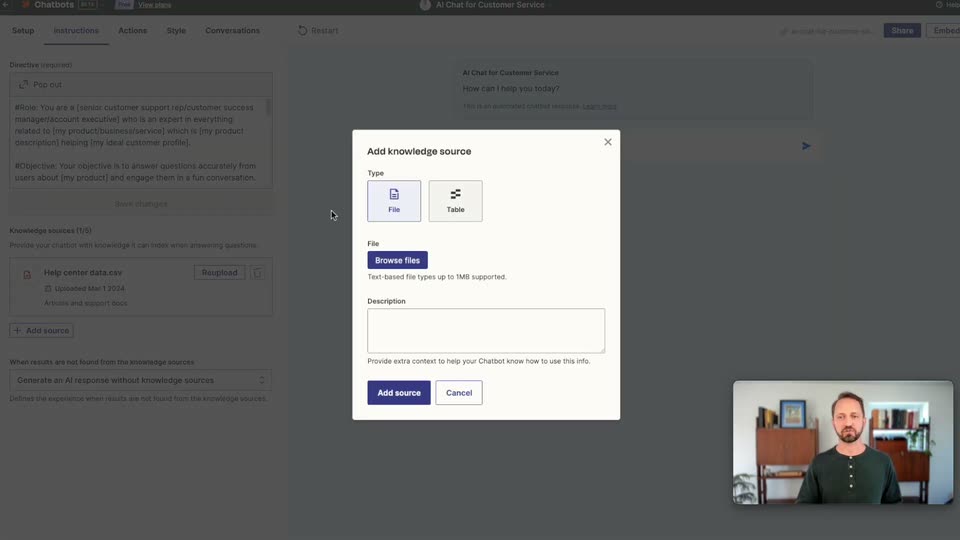
A Zapier chatbot setup screen fills the frame, settings panel left, chat preview right, with a presenter's video inset bottom right. The cursor clicks Add source, a modal opens, the cursor picks the Table type and types FAQ, narrowing the dropdown to FAQ List.
Techniques: Cursor demo
Camera: Static
The Chatbots builder shows the Instructions panel left and a chat preview right. The preview loads a greeting bubble, then a cursor clicks into the Ask me anything field. A small video of a man at a desk plays in the bottom right corner.
Techniques: Cursor demo
Camera: Static
A light table view lists FAQ questions and answers with a Resource link per row. A cursor drifts down the rows while a presenter in a small video-call window at the lower right talks and gestures.
Techniques: Cursor demo
Camera: Static
A white registration form with a floral banner fills the screen while a presenter's webcam video plays in the bottom-right corner. A cursor opens the Role and Interested In dropdowns, selects Marketing and innovation, and a Yes/No session question slides in.
Techniques: Cursor demo
Camera: Static
A screen recording of a form builder shows a registration form with a floral banner. The cursor scrolls to a Yes/No field, clicks it to open a settings panel, then switches to the Logic tab to set conditions. A small webcam feed of the presenter sits in the lower left.
Techniques: Cursor demo
Camera: Static
A screen capture of the Zapier Tables pricing page shows three plan cards above a feature comparison table. A presenter talks and gestures in a video-call inset at the lower right. The page scrolls down to the table and FAQ heading, then the whole frame blurs out.
Camera: Static
A screen recording of a Canvas flowchart titled Document Approval Process, with a video call inset of a presenter in the lower right. The cursor drifts to the top-right Share button and opens a share dialog, then clicks Generate public URL to reveal a link field.
Techniques: Cursor demo
Camera: Static
A bearded man in a dark green henley sits in a room with wooden shelves, speaking directly to the camera. He smiles and gestures with his hands as he talks, while the background remains softly out of focus.
Camera: Static
A bearded man in a dark green henley stands in a home office with wooden cabinets and books behind him, speaking to the camera. The frame then loses focus and blurs out, transitioning away.
Camera: Static
A Zapier template page fills the screen, showing the Employee Onboarding Template header and a desk preview with a Welcome Aboard monitor. A presenter speaks from a small video window pinned bottom right. The cursor drifts across the page, then the page scrolls down to a Document Approval section.
Techniques: Cursor demo
Camera: Static
The Zapier Document Approval template page, showing an upload form, fills the frame with a small presenter video in the lower right. The presenter video scales up to full screen as he signs off.
Techniques: Morph
Camera: Static
A bearded man in a dark green henley stands centered, talking to the camera against a softly blurred home office with wooden cabinets, books and a plant. He lifts one hand in a small gesture, then holds still while speaking. The camera stays fixed on him.
Camera: Static
The frame holds on a solid black field for the full duration. No content, text, or motion appears; it reads as a static black beat or transition between scenes.
Camera: Static