
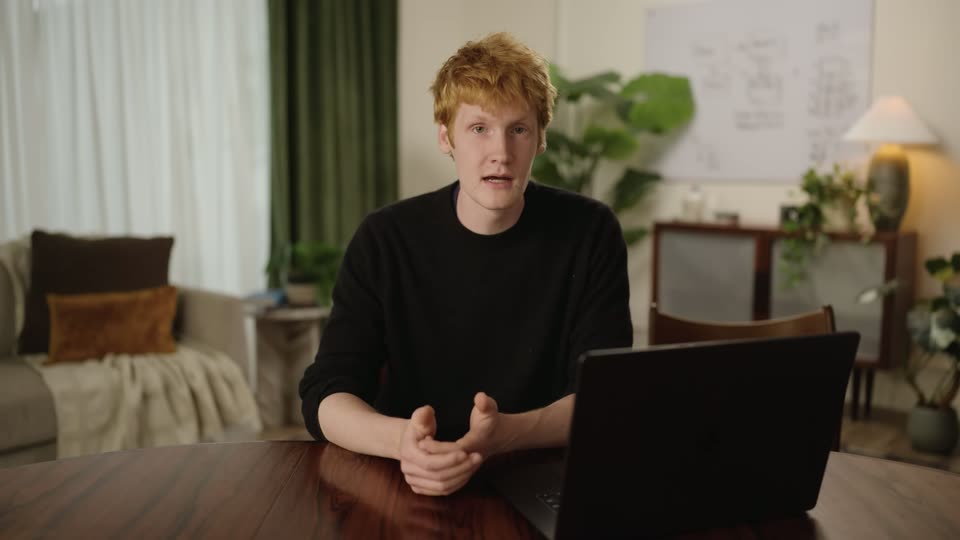
0:40
Explore
00:00:00 / 02:11:23
- Length
- 2:11
- Scenes
- 30 · 4.4 s avg
- Product on screen
- 0:06
- Features shown
- 5
- Voiceover
- Yes
- Views
- 107K on YouTube
as of November 23, 2026
Cursor’s 2:11 launch film runs 30 scenes, about 4.4 s each. The product shows up at 0:06 and 5 features are revealed. There is no explicit call to action; a voiceover carries the film. A talking-head presenter in a warm home office alternates with tight screen recordings of each feature in a dark code editor, one feature per block, from tab model to background agent. The style is defined by a clapperboard and monospace 'shipped_' title card opening, steady ~9 cuts per minute pacing, and signature moves like collapsing diff overlays, typed prompts, and a slow wireframe-cube logo reveal to close.
Footage neededEstimated needs: 5 capture groups — your screens or recordings · 1 official logo — reused across the film · 12 filmed passages — shoot, supply or replace
Is this your launch? to your site or press kit.
More like this
1:59
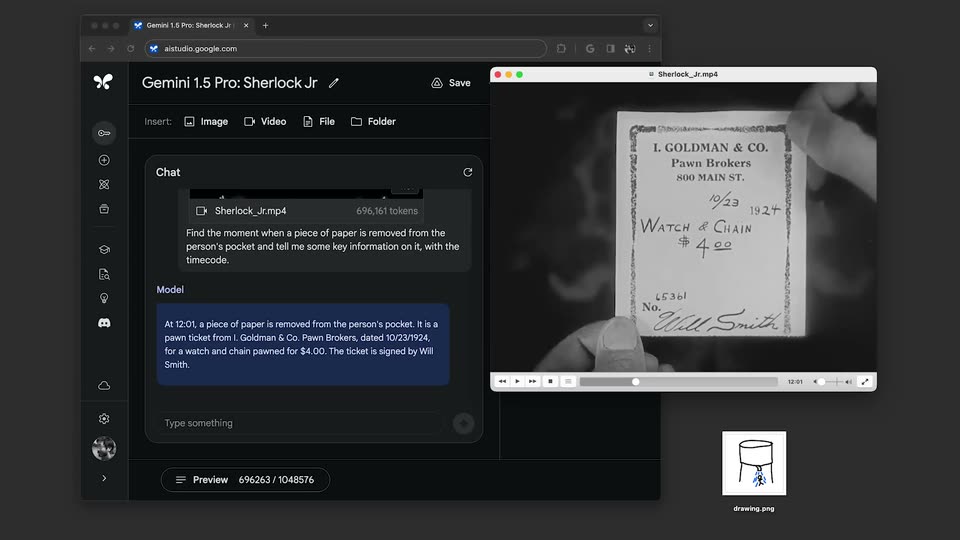

Multimodal prompting with a 44-minute movie | Gemini 1.5 Pro Demo
Google · AI · Feb 2024
4:17

Introducing Manus: The General AI Agent
Manus · Mar 2025
Similar soundtrack
Films whose music sounds like this one, voice left out
4:49
Introducing Akool Live Camera: Real-Time AI Video Creation
Akool Inc · Electronic
3:25

Amplitude Guide and Survey Overview
Amplitude · Corporate tech launch
1:54

Meet Iris by Submagic: The AI Agent That Edits Your Videos For You
Submagic · Electronic
Cursor's largest update yet, scene by scene
· 30 scenes as text
01 · Hook · 0:00–0:01
A red-haired man in a black shirt sits at a laptop as a hand brings a clapperboard into frame from the left. The board reads “Shipped” and “0.5orelease” with a date; the top stick claps shut. Medium close-up, shallow focus, white curtain and green drape behind.
Camera: Pull out
02 · Hook · 0:01–0:02
Close-up of a red-haired man seated at a laptop as a pair of hands brings a clapperboard in front of his face and claps it shut. The white board carries handwritten marker text, the frame stays locked off.
On-screen text: “Shipped”, “0.sorelease”, “5/16/25”
Camera: Static
03 · Hook · 0:02–0:05
Dark navy card. Small light-blue “MAY 2025” sits top left while “shipped_” types out letter by letter in large white monospace with a blinking underscore. A column of faint dark-purple monospace lines, “chat duplicat”, “background ag”, “cursor 0.50”, then slides in from the right.
On-screen text: “MAY 2025”, “shipped_”, “chat duplicat”, “background ag”, “cursor 0.50”
Techniques: Kinetic type
Camera: Static
04 · Hook · 0:05–0:05
The lowercase word shipped_ in dark navy monospace type sits centered on a flat light blue field, the whole word scaling down slightly across the shot.
On-screen text: “shipped_”
Techniques: Kinetic type
Camera: Static
05 · Hook · 0:05–0:06
A dark navy background with the white text 'shipped_' centered in the frame. The text remains static and locked-off.
On-screen text: “shipped_”
Camera: Static
06 · Product intro · 0:06–0:17
A red-haired man in a black sweater sits at a desk with a laptop, speaking to the camera and gesturing with his hands. The room has green curtains, leafy plants and a whiteboard, lit by soft daylight.
Camera: Static
07 · Feature reveal · 0:17–0:22
A red-haired man in a black sweater sits at a wooden table with a black laptop, speaking to the camera and gesturing with his hands. The background is a softly lit living room with a sofa, plants and a lamp. The shot stays static.
Camera: Static
08 · Feature reveal · 0:22–0:27
A dark code editor displays TypeScript source while a colored diff overlay collapses into typed lines. An autocomplete dropdown appears, then a peek window slides up at the bottom showing a second file, each step marked by a TAB hint.
Techniques: Cursor demo
Camera: Static
09 · Feature reveal · 0:27–0:34
A dark code editor shows a TypeScript file as the caret jumps between lines. Ghost text previews the next edit on the right before it commits, and small 'TAB to jump here' hints pop up beside each stop while a bottom hint reads 'TAB to chat.tsx'.
Techniques: Cursor demo
Camera: Static
10 · Feature reveal · 0:34–0:39
A red-haired man in a black shirt sits at a wooden table with a black laptop, gesturing with both hands as he addresses the camera. The softly lit living room behind him holds a couch, plants and a whiteboard.
Camera: Static
11 · Feature reveal · 0:39–0:45
A red-haired man in a black shirt sits in a medium close-up, speaking to an off-camera interviewer. The static shot holds on his face against a soft-focus backdrop of white and green curtains, shallow depth of field.
Camera: Static
12 · Feature reveal · 0:45–0:54
A dark two-pane app screen: code editor left, chat panel right. The cursor opens the model dropdown, toggles MAX Mode on, and clicks send. The prompt card turns into a Generating state while a plan streams in below.
Techniques: Cursor demo
Camera: Static
13 · Feature reveal · 0:54–0:58
A red-haired man in a black sweater sits at a wooden table in a softly lit living room, speaking to the camera. He gestures with both hands as a dark laptop, back to the lens, sits open in front of him. The shot stays static.
Camera: Static
14 · Feature reveal · 0:58–1:03
A dark code editor shows Go source with red and green diff lines, and an inline chat box at the bottom holds the prompt to add structured logging. A chat panel opens on the right listing the file diff, then 'add' is typed into its input field.
Techniques: Split screen, Cursor demo
Camera: Static
15 · Feature reveal · 1:03–1:07
A dark code editor displays Go source code while an inline input box at the bottom types the prompt “add structured logging with slog” word by word, a cursor trailing the text, ending in a generating state.
Techniques: Cursor demo
Camera: Static
16 · Feature reveal · 1:07–1:09
A red-haired man in a black sweater sits at a wooden table with a laptop facing away, speaking to camera and gesturing with both hands. A softly lit living room with a couch, plants and a lamp sits behind him. Static medium shot.
Camera: Static
17 · Feature reveal · 1:09–1:13
A dark code editor shows a JSON file listing folder paths. A blinking cursor sits on line 13 while a new path is typed letter by letter, spelling out a postgres folder. The project tree stays static in the left sidebar.
Techniques: Cursor demo
Camera: Static
18 · Feature reveal · 1:13–1:17
A dark code editor sits left of an AI chat panel. A cursor moves to the three-dot menu on a message, a Duplicate Chat dropdown pops open, then the chat scrolls up to reveal more of the response.
Techniques: Cursor demo
Camera: Static
19 · Feature reveal · 1:17–1:19
A dark chat panel fills the right half of a black frame. A prompt is typed character by character into the input box, finishing with a blinking caret, while the left half stays empty.
Camera: Static
20 · Feature reveal · 1:19–1:22
A static dark two-pane interface shows a chat input being typed into. An @ context menu opens, then a folder tree expands on the left; picking migrations inserts a folder chip into the prompt line.
Camera: Static
21 · Feature reveal · 1:22–1:29
A young man with curly reddish-blond hair and a black shirt sits in a medium close-up, speaking to an off-camera interviewer. A white curtain and a green curtain fill the soft-focus background. The camera holds still on his face as he talks.
Camera: Static
22 · Feature reveal · 1:29–1:31
A dark IDE screen shows a prompt field where a file tag is selected, then a right panel slides in to display a background agent task with its status. A second dropdown menu opens at the top left.
Camera: Static
23 · Feature reveal · 1:31–1:32
A dark interface shows an open dropdown; a cursor clicks New Background Agent. The view switches to a blank agent panel where monospace text reads Allocating resources for this agent with a request id.
Techniques: Cursor demo
Camera: Static
24 · Feature reveal · 1:32–1:36
A dark terminal panel fills the frame inside a chat window. Monospaced log lines scroll up and settle into a static list of install and success messages. A mouse cursor hovers near the top tab bar, which reads Integrate Tool Calling for Chat.go.
Camera: Static
25 · Feature reveal · 1:36–1:39
A dark code-editor window fills the frame: a left sidebar lists a background-agent task, the center panel stays empty, and a right chat panel shows the prompt to add tool calling to chat.go with a generating status. The mouse cursor drifts near the top while the interface loads.
Camera: Static
26 · Feature reveal · 1:39–1:53
A red-haired man in a black sweater sits at a desk with a dark laptop, gesturing with both hands as he talks. The room behind him holds green curtains, potted plants, a couch, and a whiteboard with faint sketches. The camera stays fixed with a shallow depth of field.
Camera: Static
27 · Other · 1:53–1:55
A red-haired person in a black sweater talks in a softly lit home office. The shot opens tight on the face, then cuts wider to reveal the person seated at a wooden desk with a closed laptop, hands resting on the surface.
Camera: Static
28 · Other · 1:55–2:06
A red-haired man in a black sweater sits at a wooden table, speaking to the camera and gesturing with both hands. An open laptop with its lid to camera sits in front of him. Static medium shot in a warm living room with a couch, plants, and a lamp.
Camera: Static
29 · Outro · 2:06–2:07
A translucent wireframe cube, the brand logo, fades up from black at the center of a dark navy field and holds still. The reveal is slow and quiet, with the cube's edges softening into view.
Camera: Static
30 · Outro · 2:07–2:11
A white faceted hexagonal form spins in the center of a dark navy field, easing from a tilted angle into a flat hexagonal logo mark.
Camera: Static