0:37

Superhuman - We just launched AI views in open beta, one of our most anticipated f
Superhuman · Productivity · Oct 2026
tdoc · Nov 2026 · 0:36 · AI-annotated
tdoc’s 0:36 launch film runs 18 scenes, about 2.0 s each. The product is on screen from the first frame and 7 features are revealed. There is no explicit call to action. A white-on-white launch reel where each feature gets a locked-off two-line headline (black with one blue phrase) above a flat UI mockup, cut at about 13 cuts per minute. Signature moves are the zoom-in into dark comment popups, self-drawing arrows on the whiteboard, and color-coded multiplayer cursors that carry the story across scenes.
Is this your launch? to your site or press kit.
Superhuman · Productivity · Oct 2026
Google · AI · Feb 2010
Cursor · Developer tools · Aug 2026
The word Introducing holds centered on a plain white field, then is replaced by the tdoc logo: a stack of five horizontal black bars of varying length beside the lowercase wordmark, both locked in the center.
On-screen text: “Introducing”
Camera: Static
A locked-off title card on a plain white background. The centered headline reads “Docs your AI agents can edit.”, with “AI agents” set in blue and the remaining words in black. The text holds still for the full duration with no camera move.
On-screen text: “Docs your AI agents can edit.”
Camera: Static
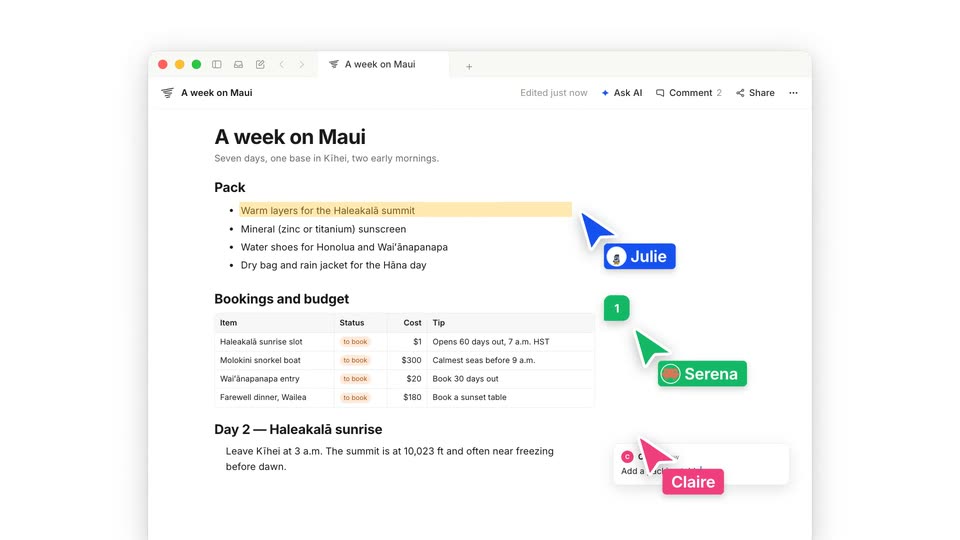
A collaborative travel document fills the frame. Named cursors for Julie, Serena and Claire drift across the page as a packing line highlights in yellow. The view zooms into that line, then into a dark comment popup where the blue cursor sits in the text field.
Techniques: Cursor demo, UI zoom
Camera: Static
A dark comment box floats over a white travel document. A blue cursor types @, an Agents dropdown opens, and the cursor picks Claude Code, filling the field. The view reframes to a second comment box where the same flow selects Grok.
Techniques: Cursor demo
Camera: Push in
A dark comment box overlays a light article page. A blue cursor opens an Agents dropdown, selects Grok, then types a prompt into the field. A static caption sits in the blank lower half of the frame.
On-screen text: “Pick any agent. On any comment.”
Techniques: Cursor demo
Camera: Static
A centered headline reads “Pick any agent. On any comment.” above a document interface titled “A week on Maui” showing a travel plan and bookings table. The headline swaps to “Your team” while labeled multiplayer cursors for Claude Code and Serena appear on the page.
On-screen text: “Pick any agent. On any comment.”, “Your team”
Camera: Static
A flat document view titled “A week on Maui” sits under a bold headline that grows from “Your team” to the full line. Agent badges drift around the window while doc sections flash red and green and comment chips pop in.
On-screen text: “Your team + every agent. One doc.”
Techniques: Kinetic type
Camera: Static
A flat browser window holds a Maui travel document, then its content switches to a matching bookings spreadsheet while the centered wordmark above grows from Docs. to Docs. Sheets., the new word in blue.
Techniques: Morph
Camera: Static
A light background holds the headline Docs. Sheets. Slides. above a flat browser window. Inside, a slides deck shows a dark left panel with the title A week on Maui and pill labels, beside an aerial coastline photo with boats. The frame stays static.
On-screen text: “Docs. Sheets. Slides.”
Camera: Static
A white backdrop holds a bold headline reading Any template. above a flat browser-window mockup. The window displays a cream travel document with a serif title and an orange italic pull quote. The composition stays static.
On-screen text: “Any template.”
Camera: Static
A flat white dashboard panel titled Maui budget sits below a bold headline. It shows three stat cards with a green, an orange and a blue figure, then a Cost by day chart with one tall blue bar and six small bars. The frame holds still.
On-screen text: “Any template. Any artifact.”
Camera: Static
A flat browser-window mockup of a travel plan sits under a bold headline reading Any template. Any artifact. in black with two words in blue. The window shows a Maui beach hero image, a white title, two pill buttons, and three labeled columns. The frame is static.
On-screen text: “Any template. Any artifact.”
Camera: Static
A bold centered headline sits above a flat browser window mockup. The window holds a slide-deck interface titled 'A week on Maui' with five travel slides in a grid, each numbered 01 to 05. The composition holds static with no visible motion.
On-screen text: “Any template. Any artifact.”
Camera: Static
A whiteboard app window displays four hand-drawn boxes mapping Maui regions, with a bold headline above. Sketchy arrows draw themselves out from the central Kahului box toward West Maui, East Maui, and the blue South shore base box.
On-screen text: “Any template. Any artifact.”
Camera: Static
A flat browser mockup of a Staybook villa listing sits under a bold headline. A cursor clicks the Comment button, a dark box types a request to Claude Code and shrinks to a badge. The headline swaps and a total line appears in the booking card.
On-screen text: “Comment on your live app.”, “Your agent updates it.”
Techniques: Cursor demo, Kinetic type
Camera: Static
A front-facing phone mockup sits beneath the headline “Ask from anywhere.” A query types into the input bar, becomes a chat bubble, then the screen fills with a document answer on the Maui plan. The clip ends on a white card reading “Any agent.”
On-screen text: “Ask from anywhere.”, “Any agent”
Camera: Static
White card: the headline “Any agent you connect.” appears with “Any agent” in blue, then “MCP & CLI.” lands below it, and a row of five white pills with small agent icons fades in.
On-screen text: “Any agent you connect.”, “MCP & CLI.”, “Claude Code”, “Codex”, “Cursor”, “Grok”, “Raft”
Techniques: Kinetic type
Camera: Static
A black stacked-line icon and the bold lowercase wordmark tdoc sit centered on a plain off-white background, locked-off. The small gray tagline tdoc.dev : Free & open source fades in beneath the logo.
On-screen text: “tdoc.dev : Free & open source”
Camera: Static